
Python driver for the Calypso UP10 anemometer

Project description







Python driver for the Calypso UP10 anemometer
About
Hardware device
The Calypso UP10 ultrasonic portable solar wind meter is a Bluetooth, solar-powered, pocket-sized, ultrasonic anemometer. No power cords or data wires needed.
Pictures:

Calypso UP10.
Resources:
Software library
The device driver library is written in Python, based on the Bleak library. It was verified to work well on an OpenPlotter installation on a Raspberry Pi, as well as a macOS workstation.
Features
Run device discovery
Acquire device status and readings (one shot)
Acquire device readings continuously (subscribe/notify)
Set device data rate
Telemetry with NMEA-0183 and SignalK over UDP
Setup
pip install --upgrade calypso-anemometer
To install the latest development version from the repository, invoke:
pip install --upgrade git+https://github.com/maritime-labs/calypso-anemometer
Pre-flight checks
We have some documentation about investigating and configuring your Bluetooth/BLE stack and about simulating the telemetry messaging. On this matter, you might want to run through a sequence of preflight checks before going into production.
Usage
Command line
Discover the ULTRASONIC BLE device and run a conversation on it. By default, the Bluetooth adapter hci0 will be used.
# Get device information with discovery.
calypso-anemometer info

# Get device reading.
calypso-anemometer read

# Get device readings, continuously at 4 Hz (default).
calypso-anemometer read --subscribe

# Get device readings, continuously at 1 Hz.
calypso-anemometer read --subscribe --rate=hz_1

# Generate fake device readings, continuously at 8 Hz.
pip install --upgrade calypso-anemometer[fake]
calypso-anemometer fake --subscribe --rate=hz_8
If you already discovered your device, know its address, and want to connect directly without automatic device discovery, see skip discovery.
Likewise, when your system has multiple Bluetooth adapters, you may want to choose a specific one, see select Bluetooth adapter.
# Get device information w/o discovery.
calypso-anemometer info --ble-address=F8:C7:2C:EC:13:D0

# Get device information w/o discovery, using a specific Bluetooth adapter.
calypso-anemometer info --ble-adapter=hci1 --ble-address=F8:C7:2C:EC:13:D0
Library
In order to use the library API, please consult the programs in the examples folder.
Synopsis:
from calypso_anemometer.core import CalypsoDeviceApi

async with CalypsoDeviceApi() as calypso:
    reading = await calypso.get_reading()
    reading.print()
Telemetry setup
The program can optionally submit telemetry messages in different formats.
SignalK telemetry
Continuously receive device readings and submit them in SignalK Delta Format via UDP:
calypso-anemometer read --subscribe --rate=hz_1 --target=udp+signalk+delta://openplotter.local:4123
To make a SignalK server receive the data, create an “UDP receiver” data connection on the Server » Data Connections dialog of your OpenPlotter instance.
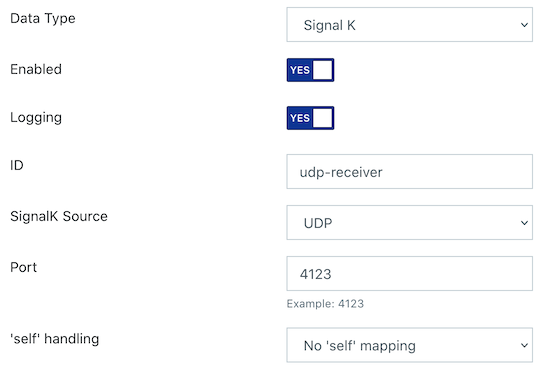
SignalK UDP receiver on port 4123.
NMEA-0183 telemetry
Continuously receive device readings and submit them in NMEA-0183 format via UDP broadcast:
calypso-anemometer read --subscribe --rate=hz_1 --target=udp+broadcast+nmea0183://255.255.255.255:10110
To make OpenCPN receive the data, create a corresponding data connection like outlined in those screenshots.
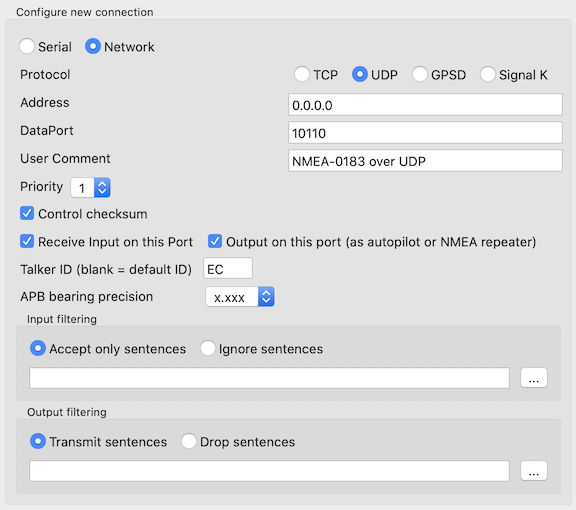
Add NMEA-0183 UDP receiver on port 10110.
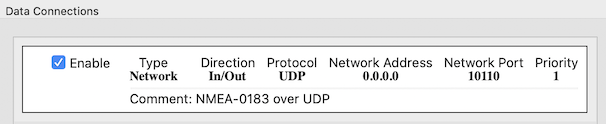
Configured NMEA-0183 UDP receiver on port 10110.
An example NMEA-0183 sentence emitted is:
$IIVWR,154.0,L,11.06,N,5.69,M,20.48,K*65
Other projects
signalk-calypso-ultrasonic is a Signal K server plugin for the Calypso Ultrasonic wireless anemometer, written in JavaScript.
CalypsoUltrasonicAPI is a library for the Calypso Ultrasonic Anemometer, written in Visual Basic .NET and Java, (also) for Android.
Troubleshooting
For helping you to find solutions for known problems, we are maintaining a dedicated page at troubleshooting. The topic range is from permission errors to BLE timeouts.
Acknowledgements
Kudos to Henrik Blidh, David Lechner, and contributors for conceiving and maintaining the excellent Bleak library.
Special thanks to Fabian Tollenaar for creating signalk-calypso-ultrasonic.
Project information
Contributions
Every kind of contribution, feedback, or patch, is much welcome. Create an issue or submit a patch if you think we should include a new feature, or to report or fix a bug.
Development
In order to setup a development environment on your workstation, please head over to the development sandbox documentation. When you see the software tests succeed, you should be ready to start hacking.
Resources
License
The project is licensed under the terms of the GNU AGPL license.


Download files
Download the file for your platform. If you're not sure which to choose, learn more about installing packages.
Source Distribution
Built Distribution
Filter files by name, interpreter, ABI, and platform.
If you're not sure about the file name format, learn more about wheel file names.
Copy a direct link to the current filters
File details
Details for the file calypso-anemometer-0.5.1.tar.gz.
File metadata
- Download URL: calypso-anemometer-0.5.1.tar.gz
- Upload date:
- Size: 37.5 kB
- Tags: Source
- Uploaded using Trusted Publishing? No
- Uploaded via: twine/4.0.1 CPython/3.9.13
File hashes
| Algorithm | Hash digest | |
|---|---|---|
| SHA256 |
89c1d6bd8e8dbd0760a919a91d0cc039af5a558277ba366b8611aab3162cf523
|
|
| MD5 |
0e6737f96812d32f263b0a349114123e
|
|
| BLAKE2b-256 |
f34d5f53581e36f6001abf10e92e9c3b200d8f0590491da35a3021942d144592
|
File details
Details for the file calypso_anemometer-0.5.1-py3-none-any.whl.
File metadata
- Download URL: calypso_anemometer-0.5.1-py3-none-any.whl
- Upload date:
- Size: 33.2 kB
- Tags: Python 3
- Uploaded using Trusted Publishing? No
- Uploaded via: twine/4.0.1 CPython/3.9.13
File hashes
| Algorithm | Hash digest | |
|---|---|---|
| SHA256 |
68679a500e4fef5b45e3515ede7d985c416f1784df4dbf4514db120e155ce54f
|
|
| MD5 |
841067cf1074f90d43728e1af2f07eca
|
|
| BLAKE2b-256 |
630cccfa04c7bd9f49b9960fc3d9c70234eea0dedf3b871b39ef4aa1dd62281c
|






