
Python driver for the Calypso UP10 anemometer

Project description





Python driver for the Calypso UP10 anemometer
About
Hardware device
The Calypso UP10 ultrasonic portable solar wind meter is a Bluetooth, solar-powered, pocket-sized ultrasonic anemometer. No power cords or data wires needed.
Resources:
Software library
The device driver library is written in Python and based on the Bleak library, the Bluetooth Low Energy platform Agnostic Klient for Python.
It was verified to work well on a Raspberry Pi / OpenPlotter installation and a macOS workstation.
Features
Device discovery
Basic conversation
Acquire device status and readings (one shot)
Acquire device readings continuously (subscribe/notify)
Set sample rate
SignalK telemetry
NMEA-0183 telemetry
Setup
pip install git+https://github.com/daq-tools/calypso-anemometer
Synopsis
Usage
Discover the ULTRASONIC BLE device and run a conversation on it:
# Get device information.
calypso-anemometer info

# Get device reading.
calypso-anemometer read

# Get device readings, continuously at 4 Hz (default).
calypso-anemometer read --subscribe

# Get device readings, continuously at 1 Hz.
calypso-anemometer read --subscribe --rate=hz_1

# Continuously receive device readings and submit them in SignalK Delta Format via UDP.
# See section "SignalK telemetry" about how to create an UDP receiver
# data connection in your Signal K server beforehand.
calypso-anemometer read --subscribe --rate=hz_1 --target=udp+signalk+delta://openplotter.local:4123

# Continuously receive device readings and submit them in NMEA-0183 format via UDP.
# See section "NMEA-0183 telemetry" about how to create an UDP receiver
# data connection in OpenCPN beforehand.
calypso-anemometer read --subscribe --rate=hz_1 --target=udp+broadcast+nmea0183://openplotter.local:10110
If you already discovered your device and know its address, use the CALYPSO_ADDRESS environment variable to skip discovery, saving a few cycles:
# Linux
export CALYPSO_ADDRESS=E7:B6:1B:DB:02:DF

# macOS
export CALYPSO_ADDRESS=FB2D3935-AEBA-41D4-AB46-CD0C5FB291A1

# Activate discovery again.
unset CALYPSO_ADDRESS
Development
# Set device data rate to one of HZ_1, HZ_4, or HZ_8.
# Note: Works only for the upcoming conversation. Will be back at HZ_4 afterwards.
calypso-anemometer set-option --rate=hz_1

# Set device mode to one of SLEEP, LOW_POWER, or NORMAL.
# Note: Does not work, the setting is read-only.
calypso-anemometer set-option --mode=normal

# Explore all services and characteristics. Useful for debugging purposes.
calypso-anemometer explore
Pre-flight checks
You will need a working Bluetooth/BLE stack. This section outlines a few commands to discover an ULTRASONIC device nearby.
Enumerate Bluetooth adapters:
hcitool dev
Devices:
    hci1    E4:5F:01:BB:71:FC
    hci0    00:1A:7D:DA:71:15

lsusb
Bus 001 Device 004: ID 0a12:0001 Cambridge Silicon Radio, Ltd Bluetooth Dongle (HCI mode)
Display information about two Bluetooth adapters:
hciconfig hci0 name
hci0:       Type: Primary  Bus: USB
    BD Address: 00:1A:7D:DA:71:15  ACL MTU: 310:10  SCO MTU: 64:8
    Name: 'openplotter #1'

hciconfig hci1 name
hci1:   Type: Primary  Bus: UART
    BD Address: E4:5F:01:BB:71:FC  ACL MTU: 1021:8  SCO MTU: 64:1
    Name: 'openplotter'
Run a BLE device scan on a specific adapter:
sudo hcitool -i hci0 lescan
Run a BLE device scan using Bleak:
bleak-lescan -i hci0
bleak-lescan -i hci1
SignalK telemetry
The program can optionally submit telemetry data in SignalK Delta Format via UDP. To make a SignalK server receive the data, create an “UDP receiver” data connection on the Server » Data Connections dialog of your OpenPlotter instance.
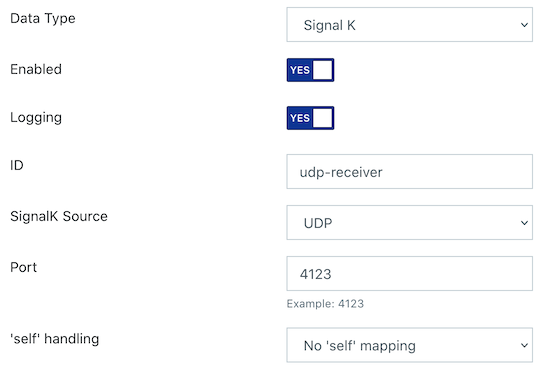
SignalK UDP receiver on port 4123.
NMEA-0183 telemetry
The program can optionally submit telemetry data in NMEA-0183 format via UDP. To make OpenCPN receive the data, create a corresponding data connection like outlined in this screenshot.
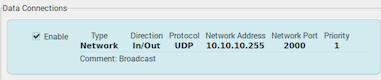
NMEA-0183 UDP receiver on port 2000.
Development
git clone https://github.com/daq-tools/calypso-anemometer
cd calypso-anemometer
python3 -m venv .venv
source .venv/bin/activate
pip install --editable=.


Download files
Download the file for your platform. If you're not sure which to choose, learn more about installing packages.
Source Distribution
Built Distribution
Filter files by name, interpreter, ABI, and platform.
If you're not sure about the file name format, learn more about wheel file names.
Copy a direct link to the current filters
File details
Details for the file calypso-anemometer-0.1.0.tar.gz.
File metadata
- Download URL: calypso-anemometer-0.1.0.tar.gz
- Upload date:
- Size: 27.4 kB
- Tags: Source
- Uploaded using Trusted Publishing? No
- Uploaded via: twine/4.0.1 CPython/3.9.13
File hashes
| Algorithm | Hash digest | |
|---|---|---|
| SHA256 |
2c5fccd90d19d25d170aa05e9604fdc32303224d336b69f859b8ab02d4cdce59
|
|
| MD5 |
91ee308a723ac4d2578ec3c3b87646ef
|
|
| BLAKE2b-256 |
ad46c3dc6d3c2b04db170be928f98d7f2c6e64ec0dd93ca744ea1ca7528d0399
|
File details
Details for the file calypso_anemometer-0.1.0-py3-none-any.whl.
File metadata
- Download URL: calypso_anemometer-0.1.0-py3-none-any.whl
- Upload date:
- Size: 29.1 kB
- Tags: Python 3
- Uploaded using Trusted Publishing? No
- Uploaded via: twine/4.0.1 CPython/3.9.13
File hashes
| Algorithm | Hash digest | |
|---|---|---|
| SHA256 |
cb325a189e70f98e60304945187b190c2b21e52b31e285e8cfcd6edcda158423
|
|
| MD5 |
3a3099de6ce4cb7c88608273c11e04f6
|
|
| BLAKE2b-256 |
0708509fabc8c4fcb8b59cd19fc9edf0af90349b3d250a7d9e99a32ef870845e
|






