






Install
Homebrew
brew tap RayBytes/chatmock
brew install chatmock
pipx / pip
pipx install chatmock
Docker
See DOCKER.md
Getting Started
# 1. Sign in with your ChatGPT account
# If you are running this on a headless server, append --headless
chatmock login

# 2. Start the server
chatmock serve
The server runs at http://127.0.0.1:8000 by default. Use http://127.0.0.1:8000/v1 as your base URL for OpenAI-compatible apps.
Example usage
Raycast Integration
-
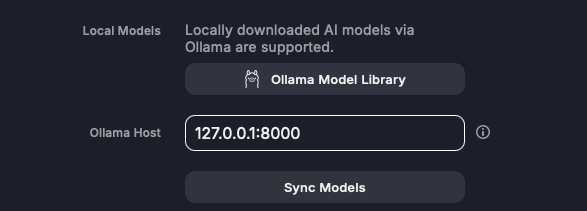
Configure the Host URL
Open your Raycast Extensions preferences, navigate to the Ollama settings section, and input the host URL (default is127.0.0.1:8000).
-
Sync Your Models
Click the Sync Models button, which will register all available models. -
Start Chatting
Open the Raycast AI Chat interface. You will now see model slugs which you can chat with.
Terax (Agentic Terminal) Integration
-
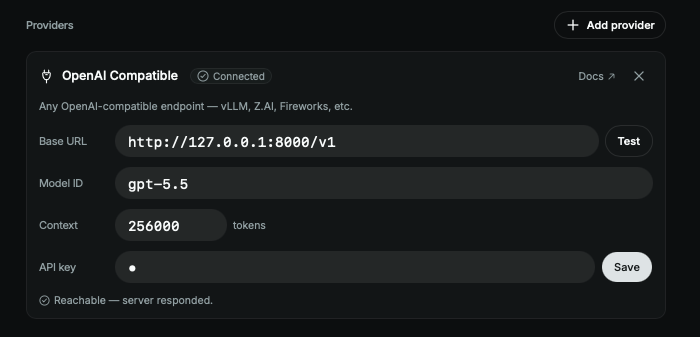
Configure the provider settings
Open your Terax settings, and switch to the Models tab, add a new provider (OpenAI Compatible), and input the host URL (default ishttp://127.0.0.1:8000/v1), along with the model IDs you wish to use (API key may be anything).
-
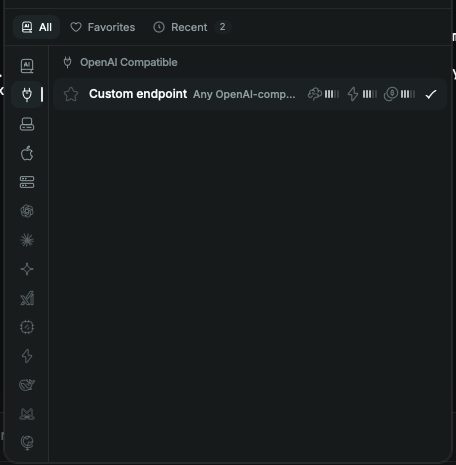
Favourite, and start using it!
Go back to your main chat window, select the model by going to the OpenAI Compatible icon, and clicking the model there (you may favourite it here to quickly select it the next time if you switch between models)
Supported Models
ChatMock automatically discovers the models available to the signed-in ChatGPT
account. It checks the latest stable Codex release on GitHub when refreshing the
catalog and uses that version for the account's model request. An optional
CHATGPT_LOCAL_MODELS_CLIENT_VERSION override accepts a stable release
version only. If GitHub is unavailable, ChatMock uses the last successful version or
its bundled verified fallback. The model list and capabilities come from the
account catalog; /v1/models and /api/tags return 503 until one is available.
With --no-model-sync, they list a built-in static set instead, which may include
models your account can't use.
The catalog refresh interval defaults to one hour.
Features
- Tool / function calling
- Structured outputs via JSON schema (
response_format, orformaton the Ollama routes) - Vision / image input
- Thinking summaries (via think tags)
- Configurable thinking effort
- Fast mode for supported models
- Web search tool
- OpenAI-compatible
/v1/responses(HTTP + WebSocket) - Ollama-compatible endpoints
- Reasoning effort exposed as separate models (optional)
Configuration
All flags go after chatmock serve. These can also be set as environment variables.
| Flag | Env var | Options | Default | Description |
|---|---|---|---|---|
--reasoning-effort |
CHATGPT_LOCAL_REASONING_EFFORT |
none, minimal, low, medium, high, xhigh, max | medium | How hard the model thinks |
--reasoning-summary |
CHATGPT_LOCAL_REASONING_SUMMARY |
auto, concise, detailed, none | auto | Thinking summary verbosity |
--reasoning-compat |
CHATGPT_LOCAL_REASONING_COMPAT |
legacy, o3, think-tags | think-tags | How reasoning is returned to the client |
--fast-mode |
CHATGPT_LOCAL_FAST_MODE |
true/false | false | Priority processing for supported models |
--enable-web-search |
CHATGPT_LOCAL_ENABLE_WEB_SEARCH |
true/false | false | Allow the model to search the web |
--expose-reasoning-models |
CHATGPT_LOCAL_EXPOSE_REASONING_MODELS |
true/false | false | List each reasoning level as its own model |
--model-sync |
CHATGPT_LOCAL_MODEL_SYNC |
true/false | true | Discover account models automatically |
--model-refresh-interval |
CHATGPT_LOCAL_MODEL_REFRESH_INTERVAL |
seconds | 3600 | Refresh interval for model discovery |
Web search in a request
{
  "model": "gpt-5.4",
  "messages": [{"role": "user", "content": "latest news on ..."}],
  "responses_tools": [{"type": "web_search"}],
  "responses_tool_choice": "auto"
}
Fast mode in a request
{
  "model": "gpt-5.4",
  "input": "summarize this",
  "fast_mode": true
}
Note
This project is not affiliated with OpenAI.
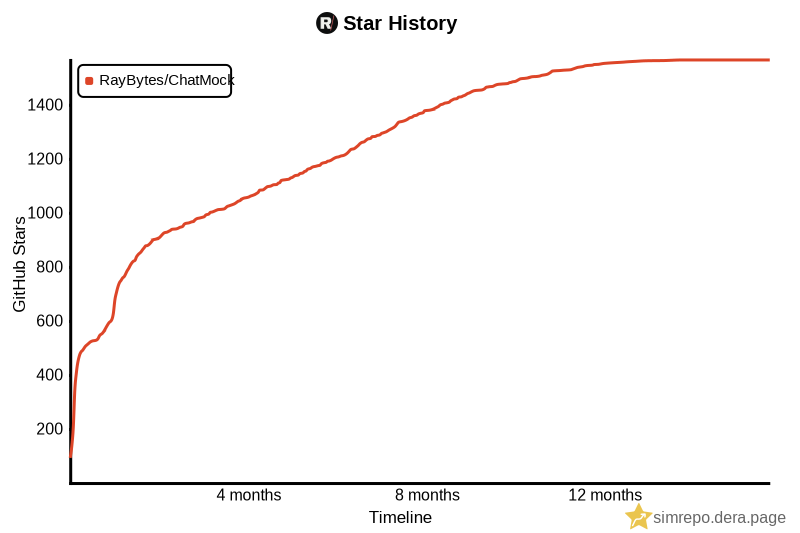
Star History
1 maintainer

Metadata
1 maintainer
Release files for chatmock 1.41
For a detailed explanation of source distributions (sdists) and built distributions (wheels), please see the package formats documentation.
Source distribution (sdist)
| File | Size | Uploaded | Provenance | Actions |
|---|---|---|---|---|
| chatmock-1.41.tar.gz | 56.0 kB | With provenance | Details for chatmock-1.41.tar.gz |
Built distribution (wheel)
| File | Interpreter | ABI | Platform | Actions Reset |
|---|---|---|---|---|
| chatmock-1.41-py3-none-any.whl | Python 3 | none | any | Details for chatmock-1.41-py3-none-any.whl |
Total release size: 111.7 kB
Release files / chatmock-1.41.tar.gz
| Download URL | chatmock-1.41.tar.gz |
|---|---|
| Size | 56.0 kB |
| Tags | Source |
|
SHA-256 checksum How to use checksums |
54ff3aa81bd8d50e6b50d0424d8068c305948cc7c0a6af7d2af3285a0051dd5e
|
|
BLAKE2b-256 checksum How to use checksums |
d83e9a5267518aa9456bccd0dbb4b07fdabc0cff1e2f04acecd922954d413e9d
|
| Upload date | |
|
Uploaded using Trusted Publishing? What is trusted publishing? |
Yes |
| Uploaded via |
twine/7.0.0 CPython/3.13.16
|
Provenance
Provenance describes where a file came from. On PyPI, provenance is shared via attestations, which provide a verifiable record of the build or publishing details. View details, limitations and caveats.


PyPI Publish Attestation
PyPI verified that this artifact, at this checksum, originated from the publisher listed below.
Signed by GitHub Actions, verified by PyPI on Nov 3, 2026.
Transparency logRelease files / chatmock-1.41-py3-none-any.whl
| Download URL | chatmock-1.41-py3-none-any.whl |
|---|---|
| Size | 55.7 kB |
| Tags | Python 3 |
|
SHA-256 checksum How to use checksums |
d158623dc740fcfa8976d992ab0ea4c4d7bb4dd3cf8af28b0ffcbcbf2ce37f67
|
|
BLAKE2b-256 checksum How to use checksums |
afe0738b6c3ab883194b2da7e61385fd79995bf2571e69115115eeefa6c53a97
|
| Upload date | |
|
Uploaded using Trusted Publishing? What is trusted publishing? |
Yes |
| Uploaded via |
twine/7.0.0 CPython/3.13.16
|
Provenance
Provenance describes where a file came from. On PyPI, provenance is shared via attestations, which provide a verifiable record of the build or publishing details. View details, limitations and caveats.
PyPI Publish Attestation
PyPI verified that this artifact, at this checksum, originated from the publisher listed below.
Signed by GitHub Actions, verified by PyPI on Nov 3, 2026.
Transparency logSecurity for chatmock 1.41
Provenance
Provenance describes where a file came from. On PyPI, provenance is shared via attestations, which provide a verifiable record of the build or publishing details. View details, limitations and caveats.
Full provenance
Both files in this release have been uploaded with provenance metadata.
Attestation for chatmock-1.41.tar.gz
PyPI Publish Attestation
PyPI verified that this artifact, at this checksum, originated from the publisher listed below.
Signed by GitHub Actions, verified by PyPI on Nov 3, 2026.
Transparency logA note on package security
PyPI is a repository for distributing packages, not a service for auditing them. While third-party security researchers and our staff do their best to detect and remove malicious packages, PyPI cannot guarantee the quality, security or suitability of any given package.
To learn more about protecting yourself from malicious actors, visit our package security documentation.














