






chdb-core
chdb-core is the foundational engine of the chDB ecosystem — an in-process SQL OLAP Engine powered by ClickHouse 1
Table of Contents
- Packages & Distributions
- Features
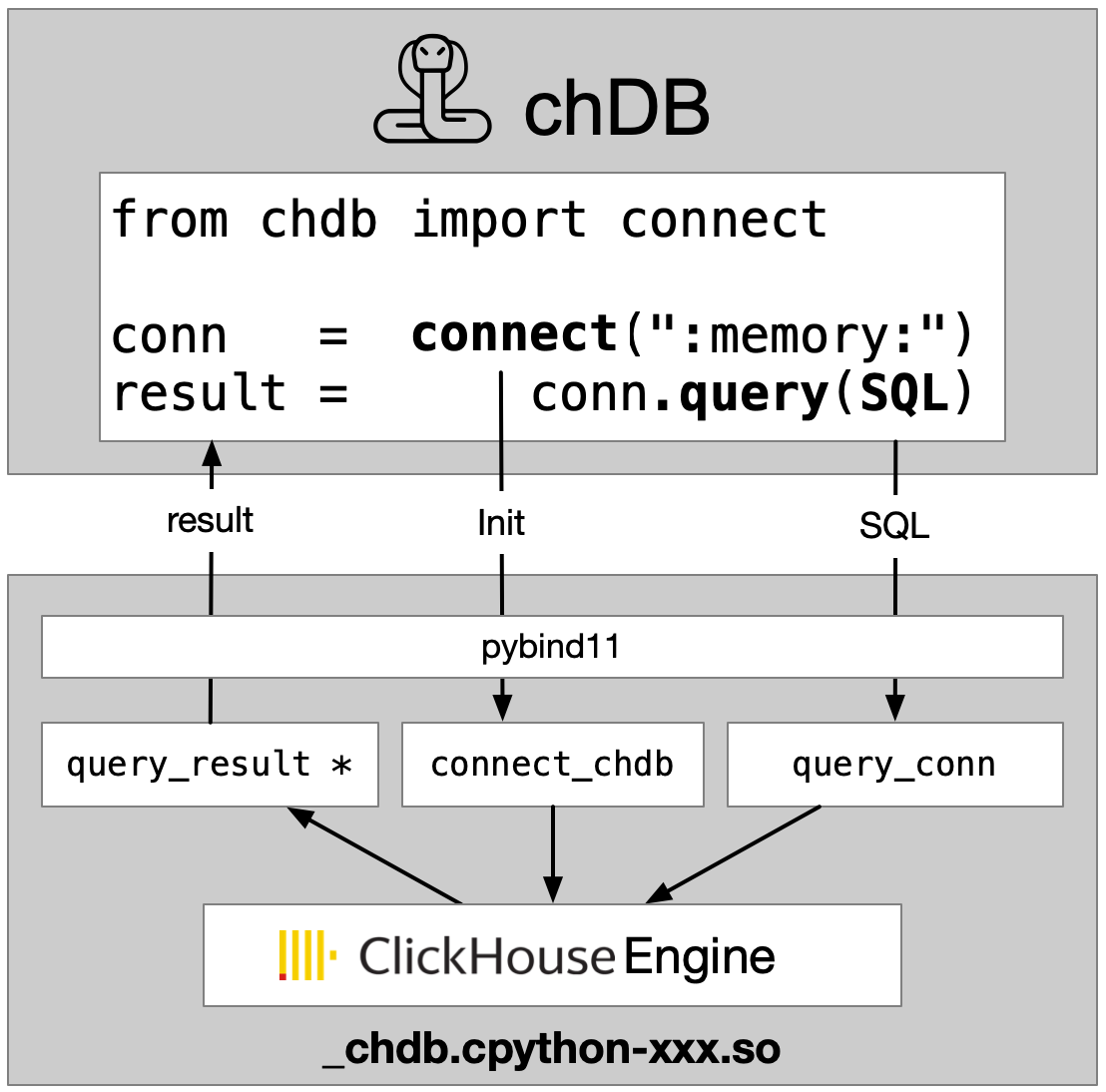
- Architecture
- Installation
- Quick Start
- API Reference
- Demos and Examples
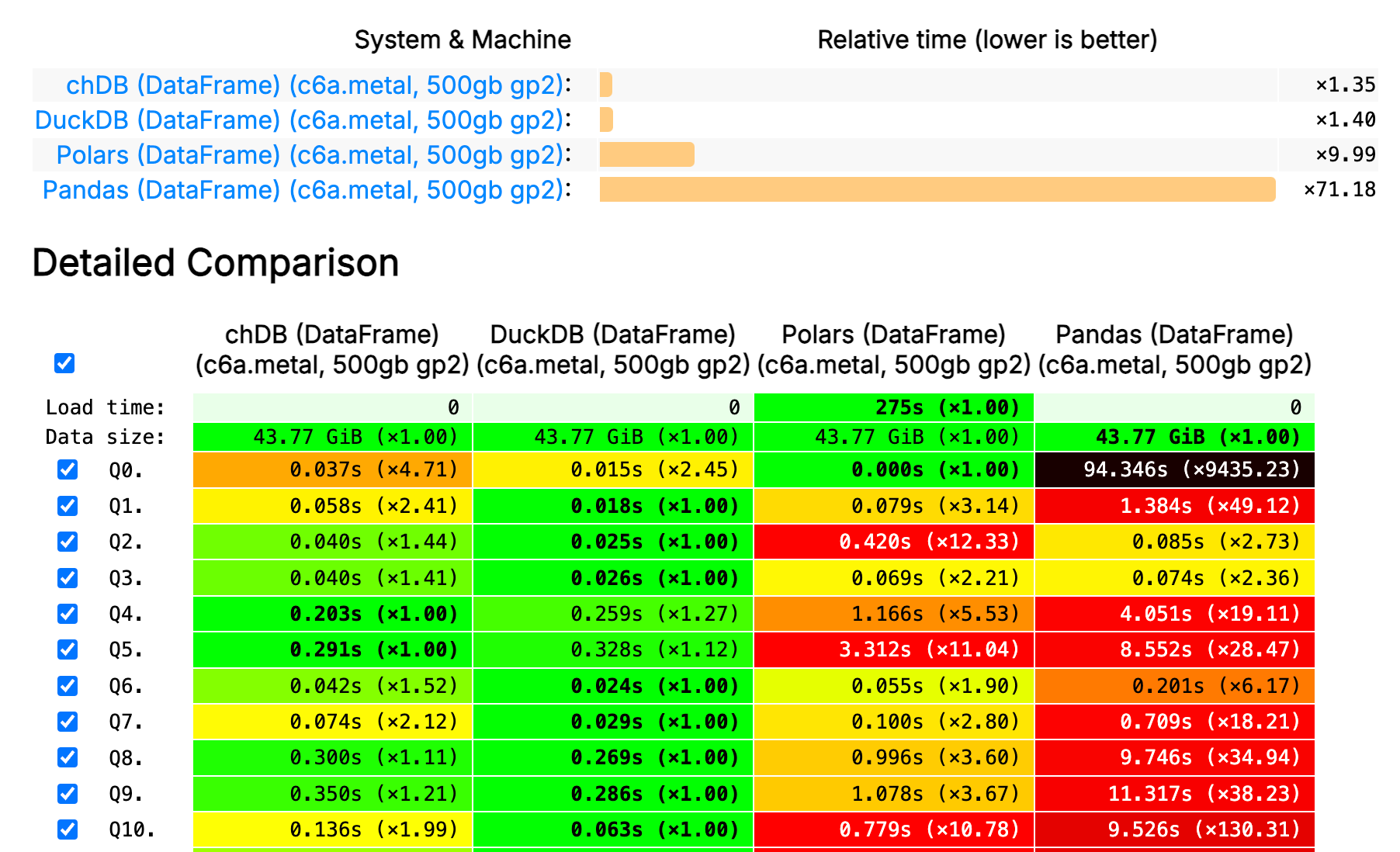
- Benchmark
- Documentation
- Contributing
Packages & Distributions
chdb-core (this repo) is the engine; chDB is a higher-level pandas-compatible DataStore API built on top of it (see the diagram below). The engine itself ships as five distribution artifacts — three Python wheels (same import chdb, differing only by build flags) and two JavaScript/WASM packages:
| Artifact | How to get it | Target / runtime | Best for |
|---|---|---|---|
| chdb-core | PyPI — pip install chdb-core |
Python 3.9+ (Linux/macOS) | Default full build — everything included |
| chdb-core-lite | PyPI — pip install chdb-core-lite |
Python 3.9+ (Linux/macOS) | Slimmer build that trims less-common features (e.g. external connectors like MySQL/Kafka) |
| chdb-core (free-threaded) | GitHub release assets | Free-threaded Python 3.14t (no GIL) | Running chDB without the GIL |
| chdb-wasm | npm — npm install chdb-wasm |
Browsers & Node (WebAssembly) | Running the full engine in the browser or Node |
| chdb-cloudflare | npm — npm install chdb-cloudflare |
Cloudflare Workers | A slimmer build for Cloudflare Workers |
┌───────────────────────────────────────────┐
│          chDB (pip install chdb)          │
│  ┌─────────────────────────────────────┐  │
│  │  DataStore: pandas-like lazy API    │  │
│  │  QueryPlanner / dual-engine exec    │  │
│  └──────────────────┬──────────────────┘  │
│                     │                     │
│  ┌──────────────────▼──────────────────┐  │
│  │  chdb-core (pip install chdb-core)  │  │
│  │  C++ ClickHouse Engine              │  │
│  │  Session / Connection / DB-API      │  │
│  │  query() / UDF / Stream             │  │
│  └─────────────────────────────────────┘  │
└───────────────────────────────────────────┘
chdb-core provides everything you need to run SQL queries with ClickHouse performance — no server required. If you want a higher-level pandas-compatible DataFrame API, install chDB instead.
Features
- In-process SQL OLAP Engine, powered by ClickHouse
- No need to install ClickHouse
- Minimized data copy from C++ to Python with python memoryview
- Input & Output support Parquet, CSV, JSON, Arrow, ORC and 60+ more formats
- Session and Connection management with stateful queries
- Streaming query support for constant-memory processing
- Python DB-API 2.0 compliance
- User Defined Functions (UDF) support
- AI-assisted SQL generation
Architecture
Installation
Currently, chdb-core supports Python 3.9+ on macOS and Linux (x86_64 and ARM64).
pip install chdb-core
Verifying a release download
Language bindings and packagers fetch the C library straight from a release, as
<platform>-libchdb.tar.gz (shared) or <platform>-libchdb-static.tar.gz (static). Every
release also carries a SHA256SUMS covering all of its assets, so a download can be checked
rather than assumed:
TAG=v26.7.2-rc.2
BASE=https://github.com/chdb-io/chdb-core/releases/download/${TAG}

curl -sSLO ${BASE}/linux-x86_64-libchdb.tar.gz
curl -sSLO ${BASE}/SHA256SUMS

# --ignore-missing so it checks the files you actually downloaded, not all of the release
sha256sum -c --ignore-missing SHA256SUMS   # shasum -a 256 -c --ignore-missing on macOS
Quick Start
import chdb

result = chdb.query("SELECT version()", "Pretty")
print(result)
API Reference
One-shot Query
The simplest way to run SQL — no session or connection needed:
import chdb

# Basic query with CSV output (default)
result = chdb.query("SELECT 1, 'hello'")
print(result)

# Pandas DataFrame output
df = chdb.query("SELECT number, number * 2 AS double FROM numbers(10)", "DataFrame")
print(df)

# Parameterized queries
df = chdb.query(
    "SELECT toDate({base_date:String}) + number AS date "
    "FROM numbers({total_days:UInt64}) "
    "LIMIT {items_per_page:UInt64}",
    "DataFrame",
    params={"base_date": "2025-01-01", "total_days": 10, "items_per_page": 5},
)
print(df)
Query on Files (Parquet, CSV, JSON, Arrow, ORC and 60+)
import chdb

res = chdb.query('SELECT * FROM file("data.parquet", Parquet)', "JSON")
print(res)

res = chdb.query('SELECT * FROM file("data.csv", CSV)', "CSV")
print(res)

# Query result statistics
print(f"SQL read {res.rows_read()} rows, {res.bytes_read()} bytes, "
      f"storage read {res.storage_rows_read()} rows, {res.storage_bytes_read()} bytes, "
      f"elapsed {res.elapsed()} seconds")

# Pandas DataFrame output
chdb.query('SELECT * FROM file("data.parquet", Parquet)', "Dataframe")
Connection API
Connection-based API for cursor-style interaction, supporting both in-memory and file-based databases:
import chdb

conn = chdb.connect(":memory:")
cur = conn.cursor()

cur.execute("CREATE TABLE test (id UInt32, name String) ENGINE = Memory")
cur.execute("INSERT INTO test VALUES (1, 'Alice'), (2, 'Bob'), (3, 'Charlie')")
cur.execute("SELECT * FROM test ORDER BY id")

print(cur.fetchone())      # (1, 'Alice')
print(cur.fetchmany(2))    # ((2, 'Bob'), (3, 'Charlie'))
print(cur.column_names())  # ['id', 'name']
print(cur.column_types())  # ['UInt32', 'String']

# Use the cursor as an iterator
cur.execute("SELECT number FROM system.numbers LIMIT 3")
for row in cur:
    print(row)

# Always close resources when done
cur.close()
conn.close()
For more details, see examples/connect.py.
# File-based persistent database
conn = chdb.connect("mydata.db")
conn.query("CREATE TABLE IF NOT EXISTS logs (ts DateTime, msg String) ENGINE = MergeTree ORDER BY ts")
conn.query("INSERT INTO logs VALUES (now(), 'started')")
result = conn.query("SELECT * FROM logs", "Pretty")
print(result)
conn.close()
Stateful Session
Sessions provide a higher-level API with automatic resource management:
from chdb import session as chs

sess = chs.Session()
sess.query("CREATE DATABASE IF NOT EXISTS db_xxx ENGINE = Atomic")
sess.query("CREATE TABLE IF NOT EXISTS db_xxx.log_table (x String, y Int) ENGINE = Log")
sess.query("INSERT INTO db_xxx.log_table VALUES ('a', 1), ('b', 3), ('c', 2), ('d', 5)")
sess.query("CREATE VIEW db_xxx.view_xxx AS SELECT * FROM db_xxx.log_table LIMIT 4")

print(sess.query("SELECT * FROM db_xxx.view_xxx", "Pretty"))
see also: test_stateful.py.
Streaming Query
Process large datasets with constant memory usage through chunked streaming:
from chdb import session as chs

sess = chs.Session()

rows_cnt = 0
with sess.send_query("SELECT * FROM numbers(200000)", "CSV") as stream_result:
    for chunk in stream_result:
        rows_cnt += chunk.rows_read()

print(rows_cnt) # 200000

# Example 2: Manual iteration with fetch()
rows_cnt = 0
stream_result = sess.send_query("SELECT * FROM numbers(200000)", "CSV")
while True:
    chunk = stream_result.fetch()
    if chunk is None:
        break
    rows_cnt += chunk.rows_read()

print(rows_cnt) # 200000
For more details, see test_streaming_query.py.
Python DB-API 2.0
import chdb.dbapi as dbapi
print("chdb driver version: {0}".format(dbapi.get_client_info()))

conn1 = dbapi.connect()
cur1 = conn1.cursor()
cur1.execute('select version()')
print("description: ", cur1.description)
print("data: ", cur1.fetchone())
cur1.close()
conn1.close()
Query on Table (Pandas DataFrame, Parquet file/bytes, Arrow bytes)
import chdb.dataframe as cdf
import pandas as pd
# Join 2 DataFrames
df1 = pd.DataFrame({'a': [1, 2, 3], 'b': ["one", "two", "three"]})
df2 = pd.DataFrame({'c': [1, 2, 3], 'd': ["①", "②", "③"]})
ret_tbl = cdf.query(sql="select * from __tbl1__ t1 join __tbl2__ t2 on t1.a = t2.c",
                  tbl1=df1, tbl2=df2)
print(ret_tbl)
# Query on the DataFrame Table
print(ret_tbl.query('select b, sum(a) from __table__ group by b'))
# Pandas DataFrames are automatically registered as temporary tables in ClickHouse
chdb.query("SELECT * FROM Python(df1) t1 JOIN Python(df2) t2 ON t1.a = t2.c").show()
Python Table Engine
Query on Pandas DataFrame
import chdb
import pandas as pd
df = pd.DataFrame(
    {
        "a": [1, 2, 3, 4, 5, 6],
        "b": ["tom", "jerry", "auxten", "tom", "jerry", "auxten"],
    }
)

chdb.query("SELECT b, sum(a) FROM Python(df) GROUP BY b ORDER BY b").show()
Query on Arrow Table
import chdb
import pyarrow as pa
arrow_table = pa.table(
    {
        "a": [1, 2, 3, 4, 5, 6],
        "b": ["tom", "jerry", "auxten", "tom", "jerry", "auxten"],
    }
)

chdb.query("SELECT b, sum(a) FROM Python(arrow_table) GROUP BY b ORDER BY b").show()
see also: test_query_py.py.
User Defined Functions (UDF)
chDB supports native Python UDFs that run in-process with full type safety.
import chdb
from chdb.session import Session
from chdb.sqltypes import INT64, STRING

sess = Session()

# Using the @chdb.func decorator
@chdb.func([INT64, INT64], INT64)
def add(a, b):
    return a + b

print(sess.query("SELECT add(12, 22)"))

# With type annotations (types inferred automatically)
@chdb.func()
def multiply(a: int, b: int) -> int:
    return a * b

print(sess.query("SELECT multiply(3, 7)"))

# Using chdb.create_function directly
chdb.create_function("strlen", len, arg_types=[STRING], return_type=INT64)
print(sess.query("SELECT strlen('hello')"))

# Remove a registered function
chdb.drop_function("strlen")
Key features:
- Type-safe: supports
INT64,FLOAT64,STRING,BOOL,DATETIME64, etc. See chdb.sqltypes for full list. - Type inference: automatically inferred from Python annotations (
int,str,bool, etc.) - NULL handling:
on_null=NullHandling.SKIP(default) skips the function call and returns NULL;NullHandling.PASSpassesNoneto the function. - Exception handling:
on_error=ExceptionHandling.PROPAGATE(default) raises the error to the caller;ExceptionHandling.IGNOREreturns NULL for that row and continues.
See also: test_func_udf.py, test_func_udf_types.py.
Query Progress
import chdb

# Auto-detect: TTY progress in terminal, progress bar in notebook
conn = chdb.connect(":memory:?progress=auto")
conn.query("SELECT sum(number) FROM numbers_mt(1e10) GROUP BY number % 10 SETTINGS max_threads=4")
Progress options: progress=auto | progress=tty | progress=err | progress=off
AI-assisted SQL Generation
import chdb

conn = chdb.connect("file::memory:?ai_provider=openai&ai_model=gpt-4o-mini")
conn.query("CREATE TABLE nums (n UInt32) ENGINE = Memory")
conn.query("INSERT INTO nums VALUES (1), (2), (3)")

sql = conn.generate_sql("Select all rows from nums ordered by n desc")
print(sql)  # SELECT * FROM nums ORDER BY n DESC

print(conn.ask("List the numbers table", format="Pretty"))
Command Line
python3 -m chdb SQL [OutputFormat]
python3 -m chdb "SELECT 1,'abc'" Pretty
Demos and Examples
- Project Documentation and Usage Examples
- Colab Notebooks and other Script Examples
Benchmark
Documentation
- For chDB specific examples and documentation refer to chDB docs
- For SQL syntax, please refer to ClickHouse SQL Reference
- For pandas-like DataStore API, see chDB
AI Coding Agent Skill
chDB provides an AI Skill that teaches AI coding agents (Cursor, Claude Code, etc.) chDB's multi-source data analytics API. Install it so your AI assistant can write correct chDB code out of the box:
curl -sL https://raw.githubusercontent.com/chdb-io/chdb/main/install_skill.sh | bash
Events
- Demo chDB at ClickHouse v23.7 livehouse! and Slides
Contributing
Contributions are what make the open source community such an amazing place to learn, inspire, and create. Any contributions you make are greatly appreciated.
- Help test and report bugs
- Help improve documentation
- Help improve code quality and performance
Bindings
We welcome bindings for other languages, please refer to bindings for more details.
Version Guide
Please refer to VERSION-GUIDE.md for more details.
Paper
License
Apache 2.0, see LICENSE for more information.
Acknowledgments
chDB is mainly based on ClickHouse 1 for trade mark and other reasons, I named it chDB.
Contact
- Discord: https://discord.gg/D2Daa2fM5K
- Email: auxten@clickhouse.com
- Twitter: @chdb
-
ClickHouse® is a trademark of ClickHouse Inc. All trademarks, service marks, and logos mentioned or depicted are the property of their respective owners. The use of any third-party trademarks, brand names, product names, and company names does not imply endorsement, affiliation, or association with the respective owners. ↩ ↩2
2 maintainers


Metadata
2 maintainers
Release files for chdb-core 26.7.3
For a detailed explanation of source distributions (sdists) and built distributions (wheels), please see the package formats documentation.
Built distributions (wheels)
| File | Reset | |||
|---|---|---|---|---|
| chdb_core-26.7.3-cp39-abi3-manylinux2014_x86_64.manylinux_2_17_x86_64.whl | CPython 3.9 | abi3 | Linux glibc 2.17+ x86-64 | Details |
| chdb_core-26.7.3-cp39-abi3-manylinux2014_aarch64.manylinux_2_17_aarch64.whl | CPython 3.9 | abi3 | Linux glibc 2.17+ ARM64 | Details |
| chdb_core-26.7.3-cp39-abi3-macosx_11_0_arm64.whl | CPython 3.9 | abi3 | macOS 11.0+ ARM64 | Details |
| chdb_core-26.7.3-cp39-abi3-macosx_10_15_x86_64.whl | CPython 3.9 | abi3 | macOS 10.15+ x86-64 | Details |
Total release size: 554.2 MB
Release files / chdb_core-26.7.3-cp39-abi3-manylinux2014_x86_64.manylinux_2_17_x86_64.whl
| Download URL | chdb_core-26.7.3-cp39-abi3-manylinux2014_x86_64.manylinux_2_17_x86_64.whl |
|---|---|
| Size | 175.4 MB |
| Tags | CPython 3.9 Linux glibc 2.17+ x86-64 abi3 |
|
SHA-256 checksum How to use checksums |
b10b96f9599fab42ba51d9be80333e1819782bdc8a91b2b26979149693ba431f
|
|
BLAKE2b-256 checksum How to use checksums |
fc6a2cc573cc0be4bd3418b6603759a764333a126a11a2e582d59731c0892365
|
| Upload date | |
|
Uploaded using Trusted Publishing? What is trusted publishing? |
No |
| Uploaded via |
twine/6.2.0 CPython/3.9.25
|
Release files / chdb_core-26.7.3-cp39-abi3-manylinux2014_aarch64.manylinux_2_17_aarch64.whl
| Download URL | chdb_core-26.7.3-cp39-abi3-manylinux2014_aarch64.manylinux_2_17_aarch64.whl |
|---|---|
| Size | 154.0 MB |
| Tags | CPython 3.9 Linux glibc 2.17+ ARM64 abi3 |
|
SHA-256 checksum How to use checksums |
e64c61a868cad97eb375fb17e23b00bf5058cc9d9d94351cb97dde82d212c7d6
|
|
BLAKE2b-256 checksum How to use checksums |
065509e9caffe3b48281209fd1e1a75a2ecec8f569c83cfed31cc87f6ecd8503
|
| Upload date | |
|
Uploaded using Trusted Publishing? What is trusted publishing? |
No |
| Uploaded via |
twine/6.2.0 CPython/3.9.25
|
Release files / chdb_core-26.7.3-cp39-abi3-macosx_11_0_arm64.whl
| Download URL | chdb_core-26.7.3-cp39-abi3-macosx_11_0_arm64.whl |
|---|---|
| Size | 104.0 MB |
| Tags | CPython 3.9 abi3 macOS 11.0+ ARM64 |
|
SHA-256 checksum How to use checksums |
2ef970603bb8a5f9d0c14e8d8d228018e25e96887ce42deb923c6ad2307781c5
|
|
BLAKE2b-256 checksum How to use checksums |
41635e4113784d9801fa232e67139b0d1b2f6502b5151ca552ac4ea4df1ca8d7
|
| Upload date | |
|
Uploaded using Trusted Publishing? What is trusted publishing? |
No |
| Uploaded via |
twine/6.2.0 CPython/3.9.25
|
Release files / chdb_core-26.7.3-cp39-abi3-macosx_10_15_x86_64.whl
| Download URL | chdb_core-26.7.3-cp39-abi3-macosx_10_15_x86_64.whl |
|---|---|
| Size | 120.9 MB |
| Tags | CPython 3.9 abi3 macOS 10.15+ x86-64 |
|
SHA-256 checksum How to use checksums |
bf5b8eea6c11dd5b1c248bd0266ab260a550788e775e4dc1c5e409afa8f20e9a
|
|
BLAKE2b-256 checksum How to use checksums |
62e2c35ba5fa6c129d89779529d24450b0a910f5dd949e66917633b839e6fe64
|
| Upload date | |
|
Uploaded using Trusted Publishing? What is trusted publishing? |
No |
| Uploaded via |
twine/6.2.0 CPython/3.9.25
|














