
ChemoMAE




ChemoMAE is a PyTorch library for learning representations of one-dimensional spectra, clustering directional features, and evaluating spatial label maps. Its preprocessing, model, training, clustering, and metric components can be used independently or combined in a pipeline.
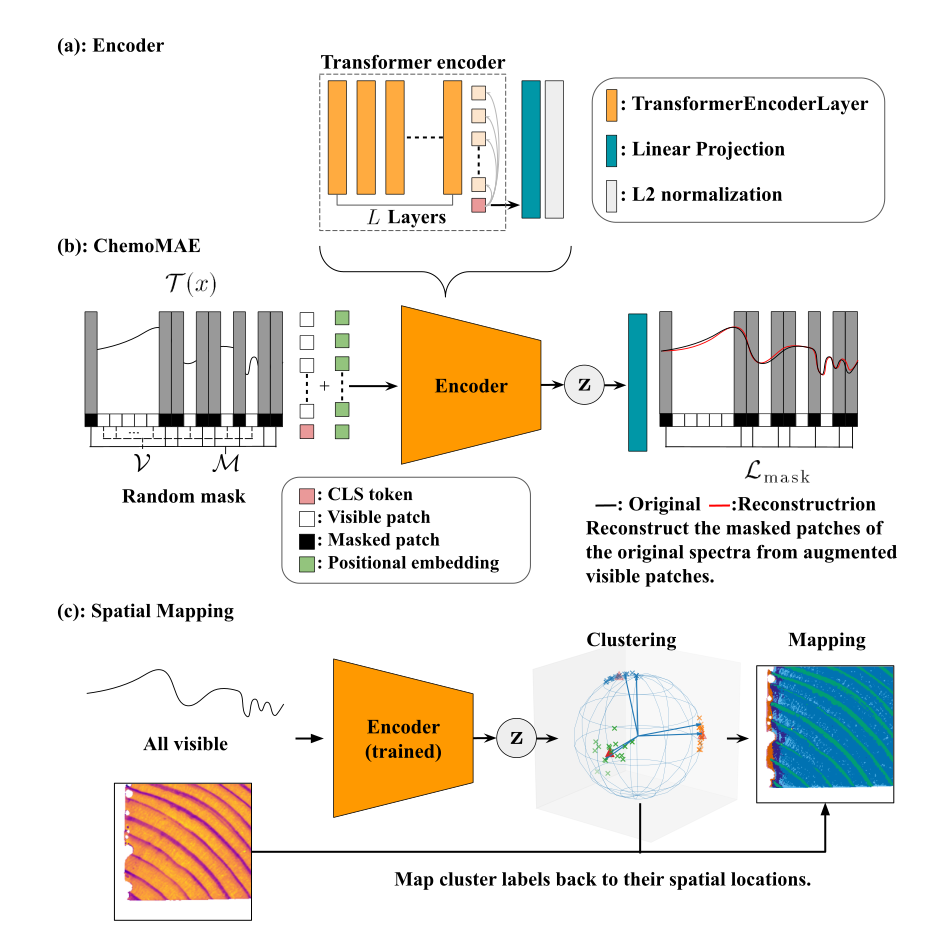
Example application: unsupervised spatial mapping of hyperspectral images. (a) A Transformer encoder projects spectra into L2-normalized representations. (b) In the illustrated training setup, augmented visible patches are used to reconstruct the masked regions of the original spectra. (c) The trained encoder receives complete spectra; their representations are clustered, and the cluster labels are mapped back to the original pixel locations.
These guides document ChemoMAE v0.2.4. README links lead to the maintained repository documentation. See the v0.2.4 release notes for changes and compatibility notes.
Choose the components you need
| Task | Components and guide |
|---|---|
| Standardize each spectrum or select diverse rows | SNV, cosine FPS |
| Learn a spectral representation | ChemoMAE, reconstruction losses |
| Train with a supplied loop or your own PyTorch loop | Trainer and hooks, optimizer/scheduler, augmentation |
| Evaluate reconstruction or extract features | Tester, Extractor |
| Cluster an existing feature matrix | CosineKMeans for hard assignments; VMFMixture for mixture probabilities |
| Evaluate a partition or a spatial map | Cosine silhouette, Local Label Agreement |
| Save a model or control random streams | Artifacts and checkpoints, RNG utilities |
SNV is optional: use it when removing each spectrum's mean and scale suits your data. Clustering accepts feature matrices without requiring a ChemoMAE model. Spatial evaluation requires a label map and validity mask; ordinary spectral learning and feature extraction require no pixel coordinates.
Quick Start
ChemoMAE requires Python 3.10 or newer. Install v0.2.4 with pip:
pip install chemomae==0.2.4
The example below runs on CPU and covers training, saving and reloading a model, feature extraction, and clustering.
ChemoMAE Example
This complete CPU example trains a small model, reloads its inference artifact, and clusters its features. SNV and clustering illustrate optional composition. The synthetic data, two epochs, and K=3 demonstrate APIs, not recommended tuning values. Outputs go to a new temporary directory whose path is printed.
import tempfile
from pathlib import Path

import torch
from torch.utils.data import DataLoader, TensorDataset

from chemomae.preprocessing import snv
from chemomae.models import ChemoMAE
from chemomae.training import Trainer, TrainerConfig, Extractor, ExtractorConfig
from chemomae.clustering import CosineKMeans

torch.manual_seed(42)
data_stream = torch.Generator().manual_seed(7)
spectra = snv(torch.randn(80, 64, generator=data_stream))
train_x, test_x = spectra[:64], spectra[64:]

def loader(x: torch.Tensor) -> DataLoader:
    return DataLoader(TensorDataset(x), batch_size=16, shuffle=False)

device = torch.device("cpu")
run_dir = Path(tempfile.mkdtemp(prefix="chemomae-"))
model = ChemoMAE(
    seq_len=64, n_patches=8, n_mask=4, d_model=16,
    nhead=4, num_layers=1, latent_dim=8,
).to(device)
optimizer = torch.optim.AdamW(model.parameters(), lr=1e-3)
trainer = Trainer(
    model, optimizer, loader(train_x),
    cfg=TrainerConfig(
        out_dir=run_dir, device=device, resume_from=None, use_ema=False,
        progress=False, verbose=False,
    ),
)
result = trainer.fit(epochs=2)

assert result["final_artifact"] is not None
inference_model = ChemoMAE.load(result["final_artifact"], device=device)
extractor = Extractor(
    inference_model,
    ExtractorConfig(representation="normalized_latent", output_device="cpu"),
)
train_features = extractor(loader(train_x))
test_features = extractor(loader(test_x))

clusterer = CosineKMeans(n_components=3, max_iter=30, device=device, random_state=42)
clusterer.fit(train_features)
test_labels = clusterer.predict(test_features)
clusterer.save_centroids(run_dir / "clusters.pt")
assert train_features.shape == (64, 8) and test_features.shape == (16, 8)
assert test_labels.shape == (16,)
print(test_labels, clusterer.converged_, clusterer.stop_reason_)
print("Outputs:", run_dir)
Choices to keep explicit
The example selects a fresh output directory, raw final weights, and CPU. Keep these choices explicit when adapting it:
| You want to… | What to specify |
|---|---|
| Start a fresh training run | Use a new out_dir and resume_from=None. Existing training artifacts cause an error. The default resume_from="auto" can resume an earlier run in the same directory. |
| Continue a saved run | Create a new Trainer with resume_from=checkpoint_path. fit(epochs=10) trains through epoch 10: a checkpoint after epoch 7 leaves epochs 8–10 to run. |
| Reload for inference | Pass result["final_artifact"] directly to ChemoMAE.load; it is an absolute path to the selected raw/EMA artifact, or None when no artifact is exported. final_model continues to name a weight file for load_state_dict. |
| Bring NumPy spectra | Explicitly convert to the model's floating dtype before training, for example torch.as_tensor(array, dtype=next(model.parameters()).dtype). NumPy arrays often start as float64 and remain float64 through SNV. |
| Choose CPU or CUDA | Move the model to the chosen device before constructing the optimizer, and pass device to the clusterer. Trainer/Extractor follow the model by default; CosineKMeans/VMFMixture default to "cuda", including on a CPU-only machine. |
See starting or resuming training
and the output-file guide
for the exact defaults and raw/EMA file choices. CPU use requires explicitly
passing device="cpu" to clustering; CUDA use requires an available CUDA device.
Continue with the staged workflow tutorial for reconstruction evaluation and optional augmentation, resume, clustering, spatial analysis, and reporting. The documentation index also provides direct routes to each API. For configuration comparisons and memory estimates, see planning a first experiment.
Model and workflow choices
ChemoMAE splits a spectrum into contiguous patches. Visible patch tokens and a CLS token enter a Transformer encoder; the projected CLS vector is the shared bottleneck from which a decoder reconstructs every spectral channel. The model guide describes masks, representations, and boundary behavior.
- Reconstruction objective: Trainer defaults to hidden-channel loss. For a
full-spectrum autoencoder, choose
n_mask=0andloss_region="all"explicitly. - Augmentation:
SpectraAugmenteroffers fractional channel shifts and tangent noise. Trainer keeps the pre-augmentation input as the target when one is supplied. - Decoder and latent: one decoder layer is affine; the default two-layer
decoder is an MLP. Latents are L2-normalized by default; set
latent_normalize=Falsewhen unconstrained latents suit the task. - Features:
model.encodeandExtractorexpose CLS, raw projected, and normalized representations with all patches visible. Usemodel.encodein a custom gradient-enabled loop for end-to-end fine-tuning. - Training control: Trainer provides reconstruction training, hooks, EMA, and completed-epoch resume. Model selection, downstream objectives, and data splits belong to the application. Model, augmentation, and loss primitives also work in ordinary PyTorch loops.
When evaluating generalization to unseen groups, fit learned components on the training groups and retain them for held-out prediction. Descriptive analysis of an existing dataset may use that dataset for fitting. Reconstruction loss, feature separation, and spatial coherence measure different properties; select the diagnostics that address your intended use.
Research background
ChemoMAE was extracted into a reusable library from spectral representation learning research. The associated research repository is WoodDegradationMap. A manuscript with an NIR-HSI case study is in preparation; its publication link will be added when available. Library defaults and examples are documented independently of that study's settings.
License
ChemoMAE is distributed under the Apache License 2.0. See NOTICE for notices.
1 maintainer

Metadata
1 maintainer
Release files for chemomae 0.2.4
For a detailed explanation of source distributions (sdists) and built distributions (wheels), please see the package formats documentation.
Source distribution (sdist)
| File | Size | Uploaded | |
|---|---|---|---|
| chemomae-0.2.4.tar.gz | 86.4 kB | Details |
Built distribution (wheel)
| File | Interpreter | ABI | Platform | Reset |
|---|---|---|---|---|
| chemomae-0.2.4-py3-none-any.whl | Python 3 | none | any | Details |
Total release size: 178.9 kB
Release files / chemomae-0.2.4.tar.gz
| Download URL | chemomae-0.2.4.tar.gz |
|---|---|
| Size | 86.4 kB |
| Tags | Source |
|
SHA-256 checksum How to use checksums |
0342296235fc9917606a639c4d12fea4820d006a3fe65af55e9a710558775339
|
|
BLAKE2b-256 checksum How to use checksums |
1a9c39a75dc58fca3d23d7019b822ca39f086d6425837e59d49e6912597f267e
|
| Upload date | |
|
Uploaded using Trusted Publishing? What is trusted publishing? |
No |
| Uploaded via |
twine/7.0.0 CPython/3.13.14
|
Release files / chemomae-0.2.4-py3-none-any.whl
| Download URL | chemomae-0.2.4-py3-none-any.whl |
|---|---|
| Size | 92.5 kB |
| Tags | Python 3 |
|
SHA-256 checksum How to use checksums |
269cda05697f6c7fccf2d6d556dded87f26ce5238c1322a64f3798e2f6b1b4bb
|
|
BLAKE2b-256 checksum How to use checksums |
ad164effe88b8829001534e5e74d9dd89527776e6d22a5402406d3d659da6790
|
| Upload date | |
|
Uploaded using Trusted Publishing? What is trusted publishing? |
No |
| Uploaded via |
twine/7.0.0 CPython/3.13.14
|














