
This release is a pre-release and may not be stable for production use.
Chempleter

Molecular autocomplete







Chempleter is a lightweight generative sequence model based on a multi-layer gated recurrent units (GRU) to predict syntactically valid extensions of a provided molecular fragment or bridge two molecules/molecular fragments. It operates on SELFIES token sequences, ensuring syntactically valid molecular generation and accepts SMILES notation as input. Due to its simple recurrent architecture and small vocabulary, the model runs efficiently on both CPUs and GPUs.
-
What can Chempleter do?
-
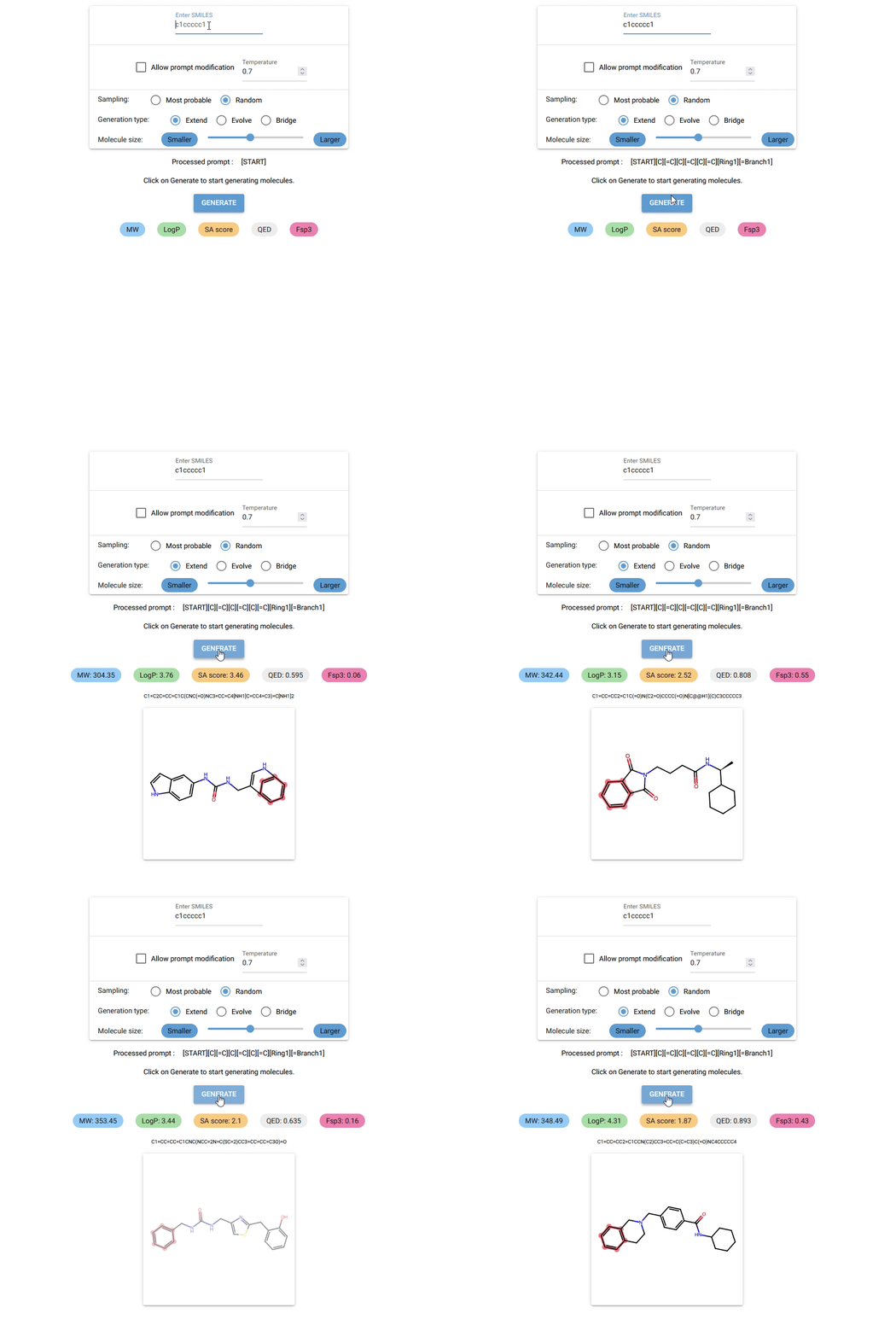
Currently, Chempleter accepts an intial molecule/molecular fragment in SMILES format and generates a larger molecule with that intial structure included, while respecting chemical syntax. It also shows some interesting descriptors.
-
It can be used to generate a wide range of structural analogs which the share same core structure (by changing the sampling temperature) or decorate a core scaffold iteratively (by increasing generated token lengths)
-
It can be used to bridge two molecules/molecular fragments to explore linker chemistry.
-
In the future, it might be adapated to predict structures with a specific chemical property using a regressor to rank predictions and transition towards more "goal-directed" predictions.
-
See chempleter in action. or try chempleter on Huggingface: chempleter-gui.
Demo
Try it our on Huggingface: chempleter-gui.
Prerequisites
- Python ">=3.12"
- uv (optional but recommended)
Installation
See detailed installation instructions.
Getting started
Visit Chempleter's docs.
Quick start
These commands are valid for running Chempleter on CPU. For GPU, see installation instructions.
-
Run the GUI directly without installing (via uv):
-
On windows:
uvx --from "chempleter[cpu]" chempleter-gui.exe -
On linux/MacOS:
uvx --from "chempleter[cpu]" chempleter-gui -
The very first start of the GUI on your device might be a bit slow. To know more about using the GUI and various options, see here.
Or
-
-
Install using uv
uv pip install "chempleter[cpu]" -
Run GUI after installation
uv run chempleter-gui -
Use the GUI
-
Type in the SMILES notation for the starting structure or leave it empty to generate random molecules. Click on
GENERATEbutton to generate a molecule. -
To know more about using the GUI and various other options, see here.
-
-
Use as a python library
-
To use Chempleter as a python library:
from chempleter.inference import extend
generated_mol, generated_smiles, generated_selfies = extend(smiles="c1ccccc1")
print(generated_smiles)
>> C1=CC=CC=C1C2=CC=C(CN3C=NC4=CC=CC=C4C3=O)O2
To draw the generated molecule :
from rdkit import Chem
Chem.Draw.MolToImage(generated_mol)
-
For details on available paramenters and inference functions, see generating molecules.
-
Model history and validation
Project structure
- src/chempleter: Contains python modules relating to different functions.
- src/chempleter/processor.py: Contains fucntions for processing csv files containing SMILES data and generating training-related files.
- src/chempleter/dataset.py: ChempleterDataset class
- src/chempleter/model.py: ChempleterModel class
- src/chempleter/inference.py: Contains functions for inference
- src/chempleter/train.py: Contains functions for training
- src/chempleter/gui.py: Chempleter GUI built using NiceGUI
- src/chempleter/data : Contains trained model, vocabulary files
License
MIT License
Copyright (c) 2025-2026 Davis Thomas Daniel
Contributing
Any contribution, improvements, feature ideas or bug fixes are always welcome.
1 maintainer

Release files for chempleter 0.1.0b10
For a detailed explanation of source distributions (sdists) and built distributions (wheels), please see the package formats documentation.
Source distribution (sdist)
| File | Size | Uploaded | |
|---|---|---|---|
| chempleter-0.1.0b10.tar.gz | 21.9 MB | Details |
Built distribution (wheel)
| File | Interpreter | ABI | Platform | Reset |
|---|---|---|---|---|
| chempleter-0.1.0b10-py3-none-any.whl | Python 3 | none | any | Details |
Total release size: 43.7 MB
Release files / chempleter-0.1.0b10.tar.gz
| Download URL | chempleter-0.1.0b10.tar.gz |
|---|---|
| Size | 21.9 MB |
| Tags | Source |
|
SHA-256 checksum How to use checksums |
90b762144ee876628d99ca35195f4cdc8c4ba00be606c3703aa9cb8d84999bef
|
|
BLAKE2b-256 checksum How to use checksums |
420475c00389433b9fa374358e25acf7f45b214ae3ea94bedb2cfb542ada1330
|
| Upload date | |
|
Uploaded using Trusted Publishing? What is trusted publishing? |
Yes |
| Uploaded via |
uv/0.11.21 {"installer":{"name":"uv","version":"0.11.21","subcommand":["publish"]},"python":null,"implementation":{"name":null,"version":null},"distro":{"name":"Ubuntu","version":"24.04","id":"noble","libc":null},"system":{"name":null,"release":null},"cpu":null,"openssl_version":null,"setuptools_version":null,"rustc_version":null,"ci":true}
|
Release files / chempleter-0.1.0b10-py3-none-any.whl
| Download URL | chempleter-0.1.0b10-py3-none-any.whl |
|---|---|
| Size | 21.9 MB |
| Tags | Python 3 |
|
SHA-256 checksum How to use checksums |
9964165243c144875efd88cd9a2367ecfa7ef96f19b32d355ea20dfeff08be86
|
|
BLAKE2b-256 checksum How to use checksums |
59c16f016f729a4f595e9e01f54a2abf8ca1ad67232428cb356ca4f6d0b0bb6e
|
| Upload date | |
|
Uploaded using Trusted Publishing? What is trusted publishing? |
Yes |
| Uploaded via |
uv/0.11.21 {"installer":{"name":"uv","version":"0.11.21","subcommand":["publish"]},"python":null,"implementation":{"name":null,"version":null},"distro":{"name":"Ubuntu","version":"24.04","id":"noble","libc":null},"system":{"name":null,"release":null},"cpu":null,"openssl_version":null,"setuptools_version":null,"rustc_version":null,"ci":true}
|














