
A lightweight generative model that extends SMILES fragments into syntactically valid molecules

Project description
Chempleter
Chempleter is lightweight generative model which utlises a simple Gated Recurrent Unit (GRU) to predict syntactically valid extensions of a provided molecular fragment. It accepts SMILES notation as input and enforces chemical syntax validity using SELFIES for the generated molecules.
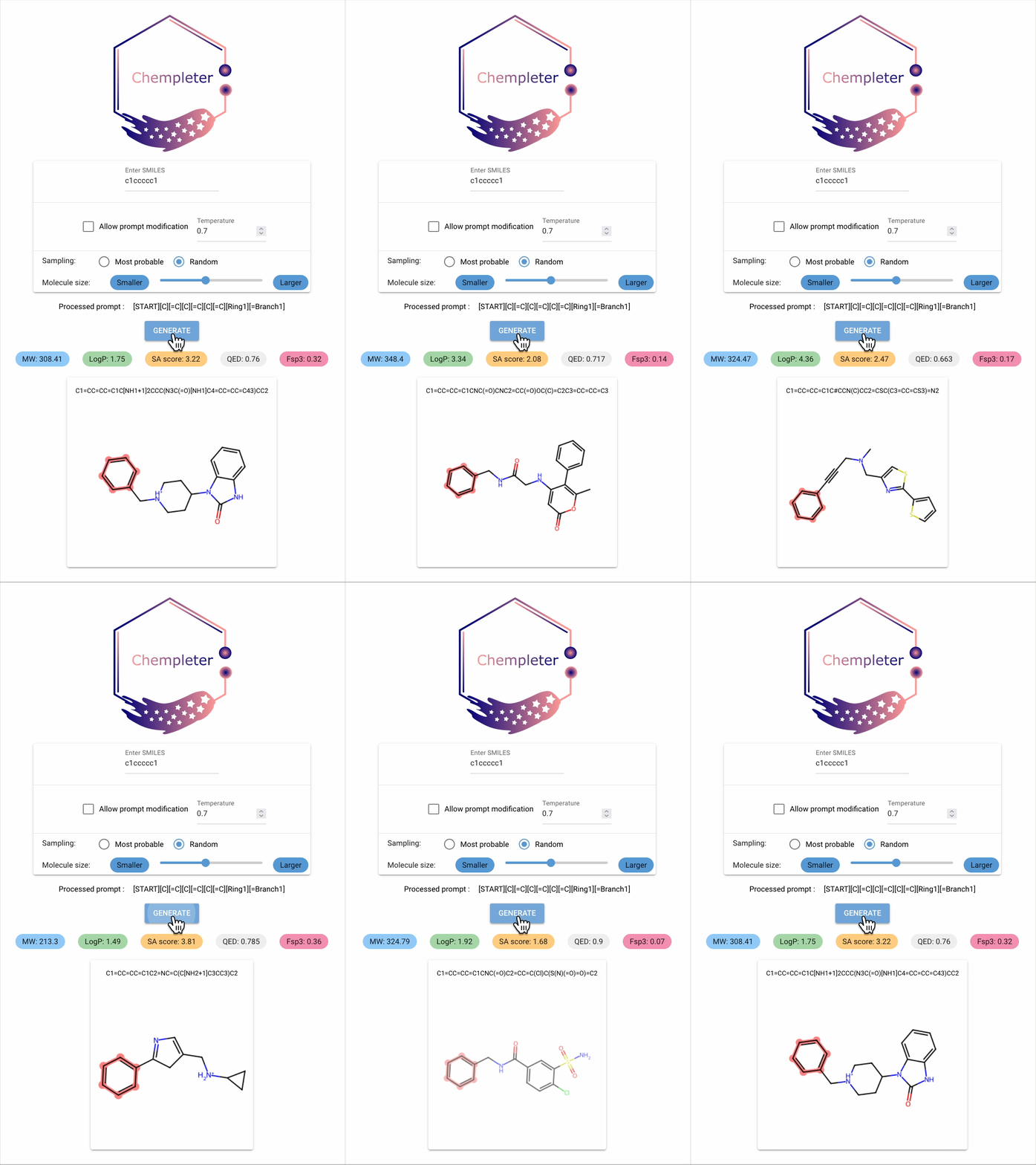
-
Why was Chempleter made?
- Mainly for me to get into Pytorch. Also, I find it fun to generate random, possibly unsynthesisable molecules from a starting structure.
-
What can Chempleter do?
-
Currently, Chempleter accepts an intial molecule/molecular fragment in SMILES format and generates a larger molecule with that intial structure included, while respecting chemical syntax. It also shows some interesting descriptors.
-
It can be used to generate a wide range of structural analogs which the share same core structure (by changing the sampling temperature) or decorate a core scaffold iteratively (by increasing generated token lengths)
-
In the future, it might be adapated to predict structures with a specific chemical property using a regressor to rank predictions and transition towards more "goal-directed" predictions.
-
Prerequisites
- Python ">=3.13"
- See pyproject.toml for dependencies.
- uv (optional but recommended)
Get started
You can install chempleter using any one of the following ways:
-
Install from PyPi
python -m pip install chempleterBy default, the CPU version of pytorch will be installed. Alternatively, you can install a PyTorch version compatible with your CUDA version by following the Pytorch documentation.
-
Install using uv
-
Clone this repo
git clone https://github.com/davistdaniel/chempleter.git -
Inside the project directory, exceute in a terminal:
uv syncBy default, the CPU version of pytorch will be installed, in case of using GPU as accelerator and CUDA 12.8:
uv sync --extra gpu128Alternatively, you can install a PyTorch version compatible with your CUDA version by following the Pytorch documentation.
-
Usage
GUI
-
To start the Chempleter GUI:
chempleter-guior
uv run src/chempleter/gui.py -
Type in the SMILES notation for the starting structure or leave it empty to generate random molecules. Click on
GENERATEbutton to generate a molecule. -
Options:
- Temperature : Increasing the temperature would result in more unusual molecules, while lower values would generate more common structures.
- Sampling :
Most probableselects the molecule with the highest likelihood for the given starting structure, producing the same result on repeated generations.Randomgenerates a new molecule each time, while still including the input structure.
As a python library
-
To use Chempleter as a python library:
from chempleter.inference import extend
generated_mol, generated_smiles, generated_selfies = extend(smiles="c1ccccc1")
print(generated_smiles)
>> C1=CC=CC=C1C2=CC=C(CN3C=NC4=CC=CC=C4C3=O)O2
To draw the generated molecule :
from rdkit import Chem
Chem.Draw.MolToImage(generated_mol)
-
For details on available parameters, refer to the
extend(chempleter.inferencemodule) function’s docstring.
Current model performance
Performance metrics were evaluated across 500 independent generations using a model checkpoint trained for 80 epochs with a batch size of 64.
| Metric | Value | Description |
|---|---|---|
| Validity | 1.0 | Proportion of Generated SMILES which respect chemical syntax; tested using selfies decoder and RDkit parser. |
| Uniqueness | 0.96 | Proportion of Generated SMILES which were unique |
| Novelty | 0.85 | Proportion of Generated SMILES which were not present in the training datatset |
Project structure
- src/chempleter: Contains python modules relating to different functions.
- src/chempleter/processor.py: Contains fucntions for processing csv files containing SMILES data and generating training-related files.
- src/chempleter/dataset.py: ChempleterDataset class
- src/chempleter/model.py: ChempleterModel class
- src/chempleter/inference.py: Contains functions for inference
- src/chempleter/train.py: Contains functions for training
- src/chempleter/gui.py: Chempleter GUI built using NiceGUI
- src/chempleter/data : Contains trained model, vocabulary files
License
MIT License
Copyright (c) 2025 Davis Thomas Daniel
Contributing
Any contribution, improvements, feature ideas or bug fixes are always welcome.
Random Notes
- Training data
- QM9 and ZINC datasets. 379997 molecules were used for training in total.
- Running wihout a GPU
- Chempleter uses a 2-layer GRU, it should run comfortably on a CPU.
Release history Release notifications | RSS feed


Download files
Download the file for your platform. If you're not sure which to choose, learn more about installing packages.
Source Distribution
Built Distribution
Filter files by name, interpreter, ABI, and platform.
If you're not sure about the file name format, learn more about wheel file names.
Copy a direct link to the current filters
File details
Details for the file chempleter-0.1.0b3.tar.gz.
File metadata
- Download URL: chempleter-0.1.0b3.tar.gz
- Upload date:
- Size: 31.8 MB
- Tags: Source
- Uploaded using Trusted Publishing? No
- Uploaded via: uv/0.7.3
File hashes
| Algorithm | Hash digest | |
|---|---|---|
| SHA256 |
665a46902aeecc004f25deba50c79b1ee627467c750f16b87f036b9df3807d76
|
|
| MD5 |
015144ee4f3f37ad9f19d750737aaafb
|
|
| BLAKE2b-256 |
d9cd64f2d7e3e302edd96daff3eddce886baa7fc53417bce7b66f77b9a5314a9
|
File details
Details for the file chempleter-0.1.0b3-py3-none-any.whl.
File metadata
- Download URL: chempleter-0.1.0b3-py3-none-any.whl
- Upload date:
- Size: 31.8 MB
- Tags: Python 3
- Uploaded using Trusted Publishing? No
- Uploaded via: uv/0.7.3
File hashes
| Algorithm | Hash digest | |
|---|---|---|
| SHA256 |
61e8177ce66dafd2d96d720d8ccea36156e6937ca49631b3f49ec07d25ac6131
|
|
| MD5 |
8cd53aeba261c09eeabf9cd357f9253a
|
|
| BLAKE2b-256 |
0991262d70cdf2d2cac768a0c02dde8f488afd3e4dbb6fb84ad699605add1315
|






