

chesssnake
Play, render and persist chess games in Python: from a library, a REST API, or your terminal.





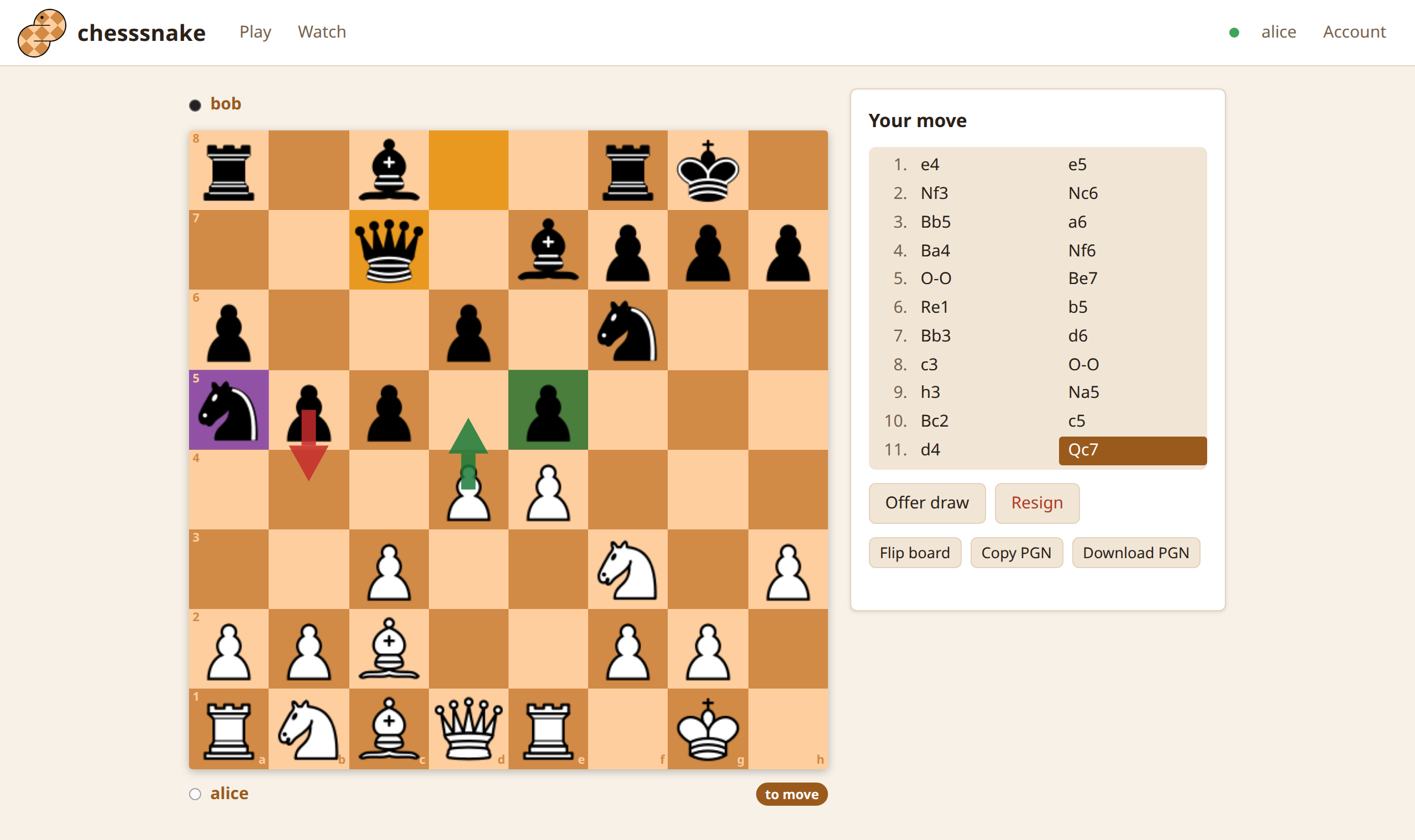
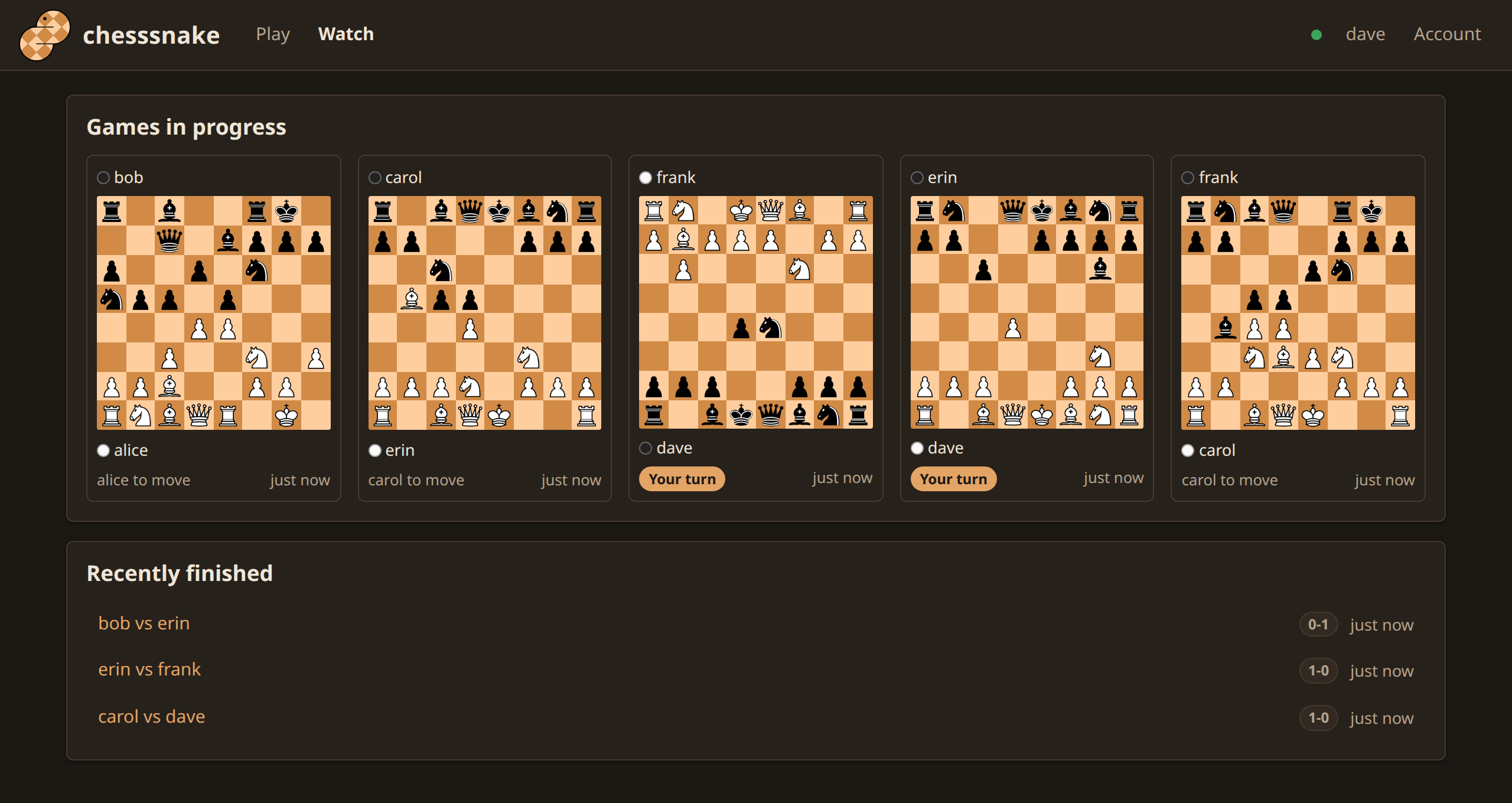
The web UI that comes with the server: a game in progress with board marks, and the Watch page, where every game in progress updates live (dark theme).
A self-hosted chess server for bots and small communities. Rules, board
images, accounts, a REST API, live updates and a web UI come in one
pip install or one container, with no third-party chess accounts needed. It
works as a plain Python library too: play in your own process, draw the
position as a PNG, and keep games in SQLite or PostgreSQL through an
api-endpoint that many clients can share.
- Full rules: castling, en passant, promotion, checkmate, stalemate, and draws by threefold repetition, the fifty-move rule and insufficient material.
- Board images from any position, one side or both, last move highlighted. Returns a PIL image, so you can keep editing it.
- Standard formats in and out: FEN, PGN, SAN, UCI move input, legal-move listing.
- The server owns the rules, so a client cannot cheat and a frontend in any language needs no chess logic of its own.
- Live updates (opt-in): clients can follow games over a websocket and see each move the moment it is made, instead of polling.
- A web UI served by the api-endpoint: play in the browser, watch any game, and manage accounts from an admin panel.
- Pure Python. Pillow is the only dependency for a local game.
Pronounced "chess-snake", after Python being a kind of snake. Not cheesecake.
Alpha. Minor versions regularly contain breaking changes. Not recommended for production until 1.0.0.
Four ways to use it
| How | Needs | |
|---|---|---|
| Library | Game.local(...) runs the engine in your process |
pip install chesssnake |
| Client + server | Game.remote(...) talks to an api-endpoint, or call the REST routes from any language |
chesssnake[client], and a server |
| Terminal | chesssnake play |
nothing extra |
| Browser | open the api-endpoint's address | a server |
All four share the same rules and the same routes, so a game started in the CLI can be continued over REST, and the other way round.
Install
chesssnake runs as a Python package, or as a Docker container for the server.
Python
pip install chesssnake                  # local games and rendering
pip install chesssnake[client]          # also play on a remote api-endpoint
pip install chesssnake[api]             # also run the server (SQLite: no database server needed)
pip install chesssnake[api,postgres]    # ... with PostgreSQL
Requires Python 3.12 or newer.
from chesssnake import Game

game = Game.local(white_name="Bob", black_name="Alice")
game.move("e4")
game.move("e5")
game.save("board.png")        # a PNG of the position
print(game.fen)               # rnbqkbnr/pppp1ppp/8/4p3/4P3/8/PPPP1PPP/RNBQKBNR w KQkq e6 0 2
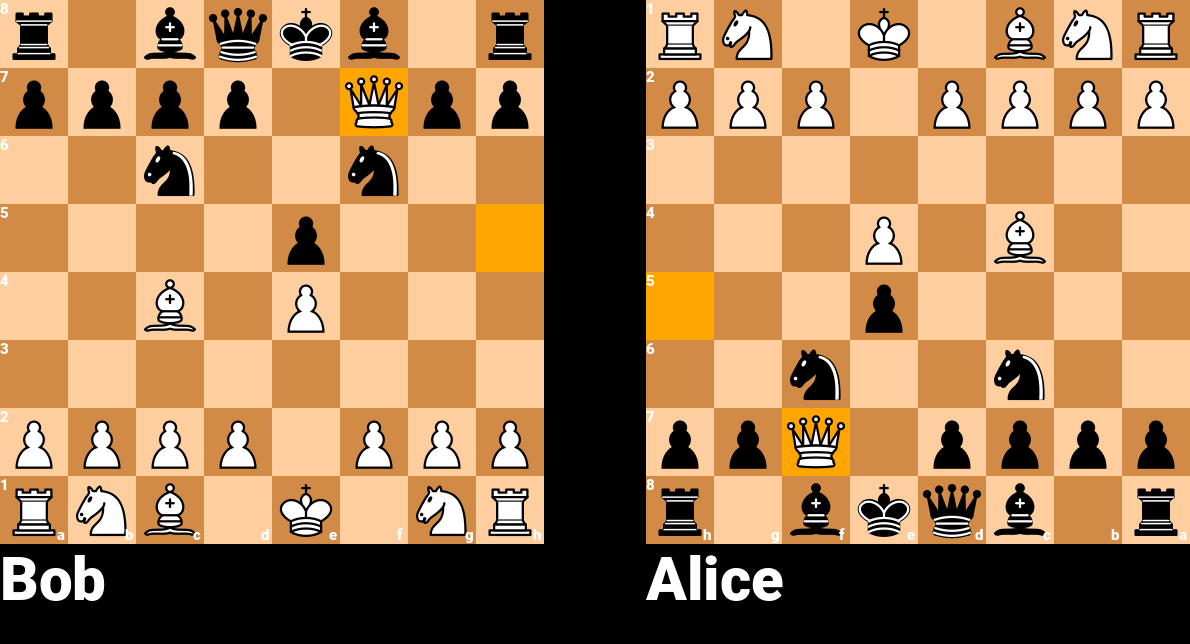
Rendered by chesssnake itself: game.save("board.png") after 1. e4 e5 2. Qh5 Nc6 3. Bc4 Nf6 4. Qxf7#. The last move is highlighted, and each player sees the board from their own side.
Or play it in the terminal, with no server:
chesssnake play --local
Docker
Images are published to ghcr.io/gabebecker2048/chesssnake for amd64 and arm64.
Save this as docker-compose.yml in a new folder:
services:
  chesssnake:
    image: ghcr.io/gabebecker2048/chesssnake:latest   # or :0.9 to stay on 0.9.x
    restart: unless-stopped
    user: "1000:1000"              # who owns ./data (`id -u`:`id -g`)
    ports:
      - "8000:8000"
    volumes:
      - ./data:/data
    environment:
      CHESSSNAKE__DATABASE__URL: sqlite:////data/chesssnake.db
      CHESSSNAKE__DATABASE__INIT_SCHEMA: "1"
      # Anyone may make an account only if you open registration:
      # CHESSSNAKE__API__REGISTRATION: "open"
      # Live updates: chesssnake play shows the opponent's move as it happens.
      # CHESSSNAKE__WEBSOCKET__ENABLED: "1"
    read_only: true
    tmpfs: [/tmp]
    cap_drop: [ALL]
    security_opt: ["no-new-privileges:true"]
    mem_limit: 512m
Then, in that folder:
mkdir data           # so it is yours, not root's
docker compose up -d
curl localhost:8000/health
docker compose exec chesssnake chesssnake user create alice --admin   # the first account
That is the whole server: SQLite in a file under ./data, no database to
install. For PostgreSQL, hardening notes and what to do before exposing it, see
the guide.
Connect to it
Players are accounts, and a game starts when one challenges another. The simplest way in is a browser: open http://localhost:8000/ and log in (that is the web UI pictured at the top).
From a terminal, anywhere on the network:
chesssnake login --api-url http://localhost:8000     # once; the token is remembered
chesssnake challenge bob                              # bob runs: chesssnake accept ID
chesssnake play --vs bob
With live updates on (CHESSSNAKE__WEBSOCKET__ENABLED), each player's terminal
shows the other's move the moment it is made; without them it checks every 10
seconds.
From Python:
from chesssnake import Game, connect

client = connect("http://localhost:8000", username="alice", password="...")
game = Game.remote(client.current_games()[0], client=client)
game.move("e4")
Or over plain HTTP, from any language:
TOKEN=$(curl -s localhost:8000/v1/auth/login -H 'Content-Type: application/json' \
  -d '{"username":"alice","password":"..."}' | jq -r .token)
curl -X POST localhost:8000/v1/games/1/moves -H "Authorization: Bearer $TOKEN" \
  -H 'Content-Type: application/json' -d '{"move":"e4"}'
More
- The guide: the Python API, running an api-endpoint, playing in a terminal, and deploying with Docker
- REST API reference: every endpoint, every error code
- The web UI: playing, watching and the admin panel in a browser
- Real-time updates: the websocket protocol, for frontends that want moves as they happen
- Configuration: every setting and its environment variable
- CHANGELOG.md and ROADMAP.md: what changed, and what is next
- CLAUDE.md: how the codebase fits together, useful to any contributor
- Releasing: how a version reaches PyPI and ghcr.io
Contributing
Issues and pull requests are welcome. The project is managed with uv:
uv sync --extra api --extra client --extra postgres   # the full stack
uv run pytest                                         # both backends
uv run ruff check && uv run ruff format --check && uv run mypy
CI runs the suite on Python 3.12 to 3.14, against both SQLite and PostgreSQL, with a coverage gate.
License
MIT, see LICENSE.
1 maintainer

Metadata
1 maintainer
Release files for chesssnake 0.15.0
For a detailed explanation of source distributions (sdists) and built distributions (wheels), please see the package formats documentation.
Source distribution (sdist)
| File | Size | Uploaded | Provenance | Actions |
|---|---|---|---|---|
| chesssnake-0.15.0.tar.gz | 301.9 kB | With provenance | Details for chesssnake-0.15.0.tar.gz |
Built distribution (wheel)
| File | Interpreter | ABI | Platform | Actions Reset |
|---|---|---|---|---|
| chesssnake-0.15.0-py3-none-any.whl | Python 3 | none | any | Details for chesssnake-0.15.0-py3-none-any.whl |
Total release size: 638.2 kB
Release files / chesssnake-0.15.0.tar.gz
| Download URL | chesssnake-0.15.0.tar.gz |
|---|---|
| Size | 301.9 kB |
| Tags | Source |
|
SHA-256 checksum How to use checksums |
d821ad9a6108894bde57503393a9225c87e66651c10eae74ba33f9a152b97e3a
|
|
BLAKE2b-256 checksum How to use checksums |
c08dbd1444004fcde4d30e25c17277af71c31bf4472ce837faceb5dc9fff25f7
|
| Upload date | |
|
Uploaded using Trusted Publishing? What is trusted publishing? |
Yes |
| Uploaded via |
twine/7.0.0 CPython/3.13.16
|
Provenance
Provenance describes where a file came from. On PyPI, provenance is shared via attestations, which provide a verifiable record of the build or publishing details. View details, limitations and caveats.


PyPI Publish Attestation
PyPI verified that this artifact, at this checksum, originated from the publisher listed below.
Signed by GitHub Actions, verified by PyPI on Nov 13, 2026.
Transparency logRelease files / chesssnake-0.15.0-py3-none-any.whl
| Download URL | chesssnake-0.15.0-py3-none-any.whl |
|---|---|
| Size | 336.3 kB |
| Tags | Python 3 |
|
SHA-256 checksum How to use checksums |
5bd1e93b768628272cc6a88ac19eaa34c46b9e686f306c7025c78fad8ca4180a
|
|
BLAKE2b-256 checksum How to use checksums |
288a67ccb18e72ae749a11adb0c5b2e200bc293fbc9541181c4bfafaa03a0dc9
|
| Upload date | |
|
Uploaded using Trusted Publishing? What is trusted publishing? |
Yes |
| Uploaded via |
twine/7.0.0 CPython/3.13.16
|
Provenance
Provenance describes where a file came from. On PyPI, provenance is shared via attestations, which provide a verifiable record of the build or publishing details. View details, limitations and caveats.
PyPI Publish Attestation
PyPI verified that this artifact, at this checksum, originated from the publisher listed below.
Signed by GitHub Actions, verified by PyPI on Nov 13, 2026.
Transparency logSecurity for chesssnake 0.15.0
Provenance
Provenance describes where a file came from. On PyPI, provenance is shared via attestations, which provide a verifiable record of the build or publishing details. View details, limitations and caveats.
Full provenance
Both files in this release have been uploaded with provenance metadata.
Attestation for chesssnake-0.15.0.tar.gz
PyPI Publish Attestation
PyPI verified that this artifact, at this checksum, originated from the publisher listed below.
Signed by GitHub Actions, verified by PyPI on Nov 13, 2026.
Transparency logA note on package security
PyPI is a repository for distributing packages, not a service for auditing them. While third-party security researchers and our staff do their best to detect and remove malicious packages, PyPI cannot guarantee the quality, security or suitability of any given package.
To learn more about protecting yourself from malicious actors, visit our package security documentation.














