

chesssnake
Play, render and persist chess games in Python — from a library, a REST API, or your terminal.




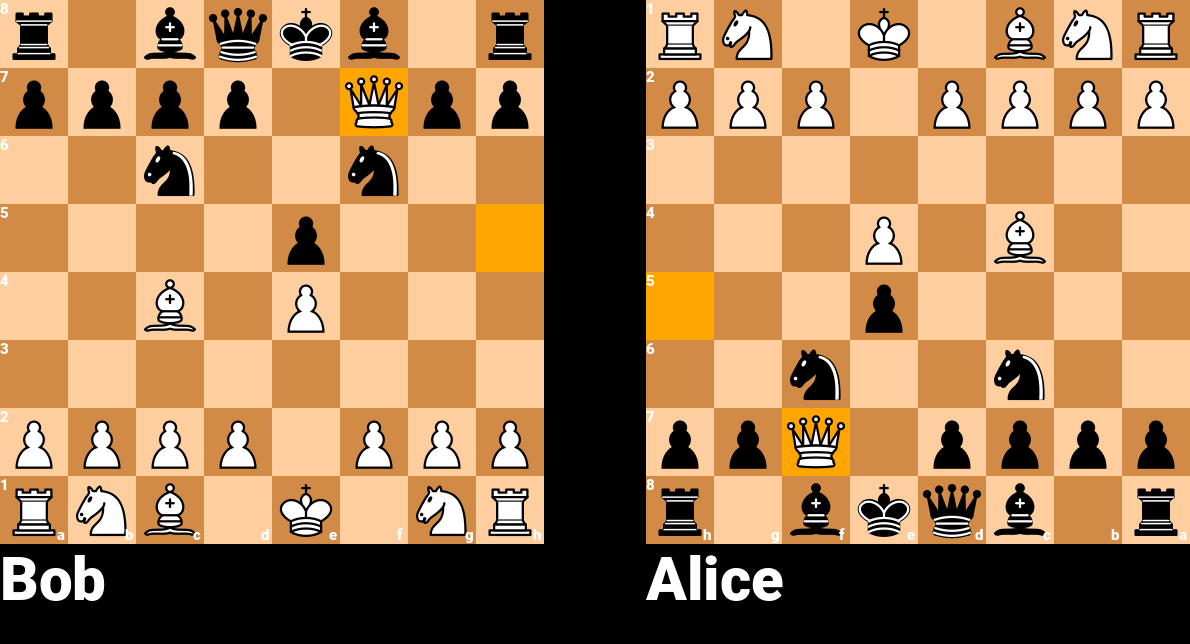
Rendered by chesssnake itself — game.save("board.png") after 1. e4 e5 2. Qh5 Nc6 3. Bc4 Nf6 4. Qxf7#. The last move is highlighted, and each player sees the board from their own side.
Pronounced "chess-snake", after Python being a kind of snake. Not cheesecake.
Alpha. Minor versions regularly contain breaking changes. Not recommended for production until 1.0.0. See VersionHistory.md.
Features
- A complete chess engine in pure Python — full rules, including castling, en passant, promotion, checkmate and stalemate, plus draws by threefold repetition, the fifty-move rule and insufficient material.
- Board images — render any position to a PNG or JPEG, from one side or both, with the last move highlighted. Returns a PIL image, so you can keep editing it.
- Standard formats — FEN in and out, PGN export, SAN move lists, legal-move enumeration.
- Persistence without SQL — a REST api-endpoint stores games in SQLite or PostgreSQL. Many clients share one database; nobody writes a query.
- The server owns the rules, so a client cannot cheat and a frontend in any language needs no chess logic of its own.
- Play in your terminal —
chesssnake play, with no server needed for a local game. - Runs in Docker — one image, either database, chosen at runtime.
Quick start
pip install chesssnake
from chesssnake import Game

game = Game.local(white_name="Gabe", black_name="Claude")
game.move("e4")
game.move("e5")
game.save("board.png")        # a PNG of the position
print(game.fen)               # rnbqkbnr/pppp1ppp/8/4p3/4P3/8/PPPP1PPP/RNBQKBNR w KQkq e6 0 2
Or play it in the terminal, with nothing else installed and no server:
chesssnake play --local
Architecture
chesssnake is split into three tiers so that many lightweight game clients — in any language — can share a single database through one authoritative server:
- Game client — sends a move (e.g.
"e4") over REST and receives the new state or a structured error. It never needs a chess engine of its own. - api-endpoint — a REST server (
chesssnake api-endpoint) that runs the chess engine: it validates and applies every move, is the single source of truth for the rules, and stores the result. - Database — the api-endpoint owns the database connection and does all SQL. SQLite needs no server; PostgreSQL is one config value away.
Because the server owns the rules, any frontend (web, mobile, a chat bot, …) can use the chesssnake backend by speaking REST — no chess logic required on the client side. (A Game.local(...) game still runs the engine in-process, with no server needed.)
Three ways to drive it
The same api-endpoint can be used three ways, in increasing order of how much it does for you:
| How | Needs | Good for | |
|---|---|---|---|
| 1. REST | Call the HTTP routes directly — see docs/rest-api.md | anything that speaks HTTP | a custom frontend, another language, a bot |
| 2. Python client | Game.remote(...) — an object that mirrors server state |
chesssnake[client] |
Python apps; the engine stays on the server |
| 3. CLI | chesssnake play — a board and a prompt |
nothing extra | playing, and poking at a deployment by hand |
All three hit the same routes and the same rules, so they interoperate: a game started in the CLI can be continued over REST, and vice versa.
Installation
Basic Installation
To install the core features of Chesssnake (local, in-memory games and image rendering), run:
pip install chesssnake
To play remote (persisted) games
Install the client extra (adds requests):
pip install chesssnake[client]
To run the api-endpoint server
Install the api extra (adds FastAPI, uvicorn, pydantic, and SQLAlchemy). This runs on SQLite with no compiled dependencies:
pip install chesssnake[api]
For a PostgreSQL backend, add the postgres extra, which brings the driver:
pip install chesssnake[api,postgres]
Usage
This library's API is focused around a Game object. Every Game object represents a game between two players.
Build games with the factory methods: Game.local(...) for an in-memory game, or Game.remote(...) for one persisted through an api-endpoint (see below).
Basic usage
A simple example:
from chesssnake import Game

# Initialize a new local game
game = Game.local(white_name="Bob", black_name="Phil")

# Make moves — move() returns the Move that was played
game.move('e4')  # Bob's move
game.move('e5')  # Phil's move

# Print the board
print(game)

# Rendering is separate from moving:
game.move('Nc3')
game.render().show()           # a PIL image (both perspectives + names)
game.render(perspective="white").show()  # or a single board from one side's POV
# (a nameless game's wide image omits the bottom name strip)
game.save('/path/to/img.png')  # or write it straight to disk
Inspecting game state
Use the intention-revealing accessors instead of raw internals:
game.to_move          # Color.WHITE or Color.BLACK — whose turn it is
game.is_over          # True once the game has ended
game.result           # a GameStatus: IN_PLAY, WHITE_WON, BLACK_WON, or DRAW
game.winner           # the winning Color, else None
game.termination      # why it ended: a Termination (checkmate, resignation, ...) or None
game.draw_offered_by  # the Color with an open draw offer, else None
Color, GameStatus, PieceType, and Termination are importable from chesssnake.
More chess features
Every game (local or remote) supports the full rules and standard formats:
game.legal_moves()    # list of legal moves ({from, to, san, promotion})
game.resign(player_id)  # resign; the opponent wins
game.move("Qh4")      # draw-by-rule (threefold, fifty-move, insufficient material,
                      #   stalemate) is detected automatically and ends the game
game.fen              # the position as standard FEN (interoperable with any chess tool)
print(game.pgn())     # export the game as PGN
All six FEN fields are also exposed directly on the game (local or remote):
game.to_move          # active color (FEN field 2)
game.castling_rights  # e.g. "KQkq", or None if none (FEN field 3)
game.en_passant       # e.g. "e3" or None          (FEN field 4)
game.halfmove_clock   # plies since last pawn move/capture (FEN field 5)
game.fullmove_number  # the move number            (FEN field 6)
The board is stored and exchanged as standard FEN, so any chess library or tool can read a chesssnake position.
Persisting games through the api-endpoint
To store and retrieve games, run the api-endpoint server and point your Game clients at it.
1. Run the server. The server needs a database connection string. Set it in a
chesssnake.toml file:
[database]
url = "sqlite:///chesssnake.db"
That is the whole database setup for SQLite — no server to install or run. To use
PostgreSQL instead, install chesssnake[api,postgres] and change the one value:
[database]
url = "postgresql://user:password@localhost:5432/chesssnake"
or as an environment variable, or as a flag — whichever suits your deployment:
CHESSSNAKE__DATABASE__URL='sqlite:///chesssnake.db'
chesssnake api-endpoint --database-url 'sqlite:///chesssnake.db'
Those are the same setting reached three ways. Every setting works like this, with
command-line flags beating environment variables, which beat the config file,
which beats the built-in default. Environment variable names are derived
mechanically from the setting's name: [api] port is always
CHESSSNAKE__API__PORT. To see what is in effect and where each value came from:
chesssnake config show
Then start the server (the --init-db flag creates the schema on first run):
chesssnake api-endpoint --host 0.0.0.0 --port 8000 --init-db
Interactive API docs are served at http://<host>:8000/docs. The HTTP routes are versioned under /v1; the client handles that for you. To require authentication, turn it on explicitly and give the server a key — enabling it without a key is a startup error rather than a server that quietly accepts everything:
CHESSSNAKE__API__API_KEY='...' chesssnake api-endpoint --require-auth
Then pass the same api_key= to Game.remote(...). See
docs/configuration.md for the full list of settings, and
chesssnake config init to write a fully commented starter config.
Playing from the terminal
chesssnake play is the third way to use the backend: a board and a prompt, with
no code to write.
Against a running api-endpoint (the game is persisted, and the server runs the engine):
chesssnake play --api-url http://localhost:8000 --group 1 --white 10 --black 20 --me 10
Or offline, with no server and nothing but the core install:
chesssnake play --local
8  ♜  ♞  ♝  ♛  ♚  ♝  ♞  ♜
7  ♟  ♟  ♟  ♟  ♟  ♟  ♟  ♟
6  ·  ·  ·  ·  ·  ·  ·  ·
5  ·  ·  ·  ·  ·  ·  ·  ·
4  ·  ·  ·  ·  ·  ·  ·  ·
3  ·  ·  ·  ·  ·  ·  ·  ·
2  ♙  ♙  ♙  ♙  ♙  ♙  ♙  ♙
1  ♖  ♘  ♗  ♕  ♔  ♗  ♘  ♖
   a  b  c  d  e  f  g  h

Gabe (white) vs Claude (black)  |  gen 1  |  white to move

> e4
Type a move in algebraic notation, or one of:
| Command | |
|---|---|
moves |
list every legal move |
board / flip |
redraw / view from the other side |
fen / pgn |
the position as FEN / the game as PGN |
draw, accept, decline |
offer a draw, answer an offer |
resign |
resign |
refresh |
check the server now (it also polls on its own) |
new |
rematch, once the game is over |
save PATH |
write a PNG of the board |
help, quit |
Notes:
--api-urlcan be omitted ifCHESSSNAKE__CLIENT__API_URLis set. With neither,playtells you so instead of hanging.--me IDis worth passing. Turn order is then enforced, so you cannot accidentally move for your opponent, and the board faces your side. Without it the session acts as whoever is to move — which is what one person at one keyboard wants.- Two players each run
playwith the same--group/--white/--blackand their own--me. While you sit at the prompt the session polls every 10 seconds and announces the opponent's move when it lands;--refresh SECONDSchanges the interval and--refresh 0turns it off. (One poll is a single small GET — measured at ~25 ms against a LAN deployment — so the interval is about how live it feels, not about load.) Every command re-reads the server first too, so you are never shown a stale position. (It is polling, not push — seedocs/realtime-websockets.mdfor the design that would make moves arrive instantly.) - A rematch started elsewhere is noticed. Re-opening a finished game starts a new
generation, so if your opponent does that while you are still looking at the old one,
the session says so and refuses to act until you type
new. That refusal is load-bearing: the server's mutating routes act on whichever generation is current, so a move sent from a superseded session would otherwise land in the new game. --asciidraws pieces as letters, and--no-coloremits no escape codes at all — both useful over a flaky terminal or when piping to a file.- Auth, if the endpoint runs with
api.require_authon:--api-key KEY, or setCHESSSNAKE__CLIENT__API_KEYto keep it out of your shell history. It is sent as theX-API-Keyheader. A missing or wrong key fails immediately withInvalid or missing API keyrather than showing you an empty board. quit, Ctrl+D or Ctrl+C all leave; Ctrl+C exits with status 130 and prints nothing. A remote game is saved on the server either way, and a local one is not saved at all.
Running in Docker
Both backends have a ready-made stack under docker/, built from
docker/build/Dockerfile:
docker compose -f docker/compose.sqlite.yaml up --build     # one container, no database server
docker compose -f docker/compose.postgres.yaml up --build   # api-endpoint + PostgreSQL
Either way the api-endpoint is on http://localhost:8000. The image carries every
extra, so the same image serves both stacks — the backend is chosen at runtime by
CHESSSNAKE__DATABASE__URL. ./docker/smoke-test.sh builds the image and plays a
full game against each stack.
2. Connect game clients. Any number of clients can share the one endpoint. Use Game.remote(...), giving the endpoint URL via the api_url argument or the CHESSSNAKE__CLIENT__API_URL environment variable:
from chesssnake import Game

# If a game already exists for these ids it is loaded; otherwise a new one is created.
# Games are unique per (white_id, black_id, group_id) — all BIGINTs.
game = Game.remote(
  123,            # white_id
  456,            # black_id
  group_id=789,
  white_name="Bob",
  black_name="Phil",
  api_url="http://localhost:8000",
  # api_key="...",  # if the server requires one
)

# The server validates and applies each move, then persists it. move() returns a
# MoveResult (from/to, check, castle/promotion/en) and raises the matching chess
# error if the move is illegal.
game.move('e4')  # Bob's move
game.move('e5')  # Phil's move

game.refresh()   # pull the latest state (e.g. after the opponent moved elsewhere)
game.render().show()  # render the board locally from the mirrored state
Because the server does the chess computation, an illegal move is rejected by the server and surfaced as the usual exception (e.g. chesssnake.engine.errors.MoveIntoCheckError). A frontend in another language would instead read the JSON {error_type, detail} and the HTTP status.
Optionally pass player_id= to Game.remote(...) so the server validates that this
client only acts for its own side, and the client sends its last-seen version so a
stale/duplicate action is rejected rather than double-applied.
Once a game finishes, calling POST /v1/games (or Game.remote(...)) again starts a
rematch — a new game between the same players — while the finished game is kept in
the archive and stays readable via ?generation=.
Any REST client can drive a game without Python or a chess engine, for example:
POST /v1/games/789/123/456/moves        {"move": "e4"}      -> new state (+ move detail)
POST /v1/games/789/123/456/resign       {"player_id": 123}
POST /v1/games/789/123/456/draw/offer   {"player_id": 123}
GET  /v1/games/789/123/456/legal-moves  -> the legal moves
GET  /v1/games/789/123/456/pgn          -> the game as PGN
GET  /v1/games/789/123/456/fen          -> the position as FEN
GET  /v1/games/789/123/456/image?perspective=white  -> a PNG from white's POV
GET  /v1/games/789/123/456/archive      -> past games between these players
GET  /v1/games/789/record?player1=123&player2=456  -> head-to-head win/draw/loss record
The full REST API is documented in docs/rest-api.md.
Matchmaking helpers (challenge, challenge_exists, delete_challenge) and the
head-to-head record helper are also importable from chesssnake.
Documentation
| docs/rest-api.md | Every REST endpoint: request and response shapes, all error codes, and how a client should interpret each one. Enough to drive a full game from any language. |
| docs/configuration.md | Every setting, its environment variable, and the four layers they resolve through. |
| docs/releasing.md | How a release reaches PyPI. |
| VersionHistory.md | What changed in each version, and what is planned. |
| CLAUDE.md | An orientation to the codebase — where each tier lives and why it is shaped that way. Useful to any contributor, not only to Claude. |
Contributing
Issues and pull requests are welcome. The project is managed with uv:
uv sync --extra api --extra client --extra postgres   # the full stack
uv run pytest                                         # both backends
uv run ruff check && uv run ruff format --check && uv run mypy
CI runs the suite on Python 3.11–3.14, against both SQLite and PostgreSQL, with a
coverage gate. CLAUDE.md is the fastest way into the codebase.
License
MIT — see LICENSE.
1 maintainer

Metadata
1 maintainer
Release files for chesssnake 0.9.1
For a detailed explanation of source distributions (sdists) and built distributions (wheels), please see the package formats documentation.
Source distribution (sdist)
| File | Size | Uploaded | Provenance | Actions |
|---|---|---|---|---|
| chesssnake-0.9.1.tar.gz | 208.7 kB | With provenance | Details for chesssnake-0.9.1.tar.gz |
Built distribution (wheel)
| File | Interpreter | ABI | Platform | Actions Reset |
|---|---|---|---|---|
| chesssnake-0.9.1-py3-none-any.whl | Python 3 | none | any | Details for chesssnake-0.9.1-py3-none-any.whl |
Total release size: 436.6 kB
Release files / chesssnake-0.9.1.tar.gz
| Download URL | chesssnake-0.9.1.tar.gz |
|---|---|
| Size | 208.7 kB |
| Tags | Source |
|
SHA-256 checksum How to use checksums |
af184eb635acabe3511b7c275bf6e0b9fab687ec8fc73e44160a6a4184cf2b0a
|
|
BLAKE2b-256 checksum How to use checksums |
f4392c35d1db21fdfff866d02b46f7de66b97afc9b804e1e8bde01197376b008
|
| Upload date | |
|
Uploaded using Trusted Publishing? What is trusted publishing? |
Yes |
| Uploaded via |
twine/7.0.0 CPython/3.13.16
|
Provenance
Provenance describes where a file came from. On PyPI, provenance is shared via attestations, which provide a verifiable record of the build or publishing details. View details, limitations and caveats.


PyPI Publish Attestation
PyPI verified that this artifact, at this checksum, originated from the publisher listed below.
Signed by GitHub Actions, verified by PyPI on Nov 3, 2026.
Transparency logRelease files / chesssnake-0.9.1-py3-none-any.whl
| Download URL | chesssnake-0.9.1-py3-none-any.whl |
|---|---|
| Size | 227.9 kB |
| Tags | Python 3 |
|
SHA-256 checksum How to use checksums |
711fb1bd2cd4db31e839607173f52913c40791141daef0cd2459aed6937005ad
|
|
BLAKE2b-256 checksum How to use checksums |
2a37aac19c772e07dbc4ede71ff36b05c9881dae36d8a7324a30c9e3176c2806
|
| Upload date | |
|
Uploaded using Trusted Publishing? What is trusted publishing? |
Yes |
| Uploaded via |
twine/7.0.0 CPython/3.13.16
|
Provenance
Provenance describes where a file came from. On PyPI, provenance is shared via attestations, which provide a verifiable record of the build or publishing details. View details, limitations and caveats.
PyPI Publish Attestation
PyPI verified that this artifact, at this checksum, originated from the publisher listed below.
Signed by GitHub Actions, verified by PyPI on Nov 3, 2026.
Transparency logSecurity for chesssnake 0.9.1
Provenance
Provenance describes where a file came from. On PyPI, provenance is shared via attestations, which provide a verifiable record of the build or publishing details. View details, limitations and caveats.
Full provenance
Both files in this release have been uploaded with provenance metadata.
Attestation for chesssnake-0.9.1.tar.gz
PyPI Publish Attestation
PyPI verified that this artifact, at this checksum, originated from the publisher listed below.
Signed by GitHub Actions, verified by PyPI on Nov 3, 2026.
Transparency logA note on package security
PyPI is a repository for distributing packages, not a service for auditing them. While third-party security researchers and our staff do their best to detect and remove malicious packages, PyPI cannot guarantee the quality, security or suitability of any given package.
To learn more about protecting yourself from malicious actors, visit our package security documentation.














