
Chrome Lens API for Python
English | Русский



Google Lens from the command line and from Python: recognise text in an image (OCR), translate it, draw the translation back onto the image, get the word coordinates. It talks to the same Protobuf endpoint as Chrome's Lens overlay.
📦 Install
Windows (PowerShell)
irm https://raw.githubusercontent.com/bropines/chrome-lens-py/main/scripts/install-uv.ps1 | iex
macOS / Linux
brew install bropines/tap/lens-scan
You already have Python 3.10+
pip install "chrome-lens-py[clipboard]"
None of these needs a Python you have to install yourself, except the last. Then:
lens_scan status     # is it working? which copy is this? what is running?
lens_scan update     # update it later, the way it was installed
Other ways in - uv without the script, Scoop, a standalone build with no Python at all, Docker, pinning a version, checksums and build provenance: docs/install.md.
🚀 Use it
lens_scan shot.png                               # OCR, language auto-detected
lens_scan shot.png -t en                         # OCR + translate into English
lens_scan shot.png ja -t ru -sx                  # Japanese in, Russian on the clipboard
lens_scan shot.png -t en -to out.png             # translation drawn onto the image
lens_scan page.png ja -t en -to out.png --manga  # manga page: vertical text, bubbles
lens_scan scans/ --format jsonl > out.jsonl      # a folder, one JSON object per image
lens_scan sharex --mode both -t ru               # ShareX: Ctrl+O and Ctrl+Shift+O (Windows)
lens_scan -h lists the options people actually use; lens_scan help options is the full reference.
The result goes to stdout and everything else to stderr, so lens_scan img.png > out.txt holds only the text. Exit codes: 0 everything worked, 1 it failed, 2 some images of several failed, 64 the command line was wrong.
Commands
| Command | |
|---|---|
lens_scan status |
version, install method, daemon, login service, ShareX, clipboard - one screen |
lens_scan update |
update this copy the way it was installed (uv, brew, Scoop, pip, installer) |
lens_scan daemon status|start|stop|restart|logs |
the warm background process that makes a scan take ~0.4 s instead of ~3 s |
lens_scan service install|uninstall|status|logs |
keep that daemon running from login (what ShareX's fast hotkey needs) |
lens_scan sharex [--mode both] [-t LANG] |
set up the ShareX hotkeys (Windows) |
lens_scan config show |
every setting, its value, and which layer set it |
lens_scan serve |
run the HTTP API in this terminal |
Add --json to anything that reports, and lens_scan help <command> explains one.
🐍 From Python
import asyncio
from chrome_lens_py import LensAPI

async def main():
    async with LensAPI() as api:
        result = await api.process_image(
            "image.png", ocr_language="ja", target_translation_language="en"
        )
        print(result["ocr_text"])
        print(result["translated_text"])

asyncio.run(main())
✨ What it does
- OCR from a file, URL, bytes, PIL image or NumPy array. Plain text, blocks (paragraphs, speech bubbles), lines, or words with geometry. Output as text, JSON, JSONL, hOCR or TSV.
- Translation into any language Lens supports.
- Translation drawn onto the image, like Chrome's Lens overlay: the source text is erased and the translation repainted in the original colours, angle and line box. Right-to-left scripts, vertical Japanese, and a manga mode for comic pages.
- Warm daemon.
lens_scanhands each command to a background process that is already running, so an image takes about 0.4 s instead of 3 s. It starts by itself. - ShareX integration: one command sets up two hotkeys, a fast one and one that always works.
- Python API with retries, backoff, fallback keys and endpoints, and a concurrency limit.
- Region queries: re-read a small area at native resolution.
- Proxy support (HTTP, HTTPS, SOCKS) and builds for Windows, Linux and macOS.
📚 Documentation
| Page | What is in it |
|---|---|
| docs/cli.md | Every option and command, output formats, exit codes, config file, LENS_* variables and their precedence. |
| docs/api.md | LensAPI: constructor, process_image, process_region, result fields, exceptions, examples. |
| docs/rendering.md | Drawing the translation onto the image: vertical text, erase modes, outline, manga mode, fonts. |
| docs/daemon.md | Fast mode and the warm daemon, the login service, the HTTP API, the security model. |
| docs/install.md | All install methods, updating, checksums and provenance, pinning a version, Docker. |
| docs/sharex.md | ShareX setup: the two hotkeys, uploader mode, manual setup, troubleshooting. |
| CHANGELOG.md | What changed in each release. |
❤️ Support & Acknowledgments
- OWOCR: Greatly inspired by and based on OWOCR. Thank you to them for their research into Protobuf and OCR implementation.
- Chrome Lens OCR: For the original implementation and ideas that formed the basis of this library. The update with SHAREX support was originally tested and added by me to chrome-lens-ocr, thanks for the initial implementation and ideas.
- AI Collaboration: A significant portion of the v3.0 code, including the architectural refactor, asynchronous implementation, and Protobuf integration, was developed in collaboration with an advanced AI assistant.
- GOOGLE: For the convenient and high-quality Lens technology.
- Support the Author: If you find this library useful, you can support the author - Boosty
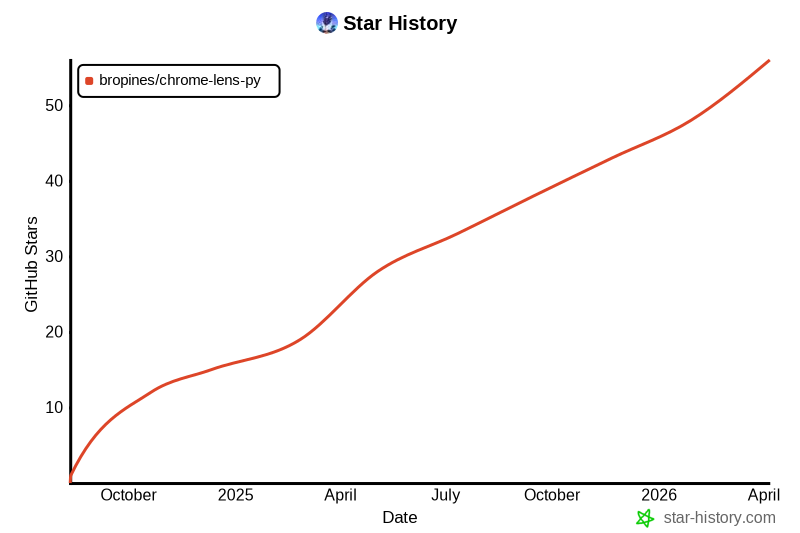
Star History
Disclaimer
This project is intended for educational and experimental purposes only. Use of Google's services must comply with their Terms of Service. The author is not responsible for any misuse of this software.
1 maintainer

Metadata
1 maintainer
Release files for chrome-lens-py 4.0.0
For a detailed explanation of source distributions (sdists) and built distributions (wheels), please see the package formats documentation.
Source distribution (sdist)
| File | Size | Uploaded | Provenance | Actions |
|---|---|---|---|---|
| chrome_lens_py-4.0.0.tar.gz | 226.2 kB | With provenance | Details for chrome_lens_py-4.0.0.tar.gz |
Built distribution (wheel)
| File | Interpreter | ABI | Platform | Actions Reset |
|---|---|---|---|---|
| chrome_lens_py-4.0.0-py3-none-any.whl | Python 3 | none | any | Details for chrome_lens_py-4.0.0-py3-none-any.whl |
Total release size: 436.9 kB
Release files / chrome_lens_py-4.0.0.tar.gz
| Download URL | chrome_lens_py-4.0.0.tar.gz |
|---|---|
| Size | 226.2 kB |
| Tags | Source |
|
SHA-256 checksum How to use checksums |
8fa0b65eb516a346e17798bed2a2d93d80d63c92da7fff7188a1937270777976
|
|
BLAKE2b-256 checksum How to use checksums |
6917c67e32095c1490f076a9df26110c13d3a4ee835cfacb3c4d759e5db06593
|
| Upload date | |
|
Uploaded using Trusted Publishing? What is trusted publishing? |
Yes |
| Uploaded via |
twine/7.0.0 CPython/3.13.16
|
Provenance
Provenance describes where a file came from. On PyPI, provenance is shared via attestations, which provide a verifiable record of the build or publishing details. View details, limitations and caveats.


PyPI Publish Attestation
PyPI verified that this artifact, at this checksum, originated from the publisher listed below.
Signed by GitHub Actions, verified by PyPI on Nov 1, 2026.
Transparency logRelease files / chrome_lens_py-4.0.0-py3-none-any.whl
| Download URL | chrome_lens_py-4.0.0-py3-none-any.whl |
|---|---|
| Size | 210.7 kB |
| Tags | Python 3 |
|
SHA-256 checksum How to use checksums |
02c0586d73ab3140039dea6904facc687edb2111a1ea6a9bac638c00fcec410b
|
|
BLAKE2b-256 checksum How to use checksums |
d591a1598bb7e8f094e707978e5d8666003e378f790add0faa50a77997910631
|
| Upload date | |
|
Uploaded using Trusted Publishing? What is trusted publishing? |
Yes |
| Uploaded via |
twine/7.0.0 CPython/3.13.16
|
Provenance
Provenance describes where a file came from. On PyPI, provenance is shared via attestations, which provide a verifiable record of the build or publishing details. View details, limitations and caveats.
PyPI Publish Attestation
PyPI verified that this artifact, at this checksum, originated from the publisher listed below.
Signed by GitHub Actions, verified by PyPI on Nov 1, 2026.
Transparency logSecurity for chrome-lens-py 4.0.0
Provenance
Provenance describes where a file came from. On PyPI, provenance is shared via attestations, which provide a verifiable record of the build or publishing details. View details, limitations and caveats.
Full provenance
Both files in this release have been uploaded with provenance metadata.
Attestation for chrome_lens_py-4.0.0.tar.gz
PyPI Publish Attestation
PyPI verified that this artifact, at this checksum, originated from the publisher listed below.
Signed by GitHub Actions, verified by PyPI on Nov 1, 2026.
Transparency logA note on package security
PyPI is a repository for distributing packages, not a service for auditing them. While third-party security researchers and our staff do their best to detect and remove malicious packages, PyPI cannot guarantee the quality, security or suitability of any given package.
To learn more about protecting yourself from malicious actors, visit our package security documentation.














