

Claude Usage Tracker
A Windows tray app that tells you, at a glance, whether you'll get through your Claude plan limits: how much of the 5-hour and weekly windows is left, when each refills, and whether your current pace runs out before the refill. It sits in the tray, in a one-line always-on-top overlay, and in a dashboard, and it pings you only when there's something to act on.
Unofficial. An independent, open-source project — not affiliated with, endorsed by, or sponsored by Anthropic. "Claude" and "Claude Code" are trademarks of Anthropic, used only to describe compatibility.
Companion Android app and home-screen widget (scan to install)


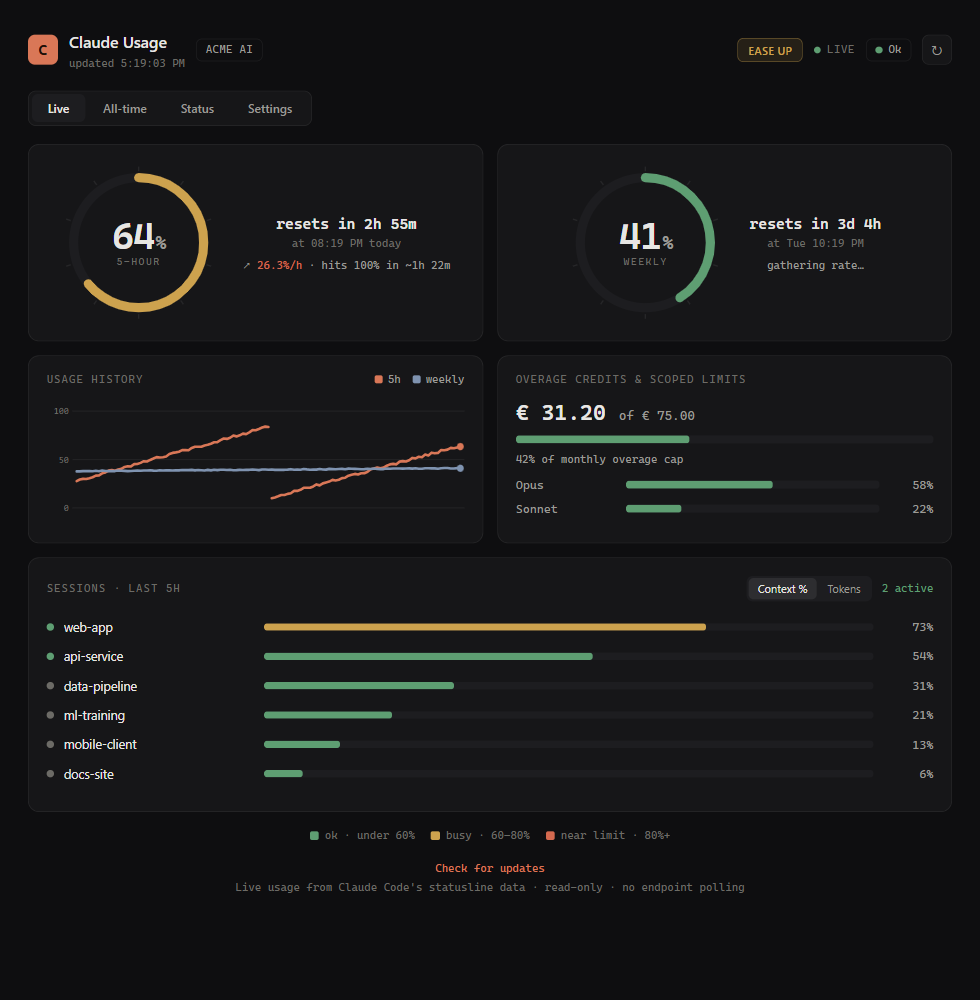
Now: the verdict, the runway chart (time until the limit vs. time until the refill) and every limit with its pace (sample data)
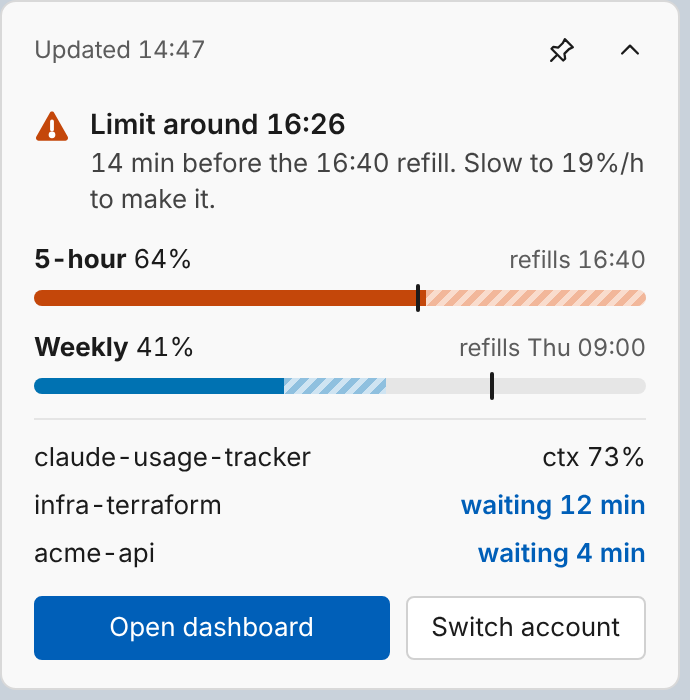
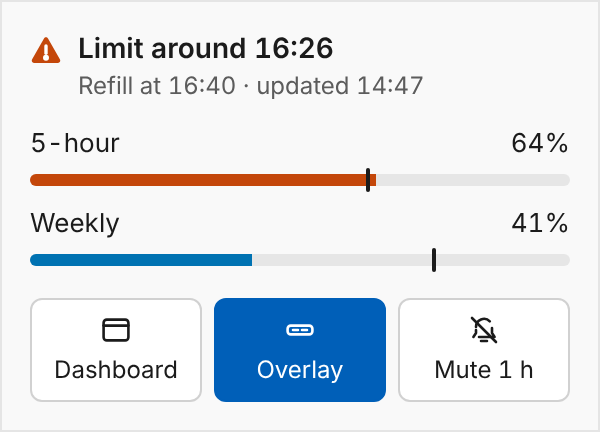
The overlay (one line at rest, expands on hover) and the tray flyout (sample data)

What it answers
- How much is left, and when does it refill? 5-hour and weekly windows, plus the per-model weekly scopes, with every refill shown as both a countdown and a clock time.
- Will I make it at this pace? A least-squares pace over the last 30 minutes (weekly: 6 hours) projected to the refill. Colour comes from that forecast, not from the raw percentage: 70% used ten minutes before a refill is fine; 30% used at a steep pace is not.
- What should I do? "Slow to 19%/h to make it", "Mute until refill", or — with a team pool — "Switch to ops@acme.dev, 82% left".
- Which sessions need me? Context fill per Claude Code session (compact before 90%) and sessions that finished a turn and are waiting for your reply or need approval.
- Is it me or Claude? Anthropic's status, shown separately from your limits.
Surfaces
- Tray icon — two bars, 5-hour on the left and weekly on the right, filled to the used % and drawn at the exact size for your display scaling. The fill is in your taskbar colours when you're on pace, amber when you should watch your pace, vermillion when you'll hit the limit before it refills (a full vermillion bar once it's reached), and grey when the data is stale. Prefer a number? Settings › Overlay & tray › Tray icon. Left-click opens the flyout; right-click opens the menu.
- Overlay — replaces the old mini widget and HUD bar. One always-on-top line
(
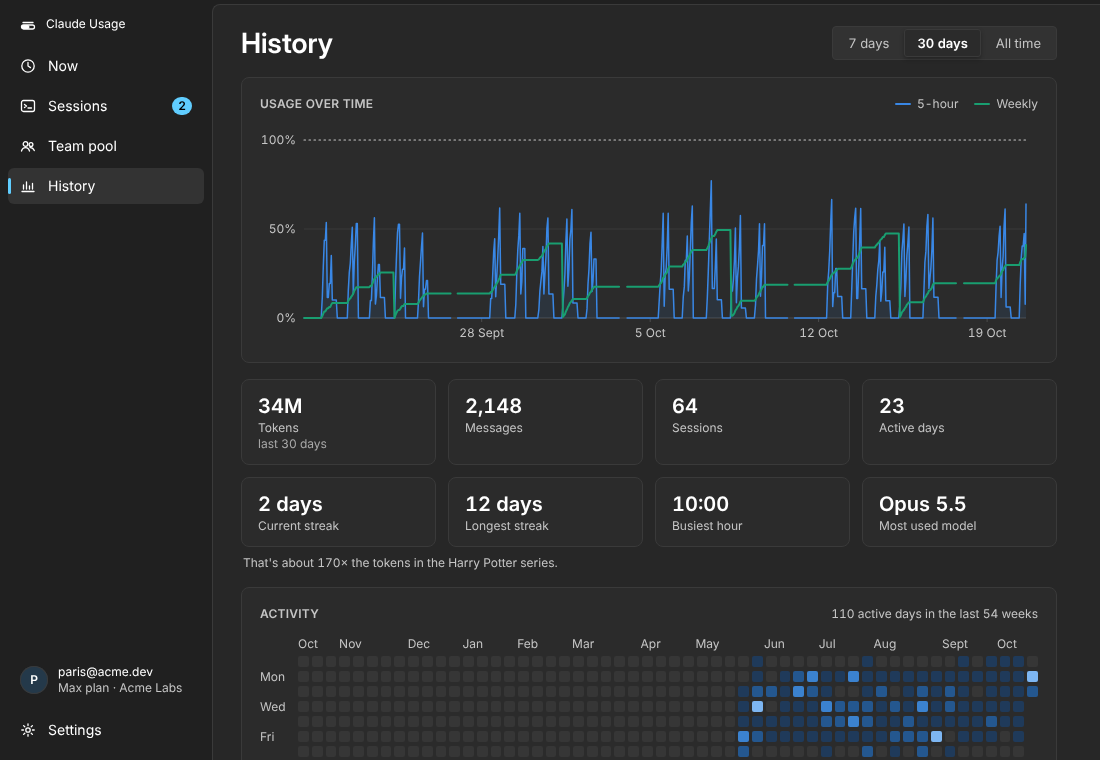
▲ 5h 64% limit ~16:26 │ 7d 41% │ ctx 73% │ 1 waiting) that never steals focus, expands in place on hover or click, can be pinned, snaps to screen edges and hides during full-screen apps and presentations. Fields, opacity and click-through are in Settings › Overlay & tray. - Dashboard — Now (verdict, runway chart, limits, active session, waiting sessions, extra usage) · Sessions · Team pool · History (usage over time, totals, streaks, activity heatmap, models, projects) · Settings (gear). Light and dark follow Windows, as do your accent colour and 12/24-hour clock.
- Alerts — one toast per episode, never a stream: will hit the limit, limit reached, refilled, context almost full, extra usage near its cap, session waiting, needs approval, and (opt-in) Claude incident. Mute until the refill, for an hour, or set quiet hours.
Tray icon (5-hour | weekly) at 16 and 24 px, light and dark taskbar: on pace, watch pace, will hit limit, limit reached, stale

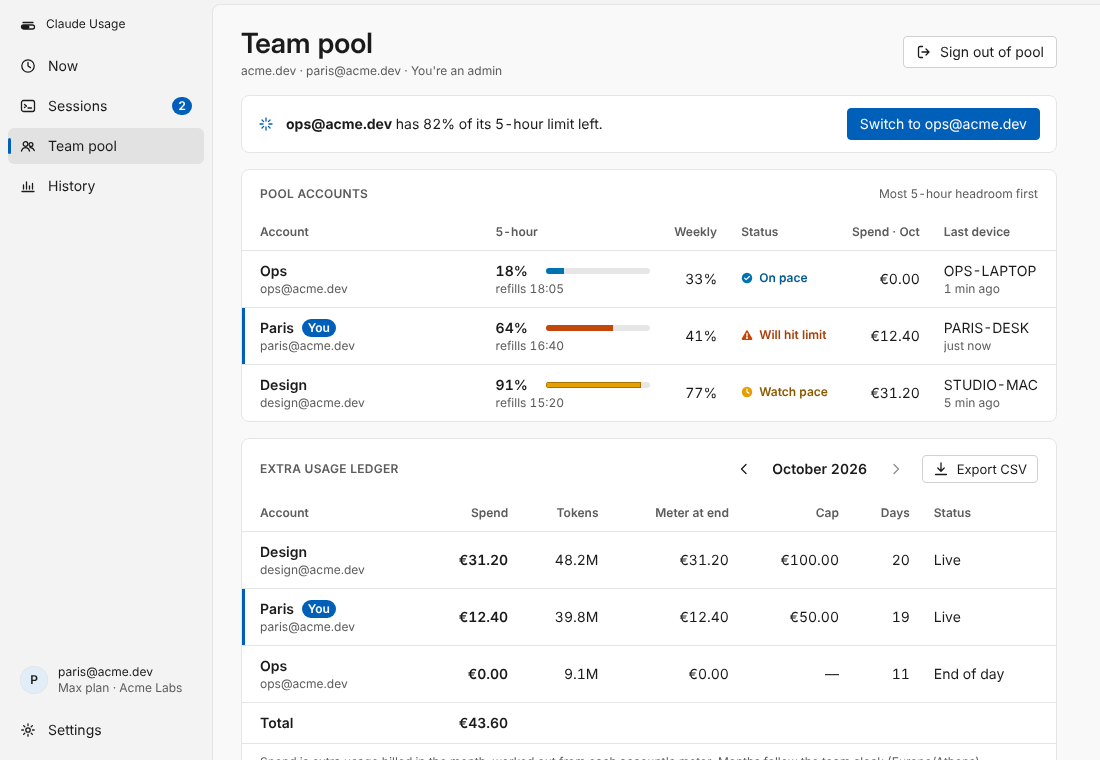
Team pool and History (sample data)
Install
Requires Windows 10/11, Claude Code installed and signed in, and the Edge WebView2 runtime (preinstalled on Windows 11; otherwise a free download). Then pick one:
Option A — Installer (no Python needed)
Download ClaudeUsageTracker-Setup.exe from the
latest release
and run it; tick the shortcuts you want (Desktop / Start Menu / start at sign-in).
Release builds are signed through SignPath when signing is configured for the release; if
Windows SmartScreen still warns, choose More info → Run anyway.
Option B — pipx
pipx install claude-usage-tracker
claude-usage-tracker --install      # Desktop / Start Menu / Startup shortcuts
Option C — from source
git clone https://github.com/paris-paraskevas/claude-usage-tracker.git
cd claude-usage-tracker
python install.py
Updating: the app checks daily (installer builds against GitHub releases, pip/pipx installs against PyPI) and offers a one-click Update that upgrades in place and restarts.
Near-live numbers (recommended)
Open Settings › Data source › Install once. It adds the tracker as Claude Code's
statusLine command, which receives your 5-hour and weekly usage after every Claude reply
(Claude Code docs), and the session hooks
that detect waiting and needs approval. If you already have a status line, the tracker
tells you and leaves yours alone. Without it, usage comes from the API every 5 minutes.
Usage
Launch Claude Usage Tracker from the Start Menu. Tray menu: Open dashboard, Show overlay, Mute alerts ›, Refresh now, Settings, Quit.
claude-usage-tracker --once          # print usage once (add --debug for raw API JSON)
claude-usage-tracker --headless      # engine + local API only, no tray or windows
claude-usage-tracker --selftest      # build state from fixtures (no network) and exit
claude-usage-tracker --install       # shortcuts and autostart
claude-usage-tracker --uninstall     # remove shortcuts, our Claude Code hooks and status line
Settings live in the dashboard (gear icon) and are saved to config.json in the app's data
folder (%LOCALAPPDATA%\ClaudeUsageTracker when installed).
How it works
- Usage numbers: Claude Code's status line input (
rate_limits, per-session context window) when installed; otherwiseGET https://api.anthropic.com/api/oauth/usagewith the OAuth token Claude Code stores in~/.claude/.credentials.json. That call also supplies the per-model weekly scopes and extra-usage spend. The token is only read, never written. - Sessions, context and history: your local Claude Code logs under
~/.claude/projects(token counts, model and timestamps only — never message content), read incrementally. - Forecast and decision: see docs/design/V2-SPEC.md.
- The UI is plain HTML/CSS/JS in
ctu/ui, served by the engine on127.0.0.1(every route rejects other origins) and updated live over Server-Sent Events.
Privacy and network
Local-first, no telemetry. The app contacts only:
| Host | Why | When |
|---|---|---|
api.anthropic.com (/api/oauth/usage, /api/oauth/profile) |
your usage, your account's org | always (your own token) |
status.anthropic.com |
service status | always |
api.github.com / pypi.org |
update check | daily, can be turned off |
| the relay (Cloudflare Worker) | end-to-end-encrypted snapshot for your phone | only if you pair a phone |
| Supabase (EU) | usage numbers shared with your email domain's pool | only if you sign in to Team pool |
Phone (optional)
View your usage and get alerts on Android, end-to-end encrypted: the desktop sends an
encrypted snapshot through a zero-knowledge relay, and pushes use data-only FCM messages
decrypted on the phone. Pair from Settings › Phone. Includes a home-screen widget
(2×1, 2×2, 4×2). See docs/REMOTE.md, relay/, android/.
Team pool (optional) — Claude Team plans
Share a pool of Claude accounts across your company: sign in to Team pool with your work
email (a one-time code; your team is your email domain). See every pooled account's 5-hour
and weekly load, who has headroom right now, and a per-account monthly extra-usage ledger
with CSV export. You consent at sign-in that usage numbers only are shared with domain
teammates — never sessions, projects or conversation content. Admins can mint a token for
the claude.ai connector. See docs/TEAM.md and mcp/.
Layout
claude_usage_tracker.py   entry point (shim)
ctu/                      the engine: usage, statusline, forecast, alerts, sessions, alltime,
                          team (Supabase pool), remote (relay), server, tray, windows, cli
ctu/ui/                   the desktop UI (dashboard, overlay, flyout) — no build step
relay/                    Cloudflare Worker: phone relay + claude.ai connector
mcp/                      local MCP server for Claude Code / Claude Desktop
android/                  companion app + home-screen widget
supabase/                 team pool schema
tests/                    pytest (engine) and tests/ui (node --test)
Development
python -m pytest -q                        # engine
cd tests/ui && npm test                    # UI formatting + runway chart
python tests/ui/mock_server.py --variant will_hit   # the UI on fixtures, no engine needed
Code signing
Windows builds can be signed with free code signing provided by SignPath.io, with a certificate from the SignPath Foundation.
1 maintainer

Metadata
1 maintainer
Release files for claude-usage-tracker 0.4.0
For a detailed explanation of source distributions (sdists) and built distributions (wheels), please see the package formats documentation.
Source distribution (sdist)
| File | Size | Uploaded | Provenance | |
|---|---|---|---|---|
| claude_usage_tracker-0.4.0.tar.gz | 199.2 kB | With provenance | Details |
Built distribution (wheel)
| File | Interpreter | ABI | Platform | Reset |
|---|---|---|---|---|
| claude_usage_tracker-0.4.0-py3-none-any.whl | Python 3 | none | any | Details |
Total release size: 385.6 kB
Release files / claude_usage_tracker-0.4.0.tar.gz
| Download URL | claude_usage_tracker-0.4.0.tar.gz |
|---|---|
| Size | 199.2 kB |
| Tags | Source |
|
SHA-256 checksum How to use checksums |
fd5efd68f0f845a02f8f2335f60e8c594bc23c0123270bea0e478bbbac770937
|
|
BLAKE2b-256 checksum How to use checksums |
8d5434f24488d3a2fde462105e4629fa2420cda94c1ae0bad1f195ba37a49bb2
|
| Upload date | |
|
Uploaded using Trusted Publishing? What is trusted publishing? |
Yes |
| Uploaded via |
twine/7.0.0 CPython/3.13.14
|
Provenance
Provenance describes where a file came from. On PyPI, provenance is shared via attestations, which provide a verifiable record of the build or publishing details. View details, limitations and caveats.


PyPI Publish Attestation
PyPI verified that this artifact, at this checksum, originated from the publisher listed below.
Signed by GitHub Actions, verified by PyPI on Oct 20, 2026.
Transparency logRelease files / claude_usage_tracker-0.4.0-py3-none-any.whl
| Download URL | claude_usage_tracker-0.4.0-py3-none-any.whl |
|---|---|
| Size | 186.5 kB |
| Tags | Python 3 |
|
SHA-256 checksum How to use checksums |
60d77090f5293ccb6a54c267acd9a947cd6ada9d75debe0cf8026c00a6e4d253
|
|
BLAKE2b-256 checksum How to use checksums |
10c0fc04b2bccafceda492857c7f938b2d97725a9c4930c1907aa9d54bc45047
|
| Upload date | |
|
Uploaded using Trusted Publishing? What is trusted publishing? |
Yes |
| Uploaded via |
twine/7.0.0 CPython/3.13.14
|
Provenance
Provenance describes where a file came from. On PyPI, provenance is shared via attestations, which provide a verifiable record of the build or publishing details. View details, limitations and caveats.
PyPI Publish Attestation
PyPI verified that this artifact, at this checksum, originated from the publisher listed below.
Signed by GitHub Actions, verified by PyPI on Oct 20, 2026.
Transparency logSecurity for claude-usage-tracker 0.4.0
Provenance
Provenance describes where a file came from. On PyPI, provenance is shared via attestations, which provide a verifiable record of the build or publishing details. View details, limitations and caveats.
Full provenance
All 2 files in this release have been uploaded with provenance metadata.
Attestation for claude_usage_tracker-0.4.0.tar.gz
PyPI Publish Attestation
PyPI verified that this artifact, at this checksum, originated from the publisher listed below.
Signed by GitHub Actions, verified by PyPI on Oct 20, 2026.
Transparency logA note on package security
PyPI is a repository for distributing packages, not a service for auditing them. While third-party security researchers and our staff do their best to detect and remove malicious packages, PyPI cannot guarantee the quality, security or suitability of any given package.














