
client-perf
客户端性能采集与分析工具,支持 PC / Android / iOS / HarmonyOS 四大平台,提供多维度的性能指标采集、任务管理、数据对比和可视化分析能力。
A client performance collection and analysis tool supporting PC / Android / iOS / HarmonyOS platforms, providing multi-dimensional performance metrics collection, task management, data comparison and visual analysis capabilities.
- English documentation: README.en.md
- Documentación en español: README.es-ES.md
- Current release:
5.1.0| Release notes
实例截图 / Screenshots
点击展开所有截图 / Click to expand all screenshots
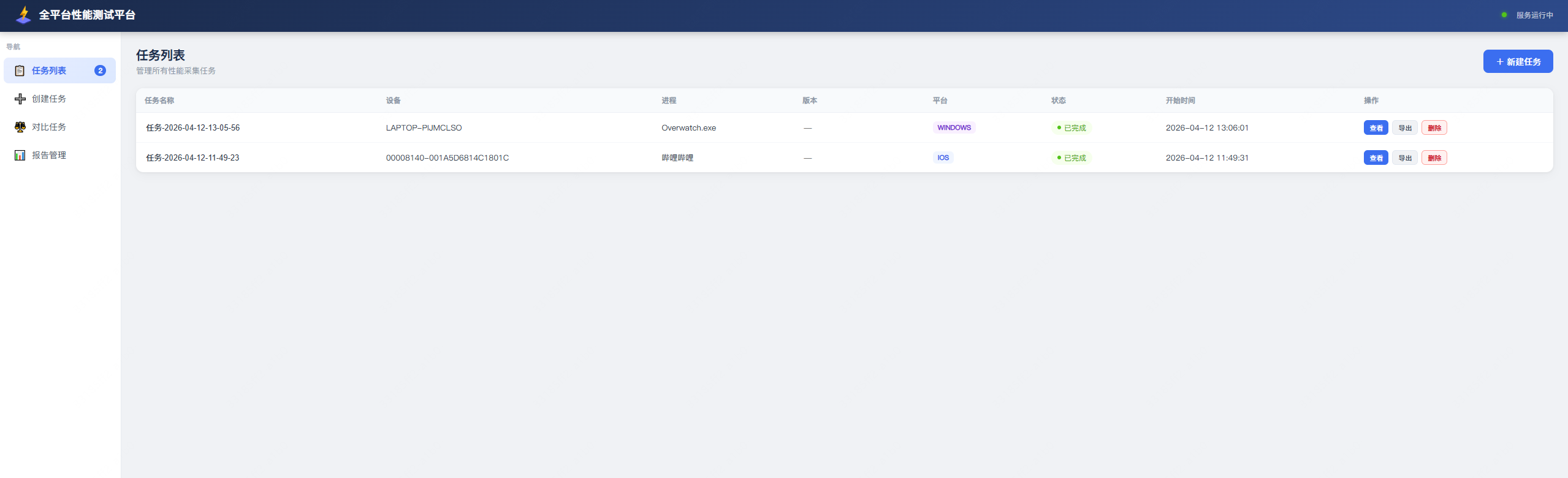
任务列表 / Task List
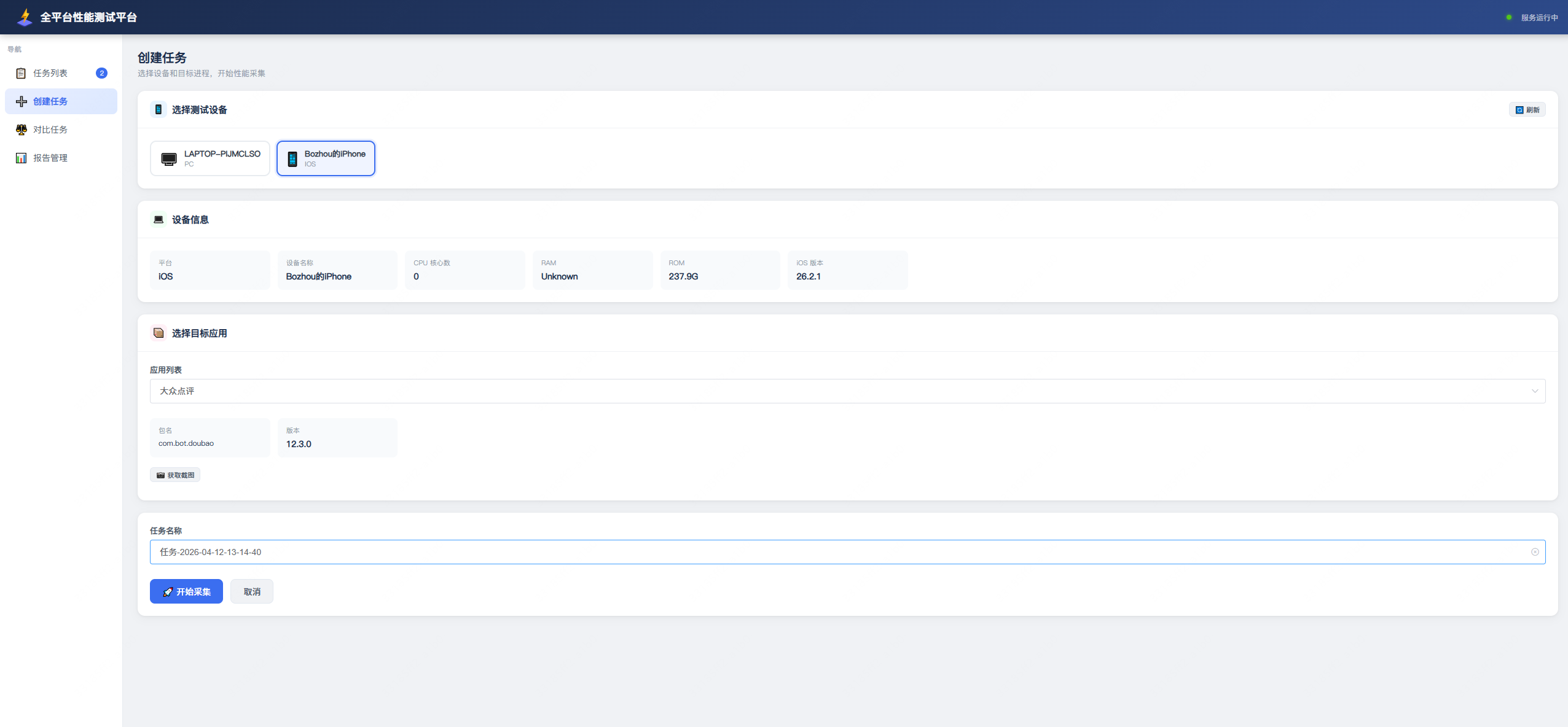
创建任务 / Create Task
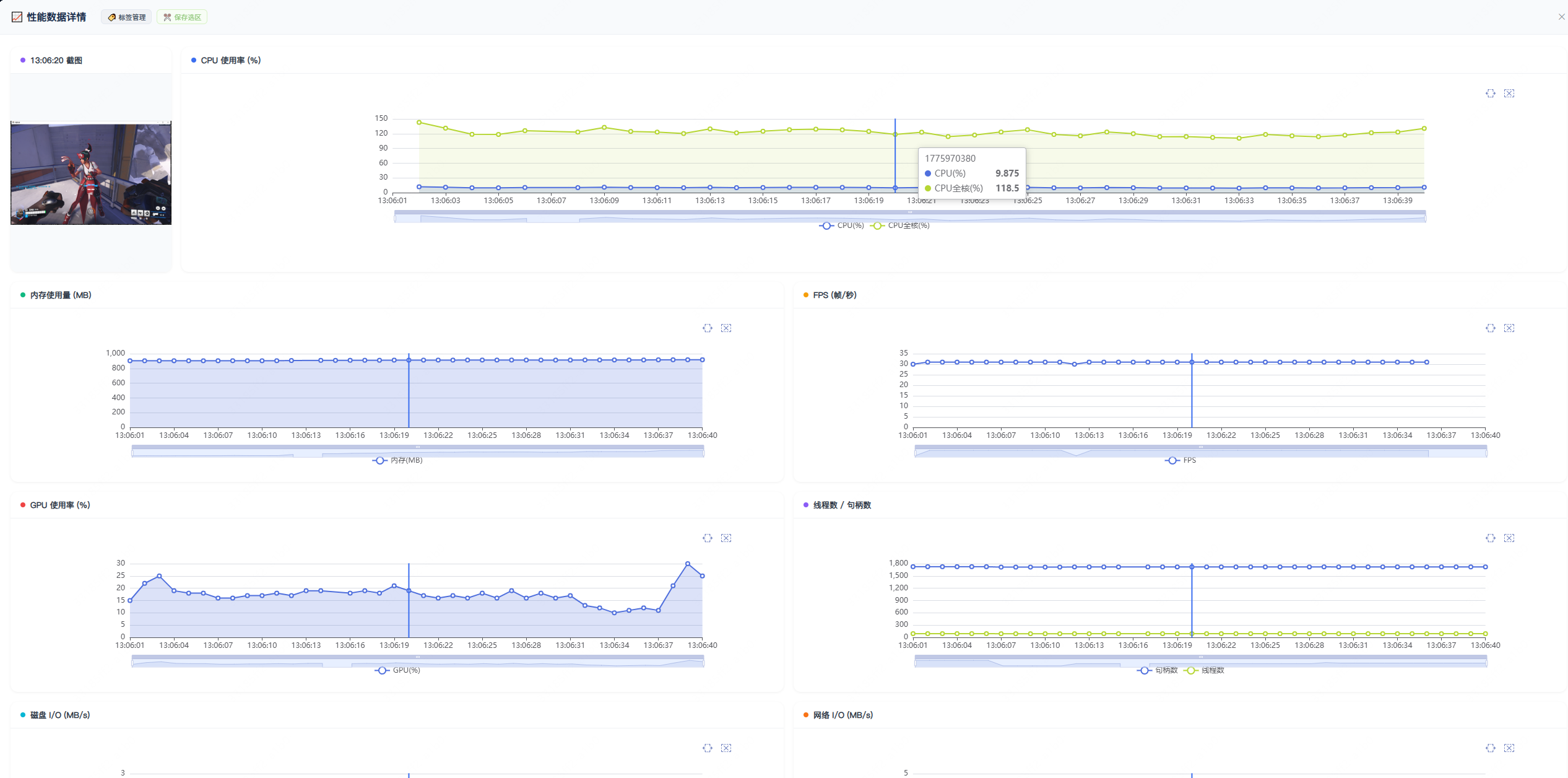
PC 应用性能报告 / PC App Performance Report
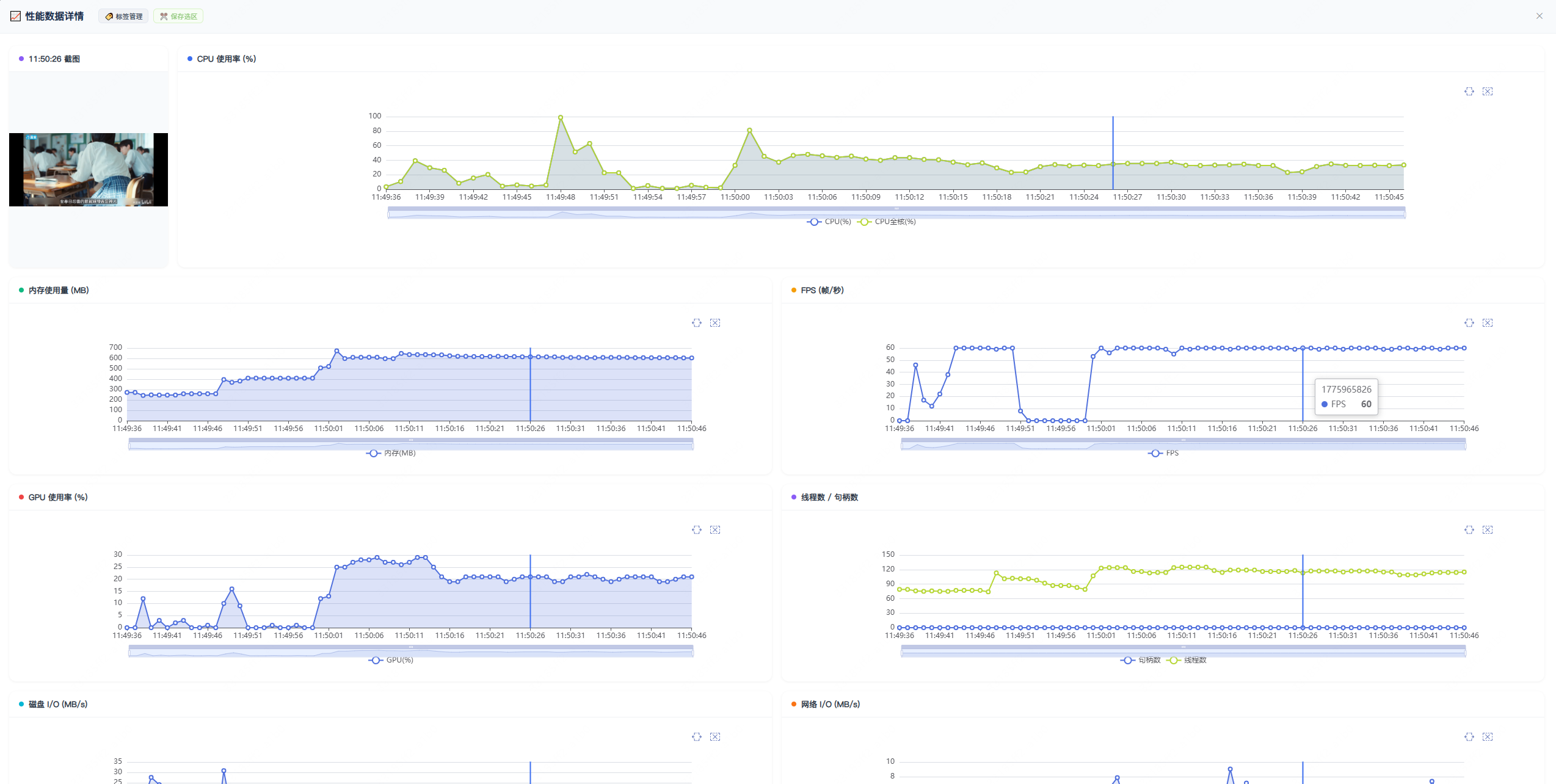
iOS App 性能报告 / iOS App Performance Report
打标签 & 对比选中内容 / Add Labels & Compare Selected Content
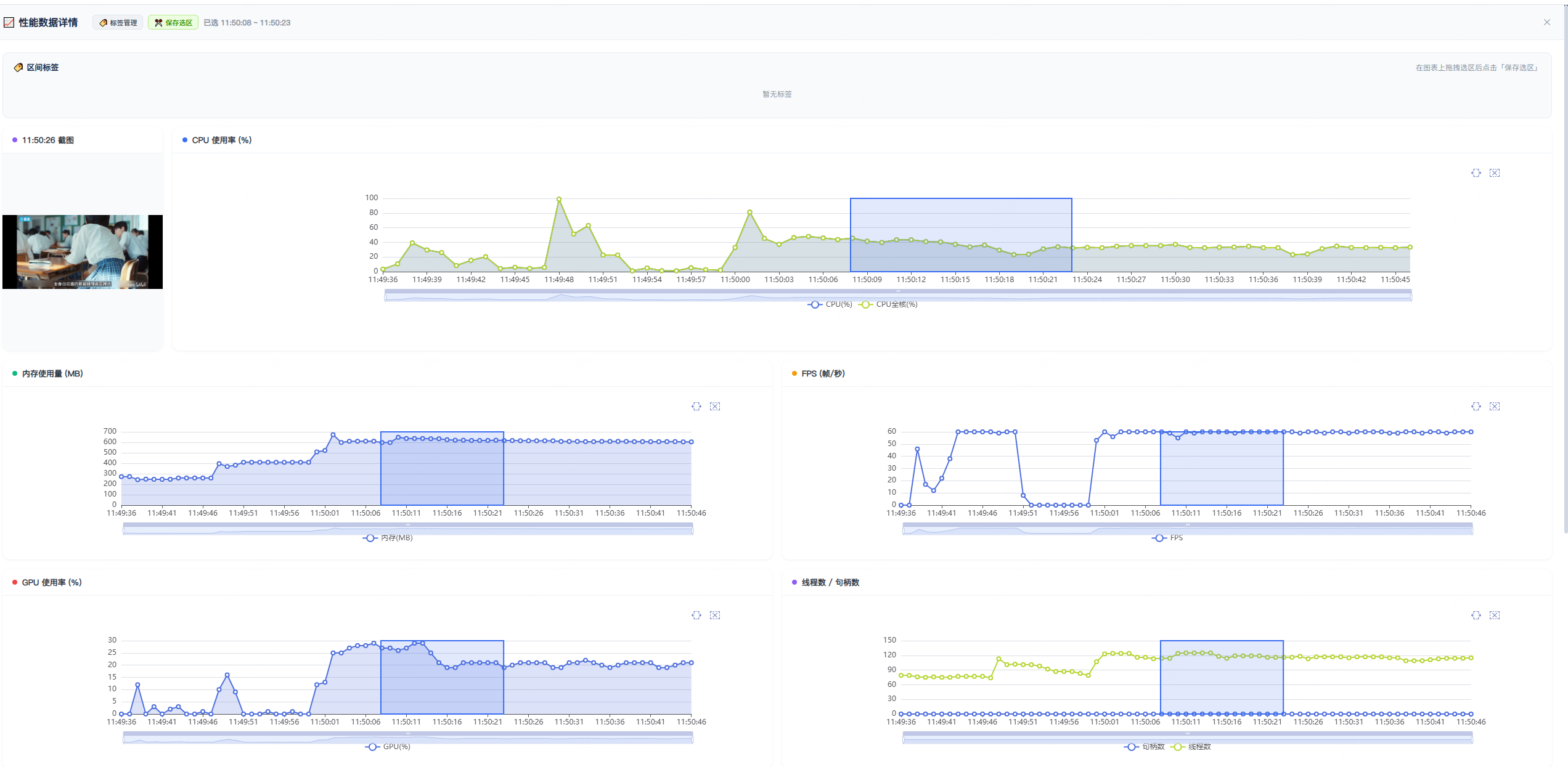
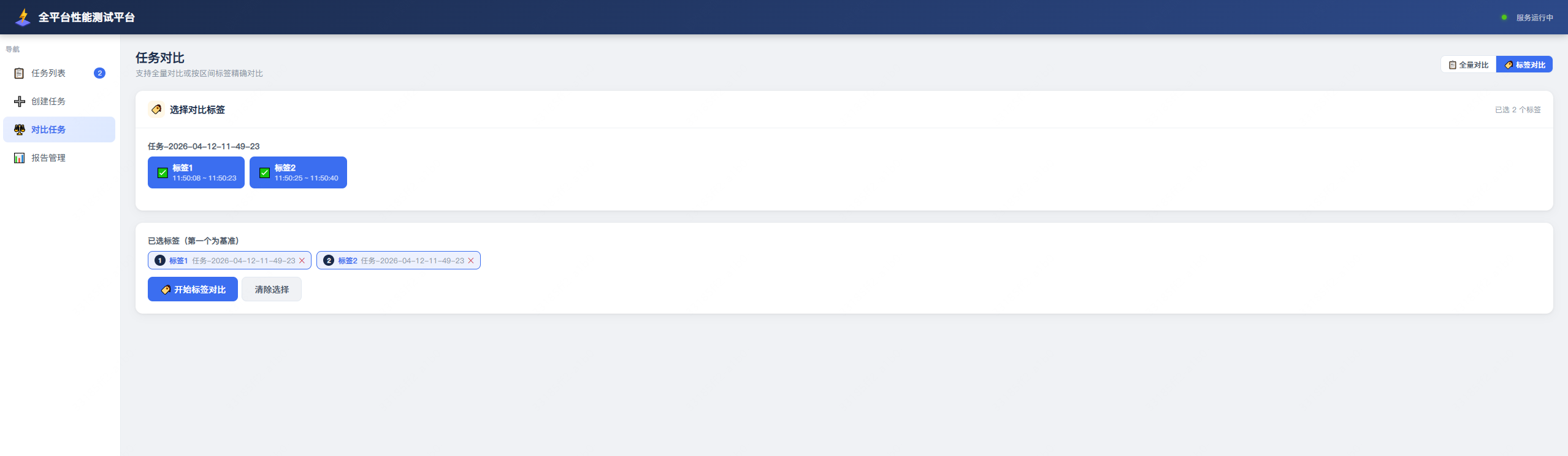
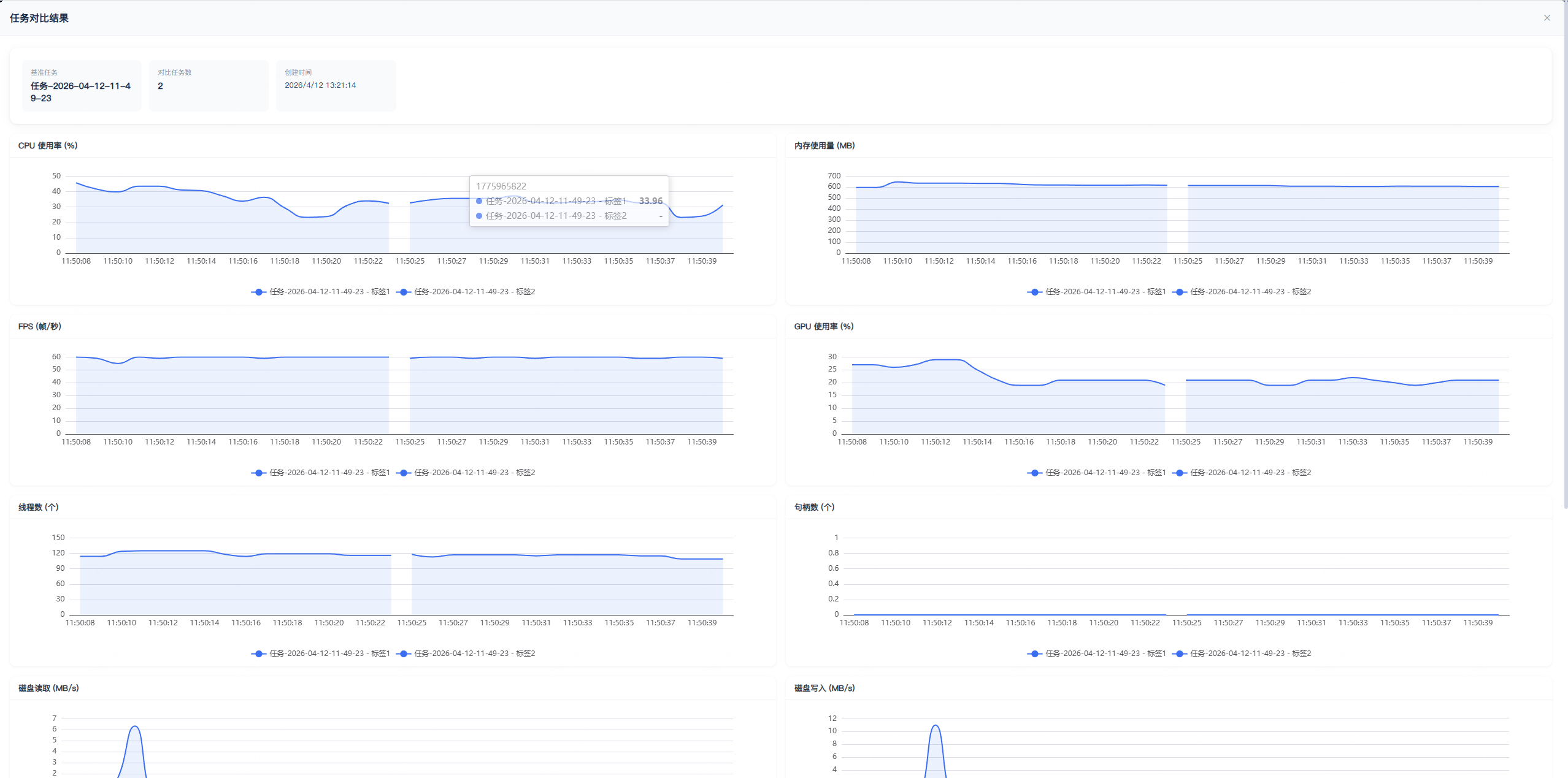
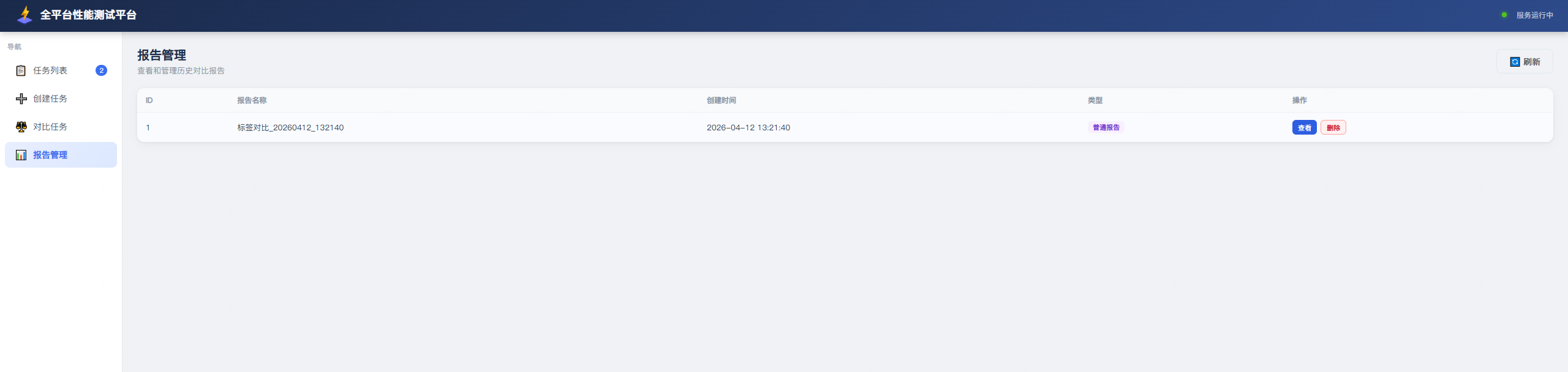
对比结果列表 / Comparison Results List
系统架构 / System Architecture
┌─────────────────────────────────────────────────────────────────────────────┐
│                              Web UI (浏览器 / Browser)                       │
│                        http://localhost:8080                                 │
└──────────────────────────────┬──────────────────────────────────────────────┘
                               │ HTTP / REST API
                               ▼
┌─────────────────────────────────────────────────────────────────────────────┐
│                           FastAPI 服务层 / Service Layer (api.py)            │
│  ┌──────────┐ ┌──────────┐ ┌──────────┐ ┌──────────┐ ┌──────────────────┐  │
│  │ 设备管理  │ │ 任务管理  │ │ 对比分析  │ │ 标签管理  │ │ Excel 报告导出   │  │
│  │Device Mgt│ │Task Mgmt │ │Comparison│ │  Labels  │ │ Excel Export     │  │
│  └────┬─────┘ └────┬─────┘ └────┬─────┘ └────┬─────┘ └────────┬─────────┘  │
└───────┼────────────┼────────────┼────────────┼────────────────┼─────────────┘
        │            │            │            │                │
        ▼            ▼            ▼            ▼                ▼
┌─────────────────────────────────────────────────────────────────────────────┐
│                          核心采集层 / Collection Layer (core/)               │
│                                                                             │
│  ┌─────────────┐  ┌──────────────┐  ┌────────────┐  ┌──────────────────┐   │
│  │  pc_tools   │  │android_tools │  │ ios_tools  │  │ harmony_tools    │   │
│  │             │  │              │  │            │  │                  │   │
│  │ psutil      │  │ adbutils     │  │ go-ios     │  │ hdc              │   │
│  │ pynvml      │  │              │  │ py-ios-dev │  │                  │   │
│  │ PresentMon  │  │              │  │            │  │                  │   │
│  └──────┬──────┘  └──────┬───────┘  └─────┬──────┘  └────────┬─────────┘   │
│         │                │                │                   │             │
│         ▼                ▼                ▼                   ▼             │
│  ┌──────────────────────────────────────────────────────────────────────┐   │
│  │                      Monitor 采集循环 / Collection Loop (monitor.py)  │   │
│  │   CPU → 内存 → FPS → GPU → 线程数 → 句柄数 → 磁盘IO → 网络IO → 截图  │   │
│  └──────────────────────────────────────────────────────────────────────┘   │
└──────────────────────────────┬──────────────────────────────────────────────┘
                               │
                               ▼
┌─────────────────────────────────────────────────────────────────────────────┐
│                           数据存储层 / Storage Layer (db.py)                 │
│                                                                             │
│   SQLite (aiosqlite)                                                        │
│   ├── tasks          任务表 / Tasks table                                   │
│   ├── comparisons    对比报告表 / Comparisons table                         │
│   └── labels         标签表 / Labels table                                  │
│                                                                             │
│   CSV 文件 (按任务目录存储) / CSV files (stored by task directory)           │
│   ├── cpu.csv / memory.csv / fps.csv / gpu.csv / ...                        │
│   └── screenshot/  截图目录 / Screenshots directory                         │
└─────────────────────────────────────────────────────────────────────────────┘
功能特性 / Features
多平台支持 / Multi-Platform Support
| 平台 / Platform | 设备发现 / Device Discovery | 进程列表 / Process List | 性能采集 / Performance | 截图 / Screenshot | 备注 / Notes |
|---|---|---|---|---|---|
| PC (Windows/macOS/Linux) | 本机 / Local | psutil | psutil + PresentMon | PIL ImageGrab | 需要管理员权限采集 FPS / Admin required for FPS |
| Android | adb | adb shell | adb shell dumpsys | adb screencap | 需要 adb 连接 / Requires adb connection |
| iOS | go-ios | go-ios apps | py-ios-device + go-ios tunnel | go-ios screenshot | iOS 17+ 需要 go-ios tunnel |
| HarmonyOS | hdc | hdc shell | hdc shell | hdc screencap | 需要 hdc 工具 / Requires hdc tool |
性能指标 / Performance Metrics
| 指标 / Metric | 说明 / Description | 采集方式 / Method | 权限要求 / Permission |
|---|---|---|---|
| CPU 使用率 / CPU Usage | 进程 CPU 占用(支持子进程聚合)/ Process CPU (supports child process aggregation) | psutil / adb / Instruments | 无 / None |
| 内存使用量 / Memory Usage | 进程 RSS 内存(支持子进程聚合)/ Process RSS memory (supports child process aggregation) | psutil / adb / Instruments | 无 / None |
| FPS / Frame Rate | 应用帧率 / Application frame rate | PresentMon (Windows) / Instruments (iOS) | Windows 需要管理员 / Admin required |
| GPU 使用率 / GPU Usage | NVIDIA GPU 占用 / NVIDIA GPU utilization | pynvml (NVML API) | 无 / None |
| 线程数 / Thread Count | 进程线程数(支持子进程聚合)/ Process threads (supports child process aggregation) | psutil / adb / Instruments | 无 / None |
| 句柄数 / Handle Count | 进程句柄数(Windows)/ Process handles (Windows) | psutil | 无 / None |
| 磁盘 IO / Disk IO | 读写速率 (MB/s) / Read/write rate (MB/s) | psutil io_counters | 无 / None |
| 网络 IO / Network IO | 发送/接收速率 (MB/s) / Send/receive rate (MB/s) | psutil net_io_counters | 无 / None |
| 截图 / Screenshot | 应用窗口截图 / Application window screenshot | PIL / adb / go-ios / hdc | 无 / None |
安装 / Installation
基础安装 / Basic Installation
项目使用 uv 管理环境、依赖和构建: The project uses uv for environments, dependencies, and builds:
# 从源码创建 .venv、安装依赖并以 editable 模式安装当前项目
# Create .venv, install dependencies, and install this project in editable mode
uv sync

# 运行命令 / Run commands
uv run client-perf --help
从软件源安装发布版本时可使用: To install a released version from the package index:
uv tool install client-perf
平台依赖 / Platform Dependencies
根据不同测试平台,需要额外安装对应的工具: Depending on the test platform, additional tools may need to be installed:
Android 平台 / Android Platform
# 确保 adb 可用 / Ensure adb is available
# 方式一:通过 Android SDK 安装 / Method 1: Install via Android SDK
# 方式二:系统包管理器 / Method 2: System package manager
#   macOS: brew install android-platform-tools
#   Ubuntu: sudo apt install adb
#   Windows: 下载 Android SDK Platform-Tools / Download Android SDK Platform-Tools
iOS 平台 / iOS Platform
# ios 相关依赖已经嵌入项目无需关注
# iOS related dependencies are embedded in the project, no additional setup needed
HarmonyOS 平台 / HarmonyOS Platform
# 安装 DevEco Studio 或 HarmonyOS SDK
# Install DevEco Studio or HarmonyOS SDK
# 确保 hdc 工具在 PATH 中,或设置 HDC_PATH 环境变量
# Ensure hdc tool is in PATH, or set HDC_PATH environment variable
快速开始 / Quick Start
启动服务 / Start Service
# 默认仅监听本机 127.0.0.1:8080 / Listens on local host 127.0.0.1:8080 by default
python -m client_perf

# 指定监听地址 / Specify listen address
python -m client_perf --host 127.0.0.1 --port 8080

# 如需自定义数据库、采集结果和报告目录
# Customize database, collection results, and report directory
CLIENT_PERF_DATA_DIR=/path/to/data python -m client_perf
管理员权限说明 / Administrator Permission
部分性能指标采集需要管理员/root 权限: Some performance metrics collection requires administrator/root privileges:
| 场景 / Scenario | 原因 / Reason | 解决方案 / Solution |
|---|---|---|
| Windows FPS 采集 / Windows FPS Collection | PresentMon 需要访问 GPU 驱动和 DirectX 接口 / PresentMon needs access to GPU driver and DirectX interface | 以管理员身份运行 / Run as administrator |
| iOS 17+ tunnel / iOS 17+ tunnel | go-ios tunnel 需要创建虚拟网卡和 userspace 网络 / go-ios tunnel needs to create virtual network interface | 以管理员/root 身份运行 / Run as administrator/root |
访问界面 / Access Interface
启动服务后,在浏览器中访问: After starting the service, access in browser:
http://localhost:8080
使用流程 / Usage Workflow
1. 发现设备 / Discover Devices
启动服务后,访问 http://localhost:8080 即可看到已连接的设备列表。
After starting the service, visit http://localhost:8080 to see the list of connected devices.
- PC:自动显示为本机 / Automatically displayed as local machine
- Android:需要
adb devices可见 / Requiresadb devicesvisible - iOS:需要 USB 连接且信任电脑 / Requires USB connection and device trusts the computer
- HarmonyOS:需要
hdc list targets可见 / Requireshdc list targetsvisible
2. 创建采集任务 / Create Collection Task
- 选择目标设备和应用/进程 / Select target device and application/process
- 填写任务名称 / Enter task name
- 选择是否包含子进程(聚合子进程的 CPU/内存等指标)/ Choose whether to include child processes (aggregate CPU/memory etc. of child processes)
- 点击开始采集 / Click to start collection
3. 查看数据 / View Data
任务运行期间,可以实时查看各项性能指标的数据曲线。 During task execution, you can view the data curves of various performance metrics in real-time.
4. 标签与对比 / Labels & Comparison
- 在任务数据页面,可以为特定时间段添加标签 / On the task data page, you can add labels for specific time periods
- 选择多个任务或标签进行对比 / Select multiple tasks or labels for comparison
- 系统会生成对比报告和 Excel 文件 / The system will generate comparison reports and Excel files
5. 导出报告 / Export Reports
- 单个任务报告:导出为 Excel,每个指标一个工作表 / Single task report: Export as Excel, one worksheet per metric
- 多任务对比:导出对比结果,包含汇总和各任务原始数据 / Multi-task comparison: Export comparison results, including summary and raw data for each task
- 标签对比:导出标签时间段内的对比结果 / Label comparison: Export comparison results within labeled time periods
项目结构 / Project Structure
client-perf/
├── client_perf/                # 核心应用代码 / Core application code
│   ├── __main__.py             # 启动入口 / Entry point
│   ├── api.py                  # FastAPI 路由和接口定义 / FastAPI routes and API definitions
│   ├── db.py                   # SQLite 数据库操作 / SQLite database operations
│   ├── comparison.py           # 对比分析逻辑 / Comparison analysis logic
│   ├── task_handle.py          # 任务采集进程管理 / Task collection process management
│   ├── util.py                 # 数据收集工具 / Data collection utilities
│   ├── log.py                  # 日志配置 / Logging configuration
│   ├── core/                   # 各平台采集实现 / Platform-specific collection implementations
│   │   ├── monitor.py          # 通用采集循环(写入 CSV)/ Generic collection loop (writes to CSV)
│   │   ├── device_manager.py   # 统一设备管理 / Unified device management
│   │   ├── pc_tools.py         # PC 平台(psutil + PresentMon + pynvml)/ PC platform
│   │   ├── android_tools.py    # Android 平台(adb)/ Android platform
│   │   ├── ios_tools.py        # iOS 平台(go-ios + py-ios-device)/ iOS platform
│   │   └── harmony_tools.py    # HarmonyOS 平台(hdc)/ HarmonyOS platform
│   ├── test_result/            # 前端界面 / Frontend interface
│   │   └── index.html
│   └── tool/                   # 内置工具 / Built-in tools
│       ├── PresentMon-1.8.0-*.exe  # Windows FPS 采集 / Windows FPS collection
│       └── go-ios-bin/             # go-ios 跨平台二进制 / go-ios cross-platform binaries
├── setup.py                    # 打包配置 / Packaging configuration
├── requirements.txt            # 依赖列表 / Dependencies list
└── README.md                   # 项目说明 / Project documentation
API 接口 / API Endpoints
设备管理 / Device Management
| 方法 / Method | 路径 / Path | 说明 / Description | 参数 / Parameters |
|---|---|---|---|
| GET | /get_devices/ |
获取所有已连接设备 / Get all connected devices | 无 / None |
| GET | /platform_capabilities/ |
获取当前环境支持的平台能力 / Get platform capabilities | 无 / None |
| GET | /system_info/ |
获取设备系统信息 / Get device system info | device_type, device_id |
| GET | /get_pids/ |
获取进程/应用列表 / Get process/app list | device_type, device_id, is_print_tree |
| GET | /get_device_apps/ |
获取设备应用列表 / Get device app list | device_type, device_id |
| GET | /pid_img/ |
获取截图 / Get screenshot | device_type, device_id, pid |
任务管理 / Task Management
| 方法 / Method | 路径 / Path | 说明 / Description | 参数 / Parameters |
|---|---|---|---|
| GET | /get_all_task/ |
获取所有任务 / Get all tasks | 无 / None |
| GET | /run_task/ |
启动采集任务 / Start collection task | pid, pid_name, task_name, device_type, device_id, package_name, include_child |
| GET | /stop_task/ |
停止采集任务 / Stop collection task | task_id |
| GET | /task_status/ |
获取任务状态 / Get task status | task_id |
| GET | /result/ |
获取任务数据 / Get task data | task_id |
| GET | /delete_task/ |
删除任务 / Delete task | task_id |
| GET | /change_task_name/ |
重命名任务 / Rename task | task_id, new_name |
| GET | /set_task_version/ |
设置任务版本 / Set task version | task_id, version |
| GET | /set_task_baseline/ |
设置基线任务 / Set baseline task | task_id, is_baseline |
对比分析 / Comparison Analysis
| 方法 / Method | 路径 / Path | 说明 / Description | 参数 / Parameters |
|---|---|---|---|
| POST | /create_comparison/ |
创建多任务对比 / Create multi-task comparison | JSON body |
| POST | /export_comparison_excel/ |
导出对比报告 / Export comparison report | JSON body |
| POST | /export_excel/ |
导出单个任务报告 / Export single task report | JSON body |
标签管理 / Label Management
| 方法 / Method | 路径 / Path | 说明 / Description | 参数 / Parameters |
|---|---|---|---|
| GET | /get_labels/{task_id}/ |
获取任务标签 / Get task labels | task_id |
| POST | /create_label_comparison/ |
创建标签对比 / Create label comparison | JSON body |
| POST | /export_label_comparison_excel/ |
导出标签对比报告 / Export label comparison report | JSON body |
统一响应格式 / Unified Response Format
所有接口返回统一格式: All endpoints return unified format:
{
  "code": 200,
  "msg": <data>
}
依赖 / Dependencies
Python 依赖 / Python Dependencies
fastapi>=0.111.0          # Web 框架 / Web framework
uvicorn[standard]>=0.29.0 # ASGI 服务器 / ASGI server
sqlalchemy[asyncio]>=2.0.0 # ORM + async engine
aiosqlite>=0.20.0         # SQLite async 驱动 / SQLite async driver
py-ios-device>=2.0.0      # iOS Instruments DTX 协议 / iOS Instruments DTX protocol
adbutils>=2.8.0           # Android ADB 工具 / Android ADB tool
psutil>=5.9.0             # PC 系统信息采集 / PC system info collection
pynvml>=11.5.0            # NVIDIA GPU(可选)/ NVIDIA GPU (optional)
openpyxl>=3.1.0           # Excel 导出 / Excel export
Pillow>=10.0.0            # PC 截图(可选)/ PC screenshot (optional)
可选:原生加速(可选)/ Optional: native acceleration
uv sync --extra native             # 安装 mypy + setuptools(nativebuild 编译用)
uv run nativebuild                 # 构建隔离原生产物
uv run client-perf native-start    # 构建后按原启动流程运行
构建 wheel 和源码包使用 uv build;依赖与项目元数据统一维护在 pyproject.toml。
安装后执行独立命令 nativebuild,即可在本地把模块编译为 C 扩展并隔离部署。
client-perf native-start <原启动参数> 等价于先执行 nativebuild,再按原参数启动
client-perf <原启动参数>;例如 client-perf native-start --port 9090。
After installing, run the standalone nativebuild command to compile modules into isolated
C extensions. client-perf native-start <original args> builds first and then follows the
same startup path as client-perf <original args>.
外部工具 / External Tools
| 工具 / Tool | 用途 / Purpose | 平台 / Platform |
|---|---|---|
| PresentMon | Windows FPS 采集(内置)/ Windows FPS collection (built-in) | Windows |
| go-ios | iOS 设备通信(内置 + 需外部安装)/ iOS device communication (built-in + external install) | macOS/Linux/Windows |
| adb | Android 设备通信 / Android device communication | 全平台 / All platforms |
| hdc | HarmonyOS 设备通信 / HarmonyOS device communication | 全平台 / All platforms |
常见问题 / FAQ
Q: Windows 上 FPS 采集失败? / FPS collection fails on Windows?
A: PresentMon 需要管理员权限。请以管理员身份运行 client-perf,或启动时不加 --no-elevate 参数。
A: PresentMon requires administrator privileges. Please run client-perf as administrator, or do not use --no-elevate parameter when starting.
Q: iOS 17+ 设备采集失败? / iOS 17+ device collection fails?
A: iOS 17+ 需要通过 go-ios tunnel 连接。请确保: A: iOS 17+ requires connection via go-ios tunnel. Please ensure:
- 以管理员/root 身份运行 / Run as administrator/root
- 设备已信任电脑 / Device trusts the computer
Q: GPU 使用率获取不到? / GPU usage cannot be obtained?
A: 当前仅支持 NVIDIA GPU(通过 pynvml)。AMD/Intel GPU 暂不支持。 A: Currently only NVIDIA GPU is supported (via pynvml). AMD/Intel GPUs are not supported yet.
Q: Linux 上截图不可用? / Screenshot not available on Linux?
A: Linux 无桌面环境时 PIL ImageGrab 不可用,截图功能会自动禁用。 A: PIL ImageGrab is not available when Linux has no desktop environment, screenshot feature will be automatically disabled.
许可证 / License
MIT License
作者 / Author
范博洲(fanbozhou)、15525730080@163.com
1 maintainer

Metadata
1 maintainer
Release files for client-perf 5.1.2
For a detailed explanation of source distributions (sdists) and built distributions (wheels), please see the package formats documentation.
Source distribution (sdist)
| File | Size | Uploaded | |
|---|---|---|---|
| client_perf-5.1.2.tar.gz | 32.3 MB | Details |
Built distribution (wheel)
| File | Interpreter | ABI | Platform | Reset |
|---|---|---|---|---|
| client_perf-5.1.2-py3-none-any.whl | Python 3 | none | any | Details |
Total release size: 64.7 MB
Release files / client_perf-5.1.2.tar.gz
| Download URL | client_perf-5.1.2.tar.gz |
|---|---|
| Size | 32.3 MB |
| Tags | Source |
|
SHA-256 checksum How to use checksums |
9fbb82cdb0cdfd22db5818aff426a5b70326ead8f1a6026498c61161e8f63e0a
|
|
BLAKE2b-256 checksum How to use checksums |
3ed4f4490e647a1d05d0a72d6ed545376b94aef77d9229d1401cb2525d470bb2
|
| Upload date | |
|
Uploaded using Trusted Publishing? What is trusted publishing? |
No |
| Uploaded via |
twine/7.0.0 CPython/3.13.12
|
Release files / client_perf-5.1.2-py3-none-any.whl
| Download URL | client_perf-5.1.2-py3-none-any.whl |
|---|---|
| Size | 32.4 MB |
| Tags | Python 3 |
|
SHA-256 checksum How to use checksums |
b4b9e89bea682d9666374f92a398f1e0a2e3738a8dc4d326426a291f6097a028
|
|
BLAKE2b-256 checksum How to use checksums |
53a21d82297f8110c0a16e14f67285ca9ff56d44e120977fe7bd06b05ce0864e
|
| Upload date | |
|
Uploaded using Trusted Publishing? What is trusted publishing? |
No |
| Uploaded via |
twine/7.0.0 CPython/3.13.12
|














