
客户端性能采集与分析工具

Project description
client-perf
客户端性能采集与分析工具,支持 PC / Android / iOS / HarmonyOS 四大平台,提供多维度的性能指标采集、任务管理、数据对比和可视化分析能力。
实例截图
点击展开所有截图
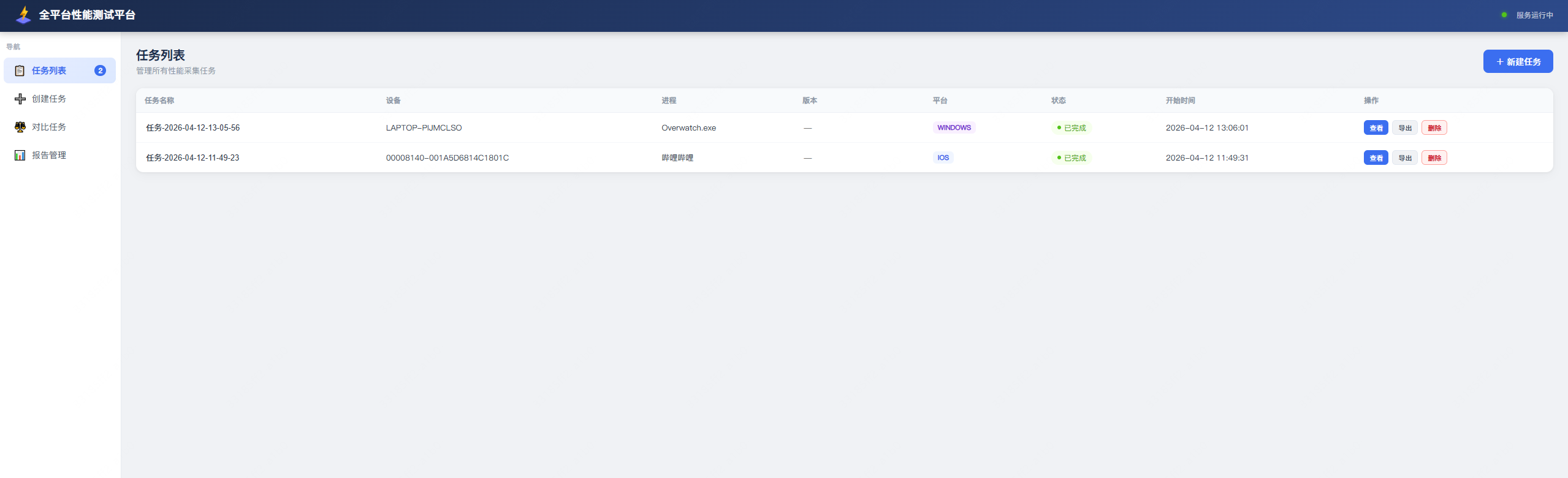
任务列表
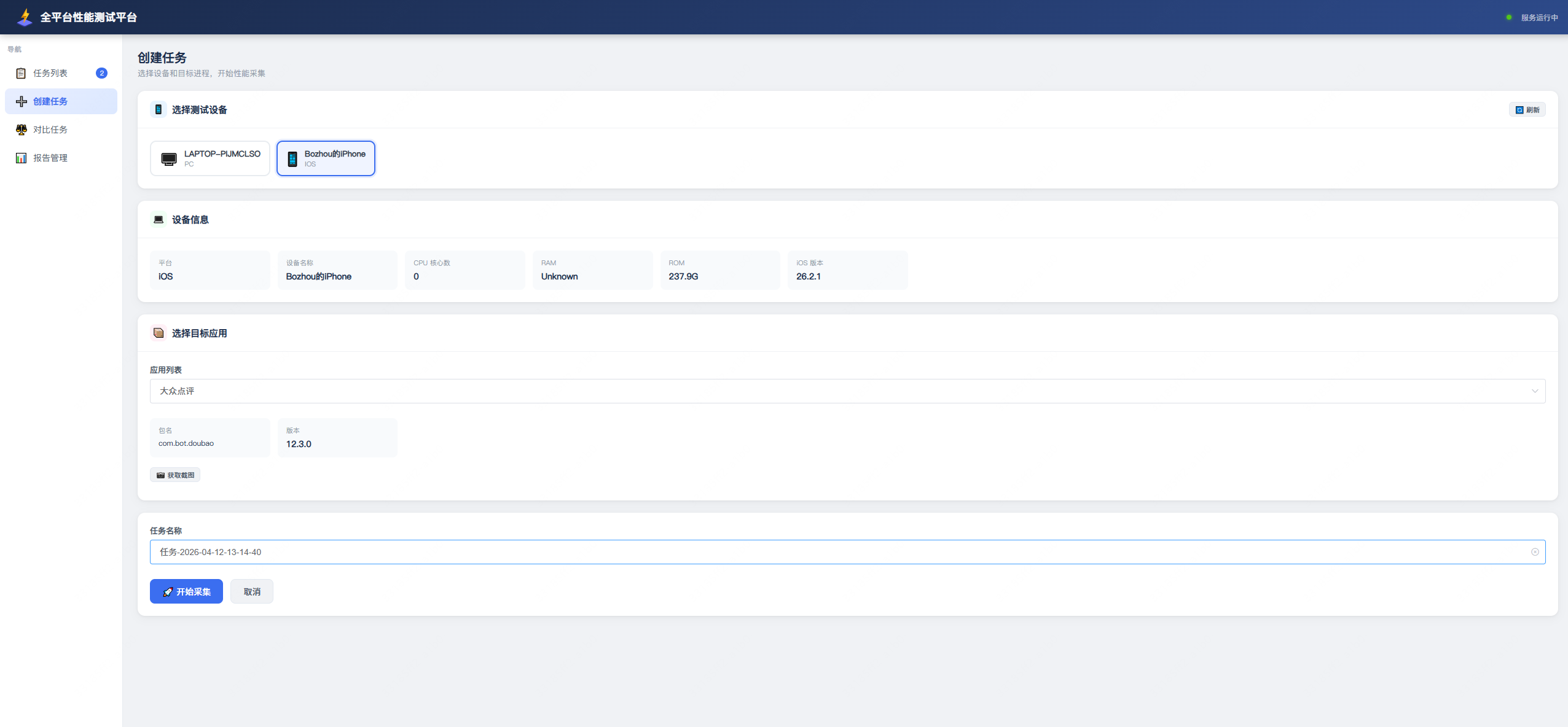
创建任务
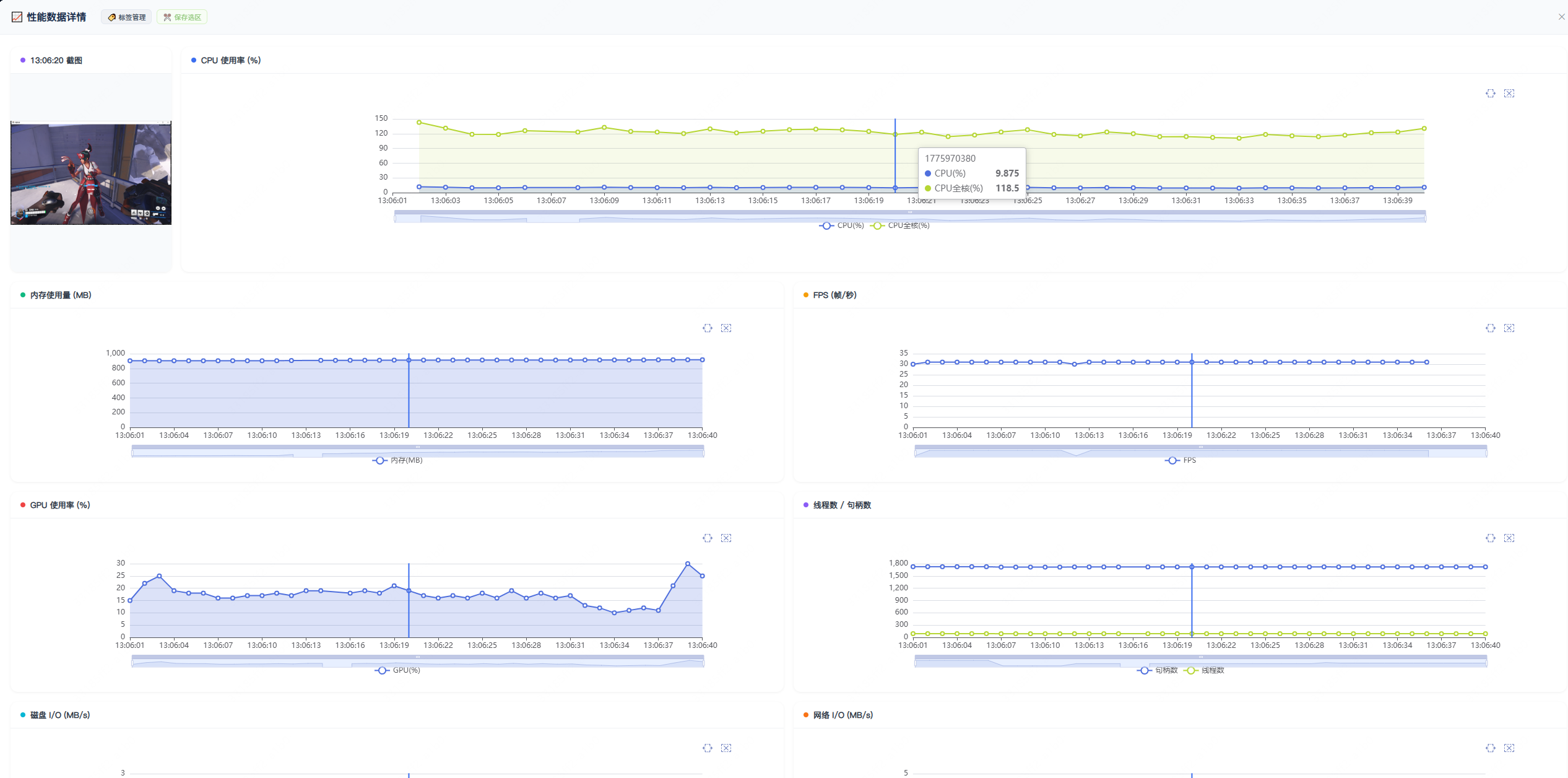
PC 应用性能报告
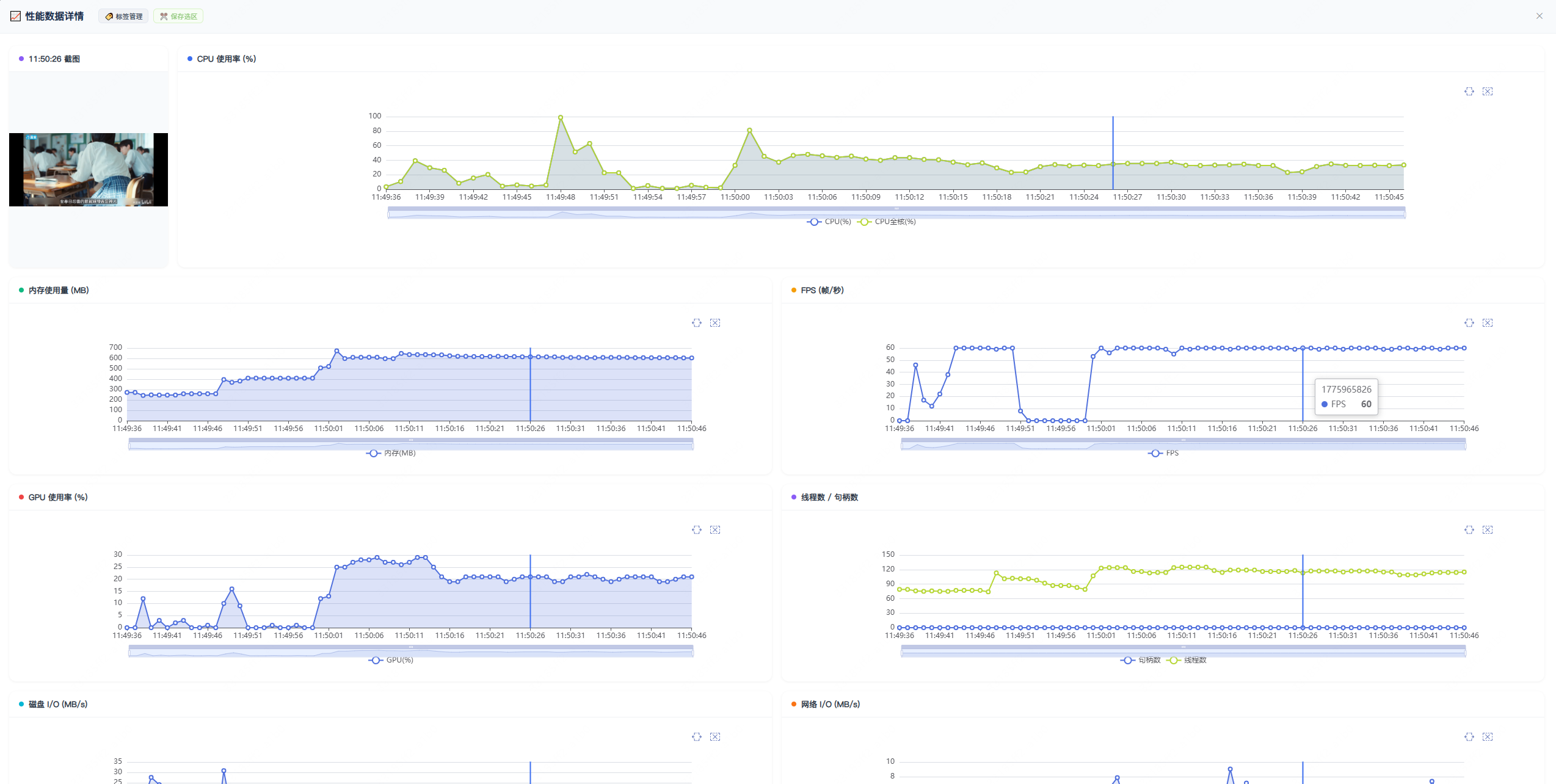
iOS App 性能报告
打标签 & 对比选中内容
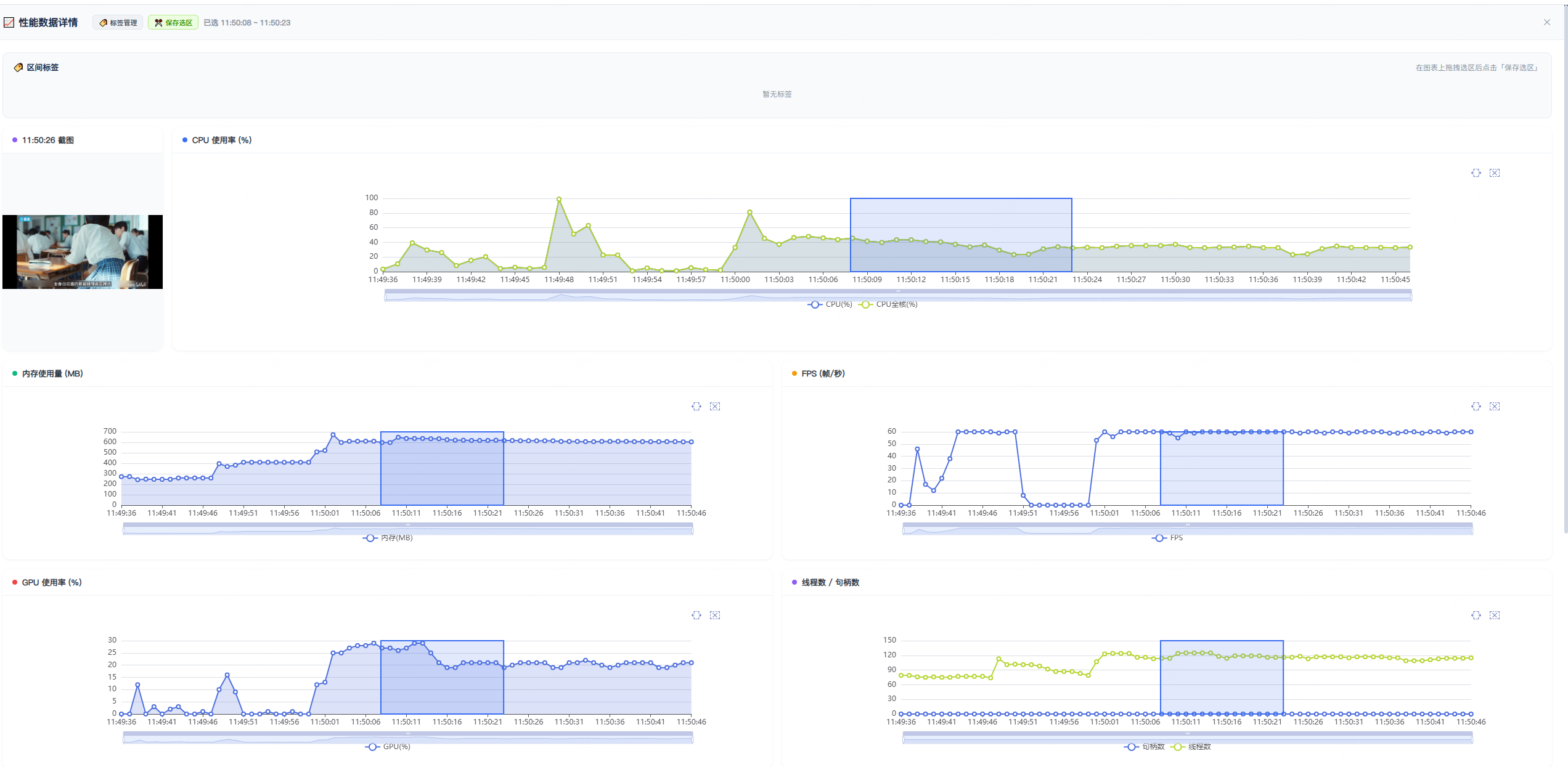
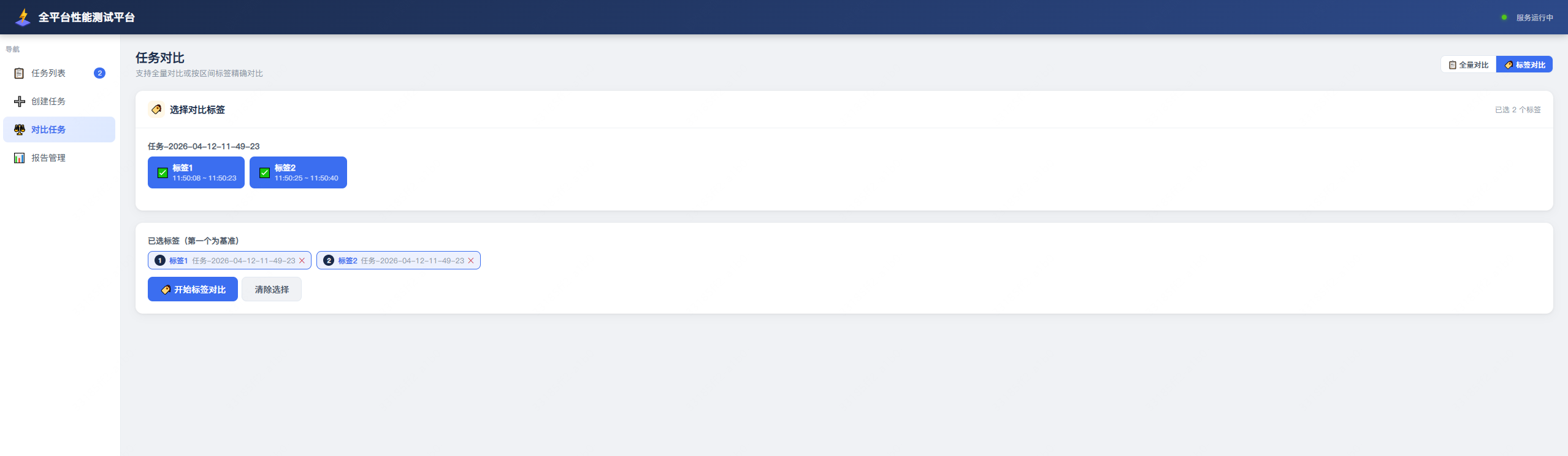
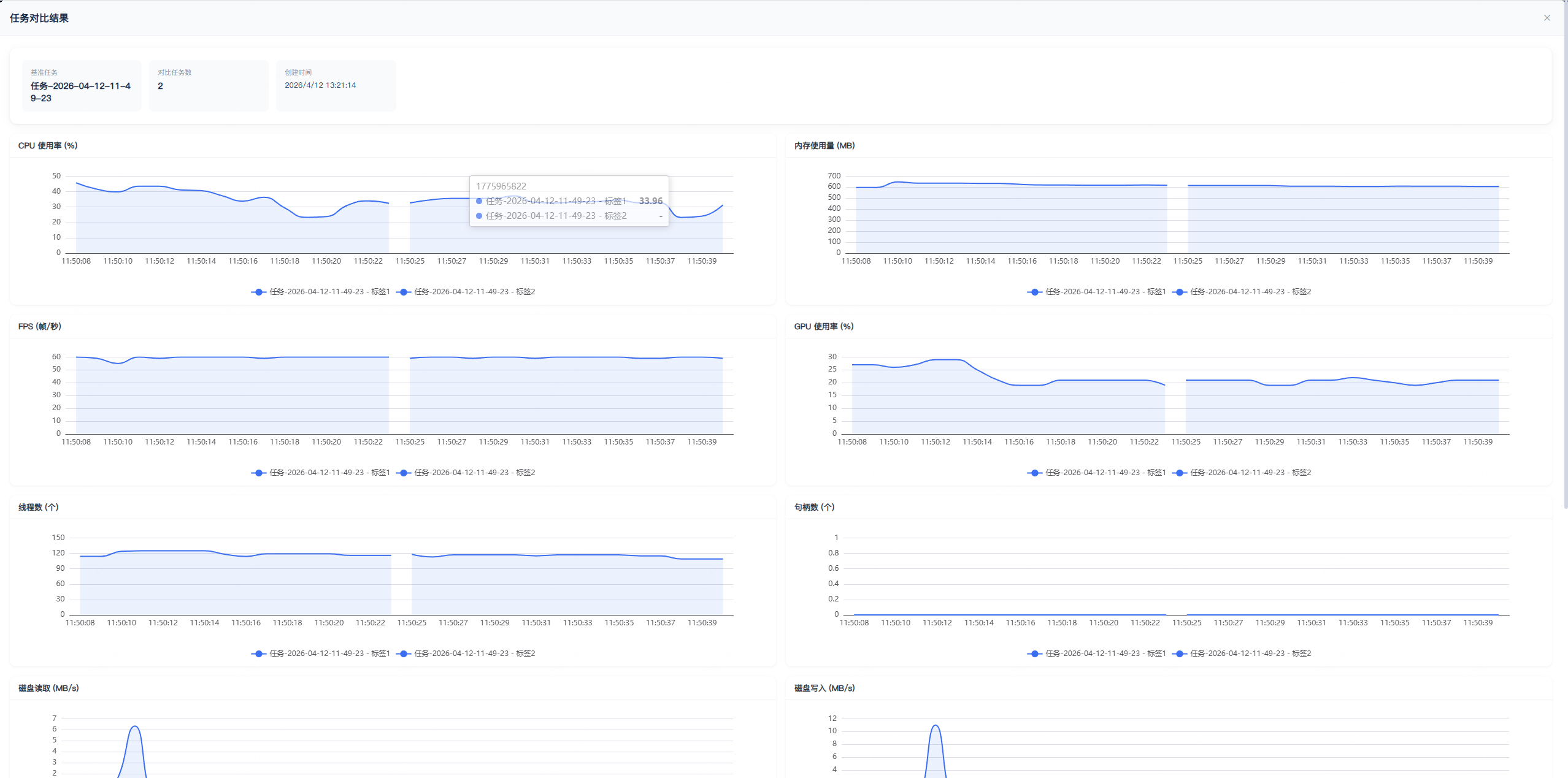
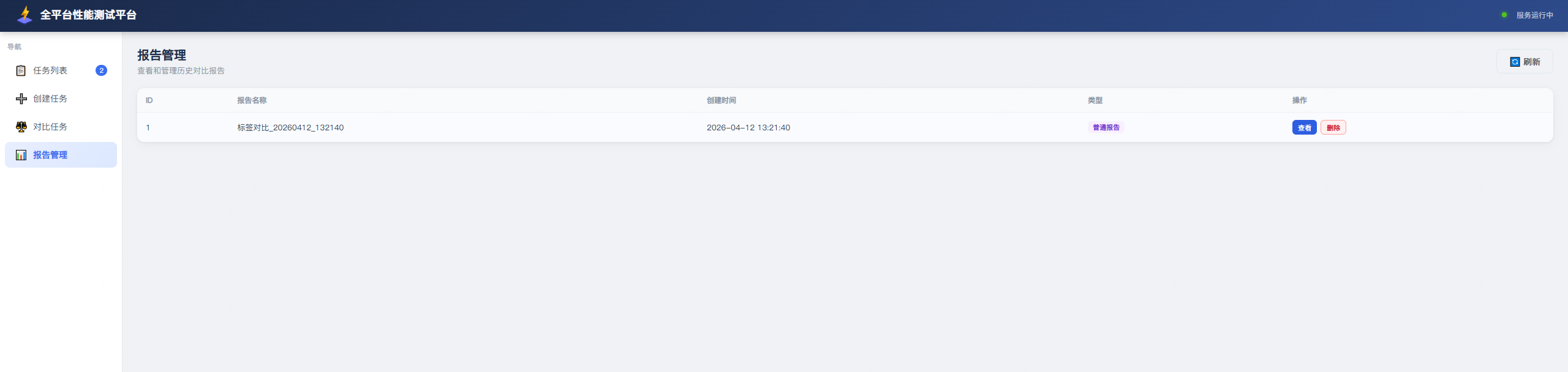
对比结果列表
系统架构
┌─────────────────────────────────────────────────────────────────────────────┐
│                              Web UI (浏览器)                                 │
│                        http://localhost:8080                                 │
└──────────────────────────────┬──────────────────────────────────────────────┘
                               │ HTTP / REST API
                               ▼
┌─────────────────────────────────────────────────────────────────────────────┐
│                           FastAPI 服务层 (api.py)                            │
│  ┌──────────┐ ┌──────────┐ ┌──────────┐ ┌──────────┐ ┌──────────────────┐  │
│  │ 设备管理  │ │ 任务管理  │ │ 对比分析  │ │ 标签管理  │ │ Excel 报告导出   │  │
│  └────┬─────┘ └────┬─────┘ └────┬─────┘ └────┬─────┘ └────────┬─────────┘  │
└───────┼────────────┼────────────┼────────────┼────────────────┼─────────────┘
        │            │            │            │                │
        ▼            ▼            ▼            ▼                ▼
┌─────────────────────────────────────────────────────────────────────────────┐
│                          核心采集层 (core/)                                  │
│                                                                             │
│  ┌─────────────┐  ┌──────────────┐  ┌────────────┐  ┌──────────────────┐   │
│  │  pc_tools   │  │android_tools │  │ ios_tools  │  │ harmony_tools    │   │
│  │             │  │              │  │            │  │                  │   │
│  │ psutil      │  │ adbutils     │  │ go-ios     │  │ hdc              │   │
│  │ pynvml      │  │              │  │ py-ios-dev │  │                  │   │
│  │ PresentMon  │  │              │  │            │  │                  │   │
│  └──────┬──────┘  └──────┬───────┘  └─────┬──────┘  └────────┬─────────┘   │
│         │                │                │                   │             │
│         ▼                ▼                ▼                   ▼             │
│  ┌──────────────────────────────────────────────────────────────────────┐   │
│  │                      Monitor 采集循环 (monitor.py)                    │   │
│  │   CPU → 内存 → FPS → GPU → 线程数 → 句柄数 → 磁盘IO → 网络IO → 截图  │   │
│  └──────────────────────────────────────────────────────────────────────┘   │
└──────────────────────────────┬──────────────────────────────────────────────┘
                               │
                               ▼
┌─────────────────────────────────────────────────────────────────────────────┐
│                           数据存储层 (db.py)                                 │
│                                                                             │
│   SQLite (aiosqlite)                                                        │
│   ├── tasks          任务表                                                 │
│   ├── comparisons    对比报告表                                             │
│   └── labels         标签表                                                 │
│                                                                             │
│   CSV 文件 (按任务目录存储)                                                  │
│   ├── cpu.csv / memory.csv / fps.csv / gpu.csv / ...                        │
│   └── screenshot/  截图目录                                                 │
└─────────────────────────────────────────────────────────────────────────────┘
功能特性
多平台支持
| 平台 | 设备发现 | 进程列表 | 性能采集 | 截图 | 备注 |
|---|---|---|---|---|---|
| PC (Windows/macOS/Linux) | 本机 | psutil | psutil + PresentMon | PIL ImageGrab | 需要管理员权限采集 FPS |
| Android | adb | adb shell | adb shell dumpsys | adb screencap | 需要 adb 连接 |
| iOS | go-ios | go-ios apps | py-ios-device + go-ios tunnel | go-ios screenshot | iOS 17+ 需要 go-ios tunnel |
| HarmonyOS | hdc | hdc shell | hdc shell | hdc screencap | 需要 hdc 工具 |
性能指标
| 指标 | 说明 | 采集方式 | 权限要求 |
|---|---|---|---|
| CPU 使用率 | 进程 CPU 占用(支持子进程聚合) | psutil / adb / Instruments | 无 |
| 内存使用量 | 进程 RSS 内存(支持子进程聚合) | psutil / adb / Instruments | 无 |
| FPS | 应用帧率 | PresentMon (Windows) / Instruments (iOS) | Windows 需要管理员 |
| GPU 使用率 | NVIDIA GPU 占用 | pynvml (NVML API) | 无 |
| 线程数 | 进程线程数(支持子进程聚合) | psutil / adb / Instruments | 无 |
| 句柄数 | 进程句柄数(Windows) | psutil | 无 |
| 磁盘 IO | 读写速率 (MB/s) | psutil io_counters | 无 |
| 网络 IO | 发送/接收速率 (MB/s) | psutil net_io_counters | 无 |
| 截图 | 应用窗口截图 | PIL / adb / go-ios / hdc | 无 |
安装
基础安装
pip install client-perf
平台依赖
根据不同测试平台,需要额外安装对应的工具:
Android 平台
# 确保 adb 可用
# 方式一:通过 Android SDK 安装
# 方式二:系统包管理器
#   macOS: brew install android-platform-tools
#   Ubuntu: sudo apt install adb
#   Windows: 下载 Android SDK Platform-Tools
iOS 平台
# 安装 go-ios(iOS 17+ 必需)
# macOS:
brew install go-ios

# Linux/Windows:
# 从 https://github.com/danielpaulus/go-ios/releases 下载对应平台的二进制文件
# 放到 PATH 中,或设置 GO_IOS_PATH 环境变量指向二进制文件路径

# Python 依赖
pip install py-ios-device
HarmonyOS 平台
# 安装 DevEco Studio 或 HarmonyOS SDK
# 确保 hdc 工具在 PATH 中,或设置 HDC_PATH 环境变量
快速开始
启动服务
# 默认监听 0.0.0.0:8080
python -m client-perf

# 指定监听地址
python -m client-perf --host 127.0.0.1 --port 8080
管理员权限说明
部分性能指标采集需要管理员/root 权限:
| 场景 | 原因 | 解决方案 |
|---|---|---|
| Windows FPS 采集 | PresentMon 需要访问 GPU 驱动和 DirectX 接口 | 以管理员身份运行, |
| iOS 17+ tunnel | go-ios tunnel 需要创建虚拟网卡和 userspace 网络 | 以管理员/root 身份运行 |
访问界面
启动服务后,在浏览器中访问:
http://localhost:8080
使用流程
1. 发现设备
启动服务后,访问 http://localhost:8080 即可看到已连接的设备列表。
- PC:自动显示为本机
- Android:需要
adb devices可见 - iOS:需要 USB 连接且信任电脑
- HarmonyOS:需要
hdc list targets可见
2. 创建采集任务
- 选择目标设备和应用/进程
- 填写任务名称
- 选择是否包含子进程(聚合子进程的 CPU/内存等指标)
- 点击开始采集
3. 查看数据
任务运行期间,可以实时查看各项性能指标的数据曲线。
4. 标签与对比
- 在任务数据页面,可以为特定时间段添加标签
- 选择多个任务或标签进行对比
- 系统会生成对比报告和 Excel 文件
5. 导出报告
- 单个任务报告:导出为 Excel,每个指标一个工作表
- 多任务对比:导出对比结果,包含汇总和各任务原始数据
- 标签对比:导出标签时间段内的对比结果
项目结构
client-perf/
├── client_perf/                # 核心应用代码
│   ├── __main__.py             # 启动入口
│   ├── api.py                  # FastAPI 路由和接口定义
│   ├── db.py                   # SQLite 数据库操作
│   ├── comparison.py           # 对比分析逻辑
│   ├── task_handle.py          # 任务采集进程管理
│   ├── util.py                 # 数据收集工具
│   ├── log.py                  # 日志配置
│   ├── core/                   # 各平台采集实现
│   │   ├── monitor.py          # 通用采集循环(写入 CSV)
│   │   ├── device_manager.py   # 统一设备管理
│   │   ├── pc_tools.py         # PC 平台(psutil + PresentMon + pynvml)
│   │   ├── android_tools.py    # Android 平台(adb)
│   │   ├── ios_tools.py        # iOS 平台(go-ios + py-ios-device)
│   │   └── harmony_tools.py    # HarmonyOS 平台(hdc)
│   ├── test_result/            # 前端界面
│   │   └── index.html
│   └── tool/                   # 内置工具
│       ├── PresentMon-1.8.0-*.exe  # Windows FPS 采集
│       └── go-ios-bin/             # go-ios 跨平台二进制
├── setup.py                    # 打包配置
├── requirements.txt            # 依赖列表
└── README.md                   # 项目说明
API 接口
设备管理
| 方法 | 路径 | 说明 | 参数 |
|---|---|---|---|
| GET | /get_devices/ |
获取所有已连接设备 | 无 |
| GET | /platform_capabilities/ |
获取当前环境支持的平台能力 | 无 |
| GET | /system_info/ |
获取设备系统信息 | device_type, device_id |
| GET | /get_pids/ |
获取进程/应用列表 | device_type, device_id, is_print_tree |
| GET | /get_device_apps/ |
获取设备应用列表 | device_type, device_id |
| GET | /pid_img/ |
获取截图 | device_type, device_id, pid |
任务管理
| 方法 | 路径 | 说明 | 参数 |
|---|---|---|---|
| GET | /get_all_task/ |
获取所有任务 | 无 |
| GET | /run_task/ |
启动采集任务 | pid, pid_name, task_name, device_type, device_id, package_name, include_child |
| GET | /stop_task/ |
停止采集任务 | task_id |
| GET | /task_status/ |
获取任务状态 | task_id |
| GET | /result/ |
获取任务数据 | task_id |
| GET | /delete_task/ |
删除任务 | task_id |
| GET | /change_task_name/ |
重命名任务 | task_id, new_name |
| GET | /set_task_version/ |
设置任务版本 | task_id, version |
| GET | /set_task_baseline/ |
设置基线任务 | task_id, is_baseline |
对比分析
| 方法 | 路径 | 说明 | 参数 |
|---|---|---|---|
| POST | /create_comparison/ |
创建多任务对比 | JSON body |
| POST | /export_comparison_excel/ |
导出对比报告 | JSON body |
| POST | /export_excel/ |
导出单个任务报告 | JSON body |
标签管理
| 方法 | 路径 | 说明 | 参数 |
|---|---|---|---|
| GET | /get_labels/{task_id}/ |
获取任务标签 | task_id |
| POST | /create_label_comparison/ |
创建标签对比 | JSON body |
| POST | /export_label_comparison_excel/ |
导出标签对比报告 | JSON body |
统一响应格式
所有接口返回统一格式:
{
  "code": 200,
  "msg": <data>
}
依赖
Python 依赖
fastapi>=0.111.0          # Web 框架
uvicorn[standard]>=0.29.0 # ASGI 服务器
sqlalchemy[asyncio]>=2.0.0 # ORM + async engine
aiosqlite>=0.20.0         # SQLite async 驱动
py-ios-device>=2.0.0      # iOS Instruments DTX 协议
adbutils>=2.8.0           # Android ADB 工具
psutil>=5.9.0             # PC 系统信息采集
pynvml>=11.5.0            # NVIDIA GPU(可选)
openpyxl>=3.1.0           # Excel 导出
apscheduler>=3.10.0       # 定时任务调度
Pillow>=10.0.0            # PC 截图(可选)
Cython>=0.29.0            # 用于编译 Python 代码
外部工具
| 工具 | 用途 | 平台 |
|---|---|---|
| PresentMon | Windows FPS 采集(内置) | Windows |
| go-ios | iOS 设备通信(内置 + 需外部安装) | macOS/Linux/Windows |
| adb | Android 设备通信 | 全平台 |
| hdc | HarmonyOS 设备通信 | 全平台 |
常见问题
Q: Windows 上 FPS 采集失败?
A: PresentMon 需要管理员权限。请以管理员身份运行 client-perf,或启动时不加 --no-elevate 参数。
Q: iOS 17+ 设备采集失败?
A: iOS 17+ 需要通过 go-ios tunnel 连接。请确保:
- go-ios 已安装且在 PATH 中
- 以管理员/root 身份运行
- 设备已信任电脑
Q: GPU 使用率获取不到?
A: 当前仅支持 NVIDIA GPU(通过 pynvml)。AMD/Intel GPU 暂不支持。
Q: Linux 上截图不可用?
A: Linux 无桌面环境时 PIL ImageGrab 不可用,截图功能会自动禁用。
许可证
MIT License
Release history Release notifications | RSS feed


Download files
Download the file for your platform. If you're not sure which to choose, learn more about installing packages.
Source Distribution
Built Distribution
Filter files by name, interpreter, ABI, and platform.
If you're not sure about the file name format, learn more about wheel file names.
Copy a direct link to the current filters
File details
Details for the file client_perf-5.0.0.tar.gz.
File metadata
- Download URL: client_perf-5.0.0.tar.gz
- Upload date:
- Size: 32.2 MB
- Tags: Source
- Uploaded using Trusted Publishing? No
- Uploaded via: twine/6.2.0 CPython/3.10.11
File hashes
| Algorithm | Hash digest | |
|---|---|---|
| SHA256 |
3374fde8b2a2aa532f25af831a8b2e5cf8fa4bf3433ac6a190c7a882fd0fc980
|
|
| MD5 |
d39a18b9ee456a74d2c166a7e05d7a86
|
|
| BLAKE2b-256 |
eaa9ffa188d91ef050197b3de184f3bacd4e73f69974a02ce3422fa152016725
|
File details
Details for the file client_perf-5.0.0-py3-none-any.whl.
File metadata
- Download URL: client_perf-5.0.0-py3-none-any.whl
- Upload date:
- Size: 32.4 MB
- Tags: Python 3
- Uploaded using Trusted Publishing? No
- Uploaded via: twine/6.2.0 CPython/3.10.11
File hashes
| Algorithm | Hash digest | |
|---|---|---|
| SHA256 |
987a32dc4c266df5b500db749c520a9ddc09ebea85ff6bbe064b12eed4186716
|
|
| MD5 |
6337b1243e1641c420cf9fa0677c99fd
|
|
| BLAKE2b-256 |
69bce91365f6e6a7651a1efea7608decaae08dd1eacf805f526f74c822f6451e
|






