
CliPassGen (Console Smart Password Generator) v4.0.1
Terminal-based smart password generator with deterministic password generation. Generate passwords from secret phrases - same secret always produces the same password, no storage required.
Decentralized by Design: Unlike traditional password managers that store encrypted vaults on central servers, Smart Password Generator stores nothing. Your secrets never leave your device. Passwords are regenerated on-demand - no cloud, no database, no trust required.









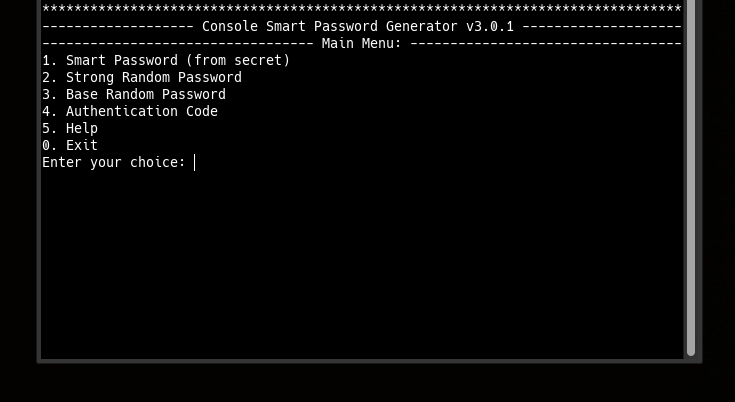
Main Interface
Core Principles
- Zero-Storage Security: No passwords or secret phrases are ever stored or transmitted
- Decentralized Architecture: No central servers, no cloud dependency, no third-party trust required
- Deterministic Generation: Same secret + same length = same password, every time
- Memory-Based Security: Your brain is the only password database
- Terminal-First: Optimized for CLI workflows and scripting
- Multi-Mode Generation: Smart passwords, strong random, base passwords, auth codes, public keys, verification
What You Can Do:
- Generate Smart Passwords: Deterministic passwords from secret phrases
- Create Public Keys: Verification keys for secret proof without exposure
- Verify Secrets: Check if a secret matches a stored public key
- Generate Random Passwords: Cryptographically secure random generation
- Create Authentication Codes: Secure codes with character diversity
- Interactive Terminal Mode: Menu-driven interface for easy use
- Command Line Mode: Scriptable generation for automation
- Cross-Platform Operation: Works on any system with Python
- No Dependencies: Pure Python with smartpasslib core
Key Features
- Decentralized & Serverless: No central database, no cloud lock-in, complete user sovereignty
- Deterministic Security: Identical input -> identical output, always
- Six Generation Modes: Smart, Strong, Base, Code, Public Key, Verify
- Public Key Verification: Generate and verify keys to prove secret knowledge
- Interactive & CLI Modes: Both menu-driven and command-line interfaces
- Hidden Input: Secret phrase entry via getpass (hidden typing)
- SmartPrinter Output: Beautiful centered and framed terminal text
- Length Flexibility: 12-100 characters for passwords, 4-100 for codes
- No Internet Required: All cryptographic operations local
Security Model
- Proof of Knowledge: Public keys verify secrets without exposing them
- Decentralized Trust: No third party needed - you control your secrets completely
- Deterministic Certainty: Mathematical certainty in password regeneration
- Ephemeral Passwords: Passwords exist only in memory during generation
- Local Computation: No data leaves your terminal
- No Recovery Backdoors: Lost secret = permanently lost passwords (by design)
Research Paradigms & Publications
- Pointer-Based Security Paradigm - Architectural Shift from Data Protection to Data Non-Existence
- Local Data Regeneration Paradigm - Ontological Shift from Data Transmission to Synchronous State Discovery
Technical Foundation
Powered by smartpasslib v4.0.1+ - The core library for deterministic password generation.
Key derivation (same as Python/JS/Kotlin/Go/C#/Rust versions v4.0.1):
| Key Type | Iterations | Purpose |
|---|---|---|
| Private Key | 15-30 (dynamic) | Password generation (never stored, never transmitted) |
| Public Key | 45-60 (dynamic) | Verification (stored locally) |
Character Set (Google-compatible):
!@#$%^&*()_+-=[]{};:,.<>?/ABCDEFGHIJKLMNOPQRSTUVWXYZ0123456789abcdefghijklmnopqrstuvwxyz
Validation Rules:
- Secret phrase: minimum 12 characters
- Password length: 12-100 characters
- Code length: 4-100 characters
Decentralized Architecture:
- No central authority required
- Metadata can be synced via any channel
- Your security depends only on your secret phrase
- Works offline - no internet connection required
Generation Modes:
- Smart Password: Deterministic from secret phrase
- Strong Password: Cryptographically secure random generation
- Base Password: Simple random password generation
- Authentication Code: Secure code generation for 2FA/MFA (4-100 chars)
- Public Key: Generate verification key from secret phrase
- Verify: Check secret against stored public key
Installation
git clone https://github.com/smartlegionlab/clipassgen
cd clipassgen
python app.py
or
pip install clipassgen==4.0.1
Quick Usage
Interactive Mode
clipassgen
Command-Line Mode
# Smart password (deterministic, CROSS-PLATFORM!)
clipassgen --smart -s "MyStrongSecretPhrase2026!" -l 16

# Strong random password
clipassgen --strong -l 20

# Base random password
clipassgen --base -l 16

# Authentication code (2FA) - up to 100 chars
clipassgen --code -l 8

# Generate public key from secret
clipassgen --public -s "MyStrongSecretPhrase2026!"

# Verify secret against public key
clipassgen --verify -s "MyStrongSecretPhrase2026!" -k "public_key_here"
Security Requirements
Secret Phrase
- Minimum 12 characters (enforced by library)
- Case-sensitive
- Use mix of: uppercase, lowercase, numbers, symbols
- Never store digitally
- NEVER use your password description as secret phrase
Strong Secret Examples
"MyStrongSecretPhrase2026!"   - mixed case + numbers + symbols
"P@ssw0rd!LongSecret"         - special chars + numbers + length
"КотБегемот2026НаДиете"       - Cyrillic + numbers
Weak Secret Examples (avoid)
"short"                       - too short, rejected by library
"password"                    - dictionary word, too short
"1234567890"                  - only digits, too short
"qwerty123"                   - keyboard pattern
Password Length Requirements
- Smart/Strong/Base passwords: 12-100 characters
- Authentication codes: 4-100 characters
Decentralized Nature
There is no "forgot password" button. This is by design:
- No central server can reset your passwords
- No support team can recover your access
- Your secret phrase is the ONLY key
This is the price of true decentralization - you are completely in control.
Cross-Platform Compatibility
CliPassGen produces identical passwords to:
| Platform | Application |
|---|---|
| Python CLI Manager | CLI PassMan |
| Desktop Python | Desktop Manager |
| Desktop C# | Desktop C# Manager |
| CLI C# Manager | CLI Manager (C#) |
| CLI C# Generator | CLI Generator (C#) |
| Rust CLI | CLI Manager (Rust) |
| Rust GUI | Desktop Manager (Rust, GUI) |
| Rust TUI | Desktop Manager (Rust, TUI) |
| Web | Web Manager |
| Android | Android Manager |
Ecosystem
Core Libraries:
- smartpasslib - Python
- smartpasslib-js - JavaScript
- smartpasslib-kotlin - Kotlin
- smartpasslib-go - Go
- smartpasslib-csharp - C#
- smartpasslib-rs - Rust
CLI Applications:
- CLI Smart Password Manager (Python)
- CLI Smart Password Generator (Python) (this)
- CLI Smart Password Manager (C#)
- CLI Smart Password Generator (C#)
- CLI Smart Password Manager (Rust)
Desktop Applications:
- Desktop Smart Password Manager (Python)
- Desktop Smart Password Manager (C#)
- Desktop Smart Password Manager (Rust, GUI)
- Desktop Smart Password Manager (Rust, TUI)
Other:
License
Copyright (©) 2026, Alexander Suvorov
Support
- Generator Issues: GitHub Issues
- Core Library Issues: smartpasslib Issues
- Documentation: Interactive help and this README
Note: Always test password generation with non-essential accounts first. Implementation security depends on proper usage.
Disclaimer
By using this software, you agree to the full disclaimer terms.
Summary: Software provided "AS IS" without warranty. You assume all risks.
Full legal disclaimer: See DISCLAIMER.md
1 maintainer

Metadata
1 maintainer
Release files for clipassgen 4.0.1
For a detailed explanation of source distributions (sdists) and built distributions (wheels), please see the package formats documentation.
Source distribution (sdist)
| File | Size | Uploaded | Provenance | |
|---|---|---|---|---|
| clipassgen-4.0.1.tar.gz | 19.8 kB | Without provenance | Details |
Built distribution (wheel)
| File | Interpreter | ABI | Platform | Reset |
|---|---|---|---|---|
| clipassgen-4.0.1-py3-none-any.whl | Python 3 | none | any | Details |
Total release size: 44.5 kB
Release files / clipassgen-4.0.1.tar.gz
| Download URL | clipassgen-4.0.1.tar.gz |
|---|---|
| Size | 19.8 kB |
| Tags | Source |
|
SHA-256 checksum How to use checksums |
99eeaa936ba08a08a6470b50e7b38de5adab14b661388b9121c7649daca08ce2
|
|
BLAKE2b-256 checksum How to use checksums |
8781cf5e978aec9fd906f623a5886ad2920fcc43284ee5f772dae1e6fa7765bd
|
| Upload date | |
|
Uploaded using Trusted Publishing? What is trusted publishing? |
No |
| Uploaded via |
twine/7.0.0 CPython/3.14.8
|
Release files / clipassgen-4.0.1-py3-none-any.whl
| Download URL | clipassgen-4.0.1-py3-none-any.whl |
|---|---|
| Size | 24.7 kB |
| Tags | Python 3 |
|
SHA-256 checksum How to use checksums |
3aaa75bf358ecbf42ca428468b451377accf5325176992e04b3d5837c5e1a655
|
|
BLAKE2b-256 checksum How to use checksums |
69d4a243a26befc62ce47c5757b9f99b496d4c71c592b70194581433bb7128a0
|
| Upload date | |
|
Uploaded using Trusted Publishing? What is trusted publishing? |
No |
| Uploaded via |
twine/7.0.0 CPython/3.14.8
|
Security for clipassgen 4.0.1
Provenance
Provenance describes where a file came from. On PyPI, provenance is shared via attestations, which provide a verifiable record of the build or publishing details. View details, limitations and caveats.
No provenance found
None of the files in this release were uploaded with provenance metadata.
A note on package security
PyPI is a repository for distributing packages, not a service for auditing them. While third-party security researchers and our staff do their best to detect and remove malicious packages, PyPI cannot guarantee the quality, security or suitability of any given package.
To learn more about protecting yourself from malicious actors, visit our package security documentation.














