
You pick your colors, we make it readable

Project description
CM-Colors 🎨✨




You do your style, we make it accessible (Our color wizard can work miracles, but even magic has limits - don't expect us to make neon yellow on white look good!)
Ever picked perfect colors for your portfolio website, only to have someone tell you they can't read your text? Yeah, that's an accessibility problem, and it's more common than you think.
The % shows the change in contrast ratio
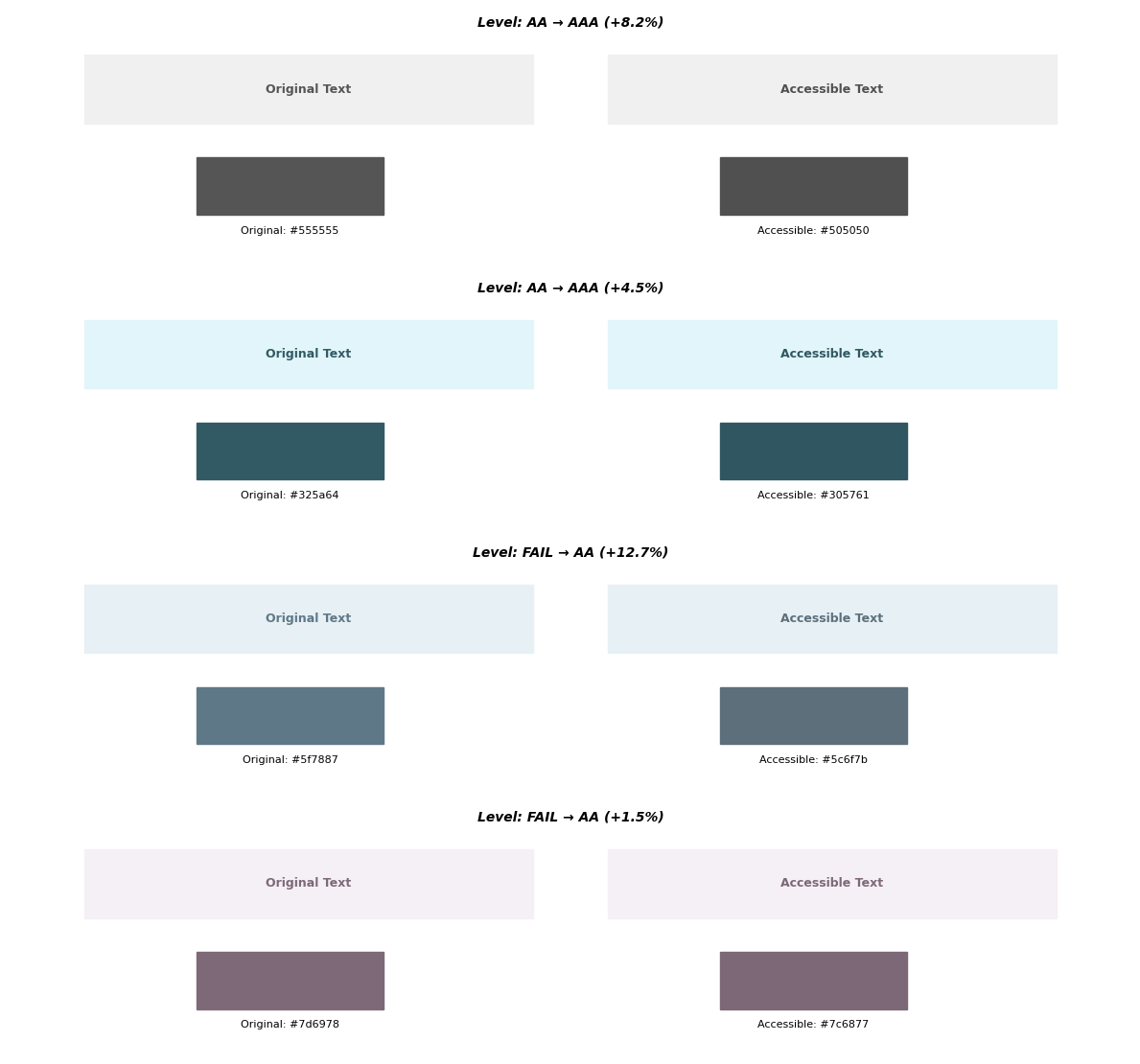
What's This About?
The Problem: You spend hours choosing the perfect shade of dusty rose for your headings and soft lavender for your background. It looks chef's kiss aesthetic... but people with visual impairments (or honestly, anyone trying to read it on their phone in sunlight) can't see it properly.
The Solution: CM-Colors takes your beautiful color choices and makes tiny, barely-noticeable tweaks so everyone can read your content. We're talking changes so small you won't even notice them, but your accessibility score will love you.
What's New in v0.2.0 ✨
Universal Color Support: Use any color format you're comfortable with - hex codes, RGB/RGBA, HSL/HSLA, or even named CSS colors like "cornflowerblue". Mix and match formats freely!
RGBA & HSLA Support: Semi-transparent colors are automatically composited over backgrounds for accurate accessibility checks.
New Color & ColorPair Classes: More intuitive API for working with colors and checking accessibility. The old syntax still works perfectly - see documentation for the classic API.
Supported Formats:
- Hex:
"#ff0000","#f00","ff0000" - RGB/RGBA:
(255, 0, 0),"rgb(255, 0, 0)","rgba(255, 0, 0, 0.8)" - HSL/HSLA:
"hsl(120, 100%, 50%)","hsla(120, 100%, 50%, 0.9)" - Named Colors:
"red","cornflowerblue","rebeccapurple"
What Does "Accessible" Even Mean?
Simple version: There needs to be enough contrast between your text and background so people can actually read it.
- Good contrast = Easy to read for everyone
- Bad contrast = Squinting, headaches, and people bouncing off your site
The web has official rules called WCAG (don't worry about what it stands for) that say exactly how much contrast you need. Most of the time, you just want to hit "AA" level - that's the sweet spot.
Installation
pip install cm-colors
That's it. No complex setup, no configuration files, no PhD in color science required.
The Magic One-Liner
This is literally all you need:
from cm_colors import ColorPair

# Your original colors - use ANY format!
text_color = '#5f7887'          # hex
bg_color = 'rgb(230, 240, 245)' # rgb string

# ✨ The magic happens here ✨
pair = ColorPair(text_color, bg_color)

print(f"Contrast ratio: {pair.contrast_ratio:.2f}")  # 3.89
print(f"WCAG level: {pair.wcag_level}")              # FAIL (needs improvement)

# Fix it automatically
tuned_text, is_accessible = pair.tune_colors()
print(f"Tuned: {tuned_text}")                        # rgb(83, 107, 122)
print(f"Accessible now? {is_accessible}")            # True
Mix & Match Color Formats
Use whatever format feels natural:
from cm_colors import Color, ColorPair

# Create colors from any format
dusty_rose = Color("#c7483b")
semi_transparent = Color("rgba(255, 0, 0, 0.5)")  # Auto-composited!
hsl_blue = Color("hsl(210, 100%, 50%)")
named = Color("cornflowerblue")

# Check if colors are valid
if dusty_rose.is_valid:
    print(f"RGB: {dusty_rose._rgb}")           # (199, 72, 59)
    # or try
    print(f"RGB: {dusty_rose.to_rgb_string()}")   # 'rgb(199, 72, 59)'

    print(f"Hex: {dusty_rose.to_hex()}")      # #c7483b

# Mix formats in a pair
pair = ColorPair("rebeccapurple", "#ffffff")
print(pair.contrast_ratio)  # 6.95
print(pair.wcag_level)      # AA
Real Examples
from cm_colors import ColorPair

# Example 1: Aesthetic dusty rose on white
pair = ColorPair("#c7483b", "white")
print(f"Original contrast: {pair.contrast_ratio:.2f}")
print(f"Level: {pair.wcag_level}")  # Might be FAIL

tuned, success = pair.tune_colors()
if success:
    print(f"Tuned! New color: {tuned}")

# Example 2: Semi-transparent overlay
pair = ColorPair("rgba(40, 117, 219, 0.9)", "#f0f0f0")
print(f"Contrast with transparency: {pair.contrast_ratio:.2f}")
Common Questions
Q: Will it ruin my carefully chosen aesthetic? A: Nope! We make the smallest possible changes. Most of the time you literally can't tell the difference.
Q: What if my colors are already accessible? A: We'll tell you they're perfect and leave them alone.
Q: What if I picked terrible colors? A: We'll try our best, but if you chose neon yellow on white... even wizards have limits. Pick better starting colors! 😅
Q: Do I need to understand color science? A: Not at all! That's why this library exists.
Q: Does the old API still work? A: Yes! All v0.1.x code works exactly the same. See the classic API documentation if you prefer the original syntax.
Other Stuff You Can Do
Quick accessibility checks:
from cm_colors import ColorPair

# Check contrast ratio (higher = better readability)
pair = ColorPair("#646464", "#ffffff")
print(f"Contrast ratio: {pair.contrast_ratio:.2f}")  # 5.92

# Check WCAG level
print(f"Level: {pair.wcag_level}")  # "AA", "AAA", or "FAIL"

# Check perceptual color difference (Delta E)
print(f"Delta E: {pair.delta_e:.2f}")  # Lower = more similar colors

# For large text (different thresholds)
pair_large = ColorPair("#767676", "white", large_text=True)
print(f"Large text level: {pair_large.wcag_level}")  # AA (more lenient)
Using the classic CMColors API:
from cm_colors import CMColors

cm = CMColors()

# All these work - any format!
ratio = cm.contrast_ratio("#646464", "white")
level = cm.wcag_level("rgb(100, 100, 100)", "#ffffff")
tuned, success = cm.tune_colors("cornflowerblue", "white")
Why This Matters
- Legal stuff: Many places require accessible websites by law
- Good human stuff: 1 in 12 people have some form of visual impairment
- SEO: Search engines care about accessibility
- Professional points: Shows you actually know what you're doing
For the Color Science Geeks 🤓
If you want to dive deep into the mathematical wizardry behind this (Delta E 2000, OKLCH color spaces, gradient descent optimization), check out our full technical documentation where we get very nerdy about color perception and optimization algorithms.
License
This project is licensed under GNU General Public License v3.0 — meaning it's free to use and modify, but you can't sell it as a closed-source product.
Problems?
Found a bug or have questions? Open an issue and we'll help you out.
Making the web readable for everyone, one color tweak at a time 🌈♿
P.S. Your design professor will be impressed that you actually thought about accessibility
Project details
Release history Release notifications | RSS feed


Download files
Download the file for your platform. If you're not sure which to choose, learn more about installing packages.
Source Distribution
Built Distribution
Filter files by name, interpreter, ABI, and platform.
If you're not sure about the file name format, learn more about wheel file names.
Copy a direct link to the current filters
File details
Details for the file cm_colors-0.2.1.tar.gz.
File metadata
- Download URL: cm_colors-0.2.1.tar.gz
- Upload date:
- Size: 42.9 kB
- Tags: Source
- Uploaded using Trusted Publishing? No
- Uploaded via: twine/6.2.0 CPython/3.14.0
File hashes
| Algorithm | Hash digest | |
|---|---|---|
| SHA256 |
eda05beefe01f0b54f6f0ad75dbf4a7af9d82288513ba480902346d907d2d594
|
|
| MD5 |
4f893af51b88ea5ab2e52a22708f9538
|
|
| BLAKE2b-256 |
844e1b8d4e980a7b156bc6729cc9a93e255c296c629f507955d8069ec26ef0d0
|
File details
Details for the file cm_colors-0.2.1-py3-none-any.whl.
File metadata
- Download URL: cm_colors-0.2.1-py3-none-any.whl
- Upload date:
- Size: 42.3 kB
- Tags: Python 3
- Uploaded using Trusted Publishing? No
- Uploaded via: twine/6.2.0 CPython/3.14.0
File hashes
| Algorithm | Hash digest | |
|---|---|---|
| SHA256 |
95d62d78f7aca401164350bed8f0c3291ae45625c4986985996c5bfaae1e7945
|
|
| MD5 |
db3cf1cf6ac189865d0c2789e23accfb
|
|
| BLAKE2b-256 |
17357a6841ae717c9d102232971f9002e83f4391853ae17e77630fd1d57239cb
|






