
You pick your colors, we make it readable

Project description
CM-Colors 🎨✨





Automatic color contrast tuning for web accessibility
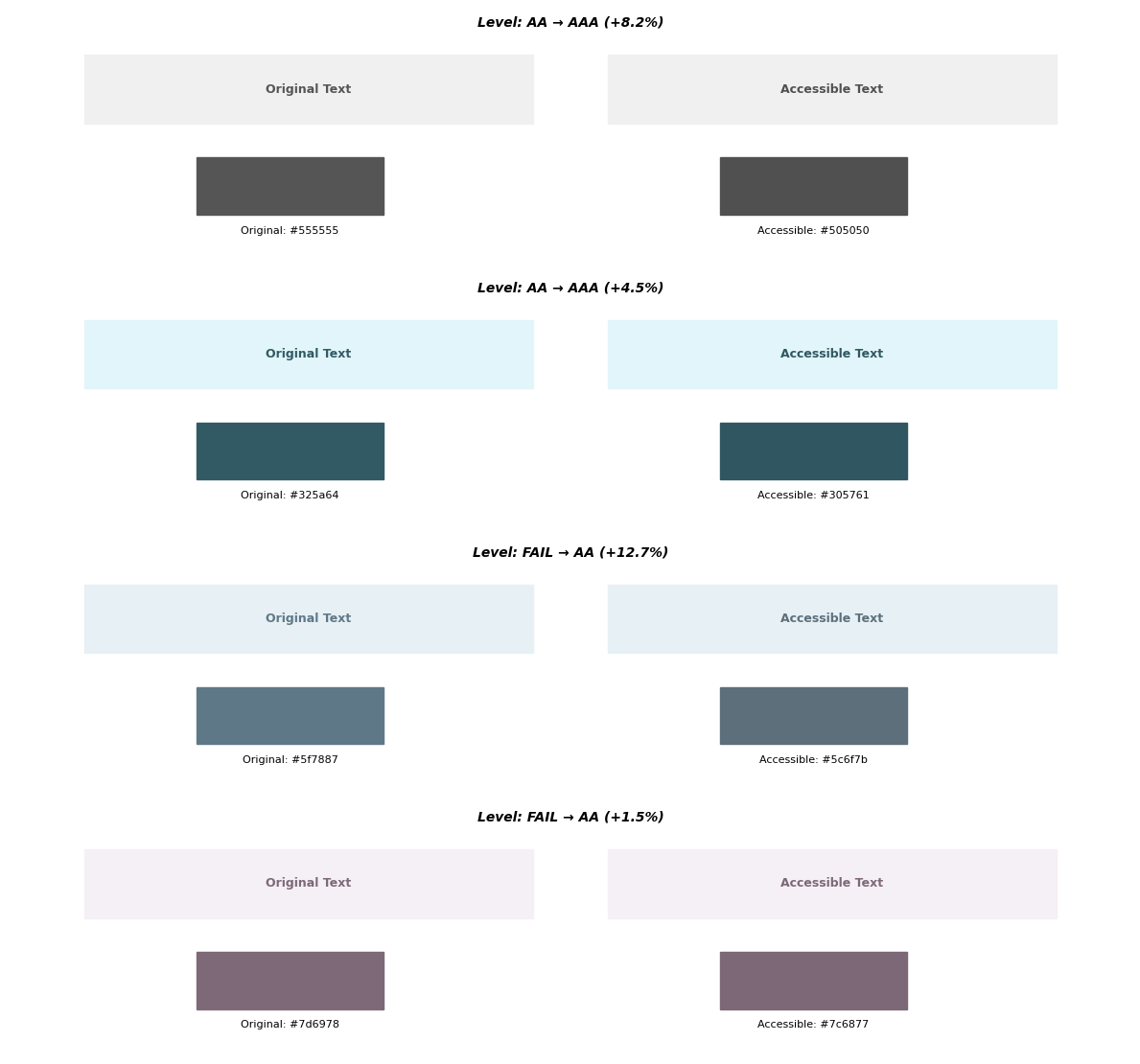
CM-Colors adjusts text and background color pairs to meet WCAG accessibility standards while preserving visual aesthetics. Use it as a command-line tool to process CSS files or as a Python library for programmatic color manipulation.
The percentage shows the change in contrast ratio:
Overview
Web content requires sufficient color contrast between text and backgrounds for readability. WCAG defines minimum contrast ratios to ensure accessibility for users with visual impairments. CM-Colors automatically adjusts colors to meet these standards with minimal perceptual changes.
Key features:
- Automatic color contrast tuning to WCAG AA/AAA standards
- Command-line tool for batch CSS file processing
- Python API for programmatic color manipulation
- Support for all common color formats (hex, RGB/RGBA, HSL/HSLA, named colors)
- Perceptual color space algorithms for visually minimal adjustments
Installation
pip install cm-colors
CLI Usage
The cm-colors command processes CSS files and tunes color contrast automatically.
Basic commands
Process a single CSS file:
cm-colors style.css
Process all CSS files in a directory:
cm-colors path/to/styles/
Process files in the current directory:
cm-colors .
Options
--default-bg COLOR
Specifies the default background color when a CSS rule lacks an explicit background declaration. Accepts any valid color format.
Default: white
Example:
cm-colors styles.css --default-bg "#f5f5f5"
Output
Modified CSS files:
The tool creates new files with _cm inserted before the extension:
- Input:
style.css - Output:
style_cm.css
Original files remain unchanged. The output preserves formatting, comments, and structure.
HTML report:
When colors are tuned, the tool generates cm_colors_report.html in the current directory with:
- Visual before/after comparison for each change
- CSS selector and file location
- Original and updated WCAG levels
- Color swatches showing differences
Console output:
Processing 3 files...

Results:
✓ 12 already accessible
✓ 5 tuned
✗ 2 failed tuning

Could not tune 2 pairs:
  style.css -> .warning-badge
    Reason: Unable to achieve sufficient contrast
  layout.css -> .subtle-text
    Reason: Colors too similar to adjust

Report generated: /path/to/cm_colors_report.html
How it works
- Discovers all CSS files in the specified path
- Parses CSS and extracts color declarations
- Resolves CSS custom properties (variables)
- Detects text/background color pairs per selector
- Evaluates each pair against WCAG AA threshold (4.5:1)
- Tunes colors below threshold using perceptual optimization
- Generates modified CSS and HTML report
Limitations
- Some color combinations cannot achieve sufficient contrast while maintaining visual similarity
- Color pair detection requires explicit
colorandbackground-colordeclarations - CSS preprocessor syntax (SCSS, LESS) is not supported; process compiled CSS instead
Python API
ColorPair class
Check and tune color contrast programmatically:
from cm_colors import ColorPair

# Create a color pair
pair = ColorPair("#5f7887", "rgb(230, 240, 245)")

# Check accessibility
print(f"Contrast ratio: {pair.contrast_ratio:.2f}")  # 3.89
print(f"WCAG level: {pair.wcag_level}")              # FAIL

# Tune colors automatically
tuned_text, is_accessible = pair.tune_colors()
print(f"Tuned color: {tuned_text}")                  # rgb(83, 107, 122)
print(f"Accessible: {is_accessible}")                # True
Color class
Work with individual colors in any format:
from cm_colors import Color

# Create colors from any format
color = Color("#c7483b")
rgba = Color("rgba(255, 0, 0, 0.5)")
hsl = Color("hsl(210, 100%, 50%)")
named = Color("cornflowerblue")

# Convert between formats
if color.is_valid:
    print(color.to_rgb_string())  # 'rgb(199, 72, 59)'
    print(color.to_hex())         # #c7483b
Supported color formats
- Hex:
"#ff0000","#f00","ff0000" - RGB/RGBA:
(255, 0, 0),"rgb(255, 0, 0)","rgba(255, 0, 0, 0.8)" - HSL/HSLA:
"hsl(120, 100%, 50%)","hsla(120, 100%, 50%, 0.9)" - Named colors:
"red","cornflowerblue","rebeccapurple"
Additional methods
from cm_colors import ColorPair

pair = ColorPair("#646464", "#ffffff")

# Check contrast ratio
print(pair.contrast_ratio)  # 5.92

# Check WCAG compliance level
print(pair.wcag_level)  # AA, AAA, or FAIL

# Calculate perceptual difference (Delta E)
print(f"Delta E: {pair.delta_e:.2f}")

# Use different threshold for large text
pair_large = ColorPair("#767676", "white", large_text=True)
print(pair_large.wcag_level)  # AA (threshold: 3.0)
Legacy API
The v0.1.x API remains supported:
from cm_colors import CMColors

cm = CMColors()
ratio = cm.contrast_ratio("#646464", "white")
level = cm.wcag_level("rgb(100, 100, 100)", "#ffffff")
tuned, success = cm.tune_colors("cornflowerblue", "white")
Documentation
For detailed usage, advanced features, and technical information, see the full documentation.
Technical details
CM-Colors uses perceptual color space transformations (OKLCH) and Delta E 2000 for color difference calculations. The tuning algorithm employs gradient descent optimization to find accessible colors with minimal perceptual change. See the Technical README for implementation details.
License
GNU General Public License v3.0
Support
Report bugs or request features by opening an issue.
Making web content accessible through automatic color contrast tuning
Project details
Release history Release notifications | RSS feed


Download files
Download the file for your platform. If you're not sure which to choose, learn more about installing packages.
Source Distribution
Built Distribution
Filter files by name, interpreter, ABI, and platform.
If you're not sure about the file name format, learn more about wheel file names.
Copy a direct link to the current filters
File details
Details for the file cm_colors-0.3.0.tar.gz.
File metadata
- Download URL: cm_colors-0.3.0.tar.gz
- Upload date:
- Size: 41.8 kB
- Tags: Source
- Uploaded using Trusted Publishing? No
- Uploaded via: twine/6.2.0 CPython/3.14.0
File hashes
| Algorithm | Hash digest | |
|---|---|---|
| SHA256 |
882529e95c085fc4093721ab033fbdf00afd5e2b5ec762362bfb48624f7d181c
|
|
| MD5 |
86f1a5ce3ca9293f6fd4925cf506e8c8
|
|
| BLAKE2b-256 |
dce828050e282e112f84b99c3e9be77ecf7eee2eed44fae3752e99a7d702c017
|
File details
Details for the file cm_colors-0.3.0-py3-none-any.whl.
File metadata
- Download URL: cm_colors-0.3.0-py3-none-any.whl
- Upload date:
- Size: 48.1 kB
- Tags: Python 3
- Uploaded using Trusted Publishing? No
- Uploaded via: twine/6.2.0 CPython/3.14.0
File hashes
| Algorithm | Hash digest | |
|---|---|---|
| SHA256 |
88ac2f3f286b6f4e579a26ef00bb2e7974850f5c8532add4cc74078ee8a13eec
|
|
| MD5 |
503d53e5717904b0f72a32f424eb90fc
|
|
| BLAKE2b-256 |
964b0aac38ff64322f621c05f93340bb68d5f7fd58ea4370bfff76d1a85d1704
|






