
Control library for Genmitsu CNC machines used as low-cost lab automation platforms (liquid handling, fraction collection, vision-based capping, etc.).
Verified details
These details have been verified by PyPIProject links
GitHub Statistics
Maintainers

Project description
cnc-4-science
Turn a low-cost, hobbyist CNC into a self-driving lab module.

Liquid handling · full video |

Pick and place · full video |
cnc-4-science is a Python control library for low-cost, easy-to-assemble,
open-source GRBL CNC routers used as the gantry for scientific automation.
The target hardware is the kind of CNC a scientist can buy off the shelf for
a few hundred dollars, put together over a weekend, modify with 3D-printed
parts, and drive from Python — no proprietary controller, no vendor SDK, no
custom firmware. The reference examples in this repo run on a Genmitsu
3018-PROVer V2, but the library is GRBL-generic and works on any equivalent
machine.
It's the foundation for building things like liquid handling and pick-and-place of vials / consumables / small parts (the two shipped examples), and any other workflow that fits the pattern "move this tool to that well and do something." Each module is built around a 3-step workflow:
| 1. Install a tool | 2. Configure the deck | 3. Write the workflow in Python |
|---|---|---|
| Design and install your instrument on the CNC carriage \u2014 a pipette, a vacuum gripper, a fraction needle, whatever the workflow needs. The mechanical interface is a 3D-printed bracket; the rest is up to the tool. | Decide what labware and external modules sit on the deck and where. Describe it in YAML \u2014 standard SBS plates and tipracks via Opentrons definitions, or open / custom JSON for larger external modules that don't fit the SBS footprint. | Write a Python protocol against cnc_machine_core and a thin tool wrapper. The two YAML files (tools/cnc_config.yaml + tools/<tool>_config.yaml) hold every setup-specific number; the protocol stays portable. |
pip install cnc-4-science
See examples/README.md for the standard 3-step user
journey every example follows. To bootstrap a brand-new CNC module with an
LLM coding agent, point it at examples/AGENTS.md \u2014
it documents the directory layout, config schema, and tool-wrapper contract
that every example follows.
Reference applications
Each example below is a complete, copyable project. Order the parts, follow the assembly guide (~1 hour), set up the venv, edit two YAML files, and run.
| Example | Tool | Workflow | Sample workflow video |
|---|---|---|---|
hello_cnc/ |
Stock spindle | Home, move, spindle on/off — the hardware smoke test | |
liquid_handling/ |
Sartorius Picus 2 pipette | Serial dilution across a 24-well plate | YouTube |
vacuum_pick_and_place/ |
Vacuum gripper (spindle-driven) | Physical tic-tac-toe — CLI + optional browser UI | YouTube |
Quick start
# 1. Pick an example and read its README + ASSEMBLY_INSTRUCTIONS.md.
#    Order/print the parts, assemble the hardware (~1 hour).

# 2. From the example folder:
python -m venv .venv
.\.venv\Scripts\Activate.ps1     # Windows
# source .venv/bin/activate      # Linux / macOS
pip install -r requirements.txt

# 3. Edit tools/cnc_config.yaml (COM port, travel bounds) and the tool config.
#    See docs/SETUP.md §0 for how to find the serial port on Windows / macOS / Linux
#    and how to measure your CNC's travel envelope.

# 4. Run the protocol.
python protocols/<name>.py
First time setting up a new CNC? Run
examples/hello_cnc/hello_cnc.pyonce to verify the gantry homes, jogs, and toggles the spindle. You don't need to re-run it for every protocol.Each example's
tools/cnc_config.yamlships withz_heights:calibrated for the reference build in itsASSEMBLY_INSTRUCTIONS.md. If your build differs, remeasure by hand — see docs/SETUP.md §4.
New to the library? Read docs/SETUP.md for the long-form software walkthrough (deck → labware → toolhead/driver → tool offsets → Z calibration → protocol).
Building your own application? Copy
examples/liquid_handling/orexamples/vacuum_pick_and_place/as a template — the conventions are documented inexamples/AGENTS.md.
API reference
Motion
| Method | Description |
|---|---|
home() / origin() |
Home and park; or move to origin without homing. |
connect() / close() |
Open / close the serial connection to the controller. |
move_to_point(x, y, z) |
Absolute move (XYZ in mm). |
move_to_point_safe(x, y, z) |
Raise Z to clearance, move XY, lower Z. Prevents collisions with labware. |
move_to_point_safe_orthogonal(x, y, z, waypoint, axis_order) |
One-axis-at-a-time waypoint move (yxy, xyx, xyxy, yxyx). |
move_to_location(location, index) |
Move to a named position from location_status.yaml. |
spindle_on(rpm) / spindle_off() |
M3 / M5. Doubles as the on/off for vacuum or solenoid tools wired to the spindle terminals. |
is_alarm() / recover_if_alarm() |
Alarm-state check + auto-rehome. Called internally before every move. |
Deck and labware
The cnc_deck module provides Well, Labware, and Deck objects for
coordinate resolution:
from cnc_machine_core import Deck
from opentrons_shared_data.labware import load_definition

deck = Deck("cnc_4_slot_deck")                               # built-in 4-slot deck (Genmitsu 3018)

# Standard SBS labware: load by Opentrons load name (no JSON file of your own).
plate = deck.load_labware_definition(
    "1", load_definition("corning_96_wellplate_360ul_flat", 1)
)

# Or a custom JSON for non-SBS gear (see custom_labware/ in the examples):
# plate = deck.load_labware("1", "custom_labware/my_rack.json")

x, y, z = plate["A1"].position()                             # absolute CNC coordinates
Protocols add the tool's XY offset at the call site —
plate["A1"].position(offset=tool.offset) — see
examples/liquid_handling/protocols/serial_dilution_demo.py
or examples/vacuum_pick_and_place/game_session.py
for the live pattern.
Built-in decks — pick one explicitly (there is no default; the CNC footprint should be visible at the call site):
cnc_4_slot_deck— standard 4-slot (2×2), sized for the Genmitsu 3018-PROVer V2 (~300×180 mm bed). Larger CNCs (3040, 6040, …) will likely want a custom deck with more slots — copy the JSON and re-measure the slot corners.cnc_1_slot_deck— single open slot at origin (no labware required)
Labware definitions are created with the Opentrons Labware Creator — only the XY well coordinates are used. Z heights are calibrated empirically per (tool, labware, action) because they depend on the tool mount and labware seating, not the labware geometry alone. See docs/SETUP.md §4.
Direct positioning (no labware)
For simple setups, use the open deck and move to raw coordinates:
from cnc_machine_core import Deck

deck = Deck("cnc_1_slot_deck")
cnc.move_to_point_safe(x=100, y=50, z=-20)
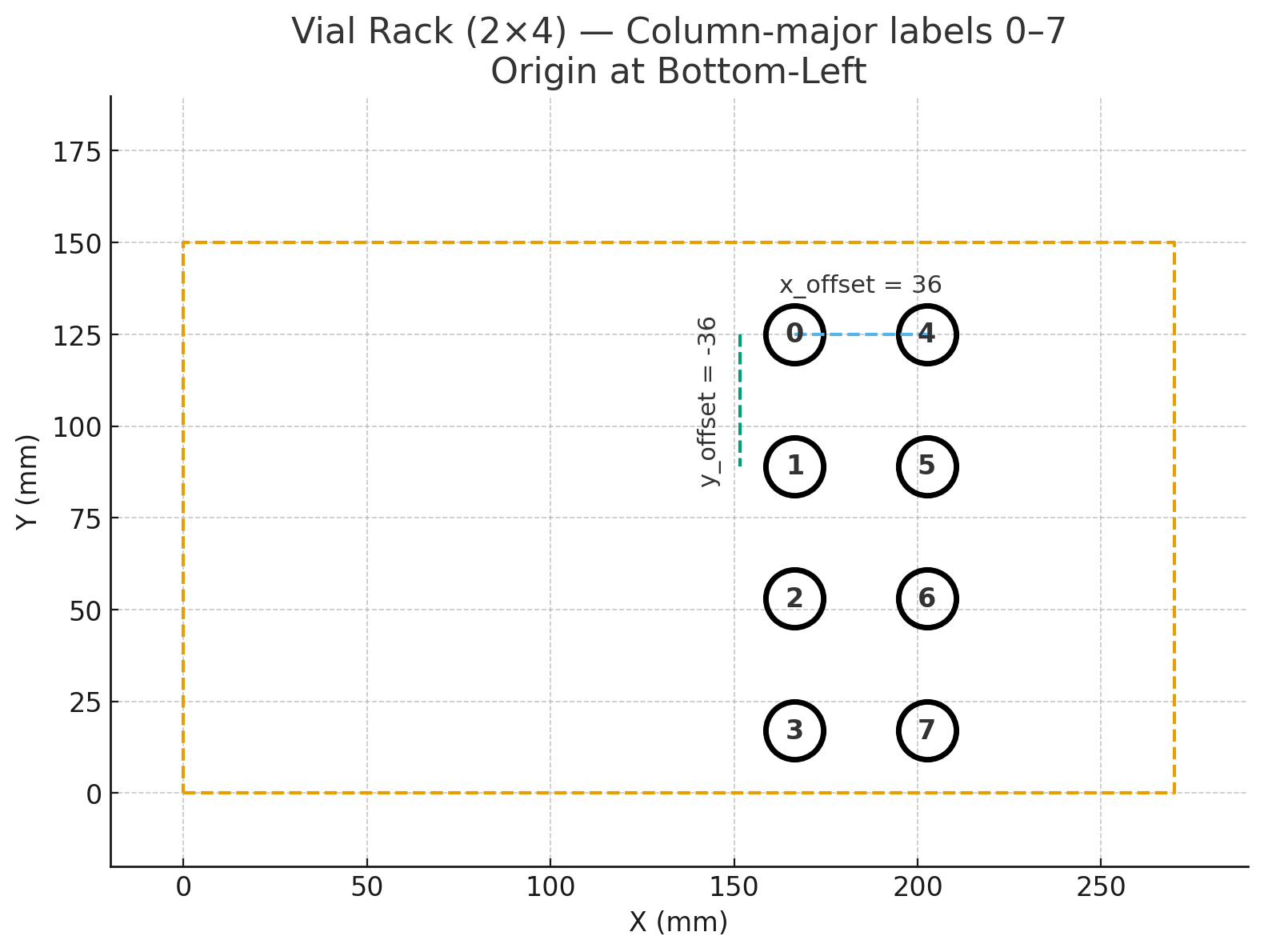
Regular grids without named wells can be described in YAML and addressed by
index via move_to_location():
vial_rack:
  num_x: 2          # columns
  num_y: 4          # rows
  x_origin: 166.5
  y_origin: 125
  z_origin: 0
  x_offset: 36
  y_offset: -36
The location index walks a full column before advancing.
Deck state
The deck_state module tracks per-well status across all slots with YAML
persistence:
from cnc_machine_core import DeckState

ds = DeckState()
ds.init_wells_from_labware("1", plate)
ds.init_from_preset({"1": {"A1": "sample"}})
ds.set_status("1", "A1", "processed")                # auto-saves
loc = ds.find_next(["1", "2"], "sample")             # ("1", "A2")
ds.count(["1"], "processed")
ds.summary()
Status strings are application-defined. A sample preset is in
examples/liquid_handling/deck_preset.yaml.
Z calibration
Z heights live in tools/cnc_config.yaml under z_heights: and are measured
empirically per (tool, labware, action) — see
docs/SETUP.md §4. Each shipped example
includes calibrated values for its reference build; remeasure by hand if
yours differs.
Tool wrapper contract
Every tool class follows the same shape, so the protocols read the same way across examples:
class MyTool:
    def __init__(self, cnc_machine, tool_config):
        self.cnc = cnc_machine
        self.offset = tool_config.get("offset", {"x": 0, "y": 0, "z": 0})
        # extract parameters from tool_config["parameters"]
See
examples/liquid_handling/tools/picus_pipette.py
for a wrapper around a vendor serial driver, and
examples/vacuum_pick_and_place/tools/vacuum_gripper.py
for a wrapper that drives the CNC's spindle terminals directly (no separate
serial port).
Authors and acknowledgements
Authors: Owen Melville, Kelvin Chow.
CNC-based scientific instruments inspired by the Keith Brown Lab [1] [2].
License
GNU General Public License v3.0 or later. See LICENSE.
Project details
Verified details
These details have been verified by PyPIProject links
GitHub Statistics
Maintainers
Release history Release notifications | RSS feed


Download files
Download the file for your platform. If you're not sure which to choose, learn more about installing packages.
Source Distribution
Built Distribution
Filter files by name, interpreter, ABI, and platform.
If you're not sure about the file name format, learn more about wheel file names.
Copy a direct link to the current filters
File details
Details for the file cnc_4_science-0.9.0.tar.gz.
File metadata
- Download URL: cnc_4_science-0.9.0.tar.gz
- Upload date:
- Size: 29.6 kB
- Tags: Source
- Uploaded using Trusted Publishing? Yes
- Uploaded via: twine/6.1.0 CPython/3.13.12
File hashes
| Algorithm | Hash digest | |
|---|---|---|
| SHA256 |
04acd395fa7a9cab10128c6f4edc72a5a5f4842f834ac479dcb9931642b5325e
|
|
| MD5 |
aa45d9deef9a2a2937f3bafdba4d6be2
|
|
| BLAKE2b-256 |
8a4c7cfcb673d704cb3ed680bf714e8f1ccaed2117138b3e2cf9135c86100c01
|
Provenance
The following attestation bundles were made for cnc_4_science-0.9.0.tar.gz:
Publisher:
publish.yml on AccelerationConsortium/cnc-4-science
-
Statement:
-
Statement type:
https://in-toto.io/Statement/v1 -
Predicate type:
https://docs.pypi.org/attestations/publish/v1 -
Subject name:
cnc_4_science-0.9.0.tar.gz -
Subject digest:
04acd395fa7a9cab10128c6f4edc72a5a5f4842f834ac479dcb9931642b5325e - Sigstore transparency entry: 1821977430
- Sigstore integration time:
-
Permalink:
AccelerationConsortium/cnc-4-science@52738920ad4e1f156530a4cacfc1654a2d1d218d -
Branch / Tag:
refs/tags/v0.9.0 - Owner: https://github.com/AccelerationConsortium
-
Access:
public
-
Token Issuer:
https://token.actions.githubusercontent.com -
Runner Environment:
github-hosted -
Publication workflow:
publish.yml@52738920ad4e1f156530a4cacfc1654a2d1d218d -
Trigger Event:
push
-
Statement type:
File details
Details for the file cnc_4_science-0.9.0-py3-none-any.whl.
File metadata
- Download URL: cnc_4_science-0.9.0-py3-none-any.whl
- Upload date:
- Size: 33.8 kB
- Tags: Python 3
- Uploaded using Trusted Publishing? Yes
- Uploaded via: twine/6.1.0 CPython/3.13.12
File hashes
| Algorithm | Hash digest | |
|---|---|---|
| SHA256 |
35d69afb2f2a66a1f715edf9d6f238a8a811e5bf34203f32bc7d7850d4096c72
|
|
| MD5 |
ff0af91ced7c39c4d6cc5c00a0d8bbbe
|
|
| BLAKE2b-256 |
edb8bda22b6e10d6d7273c02d04142d87ec6a6ebf27878735b0872b56762c22e
|
Provenance
The following attestation bundles were made for cnc_4_science-0.9.0-py3-none-any.whl:
Publisher:
publish.yml on AccelerationConsortium/cnc-4-science
-
Statement:
-
Statement type:
https://in-toto.io/Statement/v1 -
Predicate type:
https://docs.pypi.org/attestations/publish/v1 -
Subject name:
cnc_4_science-0.9.0-py3-none-any.whl -
Subject digest:
35d69afb2f2a66a1f715edf9d6f238a8a811e5bf34203f32bc7d7850d4096c72 - Sigstore transparency entry: 1821977624
- Sigstore integration time:
-
Permalink:
AccelerationConsortium/cnc-4-science@52738920ad4e1f156530a4cacfc1654a2d1d218d -
Branch / Tag:
refs/tags/v0.9.0 - Owner: https://github.com/AccelerationConsortium
-
Access:
public
-
Token Issuer:
https://token.actions.githubusercontent.com -
Runner Environment:
github-hosted -
Publication workflow:
publish.yml@52738920ad4e1f156530a4cacfc1654a2d1d218d -
Trigger Event:
push
-
Statement type:






