

Offline document audit: LLM cost, extraction readiness, and personal data.




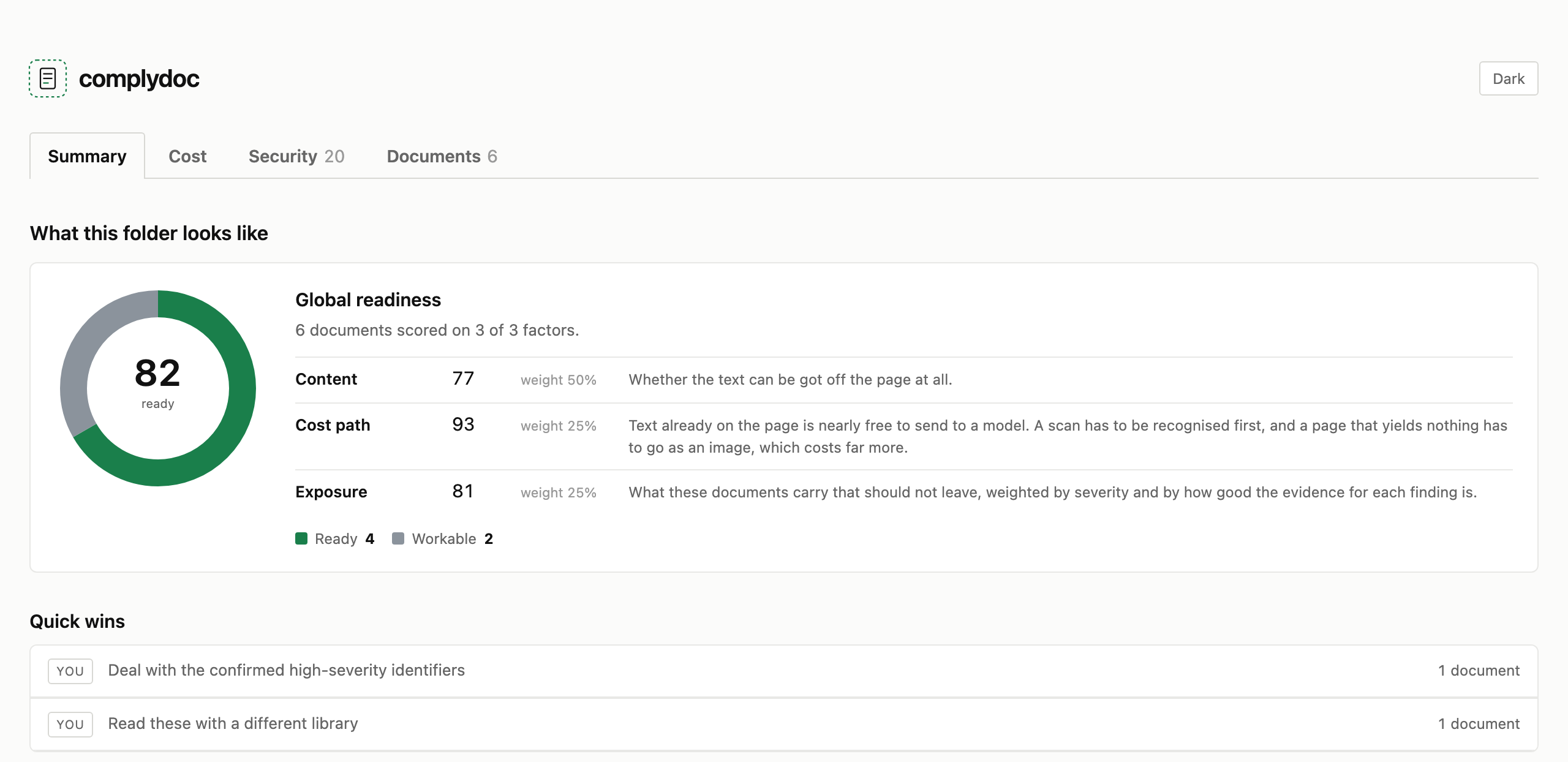
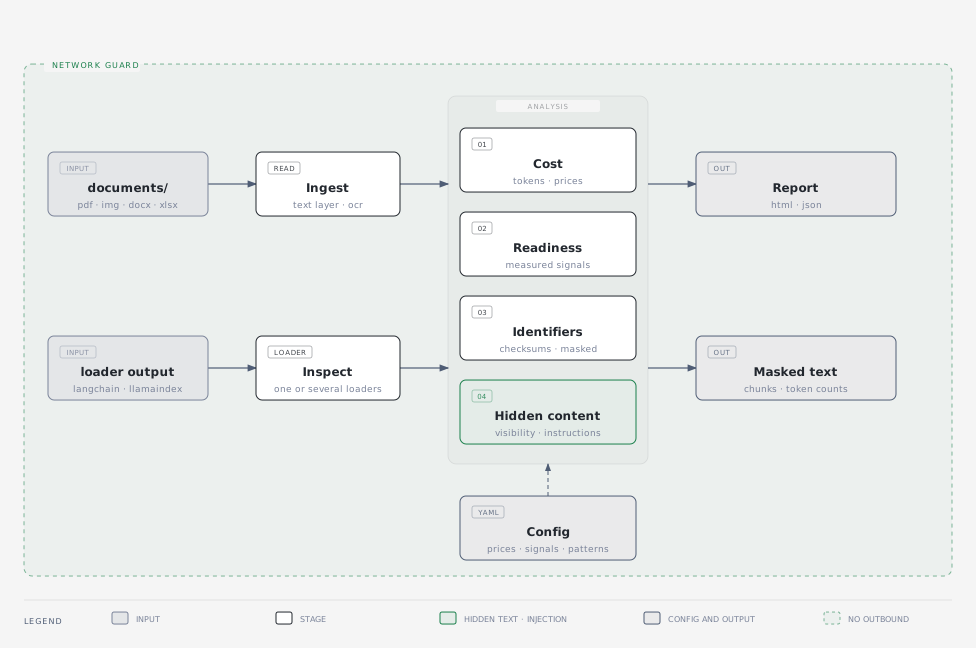
Point complydoc at a folder of business documents and it answers three questions: what they would cost to process with an LLM, how ready they are to extract data from, and what personal or financial information they hold. It is a diagnostic you run before buying a document automation system, not a pipeline you run in production.
It makes no network calls. offline.py replaces the standard library's outbound socket
and DNS entry points before any file is opened, and the test suite runs a full audit with
that guard armed. Every report records whether it was active.
Install
uv tool install git+https://github.com/duartecaldascardoso/complydoc
If complydoc: command not found, add uv's bin directory to your shell:
echo 'export PATH="$HOME/.local/bin:$PATH"' >> ~/.zshrc && exec zsh
OCR and local name detection are optional extras — a large download, and a diagnostic run is still useful without them. To install both:
uv tool install --force --reinstall --with rapidocr-onnxruntime --with spacy \
  git+https://github.com/duartecaldascardoso/complydoc
uv pip install --python "$(uv tool dir)/complydoc/bin/python" \
  https://github.com/explosion/spacy-models/releases/download/en_core_web_sm-3.8.0/en_core_web_sm-3.8.0-py3-none-any.whl
The second line puts the spaCy model inside the tool's own environment, which
spacy download cannot do because it shells out to pip and a uv tool environment has
none. complydoc doctor says which extras it can see.
Keeping it up to date
Re-run the install command with --force --reinstall. --reinstall matters as much as
--force: without it uv reuses the environment it already built for this version number,
and a change that leaves the version alone is silently ignored.
uv tool install --force --reinstall git+https://github.com/duartecaldascardoso/complydoc
Rebuilding the environment drops the optional extras, so if you use OCR or name detection,
repeat the lines above that install them. complydoc doctor tells you what the install can
see, and is worth running afterwards.
Use
See a report before you point it at anything of your own — six synthetic sample documents ship with the tool:
complydoc demo
Then the real thing:
cd ~/invoices
complydoc
That audits the folder you are standing in and writes .complydoc/complydoc.html and
.complydoc/complydoc.json, printing both as clickable links. The output directory is
hidden so a second run does not pick up the first run's reports.
complydoc audit ~/invoices --monthly-volume 2500  # extrapolate to a monthly bill
complydoc audit ~/invoices --save-text ./text     # keep the text it read, one file per document
complydoc compare ~/invoices                      # read every page with every reader installed
complydoc sensitive ~/invoices                    # only the identifier scan
complydoc readiness ~/invoices                    # only the extraction signals
complydoc cost ~/invoices                         # only the price estimate
complydoc models --new 15                         # the newest models it can price against
complydoc extractors                              # libraries that can read a text layer
complydoc engines                                 # local OCR engines
complydoc doctor                                  # what is installed
Inputs: PDF (native and scanned), PNG, JPG, TIFF, BMP, DOCX, XLSX. Folders are recursed and anything that cannot be opened is skipped and reported rather than failing the run.
Options worth knowing
| Flag | What it does |
|---|---|
--monthly-volume N |
Extrapolates the folder's cost to a monthly and annual bill |
--model <id> |
Prices one model instead of the default set; repeatable |
--save-text <dir> |
Writes the extracted text out, one file per document |
--sample N |
Audits N documents instead of all of them, keeping each file type's share |
--password <pw> |
Tried on encrypted PDFs |
--reveal |
Prints identifiers in full instead of masked, and stamps the report |
--no-ocr |
Skips reading scanned pages. Faster, and finds less |
--no-page-images / --no-extracted-text |
Leave the document content out of the report |
--extractor <id> |
Which library reads the text layer. The default is pdfplumber |
--compare-extractor <id> |
Reads every page with a second library too, and keeps what each read |
--compare-ocr-engine <id> |
The same for OCR engines, which disagree far more than the extractors |
--jobs N |
Fixes the worker count. The default reads the folder size and decides |
--print-json |
Puts the JSON on stdout and nothing else |
--sample changes what the report finds, so it says on its front page that it read a sample
and how many documents it skipped. The choice is deterministic: two runs of one folder pick
the same documents, so their reports compare.
[!IMPORTANT] The report carries the text read off each page, and a picture of each page, so that you can check what was extracted against what was there. That means the file holds the identifiers it masks elsewhere. Treat it as you would treat the documents.
--no-extracted-textand--no-page-imagesproduce a report with no document content in it.
Reading the same page twice
Three libraries can read a PDF's text layer, and they do not always agree. All three
ship with the tool; complydoc extractors lists them:
| Reader | Boxes | Tables |
|---|---|---|
pdfplumber |
per word | yes |
pdfium |
per line | no |
pypdf |
none | no |
--compare-extractor reads every page with a second reader as well and reports where the
two differ. Only the first reaches a finding; the rest are measured and never adopted. The
comparison lives inside one run — the same page on the same machine at the same moment —
so a difference is a difference between the libraries and not between two runs.
In the report, each other reader's pane shows its own text with the words only it found underlined and the words only the kept reader found struck through, so you read the page and see what moved rather than flipping between two panes. The page bar has a control that jumps straight to the next page the readers read differently — on a long document that is a handful of pages among hundreds. Spacing is not counted as a difference, or every page of every document would be marked.
They are compared in order and by word, not by size, because the case worth catching does
not change the size. On a two-column page, pdfplumber walks the text layer in the order the file
stores it, which runs across both columns and interleaves every sentence with one from the
other side. It returns the same number of characters as the readers that get it right. The
report says same words, different order when that happens, and they read different words when a reader genuinely could not read part of a page, and with --extracted-text on
you can switch between what each reader made of the page and see it.
pdfplumber remains the default because it is the only one that gives a box per word and
finds ruled tables, which several findings need. If your documents are laid out in columns,
compare it against pypdf — that costs no install and no measurable time — and look at
what the comparison says before trusting the reading.
complydoc audit ./contracts --compare-extractor pypdf --compare-extractor pdfium
Or let it use everything installed, readers and OCR engines both:
complydoc compare ./contracts
It says which readers it is using before it starts. Reading each page several times is slower than a plain audit, so it is a command you point at a sample rather than a nightly job.
A reader that returns no geometry, like pypdf, reports coverage as not measured rather
than as nought per cent, and the findings that need boxes say the same.
The report
One self-contained HTML file — no server, no network, no assets to load — behind a tab bar.
| Page | Answers |
|---|---|
| Summary | Cost per 1,000 documents, AI readiness, how long processing takes, sensitive items per document |
| Cost | Every model across three processing architectures, filterable by provider |
| Security | What personal data is in there, by category and by occurrence, sortable by severity |
| Documents | A file browser: every page beside the text read off it, with its signals a tab away |
The JSON alongside it is sorted and stable, so two runs can be compared with diff. It
carries a schema version and a digest of the config that produced it.
What it measures
Cost. Page count, dimensions, DPI, text layer coverage, text tokens from a real tokenizer, and vision tokens at each resolution. Vision formulas differ by provider — some tile the image, some use width by height, some charge a flat count — so all three shapes live in configuration, not in code.
Three architectures are compared: the text layer alone, text plus local OCR, and vision. Cost alone favours the text layer, but it only reaches documents that have one, so the number of documents each approach can serve is shown beside every figure. Where a provider publishes a batch price, that is shown too.
Input cost only — output depends on your prompt, which complydoc cannot know. Prices are either verified against the provider's own page or imported from a catalogue, and the report says which; an imported price is never presented as a checked one.
Time. Reading and analysing is measured on the machine that runs the audit, so the report
quotes a rate it observed rather than one it assumed: a breakdown by stage, per document, per
page, and the OCR throughput that dominates a folder of scans — then what that rate means for
100, 1,000, 10,000 and 100,000 documents. That is the work before anything reaches a model.
Time on the model is not estimated, because complydoc cannot benchmark a hosted endpoint
offline; add input_tokens_per_second to a model from your own benchmark and it will.
Readiness. Nineteen signals, each with a measured value, a rating, and one sentence on why it matters. Text layer and coverage, image proportion, garbled characters, tables and merged cells, columns, rotation and skew, scan DPI, fonts, date consistency, page sizes, language, encryption, and form fields — which count as a positive signal. A high score means a document that is ready to process as it stands.
The weighted score exists only because every weight is visible in configuration and printed beside its row. Signals that cannot be measured are excluded rather than counted as failures.
Personal data. Detection is not tied to one jurisdiction. Every national identifier is checksum-validated, so enabling them all does not flood the report:
| Region | Identifiers |
|---|---|
| UK | National Insurance, sort code, account number, postcode, address, phone, VAT, UTR |
| US | Social Security number, EIN, ABA routing number |
| IE · NL · PT · ES · FR · DE | PPS, BSN, NIF, DNI/NIE, NIR, Steuer-ID |
| EU | VAT numbers, per country length rules |
| International | IBAN, payment cards, email, dates of birth, names and organisations |
Pages with no readable text are listed by number and excluded from the counts, so a page nobody could read stays distinguishable from a page with nothing on it. Every mark on the page layout explains, on hover, what was found and why it matters.
[!IMPORTANT] Values are masked in the findings — at most the last four characters.
--revealunmasks them and stamps the report; categories configured asnever_revealstay masked even then.
Configuration
Everything a reader might want to disagree with — a price, a token formula, a signal weight,
a rating threshold, a detection pattern — lives in YAML, not in code. Point --config-dir at
a copy to change any of it.
| File | Contents |
|---|---|
pricing.yaml |
Model prices, how many to compare per provider, vision formulas |
model_prices.json |
The current first-party models, available to --model |
readiness.yaml |
Signal weights, rating thresholds, scoring rules |
sensitive.yaml |
Patterns, validators, regions, severities, masking rules |
Three providers are compared by default, three models each, chosen from the newest the catalogue knows about. To reach any of the others:
complydoc models --new 15                     # the most recently released
complydoc models gpt                          # or search
complydoc audit ~/invoices -m gpt-6-astra     # and price against one by name
From an agent
complydoc audit ./invoices --print-json | jq '.aggregate'
--print-json puts the report on stdout and nothing else; progress goes to stderr. complydoc
ships an agent skill, so one install gives you the tool and the instructions for driving it:
complydoc skill --install # → ~/.claude/skills/complydoc/SKILL.md
Contributing
Architecture, how to add a signal, the test fixtures, and the release process are in
CONTRIBUTING.md. The changelog ships with the package, at
src/complydoc/CHANGELOG.md.
Licence
MIT
1 maintainer

Release files for complydoc 0.3.0
For a detailed explanation of source distributions (sdists) and built distributions (wheels), please see the package formats documentation.
Source distribution (sdist)
| File | Size | Uploaded | |
|---|---|---|---|
| complydoc-0.3.0.tar.gz | 3.6 MB | Details |
Built distribution (wheel)
| File | Interpreter | ABI | Platform | Reset |
|---|---|---|---|---|
| complydoc-0.3.0-py3-none-any.whl | Python 3 | none | any | Details |
Total release size: 6.4 MB
Release files / complydoc-0.3.0.tar.gz
| Download URL | complydoc-0.3.0.tar.gz |
|---|---|
| Size | 3.6 MB |
| Tags | Source |
|
SHA-256 checksum How to use checksums |
0f80dae31c468fdd05d338c28d38c787af63c641a9e1cfde103800c5f7bb044d
|
|
BLAKE2b-256 checksum How to use checksums |
68550dc6738fcb582cdace3d3c041aed3addbd2e574dd81bf840d2e5129f89d2
|
| Upload date | |
|
Uploaded using Trusted Publishing? What is trusted publishing? |
Yes |
| Uploaded via |
twine/7.0.0 CPython/3.13.14
|
Provenance
Provenance describes where a file came from. On PyPI, provenance is shared via attestations, which provide a verifiable record of the build or publishing details. View details, limitations and caveats.


PyPI Publish Attestation
PyPI verified that this artifact, at this checksum, originated from the publisher listed below.
Signed by GitHub Actions, verified by PyPI on Sep 10, 2026.
Transparency logRelease files / complydoc-0.3.0-py3-none-any.whl
| Download URL | complydoc-0.3.0-py3-none-any.whl |
|---|---|
| Size | 2.9 MB |
| Tags | Python 3 |
|
SHA-256 checksum How to use checksums |
c26e6981b33d0b788529ae5d257ff44b5f983c604704c9e604e53731de8ac91d
|
|
BLAKE2b-256 checksum How to use checksums |
bb5d1b9f4923cc0575590fe4f645b900fb69e318ce317ae69a80bfdc91b94294
|
| Upload date | |
|
Uploaded using Trusted Publishing? What is trusted publishing? |
Yes |
| Uploaded via |
twine/7.0.0 CPython/3.13.14
|
Provenance
Provenance describes where a file came from. On PyPI, provenance is shared via attestations, which provide a verifiable record of the build or publishing details. View details, limitations and caveats.
PyPI Publish Attestation
PyPI verified that this artifact, at this checksum, originated from the publisher listed below.
Signed by GitHub Actions, verified by PyPI on Sep 10, 2026.
Transparency log













