

CostOpt — Developer-Native LLM Cost Intelligence ⚡
Drop-in wrapper for OpenAI, Anthropic & Gemini clients that adds automatic caching, smart model routing, circuit breaker protection, and a real-time observability dashboard — all 100% local.
Stop waiting for a $500 monthly cloud bill to figure out where your LLM budget went.







⚡ Overview
The Problem
Generative AI applications frequently overspend by:
- Executing Duplicate Requests: Re-querying upstream APIs for exact or near-identical prompts.
- Over-provisioning Models: Routing simple classification, extraction, or short summarization queries to expensive flagship models (e.g.,
gpt-4o,claude-3-5-sonnet) when lower-cost models (gpt-4o-mini,claude-3-haiku,llama3,deepseek-r1) satisfy accuracy requirements. - Lack of Cost Visibility: Difficulty tracking net savings, model breakdown, or request-level optimization decisions.
The CostOpt Solution
CostOpt acts as a transparent, drop-in SDK interceptor and decision engine that:
- Serves prompt hits locally in <15ms at $0.00 cost via an SQLite prompt cache.
- Analyzes request intent and complexity to automatically route simple tasks to cost-effective models.
- Enforces quality guardrails and automatic outage failovers.
- Records unified FinOps telemetry displayed on a real-time web console.
🔌 1-Line Zero-Churn Integration
# ─── BEFORE (Standard OpenAI Client) ────────────────────────────────────────
from openai import OpenAI
client = OpenAI()

# ─── AFTER (With CostOpt — zero other changes needed) ───────────────────────
from openai import OpenAI
from costopt import CostOpt

client = CostOpt(OpenAI())  # 👈 Intercepts transparently

# Your API calls are 100% identical — CostOpt automatically analyzes, caches, & routes:
response = client.chat.completions.create(
    model="gpt-4o",
    messages=[{"role": "user", "content": "Classify customer feedback: Great product!"}]
)
print(response.choices[0].message.content)
⚡ Core Features
| Feature | Description |
|---|---|
| 🗄️ Multi-Tier Prompt Cache | Tier 1 exact SHA-256 hash matching (<15ms, $0.00) + Tier 2 local TF-IDF cosine vector similarity matching. Includes parameter hashing (temperature, tools, response_format, seed). |
| 🧠 Intelligent Decision Engine | Classifies prompts into 7 task categories (simple_classification, extraction, summarization, coding, reasoning, creative_generation, general_chat) with confidence scoring. |
| 🔀 Policy-Aware Model Router | Rule-based keyword and task-complexity routing — simple tasks auto-rerouted to efficient models (gpt-4o ➔ gpt-4o-mini / deepseek-r1). |
| 🛡️ Circuit Breaker | Detects call velocity loops from the same file/line location and trips CostOptCircuitBreakerError. |
| 🔄 Outage Failover | Auto-retries fallback models on 429/503 errors (gpt-4o ➔ claude-3-5-sonnet ➔ llama3). |
| 📊 Observability & FinOps Console | Premium dark-mode dashboard (#050505 canvas, fixed left sidebar, bento grid layout) for Overview, Spend, Optimizations, Requests, and Policies. |
| 🔍 Decision Intelligence Traces | Step-by-step visual trace flow explaining every request analysis, cache evaluation, and routing decision. |
| 🖥️ VS Code Extension | Inline CodeLens cost per request, call counts, hover panels, and status bar metrics directly inside VS Code. |
| 🔒 100% Local & Private | Stored in local SQLite (costopt_telemetry.db, costopt_cache.db). Zero data leaves your machine. |
🏗️ Architecture
flowchart TD
    App["Calling Application"] -->|ChatCompletion.create| Interceptor["CostOpt SDK Client Interceptor"]
    Interceptor --> CB["Circuit Breaker Check"]
    CB --> Engine["Centralized Decision Engine"]

    subgraph Engine ["Intelligent Decision Pipeline"]
        Analyzer["1. Request Analyzer<br/>Task & Complexity Classification"]
        CacheLayer["2. Semantic Cache Layer<br/>Tier 1: SHA-256 Exact - Tier 2: TF-IDF Cosine"]
        Registry["3. Model Capability Registry<br/>Capability Scores & Token Pricing"]
        Guardrails["4. Fallback & Quality Guardrails<br/>Confidence & Outage Failover"]
        Estimator["5. Cost Estimator<br/>Baseline vs Target Cost Delta"]
    end

    CacheLayer -->|Cache HIT <15ms| Hit["Return Local Response $0.00"]
    CacheLayer -->|Cache MISS| Registry
    Registry --> Guardrails
    Guardrails -->|Decision: REROUTE / DIRECT| API["Upstream LLM API"]
    API -->|Outage 429/500| Failover["Failover Secondary Model"]

    Hit --> DB[("SQLite Telemetry & Cache DB")]
    API --> DB
    Failover --> DB

    DB --> Dashboard["CostOpt FinOps Dashboard<br/>http://127.0.0.1:8400"]
🚦 Optimization Decision Flow
Every request is evaluated by the centralized DecisionEngine and assigned one of four execution outcomes:
| Decision | Condition | Execution Path |
|---|---|---|
CACHE |
Prompt matches an existing exact or semantic entry in costopt_cache.db. |
Returned locally in <15ms ($0.00 cost). |
REROUTE |
Cache miss; task is low/medium complexity, confidence >= 0.70, and a cheaper capable model exists. | Routed to cost-effective target model (e.g., gpt-4o ➔ gpt-4o-mini). |
DIRECT |
Cache miss; high-complexity reasoning/coding task or low confidence (<0.70). | Executed using original requested model for maximum accuracy. |
FALLBACK |
Primary model endpoint fails or circuit breaker indicates outage. | Auto-failed over to secondary fallback model. |
🚀 Quickstart Guide
Step 1 — Install Python SDK
pip install costopt
Step 2 — Wrap your LLM client
from openai import OpenAI
from costopt import CostOpt

client = CostOpt(OpenAI())

response = client.chat.completions.create(
    model="gpt-4o",
    messages=[{"role": "user", "content": "Classify sentiment: This product is outstanding!"}]
)
print(response.choices[0].message.content)
Step 3 — Launch the Observability Dashboard
costopt dashboard
# Or run via Python module:
python -m costopt.main dashboard
Open http://127.0.0.1:8400 in your browser.
📊 Observability Dashboard
The web console features a modern dark-mode aesthetic (#050505 canvas, translucent borders, ambient glows, fixed left sidebar shell, and bento grid layout) across 5 primary navigation tabs:
1. Overview
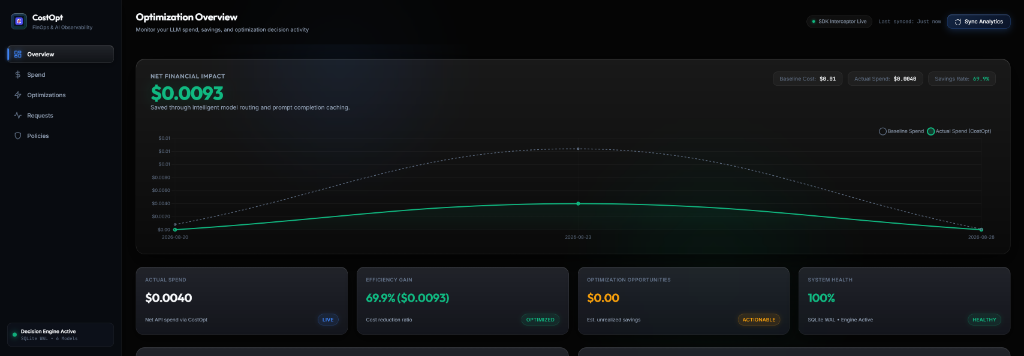
Net Financial Impact Hero Glass Card (
$0.0093/ dynamic savings), smooth spend trend area chart, bento metrics grid (Actual Spend, Efficiency Gain, Opportunities, System Health), top recommendation card, and live telemetry feed.
2. Spend Analytics
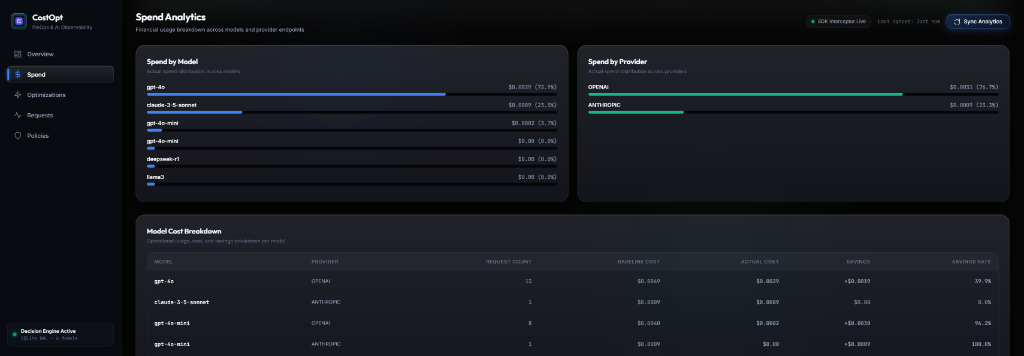
Actual LLM spend hero card with baseline comparison, spend by model/provider bento distribution cards, and sortable model cost breakdown table.
3. Optimizations Engine
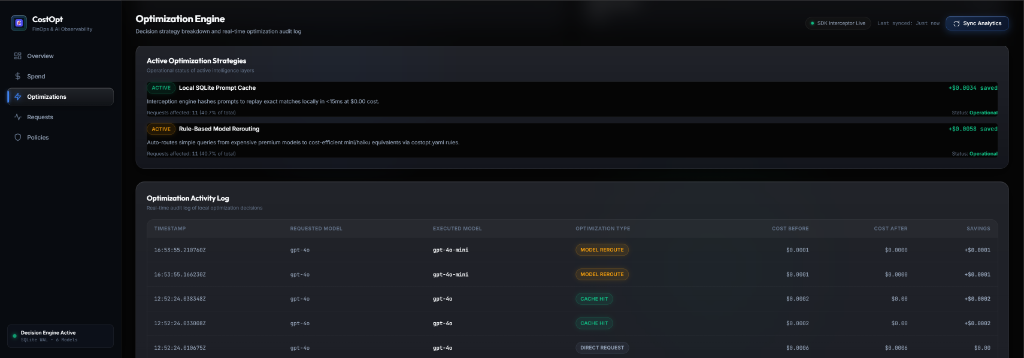
Active optimization strategy status cards (Local SQLite Cache, Rule-Based Model Rerouting), total net savings per strategy, and real-time optimization decision activity log.
4. Requests Explorer & Decision Intelligence Trace
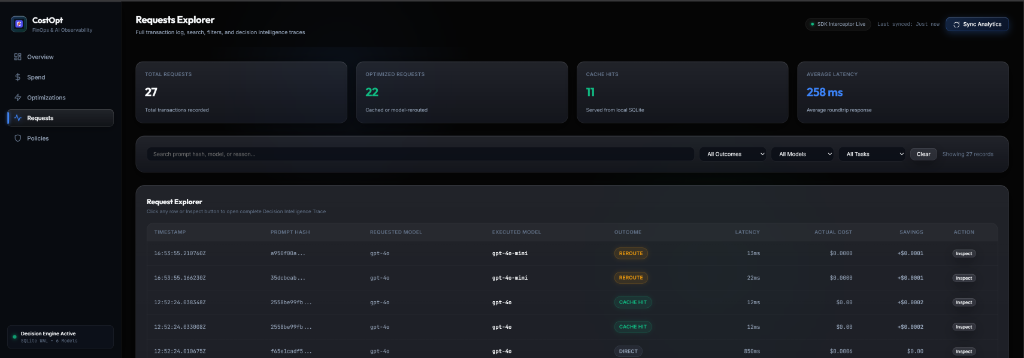
Request explorer transaction log table with prompt search, outcome filter badges (
CACHE HIT,REROUTE,DIRECT), and Request Inspection Drawer displaying step-by-step Decision Intelligence Traces.
5. Policies Configuration
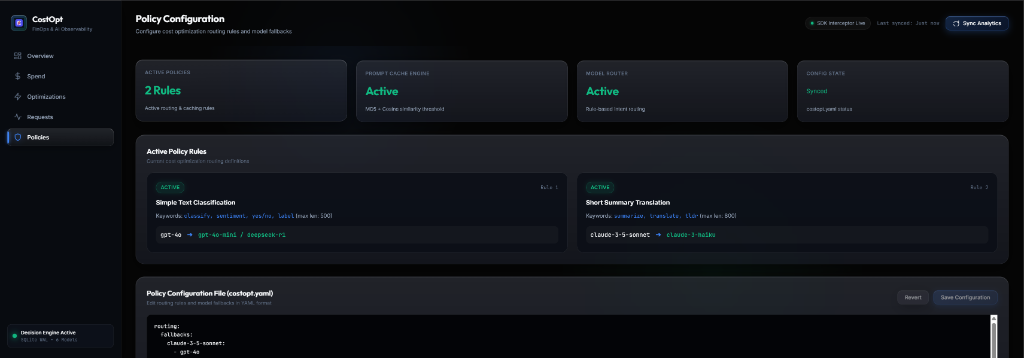
Active policy rules visual cards (
Requested Model ➔ Target Model), model routing map, livecostopt.yamlpolicy editor with unsaved state detection, save/revert options, and cache/telemetry management.
🌐 Multi-Provider Support
CostOpt supports wrapping OpenAI, Anthropic, and Google Gemini clients:
# OpenAI
from openai import OpenAI
from costopt import CostOpt

client = CostOpt(OpenAI(), provider="openai")

# Anthropic
import anthropic
from costopt import CostOpt

client = CostOpt(anthropic.Anthropic(), provider="anthropic")

# Google Gemini (via OpenAI-compatible API)
from openai import OpenAI
from costopt import CostOpt

client = CostOpt(
    OpenAI(api_key="...", base_url="https://generativelanguage.googleapis.com/v1beta/openai/"),
    provider="google"
)
Supported pricing catalogs: OpenAI, Anthropic, Google Gemini, HuggingFace, Ollama (local, $0.00).
📦 Integration with Popular Frameworks
LangChain:
from langchain_openai import ChatOpenAI
from costopt import CostOpt
from openai import OpenAI

llm = ChatOpenAI(client=CostOpt(OpenAI()).client)
LlamaIndex:
from llama_index.llms.openai import OpenAI as LlamaOpenAI
from costopt import CostOpt
from openai import OpenAI

llm = LlamaOpenAI(client=CostOpt(OpenAI()).client)
FastAPI:
from fastapi import FastAPI
from openai import OpenAI
from costopt import CostOpt

app = FastAPI()
ai_client = CostOpt(OpenAI())
🔧 Configuration Guide (costopt.yaml)
CostOpt reads a costopt.yaml file from your working directory at startup. If no file is found, a commented template is auto-generated for you.
The config has two jobs:
- Routing Rules — fire before the API call to proactively reroute to a cheaper model
- Fallback Chains — fire after an API failure to automatically retry on a different model
Full Config Structure
routing:
  fallbacks:
    <your-primary-model>:
      - <fallback-model-1>
      - <fallback-model-2>

  rules:
    - name: "Human-readable label shown in dashboard"
      keywords: ["word1", "word2"]   # trigger if ANY keyword found in prompt
      max_prompt_length: 500         # only trigger for short prompts (chars)
      original_model: "gpt-4o"      # only apply if THIS model was requested
      target_model: "gpt-4o-mini"   # reroute to this cheaper model instead

alerts:
  enabled: false
  daily_budget_usd: 10.00
  monthly_budget_usd: 50.00
  cooldown_minutes: 60
  slack_webhook_url: ""
Note: All fields in
rulesare optional. A rule with nooriginal_modelmatches any model. A rule with nokeywordsmatches any prompt within the length limit.
Provider Examples
Pick the providers you are using and copy the relevant fallback chains.
OpenAI
routing:
  fallbacks:
    gpt-4o:
      - gpt-4o-mini       # 10x cheaper, same provider
    gpt-4o-mini:
      - gpt-4o            # escalate up if mini can't handle it
    gpt-4:
      - gpt-4o
      - gpt-4o-mini

  rules:
    - name: "Route short/simple tasks to mini"
      keywords: ["classify", "yes/no", "sentiment", "label", "extract", "summarize"]
      max_prompt_length: 800
      original_model: "gpt-4o"
      target_model: "gpt-4o-mini"
Anthropic (Claude)
routing:
  fallbacks:
    claude-3-5-sonnet:
      - claude-3-haiku    # 5x cheaper
    claude-3-opus:
      - claude-3-5-sonnet
      - claude-3-haiku
    claude-3-haiku:
      - claude-3-5-sonnet # escalate if needed

  rules:
    - name: "Simple tasks — sonnet to haiku"
      keywords: ["classify", "extract", "translate", "summarize"]
      max_prompt_length: 600
      original_model: "claude-3-5-sonnet"
      target_model: "claude-3-haiku"
Google Gemini
routing:
  fallbacks:
    gemini-1.5-pro:
      - gemini-1.5-flash  # much cheaper
    gemini-1.5-flash:
      - gemini-1.5-pro    # escalate on failure

  rules:
    - name: "Extraction tasks — pro to flash"
      keywords: ["extract", "list", "bullet", "summarize", "tldr"]
      max_prompt_length: 1000
      original_model: "gemini-1.5-pro"
      target_model: "gemini-1.5-flash"
Ollama (Local / $0.00)
routing:
  fallbacks:
    llama3:
      - mistral           # another local model
      - gpt-4o-mini       # cloud fallback if local fails
    qwen2.5:0.5b:
      - llama3
    mistral:
      - llama3
      - gpt-4o-mini
Cross-Provider (Mixed Stack)
# If your primary cloud model fails, fall back to a different provider entirely:
routing:
  fallbacks:
    gpt-4o:
      - claude-3-5-sonnet   # cross-provider failover
      - gemini-1.5-flash
      - llama3              # local zero-cost last resort
    claude-3-5-sonnet:
      - gpt-4o
      - gemini-1.5-flash
    gemini-1.5-flash:
      - gpt-4o-mini
      - llama3
🚨 Outage Scenario Walkthrough
Here is what happens when OpenAI hits a rate limit during a production spike:
Your app calls:  client.chat.completions.create(model="gpt-4o", ...)
         │
         ▼
CostOpt intercepts → checks cache → MISS
         │
         ▼
Calls gpt-4o  ──►  429 Rate Limit Error
         │
         ▼
Reads fallbacks for "gpt-4o" from costopt.yaml:
  1st: claude-3-5-sonnet  →  ✅ success — response returned
         │
         ▼
Logs to telemetry: model_requested=gpt-4o, model_used=claude-3-5-sonnet
Dashboard shows: FALLBACK decision, $0 wasted on the failed call
Your code sees zero errors. The exception is swallowed by CostOpt's retry loop and the next available model responds transparently.
To set this up, add to your costopt.yaml:
routing:
  fallbacks:
    gpt-4o:
      - claude-3-5-sonnet   # cross-provider, catches OpenAI outages
      - gemini-1.5-flash    # Google backup
      - llama3              # local offline last resort
Routing Rules: When Do They Fire?
Rules fire proactively — before the API call, the moment CostOpt intercepts your request.
| Field | Behavior |
|---|---|
original_model |
Only apply this rule if the caller requested exactly this model |
keywords |
Rule triggers if any one keyword appears anywhere in the prompt text |
max_prompt_length |
Rule only triggers if the combined prompt is shorter than this (in characters) |
target_model |
The cheaper model to call instead |
All three conditions must pass for the rule to fire. If no rule matches, the original model is used.
Resetting Telemetry & Cache
python -m costopt reset-all         # wipe both telemetry logs + prompt cache
python -m costopt clear-telemetry   # wipe only the activity log
python -m costopt clear-cache       # wipe only the prompt cache
Or via the dashboard at Settings → Policies tab → Reset buttons.
🖥️ VS Code Extension
Install the CostOpt extension from the VS Code Marketplace or Open VSX Registry.
Features:
- 📍 CodeLens Inlines — cost per request, avg tokens, call count directly above
client.chat.completions.create()lines - 💬 Hover Panels — full cost breakdown + MD5 hash + cache status on hover
- 📈 Sidebar Views — Spend Forecast, Feature Attribution, Cost Drift Warnings
- 📌 Status Bar —
CostOpt: $8.42 todaylive in VS Code bottom bar
🧪 Testing
Run the automated Pytest test suite:
python -m pytest tests/ -v
Test Status: All 27 test cases pass cleanly (100% pass rate).
❓ FAQ
Q: Does CostOpt send my prompts or data to external servers?
No. 100% local. All telemetry, cache, and pricing data is stored in local SQLite files (
costopt_telemetry.db,costopt_cache.db). Zero data leaves your machine.
Q: Does it add latency to my LLM calls?
No. Prompt hashing and cache checks take under 1ms. Telemetry is written asynchronously in a background thread.
Q: What does a cache hit cost?
$0.00. Cached responses are replayed locally in under 15ms without hitting paid provider APIs.
Q: Does it work with LangChain / LlamaIndex / FastAPI?
Yes. Pass the wrapped client (
CostOpt(OpenAI()).client) into any framework that accepts a raw OpenAI client object.
Q: How does fuzzy/semantic cache matching work?
CostOpt uses TF-IDF word and character n-gram cosine vector similarity. Set
similarity_thresholdincostopt.yamlto enable near-duplicate matching (e.g.,0.90= 90% similar prompts return cached response).
Q: How do I reset all telemetry to start fresh?
Click Reset Telemetry Analytics on the Policies tab in the dashboard console.
📄 License
This project is licensed under the MIT License. See LICENSE for details.
Built for developers who want to ship fast and spend smart. 100% open source.
1 maintainer

Release files for costopt 0.2.1
For a detailed explanation of source distributions (sdists) and built distributions (wheels), please see the package formats documentation.
Source distribution (sdist)
| File | Size | Uploaded | |
|---|---|---|---|
| costopt-0.2.1.tar.gz | 79.0 kB | Details |
Built distribution (wheel)
| File | Interpreter | ABI | Platform | Reset |
|---|---|---|---|---|
| costopt-0.2.1-py3-none-any.whl | Python 3 | none | any | Details |
Total release size: 133.5 kB
Release files / costopt-0.2.1.tar.gz
| Download URL | costopt-0.2.1.tar.gz |
|---|---|
| Size | 79.0 kB |
| Tags | Source |
|
SHA-256 checksum How to use checksums |
d60971c78eec2957e4cbb30886fb7e951ab494e6fcdc62de2de2290738ee3a4a
|
|
BLAKE2b-256 checksum How to use checksums |
eadf95b0b3c2fa9b55ec16bf3c21164afedd6ad68066ce9676fb88acd1f7c9c9
|
| Upload date | |
|
Uploaded using Trusted Publishing? What is trusted publishing? |
No |
| Uploaded via |
twine/7.0.0 CPython/3.14.3
|
Release files / costopt-0.2.1-py3-none-any.whl
| Download URL | costopt-0.2.1-py3-none-any.whl |
|---|---|
| Size | 54.4 kB |
| Tags | Python 3 |
|
SHA-256 checksum How to use checksums |
c670ca1731e54b0504eedfb574888c69472781539e96a3cee844503298da2467
|
|
BLAKE2b-256 checksum How to use checksums |
b2e2570f9a614764ade3a3a4ad610b3ed7e328970de0700ddf01f64953fa485e
|
| Upload date | |
|
Uploaded using Trusted Publishing? What is trusted publishing? |
No |
| Uploaded via |
twine/7.0.0 CPython/3.14.3
|














