











counted-float
This Python package provides functionality for...
- counting floating point operations (FLOPs) of numerical algorithms implemented in plain Python, optionally weighted by their relative cost of execution
- running benchmarks to estimate the relative cost of executing various floating-point operations (requires the
benchmarkingoptional dependency)
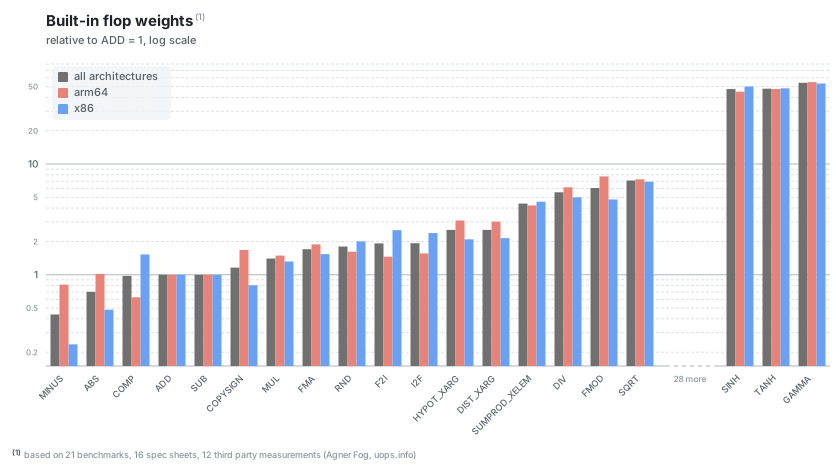
Flop weights are computed using a highly curated dataset spanning a wide range of modern CPUs:
- 21 benchmarks, 16 spec sheets, 12 third party measurements (Agner Fog, uops.info)
- covering x86 (Intel, AMD) and ARM (Apple, AWS, Azure) architectures
The target application area is evaluation of research prototypes of numerical algorithms where (weighted) flop counting can be useful for estimating total computational cost, in cases where benchmarking a compiled version (C, Rust, ...) is not feasible or desirable.
Full documentation: counted-float.readthedocs.io
Installation
Use your favorite package manager such as uv or pip. What you install decides which of
the three capabilities you get:
pip install counted-float                  # counting
pip install counted-float[benchmarking]    # + measure this machine's flop costs
pip install counted-float[cli]             # + the counted_float command
Counting is the base install and needs nothing else. Building CountedFloat
values, counting contexts, the built-in flop weights, reading benchmark results
shipped with the package, and evaluating what counting costs you on your own
workload all work here. It is about 17 MB installed.
Benchmarking measures your machine — running the flop benchmark suite to derive weights for the hardware you are on, rather than using the shipped consensus ones. It needs compiled probes (numba) and the packages that describe a CPU (psutil, py-cpuinfo), which is most of the install size: with it, expect roughly 180 MB. Without the extra, calling the benchmark suite tells you what to install instead of failing obscurely, and nothing else is affected.
The CLI adds the counted_float command. The command is always installed;
without the extra it reports what to install instead of producing a traceback.
Extras compose, so counted-float[benchmarking,cli] gets you everything.
Quick start
CountedFloat is a drop-in replacement for the built-in float; it is "contagious", so results of
math operations involving a CountedFloat stay CountedFloat:
from counted_float import CountedFloat

cf = CountedFloat(1.3)
f = 2.8

result = cf + f  # result = CountedFloat(4.1)

is_float_1 = isinstance(cf, float)  # True
is_float_2 = isinstance(result, float)  # True
FLOPs performed by CountedFloat values are counted while a FlopCountingContext is active:
from counted_float import CountedFloat, FlopCountingContext

cf1 = CountedFloat(1.73)
cf2 = CountedFloat(2.94)

with FlopCountingContext() as ctx:
    _ = cf1 * cf2
    _ = cf1 + cf2

counts = ctx.flop_counts()   # {FlopType.MUL: 1, FlopType.ADD: 1}
counts.total_count()         # 2
Performance overhead
CountedFloat adds counting overhead in two forms — the price of Python-level
operator dispatch and result wrapping. How much slower your code runs depends
almost entirely on its operation mix:
- native float ops (
+,-,*,/, comparisons): the expensive end of the range — the fixed per-operation dispatch cost dwarfs the nanoseconds of actual arithmetic; - patched
math.*calls (math.sqrt,math.lgamma, …): a roughly fixed surcharge per call, so the multiple shrinks as the function itself gets more expensive.
counted_float evaluate-overhead measures your own machine — a per-flop-type
overhead table, the geomean across types, and a practical mixed workload; see
the captured example
for representative figures.
Three facts worth knowing:
- counting state is per-thread: a
FlopCountingContextmeasures only the thread that opened it (open one context per worker thread to measure multi-threaded code, and sum the results). Free-threaded builds (3.14t) are supported and CI-tested; - the overhead is inherent and
PauseFlopCountingdoes not reduce it (the instrumented operators still execute; only count registration stops) — the escape hatch for hot uncounted regions is converting back viafloat(x); - overhead never affects count accuracy — counts are exact regardless.
This makes CountedFloat a tool for research and prototyping code, not
production hot loops.
numpy counting is an explicit non-goal: np.float64 (float subclass) scalars
work and count correctly, but mixing CountedFloat with numpy arrays raises TypeError rather
than silently returning uncounted results — see
Known limitations
for the full boundary.
Documentation
The documentation site covers the rest:
- Counting FLOPs — the counting model, counting contexts, pausing
- Math patching semantics — how (and when)
math.*functions are instrumented - FLOP weights — built-in consensus weights, configuring your own
- Benchmarking — estimating flop weights on your own hardware
- CLI reference — using
counted_floatas a stand-alone command-line tool - Known limitations — what falls outside the counting model
- Reference — per-FLOP-type counting rules, methodology, CPU scope
1 maintainer

Download files
Download the file for your platform. If you're not sure which to choose, learn more about installing packages.
Source Distribution
Built Distribution
Filter files by name, interpreter, ABI, and platform.
If you're not sure about the file name format, learn more about wheel file names.
Copy a direct link to the current filters
File details
Details for the file counted_float-2.4.0.tar.gz.
File metadata
- Download URL: counted_float-2.4.0.tar.gz
- Upload date:
- Size: 186.4 kB
- Tags: Source
- Uploaded using Trusted Publishing? Yes
- Uploaded via:
twine/7.0.0 CPython/3.13.14
File hashes
| Algorithm | Hash digest | |
|---|---|---|
| SHA256 |
87c655101ea727e667f9f67a2d3a21a2ec48fec3f118fd8d9566a242eccfdfb6
|
|
| MD5 |
e09debdc99947f7d43ba9050fadec34f
|
|
| BLAKE2b-256 |
b90d730072d12c936a5b455d07e0e86135d02454addfdb3fd75b8ea396c41e53
|
Provenance
The following attestation bundles were made for counted_float-2.4.0.tar.gz:
Publisher:
release_tag.yml on bertpl/counted-float
-
Statement:
-
Statement type:
https://in-toto.io/Statement/v1 -
Predicate type:
https://docs.pypi.org/attestations/publish/v1 -
Subject name:
counted_float-2.4.0.tar.gz -
Subject digest:
87c655101ea727e667f9f67a2d3a21a2ec48fec3f118fd8d9566a242eccfdfb6 - Sigstore transparency entry: 2396867005
- Sigstore integration time:
-
Permalink:
bertpl/counted-float@b60d410af819ce81aba60f65d7cccf3a7e830073 -
Branch / Tag:
refs/tags/v2.4.0 - Owner: https://github.com/bertpl
-
Access:
public
-
Token Issuer:
https://token.actions.githubusercontent.com -
Runner Environment:
github-hosted -
Publication workflow:
release_tag.yml@b60d410af819ce81aba60f65d7cccf3a7e830073 -
Trigger Event:
push
-
Statement type:
File details
Details for the file counted_float-2.4.0-py3-none-any.whl.
File metadata
- Download URL: counted_float-2.4.0-py3-none-any.whl
- Upload date:
- Size: 245.5 kB
- Tags: Python 3
- Uploaded using Trusted Publishing? Yes
- Uploaded via:
twine/7.0.0 CPython/3.13.14
File hashes
| Algorithm | Hash digest | |
|---|---|---|
| SHA256 |
758154e3ba36c6a7cb1664729bef615ef59d85449295f492cbb51f7d9ece6eee
|
|
| MD5 |
16e89caf5bb23d1e39fcd6faac54fc70
|
|
| BLAKE2b-256 |
81aaf12cd064c3fcb3ce8a57100cdedf292a6adf47960c99200f277ca569dde3
|
Provenance
The following attestation bundles were made for counted_float-2.4.0-py3-none-any.whl:
Publisher:
release_tag.yml on bertpl/counted-float
-
Statement:
-
Statement type:
https://in-toto.io/Statement/v1 -
Predicate type:
https://docs.pypi.org/attestations/publish/v1 -
Subject name:
counted_float-2.4.0-py3-none-any.whl -
Subject digest:
758154e3ba36c6a7cb1664729bef615ef59d85449295f492cbb51f7d9ece6eee - Sigstore transparency entry: 2396867104
- Sigstore integration time:
-
Permalink:
bertpl/counted-float@b60d410af819ce81aba60f65d7cccf3a7e830073 -
Branch / Tag:
refs/tags/v2.4.0 - Owner: https://github.com/bertpl
-
Access:
public
-
Token Issuer:
https://token.actions.githubusercontent.com -
Runner Environment:
github-hosted -
Publication workflow:
release_tag.yml@b60d410af819ce81aba60f65d7cccf3a7e830073 -
Trigger Event:
push
-
Statement type:














