
CSVise CLI Tools
Beautiful CLI tools for CSV analysis, validation, and data cleaning with Rich-powered output



Installation • Quick Start • Features • Documentation
📋 Table of Contents
- CSVise CLI Tools
🚀 Installation
From PyPI (Recommended)
pip install csvise
From Source
git clone https://github.com/rawsabsaid/csvise-cli-tool.git
cd csvise-cli-tool
pip install -e .
⚡ Quick Start
Display CSV Data
# Beautiful table display with Rich formatting
csvise display data.csv

# Classic plain text output
csvise display data.csv --classic
Analyze Data
# Comprehensive analysis
csvise analyze data.csv

# Detect outliers and correlations
csvise analyze data.csv --outliers --correlations
Clean Data
# Remove duplicates and normalize whitespace
csvise clean data.csv --remove-duplicates --normalize-whitespace --output cleaned.csv
✨ Features
Display & Validation
Beautiful CSV display with automatic delimiter detection and data validation:
csvise display FILENAME [OPTIONS]
Options:
--display: Display formatted table output--debug: Enable debug output for troubleshooting-v: Verbose mode with detailed operation logs-dl, --delimiter DELIMITER: Set custom delimiter-stf, --save_to_file OUTPUT: Save output to file--rich: Use Rich formatting (default)--classic: Use classic plain text formatting
Data Analysis & Statistics
Comprehensive data analysis with statistical insights:
csvise analyze FILENAME [OPTIONS]
Options:
--columns, -c: Analyze specific columns (comma-separated)--correlations: Show correlation matrix for numeric columns--outliers: Detect outliers in numeric columns--distribution: Show value distribution for categorical columns-v: Verbose mode--classic: Use classic plain text formatting
Data Cleaning Operations
Powerful data cleaning and transformation capabilities:
csvise clean FILENAME [OPTIONS]
Options:
--remove-duplicates: Remove duplicate rows--normalize-whitespace: Normalize whitespace in all columns--standardize-case: Standardize text case (upper, lower, title, sentence)--fill-missing: Fill missing values (empty, mode, mean, median, custom)--fill-value: Custom value for missing data--remove-empty-rows: Remove rows with high empty cell percentage--output, -o: Output file for cleaned data-v: Verbose mode--classic: Use classic plain text formatting
🎨 Rich UI Integration
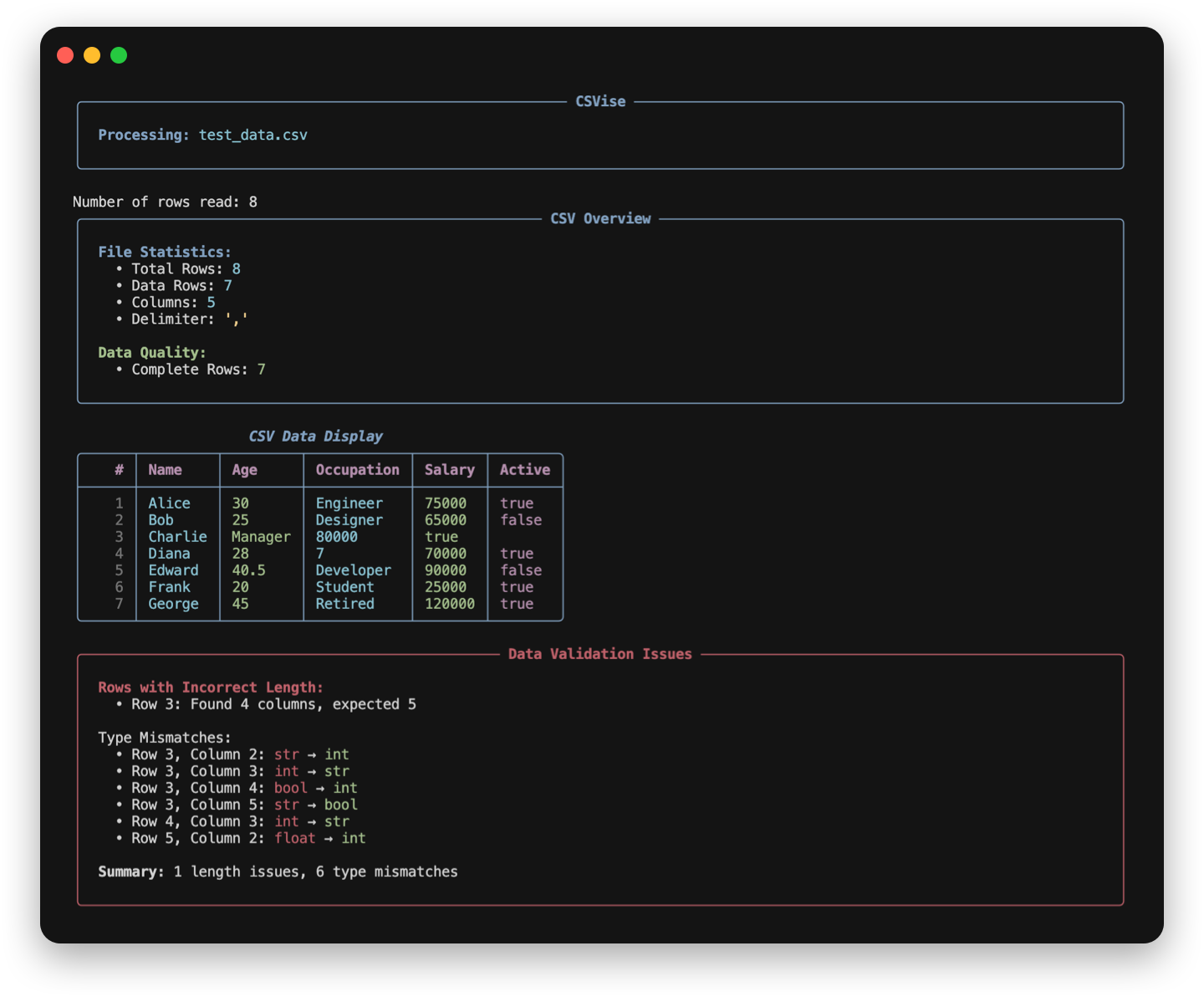
CSVise features beautiful Rich-powered CLI output:
- Color-coded Tables: Data types are color-coded (integers in green, floats in yellow, booleans in magenta)
- Information Panels: File statistics and validation issues in styled panels
- Progress Indicators: Visual feedback during data processing
- Enhanced Messages: Beautiful error and success message formatting
- Type Highlighting: Automatic highlighting of data type mismatches
Modes:
- Rich Mode (
--rich): Enhanced visual experience with colors and panels [default] - Classic Mode (
--classic): Traditional plain text output for compatibility
📖 Documentation
Command Reference
Global Options
--help: Show help and documentation--version: Display current version
Custom Delimiter Example
csvise display data.csv --delimiter ";"
Configuration
Customize default behavior with csvtoolsConfig.json:
{
    "additional_delimiters": ["|", ";", "###"],
    "start_index": 1,
    "num_rows_to_print": null,
    "display_column_lines": true,
    "display_row_lines": false,
    "check_type_mismatches": true,
    "string_case": "default"
}
Examples
Rich UI Examples
# Beautiful table with validation
csvise display data.csv --debug

# Analysis with correlations
csvise analyze data.csv --correlations

# Clean data with progress feedback
csvise clean data.csv --remove-duplicates --normalize-whitespace
Classic Mode Examples
# Plain text output for scripts
csvise display data.csv --classic --debug

# Classic analysis output
csvise analyze data.csv --classic --outliers
Data Analysis Examples
# Comprehensive analysis
csvise analyze data.csv --correlations

# Analyze specific columns
csvise analyze data.csv --columns "Age,Salary,Department"

# Detect outliers
csvise analyze data.csv --outliers

# Show distributions
csvise analyze data.csv --distribution
Data Cleaning Examples
# Basic cleaning
csvise clean data.csv --remove-duplicates --normalize-whitespace

# Advanced cleaning pipeline
csvise clean data.csv \
    --remove-duplicates \
    --normalize-whitespace \
    --standardize-case title \
    --fill-missing mode \
    --output cleaned_data.csv

# Remove empty rows
csvise clean data.csv --remove-empty-rows 0.5 --output cleaned.csv
Example Output
[VERBOSE] Detecting delimiter from sample row: Name,Age,Occupation
[VERBOSE] Delimiter detected: ,
[VERBOSE] Detected columns: ['Name', 'Age', 'Occupation']

  | Name      | Age       | Occupation
--------------+-----------+-------------
1 | Alice     | 30        | Engineer
2 | Bob       | 25        | Designer
3 | Charlie   | Manager   |
4 | Diana     | 28        | 7
5 | Edward    | 40.5      | Developer
6 | Frank     | 20        | Student
7 | George    | 45        | Retired

ROWS WITH INCORRECT LENGTH:
Row 3 is of length 2, expected 3

ROWS WITH POTENTIAL TYPE MISMATCHES:
Row 3, Column 2: Found str, expected int
Row 4, Column 3: Found int, expected str

Total number of rows with incorrect length: 1
Total number of type mismatches: 2
🔧 Development
Setup Development Environment
git clone https://github.com/rawsabsaid/csvise-cli-tool.git
cd csvise-cli-tool
pip install -e ".[dev]"
Run Tests
pytest tests/
Code Quality
# Format code
black csvtools/

# Check linting
flake8 csvtools/

# Type checking
mypy csvtools/
Build Package
python -m build
twine check dist/*
📄 License
This project is licensed under the MIT License - see the LICENSE file for details.
Made with ❤️ by Rawsab Said
1 maintainer

Metadata
1 maintainer
Release files for csvise 1.2.2
For a detailed explanation of source distributions (sdists) and built distributions (wheels), please see the package formats documentation.
Source distribution (sdist)
| File | Size | Uploaded | |
|---|---|---|---|
| csvise-1.2.2.tar.gz | 24.2 kB | Details |
Built distribution (wheel)
| File | Interpreter | ABI | Platform | Reset |
|---|---|---|---|---|
| csvise-1.2.2-py3-none-any.whl | Python 3 | none | any | Details |
Total release size: 50.8 kB
Release files / csvise-1.2.2.tar.gz
| Download URL | csvise-1.2.2.tar.gz |
|---|---|
| Size | 24.2 kB |
| Tags | Source |
|
SHA-256 checksum How to use checksums |
36f001dd71304aafa3946cbaecd7f1fbb4ba6d34a6f74239c9247474830d7045
|
|
BLAKE2b-256 checksum How to use checksums |
9b6f00bcea375bfdb85f27a9f438c35f7747504d2b41fbc6de81d0708d676190
|
| Upload date | |
|
Uploaded using Trusted Publishing? What is trusted publishing? |
No |
| Uploaded via |
twine/6.1.0 CPython/3.13.5
|
Release files / csvise-1.2.2-py3-none-any.whl
| Download URL | csvise-1.2.2-py3-none-any.whl |
|---|---|
| Size | 26.6 kB |
| Tags | Python 3 |
|
SHA-256 checksum How to use checksums |
26ebfa86cb1e1e3a9321d8b2bdbe44a3cd09f94e0f36c40dff3f87d73eb47394
|
|
BLAKE2b-256 checksum How to use checksums |
a104defc634a767b2e73d7593bd17fe03b355dd2f5bde8861fa25ccfc2b8e8de
|
| Upload date | |
|
Uploaded using Trusted Publishing? What is trusted publishing? |
No |
| Uploaded via |
twine/6.1.0 CPython/3.13.5
|














