
CLI Tools for Tabular Data - CSV analysis, validation, and beautiful display

Project description
CSVise CLI Tools
Beautiful CLI tools for CSV analysis, validation, and data cleaning with Rich-powered output



Installation • Quick Start • Features • Documentation
📋 Table of Contents
🚀 Installation
From PyPI (Recommended)
pip install csvise
From Source
git clone https://github.com/rawsabsaid/csvise-cli-tool.git
cd csvise-cli-tool
pip install -e .
⚡ Quick Start
Display CSV Data
# Beautiful table display with Rich formatting
csvise display data.csv

# Classic plain text output
csvise display data.csv --classic
Analyze Data
# Comprehensive analysis
csvise analyze data.csv

# Detect outliers and correlations
csvise analyze data.csv --outliers --correlations
Clean Data
# Remove duplicates and normalize whitespace
csvise clean data.csv --remove-duplicates --normalize-whitespace --output cleaned.csv
✨ Features
Display & Validation
Beautiful CSV display with automatic delimiter detection and data validation:
csvise display FILENAME [OPTIONS]
Options:
--display: Display formatted table output--debug: Enable debug output for troubleshooting-v: Verbose mode with detailed operation logs-dl, --delimiter DELIMITER: Set custom delimiter-stf, --save_to_file OUTPUT: Save output to file--rich: Use Rich formatting (default)--classic: Use classic plain text formatting
Data Analysis & Statistics
Comprehensive data analysis with statistical insights:
csvise analyze FILENAME [OPTIONS]
Options:
--columns, -c: Analyze specific columns (comma-separated)--correlations: Show correlation matrix for numeric columns--outliers: Detect outliers in numeric columns--distribution: Show value distribution for categorical columns-v: Verbose mode--classic: Use classic plain text formatting
Data Cleaning Operations
Powerful data cleaning and transformation capabilities:
csvise clean FILENAME [OPTIONS]
Options:
--remove-duplicates: Remove duplicate rows--normalize-whitespace: Normalize whitespace in all columns--standardize-case: Standardize text case (upper, lower, title, sentence)--fill-missing: Fill missing values (empty, mode, mean, median, custom)--fill-value: Custom value for missing data--remove-empty-rows: Remove rows with high empty cell percentage--output, -o: Output file for cleaned data-v: Verbose mode--classic: Use classic plain text formatting
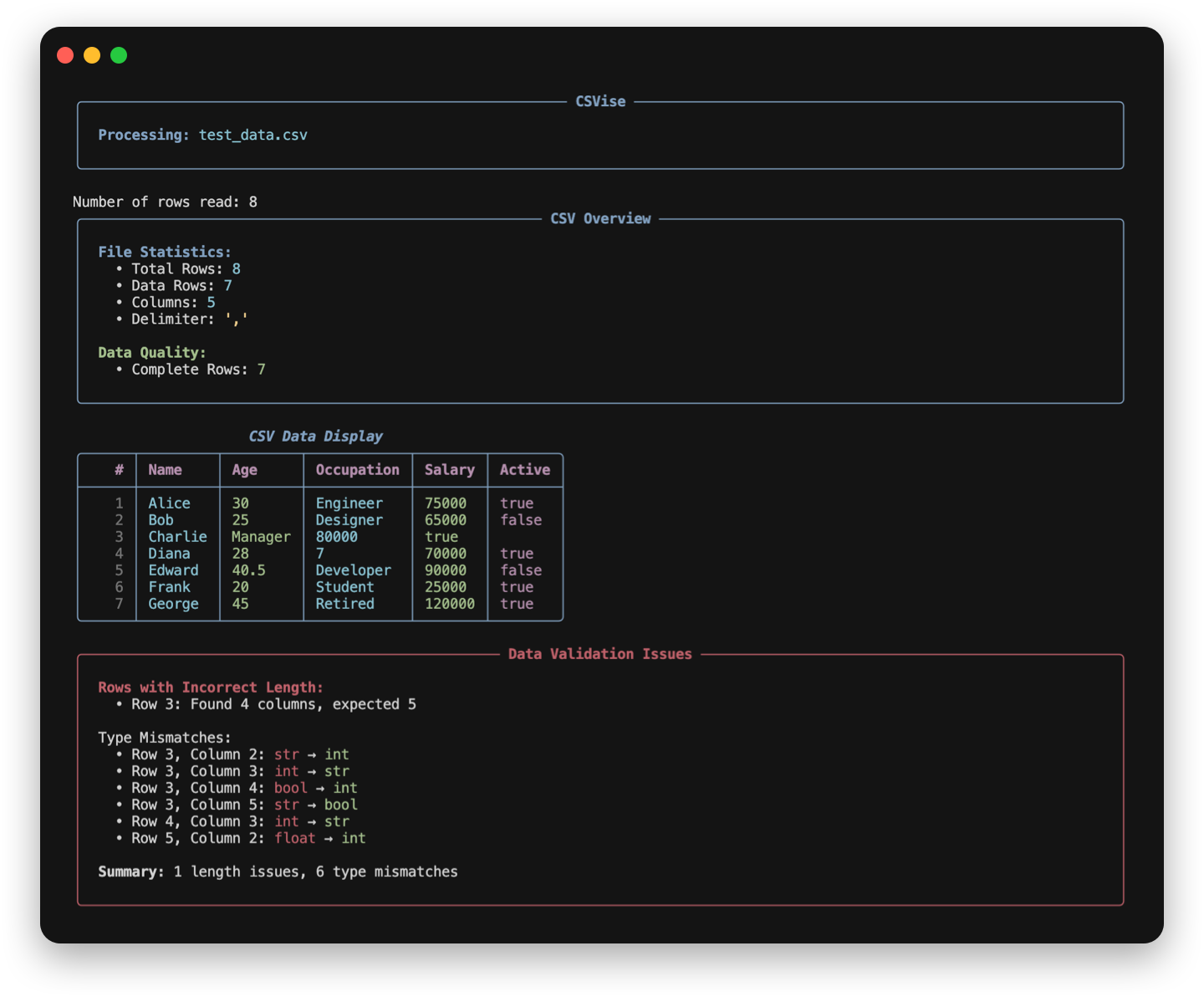
🎨 Rich UI Integration
CSVise features beautiful Rich-powered CLI output:
- Color-coded Tables: Data types are color-coded (integers in green, floats in yellow, booleans in magenta)
- Information Panels: File statistics and validation issues in styled panels
- Progress Indicators: Visual feedback during data processing
- Enhanced Messages: Beautiful error and success message formatting
- Type Highlighting: Automatic highlighting of data type mismatches
Modes:
- Rich Mode (
--rich): Enhanced visual experience with colors and panels [default] - Classic Mode (
--classic): Traditional plain text output for compatibility
📖 Documentation
Command Reference
Global Options
--help: Show help and documentation--version: Display current version
Custom Delimiter Example
csvise display data.csv --delimiter ";"
Configuration
Customize default behavior with csvtoolsConfig.json:
{
    "additional_delimiters": ["|", ";", "###"],
    "start_index": 1,
    "num_rows_to_print": null,
    "display_column_lines": true,
    "display_row_lines": false,
    "check_type_mismatches": true,
    "string_case": "default"
}
Examples
Rich UI Examples
# Beautiful table with validation
csvise display data.csv --debug

# Analysis with correlations
csvise analyze data.csv --correlations

# Clean data with progress feedback
csvise clean data.csv --remove-duplicates --normalize-whitespace
Classic Mode Examples
# Plain text output for scripts
csvise display data.csv --classic --debug

# Classic analysis output
csvise analyze data.csv --classic --outliers
Data Analysis Examples
# Comprehensive analysis
csvise analyze data.csv --correlations

# Analyze specific columns
csvise analyze data.csv --columns "Age,Salary,Department"

# Detect outliers
csvise analyze data.csv --outliers

# Show distributions
csvise analyze data.csv --distribution
Data Cleaning Examples
# Basic cleaning
csvise clean data.csv --remove-duplicates --normalize-whitespace

# Advanced cleaning pipeline
csvise clean data.csv \
    --remove-duplicates \
    --normalize-whitespace \
    --standardize-case title \
    --fill-missing mode \
    --output cleaned_data.csv

# Remove empty rows
csvise clean data.csv --remove-empty-rows 0.5 --output cleaned.csv
Example Output
[VERBOSE] Detecting delimiter from sample row: Name,Age,Occupation
[VERBOSE] Delimiter detected: ,
[VERBOSE] Detected columns: ['Name', 'Age', 'Occupation']

  | Name      | Age       | Occupation
--------------+-----------+-------------
1 | Alice     | 30        | Engineer
2 | Bob       | 25        | Designer
3 | Charlie   | Manager   |
4 | Diana     | 28        | 7
5 | Edward    | 40.5      | Developer
6 | Frank     | 20        | Student
7 | George    | 45        | Retired

ROWS WITH INCORRECT LENGTH:
Row 3 is of length 2, expected 3

ROWS WITH POTENTIAL TYPE MISMATCHES:
Row 3, Column 2: Found str, expected int
Row 4, Column 3: Found int, expected str

Total number of rows with incorrect length: 1
Total number of type mismatches: 2
🔧 Development
Setup Development Environment
git clone https://github.com/rawsabsaid/csvise-cli-tool.git
cd csvise-cli-tool
pip install -e ".[dev]"
Run Tests
pytest tests/
Code Quality
# Format code
black csvtools/

# Check linting
flake8 csvtools/

# Type checking
mypy csvtools/
Build Package
python -m build
twine check dist/*
📄 License
This project is licensed under the MIT License - see the LICENSE file for details.
Made with ❤️ by Rawsab Said
Release history Release notifications | RSS feed


Download files
Download the file for your platform. If you're not sure which to choose, learn more about installing packages.
Source Distribution
Built Distribution
Filter files by name, interpreter, ABI, and platform.
If you're not sure about the file name format, learn more about wheel file names.
Copy a direct link to the current filters
File details
Details for the file csvise-1.2.1.tar.gz.
File metadata
- Download URL: csvise-1.2.1.tar.gz
- Upload date:
- Size: 24.1 kB
- Tags: Source
- Uploaded using Trusted Publishing? No
- Uploaded via: twine/6.1.0 CPython/3.13.5
File hashes
| Algorithm | Hash digest | |
|---|---|---|
| SHA256 |
0a1ffc4224e4196f6eade0a6670ce17c571700814857cde4b75ddacb16d1f1e7
|
|
| MD5 |
fd97712fcbbae5e170301c3d977c05e8
|
|
| BLAKE2b-256 |
ea00cc7523e4734c02b782cac1f35d9ef3ee16a4bb5a949dbe57cebad5ba4c57
|
File details
Details for the file csvise-1.2.1-py3-none-any.whl.
File metadata
- Download URL: csvise-1.2.1-py3-none-any.whl
- Upload date:
- Size: 26.5 kB
- Tags: Python 3
- Uploaded using Trusted Publishing? No
- Uploaded via: twine/6.1.0 CPython/3.13.5
File hashes
| Algorithm | Hash digest | |
|---|---|---|
| SHA256 |
79aea5c6063ef62af209dc6b9903c5649273935003aa7603241e55fd9260f03f
|
|
| MD5 |
8c63f8d4e10f96fcfab449dd88288bc6
|
|
| BLAKE2b-256 |
50e4db4e337f473759de1c74d45ab6b9b6ae67f94ee493dd96fcbca429705513
|






