
CLI Tools for Amdocs ConnectX

Project description

Introduction
The ctxcli package provides Command Line Interface (CLI) tools for Amdocs ConnectX. These tools allow authorized ConnectX users to perform various operations on the system.
Installation
Before installing ctxcli, ensure that Python and pip are installed on your system.
To install ctxcli from PyPI, use the following command:
pip install ctxcli
Authentication
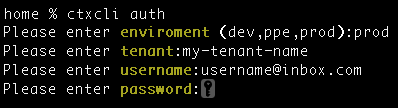
Before running any command, you need to authenticate by running the ‘auth’ command. Use the following command to authenticate:
ctxcli auth
You will be prompted to enter your tenant, environment (dev, ppe, prod), username, and password.
Commands
The ctxcli commands are divided into the following categories: Users, Tenant, and Migration.
Users
To list all the users in the system, use the following command:
ctxcli user list
This command will display a table with the following fields: Id, Username, Status, Enabled, Created (date), Last modified.
Tenant
To list all the sub-tenants in the system, use the following command:
ctxcli tenant list
This command will display a table with the following fields: Id, Name, Brand, Created (date).
Migration
To list all the migration files in the system, use the following command:
ctxcli migration file list
This command will display a table with the following fields: Id, Name, Created (date), Records (total number of records in the file), Pending (number of pending records), In Progress (number of in progress records), Done (number of done records), Failed (number of failed records), Status.
License
Copyright 2024 Amdocs
Release history Release notifications | RSS feed


Download files
Download the file for your platform. If you're not sure which to choose, learn more about installing packages.
Source Distribution
File details
Details for the file ctxcli-0.1.1.tar.gz.
File metadata
- Download URL: ctxcli-0.1.1.tar.gz
- Upload date:
- Size: 6.9 kB
- Tags: Source
- Uploaded using Trusted Publishing? No
- Uploaded via: twine/5.1.0 CPython/3.9.12
File hashes
| Algorithm | Hash digest | |
|---|---|---|
| SHA256 |
f44b6952b4dcb5c5179c65f11e941728233c7b9396097f1ef176eacbb5177856
|
|
| MD5 |
c5e2de9e9db251bc270222c67246415e
|
|
| BLAKE2b-256 |
da7ecf54d557e7ccd9a014ccc2d76ce608494b2449d0931db9e07f4cfdabec67
|






