






daio
Video and data IO tools for Python.
Links: API documentation, GitHub repository
Installation
- via conda or mamba:
conda install conda-forge::daio - if you prefer pip:
pip install daio
Use
Video IO
Write video:
from daio.video import VideoReader, VideoWriter
writer = VideoWriter('/path/to/video.mp4', fps=25)
for i in range(20):
    frame = np.random.randint(0,255,size=(720,1280), dtype='uint8')
    writer.write(frame)
writer.close()
Read video using speed-optimized array-like indexing or iteration:
reader = VideoReader('/path/to/video.mp4')
frame_7 = reader[7]
first10_frames = reader[:10]
for frame in reader:
    process_frame(frame)
reader.close()
You can also use with statements to handle file closure:
with VideoWriter('/path/to/video.mp4', fps=25) as writer:
    for i in range(20):
        frame = np.random.randint(0,255,size=(720,1280), dtype='uint8')
        writer.write(frame)
#or
with VideoReader('/path/to/video.mp4') as reader:
    frame_7 = reader[7]
HDF5 file IO
Lazily load HDF5 with a dict-like interface (contents are only loaded when accessed):
from daio.h5 import lazyh5
h5 = lazyh5('/path/to/datafile.h5')
b_loaded = h5['b']
e_loaded = h5['c']['e']
h5.keys()
Create a new HDF5 file (or add items to existing file by setting argument readonly=False):
h5 = lazyh5('test.h5')
h5['a'] = 1
h5['b'] = 'hello'
h5['c'] = {} # create subgroup
h5['c']['e'] = [2,3,4]
Load entire HDF5-file to dict, or save dict to HDF5-file:
# save dict to HDF5 file:
some_dict = dict(a = 1, b = np.random.randn(3,4,5), c = dict(g='nested'), d = 'some_string')
lazyh5('/path/to/datafile.h5').from_dict(some_dict)
# load dict from HDF5 file:
loaded = lazyh5('/path/to/datafile.h5').to_dict()
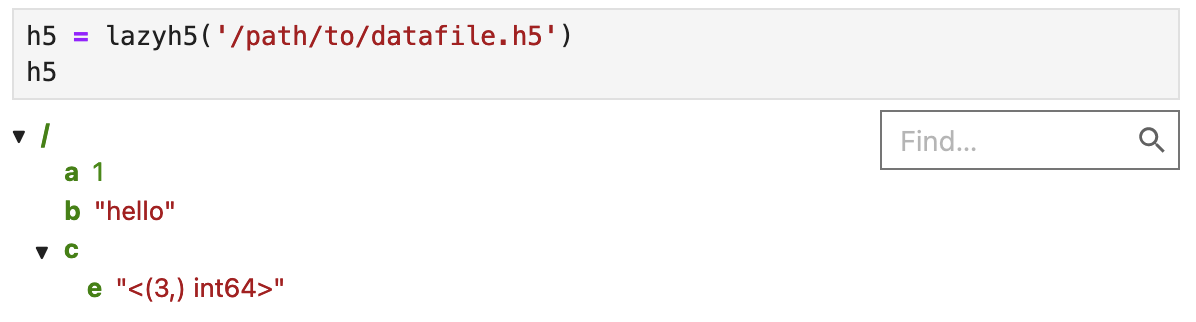
In Jupyter, you can interactively explore the file structure:
Old interface (expand this)
from daio.h5 import save_to_h5, load_from_h5
# save dict to HDF5 file:
some_dict = dict(a = 1, b = np.random.randn(3,4,5), c = dict(g='nested'), d = 'some_string')
save_to_h5('/path/to/datafile.h5', some_dict)
# load dict from HDF5 file:
dict_loaded = load_from_h5('/path/to/datafile.h5')
1 maintainer

Release files for daio 1.0.0
For a detailed explanation of source distributions (sdists) and built distributions (wheels), please see the package formats documentation.
Source distribution (sdist)
| File | Size | Uploaded | |
|---|---|---|---|
| daio-1.0.0.tar.gz | 11.8 kB | Details |
Built distribution (wheel)
| File | Interpreter | ABI | Platform | Reset |
|---|---|---|---|---|
| daio-1.0.0-py3-none-any.whl | Python 3 | none | any | Details |
Total release size:21.7 kB
Release files / daio-1.0.0.tar.gz
| Download URL | daio-1.0.0.tar.gz |
|---|---|
| Size | 11.8 kB |
| Tags | Source |
|
SHA-256 checksum How to use checksums |
848b7adcde6426943278e97d75f7c2af2ced8fb7adf22b63fa73b6ef5f279821
|
|
BLAKE2b-256 checksum How to use checksums |
91e9534ad855f5f19ba2daa38bd3c76000add33a5a27569d78ad0131408d1b80
|
| Upload date | |
|
Uploaded using Trusted Publishing? What is trusted publishing? |
No |
| Uploaded via |
twine/6.1.0 CPython/3.9.22
|
Release files / daio-1.0.0-py3-none-any.whl
| Download URL | daio-1.0.0-py3-none-any.whl |
|---|---|
| Size | 10.0 kB |
| Tags | Python 3 |
|
SHA-256 checksum How to use checksums |
7e6e7a601a763491f9851976cd917a6730e485f64c63eac56b0eaa62c0d9ecdc
|
|
BLAKE2b-256 checksum How to use checksums |
6e18afae54b8e24bd5cf1d83e20778665cc16b5a7f542fb8762c50548ab7d650
|
| Upload date | |
|
Uploaded using Trusted Publishing? What is trusted publishing? |
No |
| Uploaded via |
twine/6.1.0 CPython/3.9.22
|














