
video and data IO tools for Python

Project description






daio
Video and data IO tools for Python.
Links: API documentation, GitHub repository
Installation
- via conda or mamba:
conda install danionella::daio - if you prefer pip:
pip install daio - for development, clone this repository change to the directory containing
pyproject.tomlconda env create -n env_name -f environment.ymlconda activate env_namepip install -e .
Use
Video IO
Write video:
from daio.video import VideoReader, VideoWriter
writer = VideoWriter('/path/to/video.mp4', fps=25)
for i in range(20):
    frame = np.random.randint(0,255,size=(720,1280), dtype='uint8')
    writer.write(frame)
writer.close()
Read video using speed-optimized array-like indexing or iteration:
reader = VideoReader('/path/to/video.mp4')
frame_7 = reader[7]
first10_frames = reader[:10]
for frame in reader:
    process_frame(frame)
reader.close()
You can also use with statements to handle file closure:
with VideoWriter('/path/to/video.mp4', fps=25) as writer:
    for i in range(20):
        frame = np.random.randint(0,255,size=(720,1280), dtype='uint8')
        writer.write(frame)
#or
with VideoReader('/path/to/video.mp4') as reader:
    frame_7 = reader[7]
HDF5 file IO
Lazily load HDF5 with a dict-like interface (contents are only loaded when accessed):
from daio.h5 import lazyh5
h5 = lazyh5('/path/to/datafile.h5')
b_loaded = h5['b']
e_loaded = h5['c']['e']
h5.keys()
Create a new HDF5 file (or add items to existing file by setting argument readonly=False):
h5 = lazyh5('test.h5')
h5['a'] = 1
h5['b'] = 'hello'
h5['c'] = {} # create subgroup
h5['c']['e'] = [2,3,4]
Load entire HDF5-file to dict, or save dict to HDF5-file:
# save dict to HDF5 file:
some_dict = dict(a = 1, b = np.random.randn(3,4,5), c = dict(g='nested'), d = 'some_string')
lazyh5('/path/to/datafile.h5').from_dict(some_dict)
# load dict from HDF5 file:
loaded = lazyh5('/path/to/datafile.h5').to_dict()
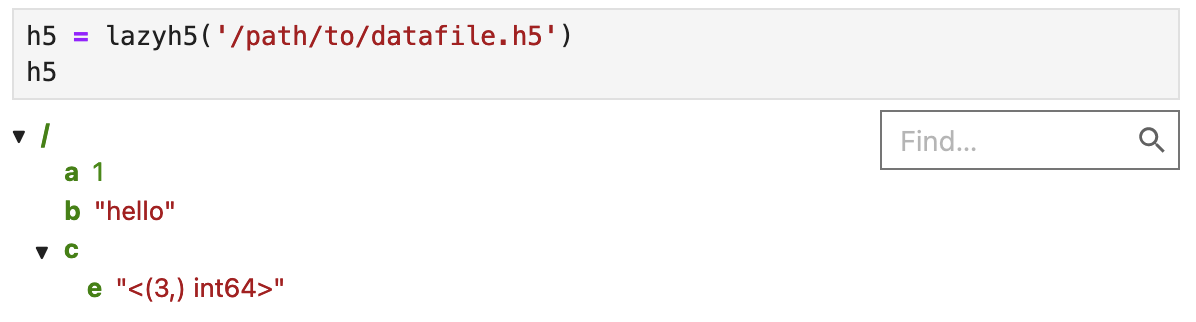
In Jupyter, you can interactively explore the file structure:
Old interface (expand this)
from daio.h5 import save_to_h5, load_from_h5
# save dict to HDF5 file:
some_dict = dict(a = 1, b = np.random.randn(3,4,5), c = dict(g='nested'), d = 'some_string')
save_to_h5('/path/to/datafile.h5', some_dict)
# load dict from HDF5 file:
dict_loaded = load_from_h5('/path/to/datafile.h5')
Release history Release notifications | RSS feed


Download files
Download the file for your platform. If you're not sure which to choose, learn more about installing packages.
Source Distribution
Built Distribution
Filter files by name, interpreter, ABI, and platform.
If you're not sure about the file name format, learn more about wheel file names.
Copy a direct link to the current filters
File details
Details for the file daio-0.0.4.tar.gz.
File metadata
- Download URL: daio-0.0.4.tar.gz
- Upload date:
- Size: 11.1 kB
- Tags: Source
- Uploaded using Trusted Publishing? No
- Uploaded via: twine/6.1.0 CPython/3.9.21
File hashes
| Algorithm | Hash digest | |
|---|---|---|
| SHA256 |
c50b0e0068782d5eaa6fb373c0b9146fe88a46bece4a7473526c8d2b89a91f7e
|
|
| MD5 |
a2ecad12021ea70ef88c4464ef4bc4cb
|
|
| BLAKE2b-256 |
388f659ded288c17a96ace78633762838e58ad8c53ea94bbcce68fc089ede98e
|
File details
Details for the file daio-0.0.4-py3-none-any.whl.
File metadata
- Download URL: daio-0.0.4-py3-none-any.whl
- Upload date:
- Size: 9.8 kB
- Tags: Python 3
- Uploaded using Trusted Publishing? No
- Uploaded via: twine/6.1.0 CPython/3.9.21
File hashes
| Algorithm | Hash digest | |
|---|---|---|
| SHA256 |
31ce88270d93b8c47dac7c4a9a65b88bd1bbbb806df055d29e8dccca5de7059e
|
|
| MD5 |
fae1c773ad2b564960fd9487aa345fca
|
|
| BLAKE2b-256 |
c243491308f06369f0fc8104227a47665a2e8322487838ab5ddb5c361a77c6ed
|






