
DFD — Data Flow Diagrams as Code




Describe system architectures as text, get diagrams as SVG, PNG, PDF, and more. Version-controlled, diffable, no GUI needed.
DFD generates Data Flow Diagrams from a simple text-based DSL, rendered via Graphviz. It supports the SA/SD and SA/RT methodologies (Structured Analysis / Structured Design, with real-time extensions) as described by Edward Yourdon.
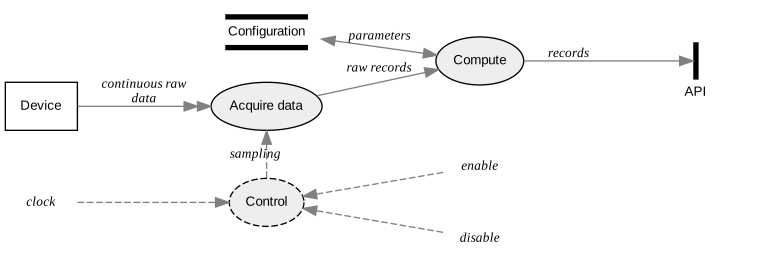
The diagram above is generated from this input:
process   Acquire         Acquire data
process   Compute
control   Control
entity    Device
store     Config          Configuration
channel   API

*         ::>  Control    clock
Control   <::  *          enable
Control   <::  *          disable
Control   ::>? Acquire    sampling

Device    ->>  Acquire    continuous raw data
Acquire   -->  Compute    raw records
Config    <->  Compute    parameters
Compute   -->  API        records
Features
| Feature | Description |
|---|---|
| SA/RT support | Signals, control processes, and channels for real-time and embedded systems |
| Context diagrams | Generate a top-level SA/SD context diagram (style context) |
| Frames and grouping | Visually group related items |
| Filters | Render focused subsets of a large master diagram (neighborhood, only/without) |
| Dependency checking | Verify that all referenced includes and items are consistent |
| Includes and reuse | Split large diagrams across files, share common item definitions via include |
| Markdown embedding | Embed diagrams directly in Markdown files and generate all images in one pass (--markdown mode) |
| Layout control | Horizontal or vertical orientation, placement constraints between items, relaxed constraints on connections |
| Styling | Background color, graph title suppression, inline Graphviz attributes, reusable attribute aliases |
| Multiple output formats | SVG, PNG, PDF, JPG, EPS, and any other format supported by your Graphviz installation (run dot -Thelp for the full list), plus raw DOT source |
Quick start
pip install data-flow-diagram
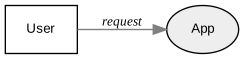
Create a file hello.dfd:
entity    User
process   App
store     DB

User --> App    request
App  --> DB     query
DB   --> App    result
App  --> User   response
Generate the diagram:
data-flow-diagram hello.dfd -o hello.svg --no-graph-title
You should obtain:

Or pipe directly from stdin:
echo 'entity User
process App
User --> App  request' | data-flow-diagram -o quick.svg --no-graph-title
Installing
For users
Requires Python 3.11+ and Graphviz.
Linux (Debian/Ubuntu):
sudo apt install graphviz
pip install data-flow-diagram
macOS (Homebrew):
brew install graphviz python3
pip install data-flow-diagram
If you get a ModuleNotFoundError: No module named 'reportlab.graphics._renderPM'
error at runtime, reinstall reportlab:
pip install --upgrade --force-reinstall reportlab
For developers
Requires GNU Make (pre-installed on most Linux distributions; on macOS, install
the Xcode Command Line Tools if not already present: xcode-select --install).
git clone https://github.com/pbauermeister/dfd.git
cd dfd
make all    # creates venv, installs deps, formats, lints, tests, builds docs
make all auto-detects your OS and installs the required system packages
(Debian apt or macOS brew). Run make help for all available targets.
Documentation
Full syntax reference, examples, and advanced features:
- 1. Methodology and scope
- 2. Syntax
- 3. Details with examples
- 4. Markdown snippets
- 5. Including
- 6. Dependencies
- 7. Filters
- 8. Influencing the layout
Usage
data-flow-diagram -h says:
usage: data-flow-diagram [-h] [--output-file OUTPUT_FILE] [--markdown]
                         [--format FORMAT]
                         [--background-color BACKGROUND_COLOR]
                         [--no-graph-title] [--no-check-dependencies]
                         [--debug] [--version]
                         [INPUT_FILE]

Command-line DFD diagram generator. Converts a textual description into a
graphic file.

positional arguments:
  INPUT_FILE            DFD input file; if omitted, stdin is used

options:
  -h, --help            show this help message and exit
  --output-file OUTPUT_FILE, -o OUTPUT_FILE
                        output file name; pass '-' to use stdout; if omitted,
                        use INPUT_FILE base name with '.svg' extension, or
                        stdout
  --markdown, -m        consider snippets between opening marker: ```data-
                        flow-diagram OUTFILE, and closing marker: ``` allowing
                        to generate all diagrams contained in an INPUT_FILE
                        that is a markdown file
  --format FORMAT, -f FORMAT
                        output format: gif, jpg, tiff, bmp, pnm, eps, pdf, svg
                        (any supported by Graphviz), or dot (raw Graphviz DOT
                        text); default is svg
  --background-color BACKGROUND_COLOR, -b BACKGROUND_COLOR
                        background color name (including 'none' for
                        transparent) in web color notation; see
                        https://developer.mozilla.org/en-
                        US/docs/Web/CSS/color_value for a list of valid names;
                        default is white
  --no-graph-title      suppress graph title
  --no-check-dependencies
                        suppress dependencies checking
  --debug               emit debug messages
  --version, -V         print the version and exit

See https://github.com/pbauermeister/dfd for information, syntax and examples.
Links
- Source code: github.com/pbauermeister/dfd
- Package: pypi.org/project/data-flow-diagram
- Changelog: CHANGES.md
- License: GPLv3
1 maintainer

Release files for data-flow-diagram 1.17.4
For a detailed explanation of source distributions (sdists) and built distributions (wheels), please see the package formats documentation.
Source distribution (sdist)
| File | Size | Uploaded | |
|---|---|---|---|
| data_flow_diagram-1.17.4.tar.gz | 37.0 kB | Details |
Built distribution (wheel)
| File | Interpreter | ABI | Platform | Reset |
|---|---|---|---|---|
| data_flow_diagram-1.17.4-py3-none-any.whl | Python 3 | none | any | Details |
Total release size: 71.5 kB
Release files / data_flow_diagram-1.17.4.tar.gz
| Download URL | data_flow_diagram-1.17.4.tar.gz |
|---|---|
| Size | 37.0 kB |
| Tags | Source |
|
SHA-256 checksum How to use checksums |
9133746628905d538a1b1e00dee1454aa51c610fceeec320f6d029f5322f8d95
|
|
BLAKE2b-256 checksum How to use checksums |
2cf11e82981848a17f189cc04ca2dfb285f420c9dabc2d5da32a8cb05cccede5
|
| Upload date | |
|
Uploaded using Trusted Publishing? What is trusted publishing? |
No |
| Uploaded via |
twine/6.1.0 CPython/3.12.3
|
Release files / data_flow_diagram-1.17.4-py3-none-any.whl
| Download URL | data_flow_diagram-1.17.4-py3-none-any.whl |
|---|---|
| Size | 34.5 kB |
| Tags | Python 3 |
|
SHA-256 checksum How to use checksums |
ac9a11924c90327f6aa446cfa2932e9ba0bb38648b6281ccce1566505aa5f55b
|
|
BLAKE2b-256 checksum How to use checksums |
4ccee73eee72c2acc691e4ad08d21349ced9d0cda1f29f8d0cc3269731d01f65
|
| Upload date | |
|
Uploaded using Trusted Publishing? What is trusted publishing? |
No |
| Uploaded via |
twine/6.1.0 CPython/3.12.3
|














