
Scan, redact, and manage PII in your documents before they get uploaded to a Retrieval Augmented Generation (RAG) system.

Project description

Open-source PII Detection for Retrieval Systems.
Scan, redact, and manage PII in your documents before they get uploaded to a Retrieval Augmented Generation (RAG) system.






Overview
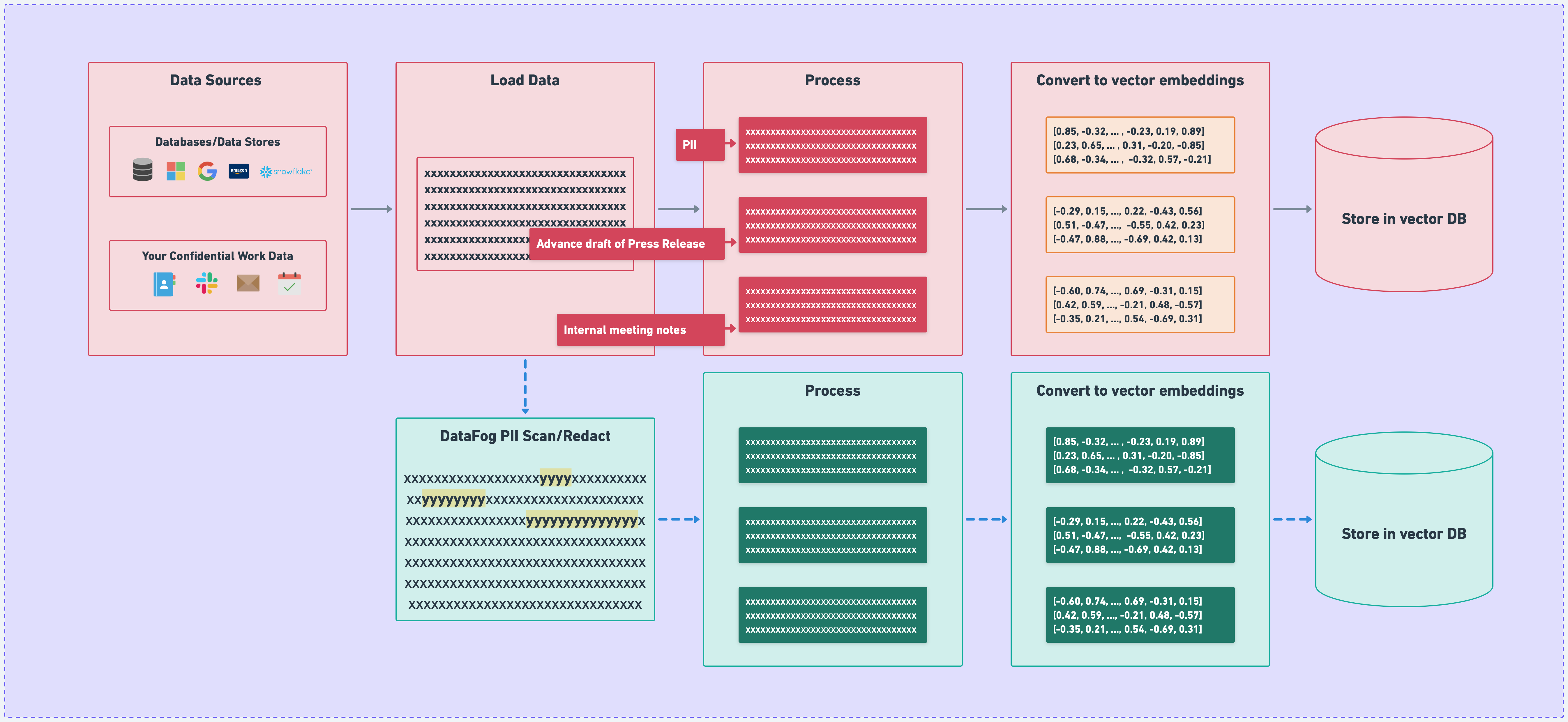
DataFog works by scanning and redacting-out PII in files before are uploaded to a RAG system.
How it works
Installation
DataFog can be installed via pip:
pip install datafog # python client
Usage
We're going to build up functionality starting with support for the Microsoft Presidio library. If you have any custom requests that would be of benefit to the community, please let us know!
  import requests
  from datafog import PresidioEngine as presidio

  # Example: Detecting PII in a String
  pii_detected = presidio.scan("My name is John Doe and my email is johndoe@genai.com")
  print("PII Detected:", pii_detected)

  # Example: Detecting PII in a File
  sample_filepath = "/Users/sidmohan/Desktop/v2.0.0/datafog-python/tests/files/input_files/sample.csv"
  with open(sample_filepath, "r") as f:
      original_value = f.read()
  pii_detected = presidio.scan(original_value)
  print("PII Detected in File:", pii_detected)

  # Example: Detecting PII in a URL
  sample_url = "https://gist.githubusercontent.com/sidmohan0/1aa3ec38b4e6594d3c34b113f2e0962d/raw/42e57146197be0f85a5901cd1dcdd9ad15b31bab/sotu_2023.txt"
  response = requests.get(sample_url)
  original_value = response.text
  pii_detected = presidio.scan(original_value)
  print("PII Detected in URL Content:", pii_detected)
Depending on your input, the output will be a list of detected PII entities:
PII Detected: [type: EMAIL_ADDRESS, start: 36, end: 53, score: 1.0, type: PERSON, start: 11, end: 19, score: 0.85, type: URL, start: 44, end: 53, score: 0.5]
Contributing
This is an open-source project and we welcome contributions. If you have any questions, please feel free to reach out to us, join our Discord or email me directly at sid@datafog.ai.
Dev Notes
- Clone repo
- Run 'poetry install' to install dependencies (recommend entering poetry shell for preserving dependencies)
- Justfile commands:
just formatto apply formatting.just lintto check formatting and style.just tagto tag your project on gitjust uploadto publish to PyPi.
Testing
To run the datafog unit tests, check out this repository and do
tox
License
This software is published under the MIT license.
Release history Release notifications | RSS feed


Download files
Download the file for your platform. If you're not sure which to choose, learn more about installing packages.
Source Distribution
File details
Details for the file datafog-2.3.0b1.tar.gz.
File metadata
- Download URL: datafog-2.3.0b1.tar.gz
- Upload date:
- Size: 9.6 kB
- Tags: Source
- Uploaded using Trusted Publishing? No
- Uploaded via: twine/5.0.0 CPython/3.10.1
File hashes
| Algorithm | Hash digest | |
|---|---|---|
| SHA256 |
a6aa5dd7e38417723a0f4044e05de54978730764971d8904109dac9f0348a5c2
|
|
| MD5 |
b1f0dc71c6b090c7d2ae76b124c83388
|
|
| BLAKE2b-256 |
c3064e50b93d5d6cf7ecb5235311637ee027954fda8cdffbe5a7150776c41c92
|






