
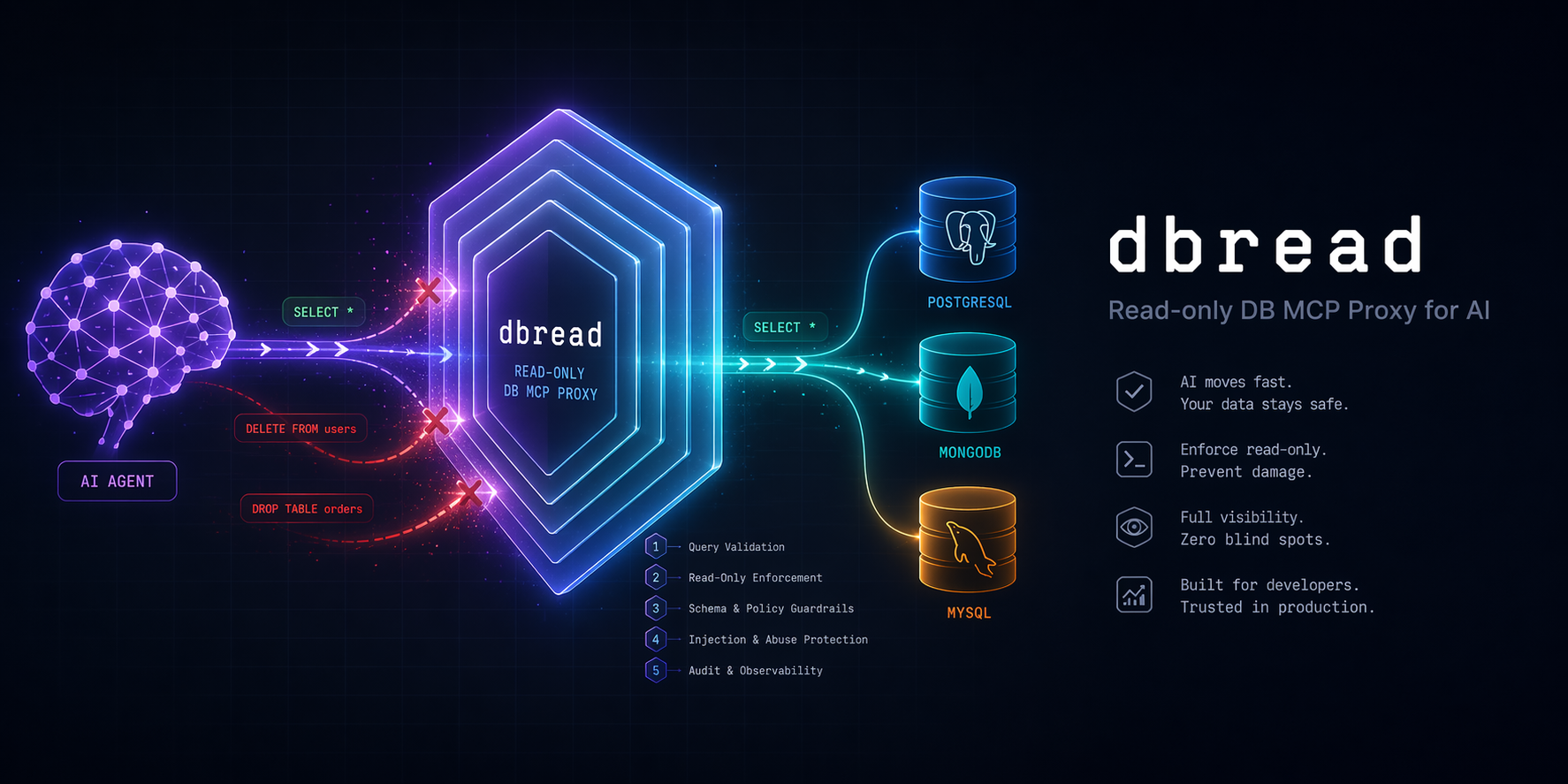
dbread
Read-only database MCP proxy for AI — safe SELECT + MongoDB read access with 5-layer defense







Why · Quickstart · Add a connection · CLI · Tools · Security · Update · Docs
🤔 Why
Handing a raw database connection string to an AI is like handing a stranger your car keys. They probably won't crash it, but you wouldn't bet the car on it.
dbread sits between your AI and your DBs and enforces read-only access through five independent layers — if one layer has a bug, the next one still blocks you.
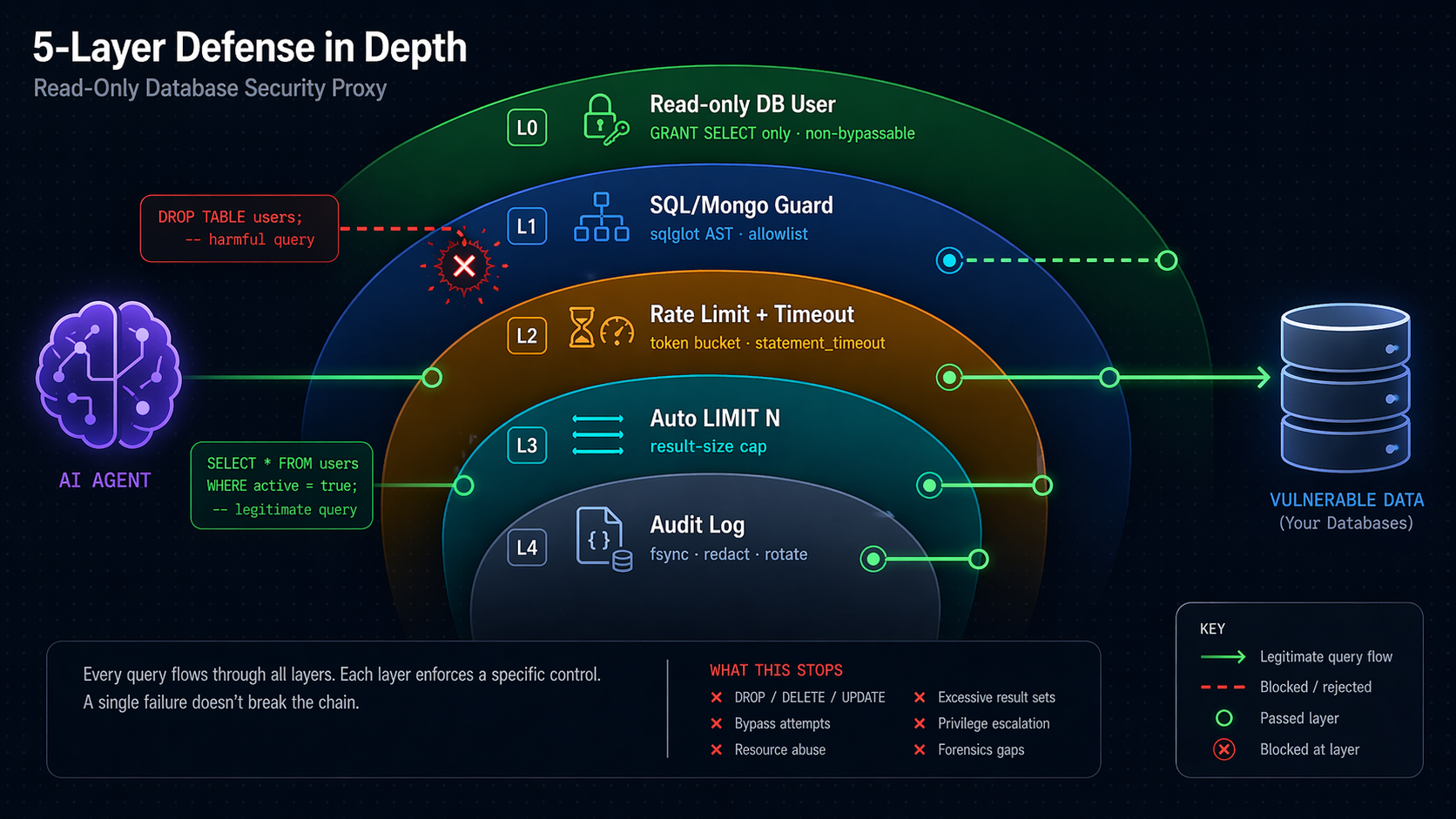
⚠️ Security note — do not skip. Layer 0 (a read-only DB user, step 2b) is the only non-bypassable guarantee. Layers 1–4 reduce blast radius and make attacks loud — they are not substitutes. If you point dbread at a DB where the configured user can write, a single sqlglot parser gap (past, present, or future) can let a write through. See Known Limitations.
⚡ Quickstart (2 minutes, no clone needed)
1. Install as a tool
# From PyPI (recommended):
uv tool install "dbread[postgres]"          # extras: postgres, mysql, mssql, oracle, duckdb, clickhouse, mongo

# OR straight from GitHub (no PyPI needed):
uv tool install "git+https://github.com/tvtdev94/dbread[postgres]"
💡 Pick the extras you need now. To add more drivers later, use
dbread add-extra <name>(preserves prior).
2. Scaffold config (one command)
dbread init
Creates ~/.dbread/config.yaml, ~/.dbread/.env, and ~/.dbread/sample.db (a tiny read-only SQLite demo so everything works immediately). Prints the exact claude mcp add line to paste in step 4. Skip to step 4 if you only want the demo; otherwise edit config.yaml / .env first (step 3).
💡 Claude Code users:
dbread initalso installs a skill at~/.claude/skills/dbread/SKILL.mdthat teaches Claude the safe query workflow (discover → describe → query), SQL vs MongoDB routing, when to reach forsample_table/profile_table, thedbread add/add-extra/doctorsetup helpers, and how to recover from guard / rate-limit errors. Auto-refreshes onuv tool upgrade dbread(v0.7.2+) — no manual re-install needed.
2b. Create a read-only DB user (when pointing at a real DB)
See docs/setup-db-readonly.md — copy-paste SQL/Mongo snippets for PostgreSQL / MySQL / MSSQL / Oracle / SQLite / DuckDB / ClickHouse / MongoDB, plus compat notes for CockroachDB · Timescale · Aurora · SingleStore · PlanetScale · Yugabyte · DocumentDB · CosmosDB.
2c. Add your real connection (one command)
Have a connection string from a tool, cloud console, or .NET / JDBC / ODBC config? Don't hand-edit YAML:
dbread add
Paste your connection string when prompted (input is hidden — safe for passwords). dbread:
- Auto-detects the format — URI · JDBC · ADO.NET / C# · ODBC · MongoDB Atlas (
mongodb+srv://) · MotherDuck · file path - Converts to the right SQLAlchemy URL with the correct
+driversuffix and URL-escaped password - Tests with
SELECT 1(or Mongoping) — fail-fast before saving - Writes
~/.dbread/.env(chmod0600on POSIX) +~/.dbread/config.yaml(preserves your comments)
Supports PostgreSQL · MySQL · MSSQL · Oracle · SQLite · DuckDB · ClickHouse · MongoDB.
# Common flags:
dbread add prod_pg                          # provide a name (otherwise prompted)
dbread add --no-test                        # skip the live connection test
dbread add --dialect-hint mssql             # force dialect when ambiguous
dbread add --manual --dialect-hint postgres # skip detection, paste a SQLAlchemy URL directly
dbread add --from-stdin < my-conn.txt       # script-friendly (non-interactive)
💡 Auto-detect failed? dbread offers a fallback menu — paste a SQLAlchemy URL manually, generate a copy-paste config template, or cancel. Same recovery if the live test fails (save anyway / edit & retry / cancel).
See docs/connection-string-formats.md for all recognised formats and
URL templates per dialect, and docs/cli-reference.md for the complete CLI reference.
3. Create config.yaml + .env
# ~/.dbread/config.yaml
connections:
  mydb:
    url_env: MYDB_URL
    dialect: postgres
    rate_limit_per_min: 60
    statement_timeout_s: 30
    max_rows: 1000
    # max_rows_estimate: 100000   # opt-in Layer 2.5 — reject if EXPLAIN > N rows (postgres/mysql/mssql/oracle/duckdb/mongodb)

  # Optional: MongoDB (requires `uv tool install "dbread[mongo]"`)
  # analytics_mongo:
  #   url_env: MONGO_URL
  #   dialect: mongodb
  #   rate_limit_per_min: 60
  #   statement_timeout_s: 30    # becomes maxTimeMS=30000 per command
  #   max_rows: 1000
  #   mongo:
  #     sample_size: 100         # docs sampled by describe_table (10-1000)
  #     databases: [crm, billing] # extra databases this connection may read; ["*"] = all but admin/local/config
  #     read_preference: secondaryPreferred  # keep reads off the primary (default: driver default)

audit:
  path: ~/.dbread/audit.jsonl   # ~ expansion supported
  rotate_mb: 50                  # rotates current → .1 → .2 → .3 (oldest dropped)
  timezone: UTC                  # IANA name; default UTC
  redact_literals: false         # true → SQL literals become "?" in log (PII hardening)
  retention_days: 7              # auto-prune entries older than N days (null = off)
# ~/.dbread/.env
MYDB_URL=postgresql+psycopg2://ai_readonly:password@host:5432/mydb
# MONGO_URL=mongodb://ai_ro:password@host:27017/analytics?tls=true
4. Register with Claude Code
claude mcp add --scope user dbread \
  --env DBREAD_CONFIG=/path/to/config.yaml \
  -- dbread
Or without install (one-shot via uvx):
claude mcp add --scope user dbread \
  --env DBREAD_CONFIG=/path/to/config.yaml \
  -- uvx --from "dbread[postgres]" dbread
5. Use it
Restart Claude Code → /mcp → dbread appears. Ask Claude: "list connections in dbread, then count rows per status in the orders table."
Alternative: clone the repo (for development)
git clone https://github.com/tvtdev94/dbread && cd dbread
uv sync --extra postgres --extra dev
cp config.example.yaml config.yaml && cp .env.example .env
claude mcp add --scope user dbread -- uv --directory $(pwd) run dbread
Ask Claude: "List connections in dbread, then count rows per status in the orders table."
🏗️ Architecture
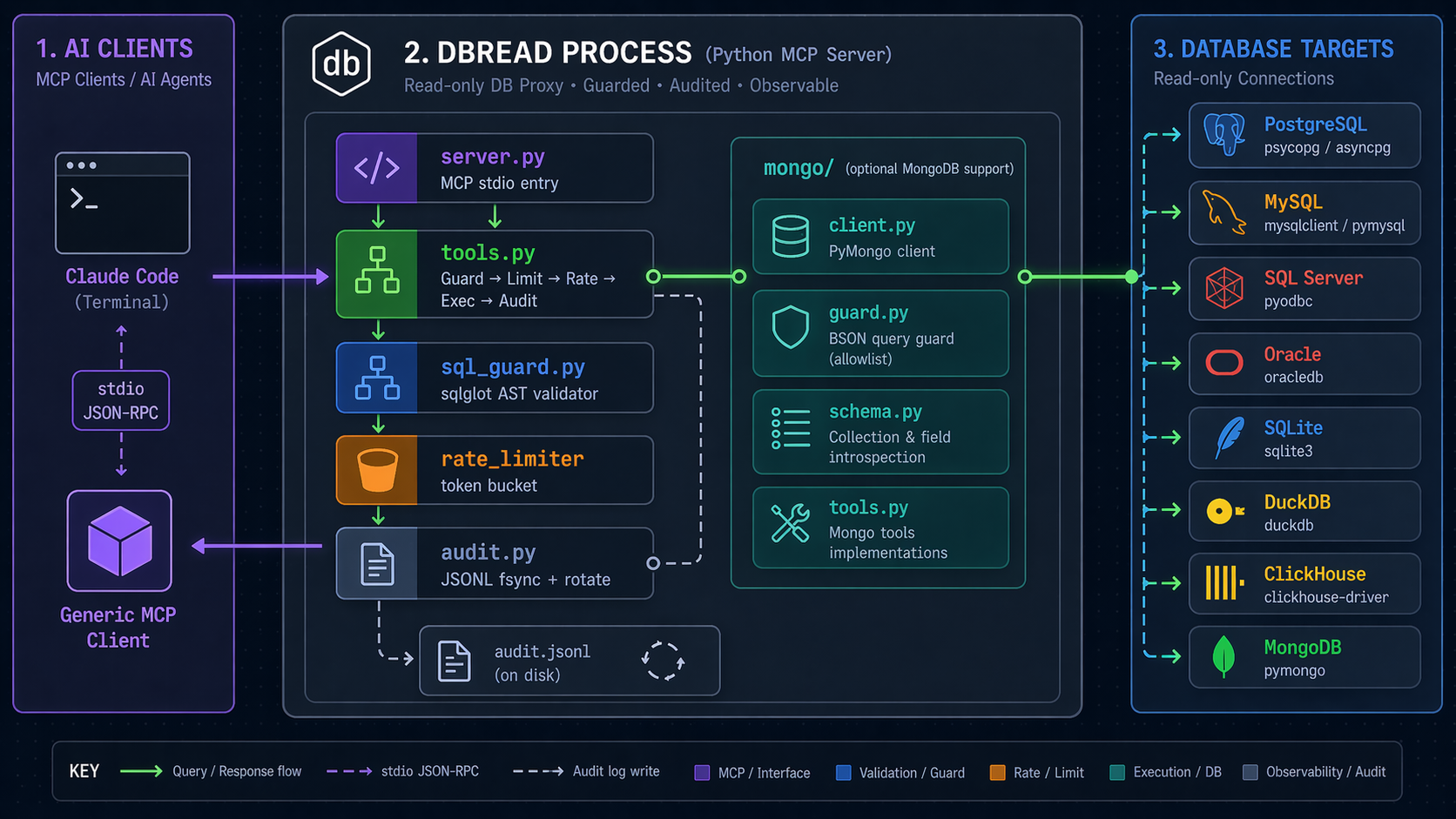
Data flow for a query call:
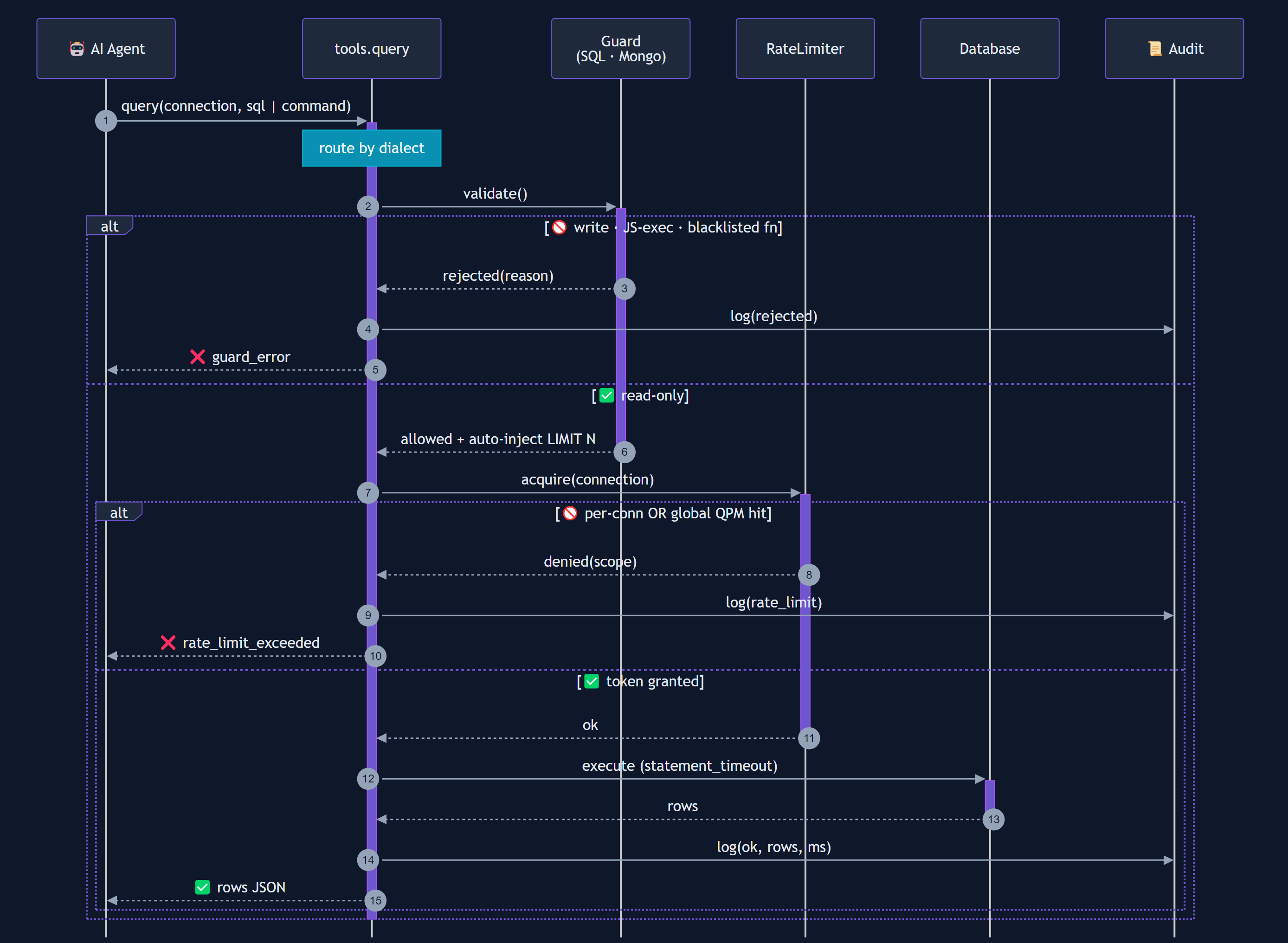
Mermaid source (for contributors — re-render with mmdc)
sequenceDiagram
    autonumber
    participant AI as 🤖 AI Agent
    participant T as tools.query
    participant G as Guard<br/>(SQL · Mongo)
    participant R as RateLimiter
    participant D as Database
    participant A as 📜 Audit

    AI->>+T: query(connection, sql | command)
    Note over T: route by dialect

    T->>+G: validate()
    alt 🚫 write · JS-exec · blacklisted fn
        G-->>T: rejected(reason)
        T->>A: log(rejected)
        T-->>AI: ❌ guard_error
    else ✅ read-only
        G-->>-T: allowed + auto-inject LIMIT N

        T->>+R: acquire(connection)
        alt 🚫 per-conn OR global QPM hit
            R-->>T: denied(scope)
            T->>A: log(rate_limit)
            T-->>AI: ❌ rate_limit_exceeded
        else ✅ token granted
            R-->>-T: ok
            T->>+D: execute (statement_timeout)
            D-->>-T: rows
            T->>A: log(ok, rows, ms)
            T-->>AI: ✅ rows JSON
        end
    end
    deactivate T
Source: docs/images/query-flow.mmd. Regenerate with:
npx -p @mermaid-js/mermaid-cli mmdc \
  -i docs/images/query-flow.mmd \
  -o docs/images/query-flow.png \
  -c docs/images/mermaid-config.json \
  -b "#0f172a" -w 1600 -H 1200 --scale 2
🧰 Tools
| Tool | Purpose | Input |
|---|---|---|
list_connections |
Configured connections + dialects | — |
list_tables |
Relations, tagged table / view / materialized_view (SQL) or collection / view / timeseries (Mongo). PG/MySQL add row_estimate + size_bytes |
connection, schema?, database? |
list_schemas |
Schema names (Mongo: the databases this connection may read) | connection, database? |
list_databases |
Mongo only: allowed databases with on-disk size | connection |
describe_table |
SQL: columns/types/PKs/defaults/comments/indexes/foreign keys/check + unique constraints. Mongo: sampled field schema + indexes + collection type + $jsonSchema validator |
connection, table, schema?, database? |
sample_table |
Most recent rows, auto-ordered by timestamp column, else PK desc (_id on Mongo) |
connection, table, n?, schema?, database? |
profile_table |
Per column: null count + %, distinct count, min/max — over a bounded sample. Mongo also reports the BSON type mix and type_drift |
connection, table, columns?, schema?, sample_size?, database? |
collection_stats |
Mongo only: document count, data/storage size, per-index size and usage ($collStats + $indexStats) |
connection, table, database? |
database_overview |
Every table/collection with kind, row estimate, size, column count, primary key, plus the foreign-key map — in one call. Capped at 500 relations (SQL) / 20 collections (Mongo), with truncated |
connection, schema?, database? |
search_schema |
Case-insensitive search of table/collection and column/field names across the whole database | connection, pattern, schema?, database? |
check_integrity |
Exact whole-table checks: orphaned foreign keys, duplicates over given columns, all-NULL columns, constant columns. Count + up to 5 examples per check | connection, table, checks?, unique_columns?, references? (Mongo), schema?, database? |
diff_schema |
Compare two connections (for example staging vs prod): tables, columns, types, nullability, indexes. Same caps as database_overview, reported as truncated_a / truncated_b |
connection_a, connection_b, schema_a?, schema_b?, database_a?, database_b? |
db_health |
PostgreSQL/MySQL server health: top statements, unused indexes, dead tuples / fragmentation, lock waits, long-running transactions. Each section fails alone with a grant hint | connection |
query |
Run SELECT/WITH/EXPLAIN/SHOW (SQL) or Mongo command (find/count/distinct/aggregate). Auto-limited. Rate-limited. Audited. |
connection, sql | command, max_rows?, params?, database? |
explain |
Query execution plan | connection, sql | command, database? |
database is MongoDB-only and must be in the connection's allowlist (see
Config); SQL connections reject it.
Debugging data fast. sample_table then profile_table answers "what does
this data actually look like, and which column is broken" in two calls instead
of a dozen hand-written queries against the rate budget.
Auditing a whole database. database_overview maps every table and its
relationships, search_schema finds where a concept lives, check_integrity
counts orphans and duplicates exactly, diff_schema spots migration drift
between environments, and db_health shows what the server is struggling
with. Every row-reading statement behind them goes through the same guard,
cost guard, statement timeout, rate limit and audit as query; catalog-only
calls cost one rate-limit token and one audit row each.
💻 CLI Commands
dbread is also a CLI for setup, troubleshooting, and audit analysis.
| Command | Purpose |
|---|---|
dbread |
Start the MCP stdio server (reads DBREAD_CONFIG) |
dbread init |
Scaffold ~/.dbread/{config.yaml,.env,sample.db} + install Claude skill |
dbread add [name] |
Interactive wizard — paste any connection string, auto-detect & convert |
dbread add-extra <e1> ... |
Install additional driver extras without losing existing ones |
dbread list-extras |
Show tracked vs actually-importable extras |
dbread doctor |
Per-connection health table — driver check + live ping (5s, parallel) + summary stats + smart fix hints. Use --quick to skip live tests. |
dbread audit [opts] |
Analyze audit.jsonl (--since, --conn, --slow, --rejected, --tail) |
dbread query <conn> "<sql>" |
One-shot query — TTY → ASCII table, pipe → JSONL, --format csv for export. --explain, --max-rows, --command '<json>' (Mongo). Same guard/audit pipeline as MCP path. |
dbread upgrade [--check] |
Reinstall via uv tool install --reinstall preserving tracked extras. Windows pre-check + --force-windows override + --check dry-run (compares vs PyPI latest). |
dbread install-skill [--force] |
Install/refresh the Claude Code skill |
dbread --version / --help |
Self-explanatory |
Full reference: docs/cli-reference.md.
🛡️ Security Model
| Layer | Mechanism | What it rejects |
|---|---|---|
| 0 | DB user with GRANT SELECT only |
All writes — mandatory, non-bypassable |
| 1 | sqlglot AST validation (SQL) · allowlist validator (Mongo) |
SQL: INSERT · UPDATE · DELETE · MERGE · CREATE · ALTER · DROP · TRUNCATE · GRANT · REVOKE · USE · SELECT … FOR UPDATE/SHARE · multi-statement (SELECT 1; DROP...) · PG CTE-DML trick (WITH d AS (DELETE...) SELECT...) · time-based DoS (pg_sleep*, sleep, benchmark, MSSQL WAITFOR DELAY/TIME) · function blacklist (pg_read_file, xp_cmdshell, load_file, dblink_exec, ClickHouse url/s3/remote, DuckDB read_csv/read_parquet, …). Mongo: only find/count/distinct/aggregate, plus a per-command field allowlist so an unsupported option is rejected rather than silently ignored; blocks $out · $merge · $function · $accumulator · $where · mapReduce · cross-DB $lookup/$unionWith · recursively walks $facet/$lookup.pipeline/$unionWith.pipeline. |
| 2 | Rate limit + statement_timeout |
Runaway loops · long-running queries |
| 2.5 | Pre-exec cost guard — EXPLAIN-based row estimate (postgres / mysql / mssql / oracle / duckdb / mongodb; opt-in via max_rows_estimate) |
Queries the planner estimates will return / scan more than max_rows_estimate rows |
| 3 | Auto-inject LIMIT N, and clamp a larger caller-supplied LIMIT down to it |
Oversized result sets |
| 4 | JSONL audit log (fsync each write, 3-backup rotate, opt-in PII redact) |
(detection, not prevention — grep-friendly forensics) |
💡 Principle: Never rely on a single layer. Layer 0 is the guarantee; Layers 1–4 make attacks loud and rare.
Where statement_timeout_s is actually enforced (Layer 2):
| Dialect | Mechanism |
|---|---|
postgres |
-c statement_timeout + default_transaction_read_only=on |
mysql |
SET SESSION MAX_EXECUTION_TIME |
mssql |
pyodbc Connection.timeout set on connect |
clickhouse |
max_execution_time setting |
sqlite |
set_progress_handler interrupt |
oracle |
Connection.call_timeout |
mongodb |
maxTimeMS on every command |
duckdb |
Not supported — DuckDB exposes no statement-timeout knob. max_rows and the rate limit still apply. |
Full threat model: docs/security-threat-model.md (STRIDE analysis).
⚡ Overhead
dbread adds guard + limit-injection work on every query. Rough p95 per call, measured in-process (no DB round-trip):
| Workload | guard.validate | guard.inject_limit | total overhead |
|---|---|---|---|
SELECT 1 |
~0.17 ms | ~0.44 ms | ~0.6 ms |
| Realistic WHERE + ORDER BY | ~0.65 ms | ~1.28 ms | ~1.9 ms |
| 5-CTE 10-table join | ~3.1 ms | ~4.8 ms | ~7.9 ms |
Rate-limit acquire: ~1 µs. Run uv run python scripts/benchmark_overhead.py on your box. Full methodology: docs/benchmarks.md.
📋 Example Prompts
💬 "List connections in dbread."
💬 "Describe the schema of the orders table in analytics_prod."
💬 "Top 10 customers by lifetime value — use dbread."
💬 "Run EXPLAIN on: SELECT ... ORDER BY created_at"
💬 "Count orders by status in analytics_mongo (use aggregate)."
💬 '{"find": "users", "filter": {"status": "active"}}'   (Mongo command form)
💬 "Update user 1 to 'hacked'."
   → ❌ sql_guard: node_rejected: Update

💬 "WITH d AS (DELETE FROM users RETURNING *) SELECT * FROM d"
   → ❌ sql_guard: node_rejected: Delete   (PG CTE-DML blocked)

💬 "SELECT 1; DROP TABLE users;"
   → ❌ sql_guard: multi_statement_not_allowed

💬 '{"aggregate": "users", "pipeline": [{"$out": "leak"}]}'
   → ❌ mongo_guard: blocked_operator: $out
📜 Audit Log
Every call lands in audit.jsonl — one JSON per line, append-only, fsync'd on each write (survives kill -9), auto-rotated at 50 MB through a 3-backup chain (.1 → .2 → .3).
{"ts":"2026-04-22T12:30:12+00:00","conn":"analytics","sql":"SELECT * FROM users LIMIT 100","rows":100,"ms":42,"status":"ok"}
{"ts":"2026-04-22T12:30:15+00:00","conn":"analytics","sql":"DELETE FROM users","rows":0,"ms":0,"status":"rejected","reason":"node_rejected: Delete"}
Default timezone is UTC; override with audit.timezone: Asia/Bangkok (IANA). Enable audit.redact_literals: true to rewrite SQL literals to ? before logging — handy when prompts may contain PII.
Set audit.retention_days: N to auto-prune entries older than N days. Runs once at startup then at most once per hour on subsequent writes — covers both current file and rotated backups (.1, .2, .3). Malformed lines are kept (fail-safe). Leave unset to keep only size-based rotation (max ~4 × rotate_mb).
jq 'select(.status=="rejected")' audit.jsonl     # just rejections
jq 'select(.ms > 1000)' audit.jsonl              # slow queries
jq -s 'group_by(.status)|map({s:.[0].status,n:length})' audit.jsonl   # counts
No jq? Use the built-in analyzer:
dbread audit                     # summary: counts, top slow, top rejected
dbread audit --since 1h          # last hour only
dbread audit --conn analytics    # filter by connection
dbread audit --slow 1000         # queries >= 1000 ms
dbread audit --rejected          # only rejections, grouped by reason
dbread audit --tail              # follow new entries (like tail -f)
Rotated backups (.1 · .2 · .3) are aggregated automatically.
🗂️ Config
config.yaml (gitignored — safe to edit with real values):
connections:
  analytics_prod:
    url_env: ANALYTICS_PROD_URL        # credentials from .env
    dialect: postgres
    rate_limit_per_min: 60
    statement_timeout_s: 30
    max_rows: 1000

  local_mysql:
    url: mysql+pymysql://readonly:pw@localhost/shop
    dialect: mysql
    rate_limit_per_min: 120
    statement_timeout_s: 15
    max_rows: 500

  local_duckdb:
    url: duckdb:///./analytics.duckdb?access_mode=read_only
    dialect: duckdb
    rate_limit_per_min: 200
    statement_timeout_s: 30
    max_rows: 5000

  clickhouse_prod:
    url_env: CLICKHOUSE_URL            # clickhouse+http://readonly:pw@host:8123/db
    dialect: clickhouse
    rate_limit_per_min: 60
    statement_timeout_s: 30
    max_rows: 1000

audit:
  path: ~/.dbread/audit.jsonl         # ~ expansion supported
  rotate_mb: 50                        # rotate chain: current → .1 → .2 → .3
  timezone: UTC                        # IANA; default UTC
  redact_literals: false               # true → SQL literals → "?"
  retention_days: 7                    # auto-prune entries older than N days (null = off)
Supported dialects: postgres · mysql · mssql · sqlite · oracle · duckdb · clickhouse · mongodb.
Compat (no new dialect): CockroachDB, TimescaleDB, Aurora PG (use postgres) · Aurora MySQL, SingleStore, PlanetScale (use mysql). See docs/setup-db-readonly.md.
🧪 Testing
uv sync --extra dev
uv run pytest                          # 622 passing
uv run pytest --cov=dbread             # coverage report (87% overall)
uv run ruff check src/                 # lint

# Integration tests with real PG + MySQL + ClickHouse + MongoDB (needs Docker):
cd tests/integration && docker compose up -d
uv run pytest tests/integration/ -v
- 600+ unit tests cover config, connections, audit (fsync/tz/redact/rotate), SQL guard (57 evasion cases incl. WAITFOR & sleep variants), Mongo guard (24 adversarial cases — $out/$merge smuggling, JS exec, cross-DB $lookup/$unionWith, deep nesting), rate limiter, tools, the v0.8 cost guard (41 tests across 6 dialects + Mongo + integration),
dbread queryCLI (18 tests),dbread upgradeCLI (24 tests), plus the v0.7 connection-string parsers (84 tests across 6 format families × 8 dialects), converter (54 tests), wizard + writers (47 tests), extras tracking (36 tests), CLI (22 tests). - Per-field behavioral tests prove
findactually appliessort,skip,hintandcollation, against both a recording fake and a live server. A cheaper contract test compares the guard's accepted field set with the executor's declared one, which catches the two drifting apart but does not by itself prove a field is applied. - 4 subprocess smoke tests drive
server.pyvia real stdio JSON-RPC. - 4 SQLite + 4 DuckDB E2E tests always run (no Docker).
- PG + MySQL + ClickHouse + MongoDB E2E tests skip gracefully without Docker.
- CI runs on GitHub Actions matrix: Python 3.11/3.12 × Ubuntu/Windows + a dedicated
extras-install-orderjob that provesdbread add-extrapreserves prior drivers.
⚠️ Known Limitations
Honesty pass — what dbread does not do:
- sqlglot is best-effort, dialect-dependent. Coverage is strong for Postgres / MySQL / SQLite; medium for MSSQL / Oracle / ClickHouse / DuckDB. See the dialect coverage table. Function blacklists are deny-lists; new dialect features arrive between releases.
- Rate limit is single-process, in-memory. Multiple dbread processes (multi-user install) don't share buckets.
global_rate_limit_per_mincaps one process only. - Audit is reactive, not preventive. JSONL +
dbread audithelp you notice; they don't block. - No query cost estimator. Layer 2 has
statement_timeoutandLIMIT N, but an expensive index-less scan that finishes in time still runs. - Pre-1.0 project. Real-world adversarial testing accumulates over time. Treat dbread as one layer of defense, not the whole perimeter.
- MongoDB guard is new (v0.4). Allowlist-based, less battle-tested than sqlglot. Adversarial suite covers the known write-stage / JS-exec evasions; report new ones.
- Mongo schema and
profile_tableare sampled, not authoritative (default 100 docs on Mongo, 5000 rows on SQL). Rare fields and outliers may be missed — bumpmongo.sample_size(max 1000) orsample_sizeif needed. - No Atlas Search /
$search/$vectorSearchsupport. Deferred. - No cursor pagination. Deliberate: a
getMorecarries no query to re-validate and audits as an opaque cursor id, which would bypass Layers 1 and 4. Usesort+limit, then a range filter on the sort key for deeper pages. - SQLite drops CTE column lists.
WITH c(n) AS (...)is re-serialized by sqlglot without the(n), so the statement fails withno such column. WriteWITH c AS (SELECT 1 AS n ...)instead. PostgreSQL, MySQL and DuckDB are unaffected. paramsskips LIMIT injection. Re-serializing a parameterized statement would rewrite:nameinto a placeholder style the driver may not accept, so the SQL is left untouched and only the fetch cap applies. Include your ownLIMITwithparams.truncatedis conservative. A result landing exactly onmax_rowsreportstruncated: trueeven when nothing was cut.- Mongo
database_overview/search_schema/diff_schemafield lists are sampled, and Mongo has no declared relationships, sorelationshipsis always empty andcheck_integrityorphans need explicitreferences. check_integrityis exact, so it scans. The statement timeout is what bounds it. The cost guard rejects only when the planner's estimate exceedsmax_rows_estimate, and the counts and groupings these checks run usually estimate a handful of result rows (PostgreSQL estimates the one-row count, not the rows scanned), so expect a timeout rather than a rejection on a large table.- Mongo
database_overviewcosts up to two rate-limit tokens per collection (one$sample, one$collStats), plus one forlistCollections;schema_snapshot, and so each Mongo side ofdiff_schema, one per collection plus one. A collection whose reads fail reportserrorand null numbers instead of failing the call. db_healthdepends on server privileges.pg_stat_statements,pg_read_all_stats,performance_schemaandsysaccess are needed for full output; seedocs/setup-db-readonly.md.$indexStatsneeds an extra grant beyond the plainreadrole. It is allowlisted, and fails loudly withnot authorizedwhen the role lacks it.
🔄 Update / add more drivers
# Upgrade to latest:
uv tool upgrade dbread

# Add a new driver later WITHOUT losing existing ones:
dbread add-extra mongo
# (under the hood: uv tool install --force "dbread[postgres,mysql,mongo,...]")

# Check what's installed and what your config needs:
dbread doctor
dbread list-extras
⚠️ Why
add-extrainstead ofuv tool install dbread[mongo]? Becauseuv tool installalways recreates the tool environment, dropping previously-installed extras.dbread add-extratracks the union of all installed extras and reinstalls correctly so you never lose drivers you already had.
💡 Skill auto-refresh (v0.7.2+):
uv tool upgrade dbreadupgrades the package; the next time you run anydbreadcommand (e.g.dbread doctor, or Claude Code starts the MCP server), the bundled Claude skill at~/.claude/skills/dbread/SKILL.mdis silently refreshed if its content has changed. No manualdbread install-skill --forceneeded. Restart Claude Code to pick up the new skill in your session.
⚠️ Windows: close Claude Code before upgrading.
dbread.exeis a running process when Claude Code is open, and Windows refuses to overwrite a running.exe(os error 32: ... being used by another process). Quit Claude Code (or kill stray processes withGet-Process dbread | Stop-Process -Force) beforeuv tool upgrade dbread, then reopen. Linux/macOS don't have this restriction.
Working from a git checkout (source install)? Run bash scripts/dev-install.sh (or the .ps1 variant) — see the
Development section.
📚 Docs
| Document | What's in it |
|---|---|
docs/setup-db-readonly.md |
Copy-paste SQL / Mongo for Layer 0 read-only user on PG / MySQL / MSSQL / Oracle / SQLite / DuckDB / ClickHouse / MongoDB |
docs/cli-reference.md |
Complete CLI reference for all dbread commands with examples and exit codes |
docs/connection-string-formats.md |
Every format dbread add recognises + SQLAlchemy URL templates per dialect + fallback options |
docs/release-process.md |
Auto-publish pipeline (GitHub Actions → PyPI) — how to release, safety gates, troubleshooting |
docs/architecture.md |
Component diagram · 5-layer details · data flow · design decisions |
docs/security-threat-model.md |
Full STRIDE analysis · residual risks · response plan |
docs/benchmarks.md |
Overhead methodology + per-workload p95 numbers |
docs/manual-smoke-test.md |
Step-by-step checklist for verifying integration with Claude Code |
🧱 Project Layout
src/dbread/
├── server.py            # MCP stdio entry — registers 15 tools, dispatches to handlers
├── tools.py             # SQL tool handlers (guard → limit → rate → exec → audit)
├── inspection_tools.py  # whole-database tools: overview, search, integrity, diff, health
├── inspection/          # SQL catalog reads, integrity/health statements, schema snapshot + diff
├── explore.py           # statement builders for sample_table / profile_table
├── cost_guard.py        # Layer 2.5 — EXPLAIN-based row estimate before execution
├── sql_guard.py         # sqlglot AST validator + LIMIT injection/clamping
├── rate_limiter.py      # thread-safe token bucket per connection + global cap
├── connections.py       # SQLAlchemy engine manager (lazy, per-dialect)
├── config.py            # pydantic Settings (YAML + env)
├── audit.py             # append-only JSONL with fsync + size rotation + redaction
├── audit_cli.py         # `dbread audit` analyzer (since/conn/slow/rejected/tail)
├── cli.py               # CLI dispatcher: init, add, add-extra, list-extras, doctor, audit, ...
├── mongo/               # MongoDB stack
│   ├── client.py        # MongoClient manager (one per connection name)
│   ├── guard.py         # command/stage/field allowlists + limit injection
│   ├── schema.py        # sample-based schema inference + column profiling + type drift
│   ├── base.py          # database allowlist scoping, metadata token + audit
│   ├── query.py / execute.py  # guarded query + explain, command spec -> pymongo
│   ├── inspect.py / catalog.py  # describe, list, collection_stats, overview, search, snapshot
│   ├── integrity.py     # orphan / duplicate / null / constant checks
│   └── tools.py         # MongoToolHandlers composing the modules above
├── extras/              # NEW v0.7 — driver-extra tracking
│   ├── manager.py       # state file (~/.dbread/installed_extras.json) + find_spec scan
│   └── installer.py     # subprocess wrapper: `uv tool install --force "dbread[<union>]"`
└── connstr/             # NEW v0.7 — `dbread add` connection-string wizard
    ├── types.py         # ParsedConn dataclass + UnsupportedConnString / UnknownFormat
    ├── detector.py      # priority-ordered format dispatch
    ├── converter.py     # ParsedConn → SQLAlchemy URL (URL.create + Mongo hand-build)
    ├── wizard.py        # interactive 10-step flow (paste → detect → test → write)
    ├── writers.py       # comment-preserving .env / config.yaml writers
    ├── _manual_entry.py # fallback: manual URL entry + template generator
    └── parsers/         # one per format family
        ├── uri.py       # postgresql://, mysql://, mongodb://, mongodb+srv://, ...
        ├── jdbc.py      # jdbc:postgresql://, jdbc:oracle:thin:@..., ...
        ├── adonet.py    # Server=...;Database=...;User Id=...;Password=...; (C# / .NET)
        ├── odbc.py      # Driver={ODBC Driver 17 for SQL Server};Server=...;...
        ├── cloud.py     # mongodb+srv://, MotherDuck md:, *.clickhouse.cloud
        └── filepath.py  # *.db / *.sqlite / *.duckdb / :memory:
Every core runtime module stays small and single-purpose — most files sit under 200 LOC so the whole stack is readable end-to-end in a single sitting.
🛠️ Development
Working from source (no PyPI release yet, or iterating on a patch)? Use the
dev-install scripts — they reinstall the uv tool with a full wheel
rebuild even when the version hasn't changed (uv tool install --force
alone does NOT re-copy source when the version is unchanged).
# Bash (macOS, Linux, Git-Bash on Windows)
bash scripts/dev-install.sh            # installs [mongo] extras by default
bash scripts/dev-install.sh "mongo,postgres,mysql"
# PowerShell
.\scripts\dev-install.ps1
.\scripts\dev-install.ps1 -Extras "mongo,postgres,mysql"
Then in Claude Code: /mcp → pick dbread → Reconnect so the new tool
list is fetched.
🙏 Credits
Built with mcp · sqlglot · SQLAlchemy 2.x · pydantic · uv.
1 maintainer

Metadata
1 maintainer
Release files for dbread 0.10.0
For a detailed explanation of source distributions (sdists) and built distributions (wheels), please see the package formats documentation.
Source distribution (sdist)
| File | Size | Uploaded | Provenance | Actions |
|---|---|---|---|---|
| dbread-0.10.0.tar.gz | 5.3 MB | Without provenance | Details for dbread-0.10.0.tar.gz |
Built distribution (wheel)
| File | Interpreter | ABI | Platform | Actions Reset |
|---|---|---|---|---|
| dbread-0.10.0-py3-none-any.whl | Python 3 | none | any | Details for dbread-0.10.0-py3-none-any.whl |
Total release size: 5.4 MB
Release files / dbread-0.10.0.tar.gz
| Download URL | dbread-0.10.0.tar.gz |
|---|---|
| Size | 5.3 MB |
| Tags | Source |
|
SHA-256 checksum How to use checksums |
14f2974878952fe061a8e47e3e1dd6eeb45c4ef9e98121aea7096643527f12a0
|
|
BLAKE2b-256 checksum How to use checksums |
de65da275926af61aade40bf51112c100dfd02dba68f009ed66db7affe133e31
|
| Upload date | |
|
Uploaded using Trusted Publishing? What is trusted publishing? |
No |
| Uploaded via |
twine/7.0.0 CPython/3.13.16
|
Release files / dbread-0.10.0-py3-none-any.whl
| Download URL | dbread-0.10.0-py3-none-any.whl |
|---|---|
| Size | 135.1 kB |
| Tags | Python 3 |
|
SHA-256 checksum How to use checksums |
6bd4f237dc6bee5fb531912876af924e751173196c57e77358c32d6b956526ea
|
|
BLAKE2b-256 checksum How to use checksums |
2d4ab54ae3193ece230c3520e88ffcb3c30f1894e06939dad4da9cfd412435ce
|
| Upload date | |
|
Uploaded using Trusted Publishing? What is trusted publishing? |
No |
| Uploaded via |
twine/7.0.0 CPython/3.13.16
|
Security for dbread 0.10.0
Provenance
Provenance describes where a file came from. On PyPI, provenance is shared via attestations, which provide a verifiable record of the build or publishing details. View details, limitations and caveats.
No provenance found
None of the files in this release were uploaded with provenance metadata.
A note on package security
PyPI is a repository for distributing packages, not a service for auditing them. While third-party security researchers and our staff do their best to detect and remove malicious packages, PyPI cannot guarantee the quality, security or suitability of any given package.
To learn more about protecting yourself from malicious actors, visit our package security documentation.














