
DeckTalk
Narrated presentations, cut to the word.
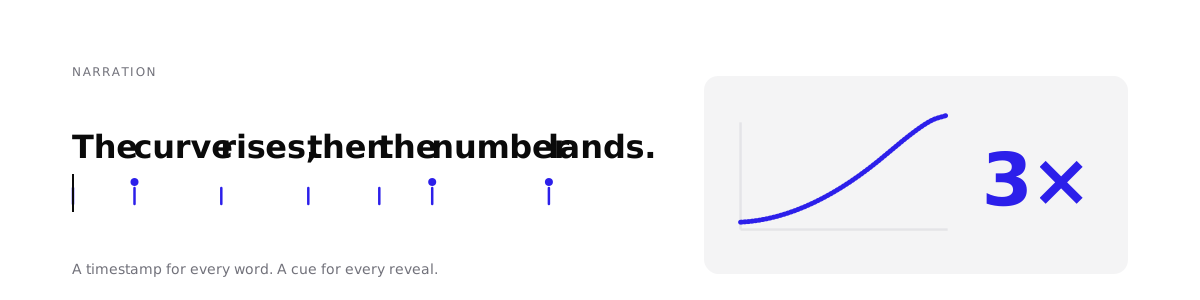
DeckTalk makes a narrated video from a markdown script and HTML slides.
Each reveal starts on the word that introduces it.
If you change a sentence, DeckTalk voices only that section again.
DeckTalk is for lecturers, course authors, developer advocates, and the agents that help them.



Quickstart ·
Docs ·
Requirements and costs ·
Reference card for agents ·
Changelog
Agents can read llms.txt.
Make your first video
You need Python 3.12 or later. These steps use uv, a Python package manager. If you use pipx, run pipx install decktalk in step 1 instead.
-
Install DeckTalk.
uv tool install decktalkuv ends with
Installed 1 executable: decktalk. -
Download Chromium, ffmpeg, and KaTeX. You do this one time per machine.
decktalk setupOn Linux, this step asks for sudo. The last line is
setup complete. -
Create the scaffold, a complete example project.
decktalk init my-lesson -
Go into the project.
cd my-lesson -
Build the video without an account.
decktalk build --silentThe build ends with
builtand the path ofbuild/out/my-lesson.mp4. The build took 224.4 seconds on a MacBook Pro with Apple M5 Pro and 64 GB memory, because recording runs in real time. -
Copy the example settings file.
cp .env.example .env -
In
.env, set your ElevenLabs API key and voice id. DeckTalk never prints the key. -
Build the video with your voice.
decktalk buildThis build spends ElevenLabs credits for every section. It writes the video, SRT and VTT captions, and one chapter per section. What spends credits lists the cost.
The scaffold is a five-section lesson. The quickstart shows the output of each step and what the example video shows.
What you write
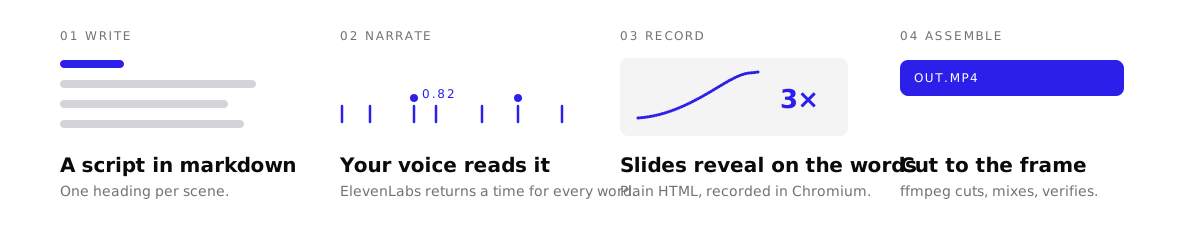
You write four files. One cue id per reveal, such as 1.1bowl, ties the script, the cues, and the page together.
| File | What it holds |
|---|---|
script.md |
What the voice says, under one ## N. Title heading per section. |
decktalk.toml |
The project file. It ties each section to a page or to a clip of your own. |
cues.json |
The phrase that each reveal starts on. |
A page in deck/ |
The slides, as plain HTML. |
The narrate stage writes a words file with the start and end of every spoken word. If a cue phrase is not in the spoken words, the build stops and names the cue. Your first deck writes one section in all four files.
Why the cuts are exact

A browser does not start recording at a known time, so DeckTalk does not use a timer. The recorder covers the page in magenta until the narration starts. The first frame without magenta is narration t=0, on Linux, macOS, and Windows.
decktalk verify then measures every reveal in the finished video. This sample comes from a silent build of the scaffold.
check                 cue       at   chg %   ctl %   offset     a/v  result
1:1.1bowl            1.25     1.25    1.05    0.00    -10ms    -9ms  changed
3:3.4name           71.98   110.58    2.77    0.00    +20ms   +11ms  changed
4:4.1words          14.31   172.99    1.47    0.00    +10ms   -11ms  changed
The offset column is the time from the cue time to the onset of the reveal, in milliseconds. Verify defines every column and limit.
Requirements and costs
- Software. DeckTalk needs Python 3.12 or later, on Linux, macOS, or Windows.
decktalk setupdownloads the rest. - Accounts. A silent build needs no account. A voiced build needs an ElevenLabs API key and a voice id.
- Cost. Every ElevenLabs plan can call the API. The free plan has limits for a video you publish.
Requirements and costs lists every download and every command that spends credits.
How it compares
| Tool | Timing comes from | Slides are | After you edit one sentence |
|---|---|---|---|
| DeckTalk | the spoken words, one time per word | your HTML | DeckTalk voices one section again. build --only N records only that section. |
| Remotion, Motion Canvas | frame numbers or seconds in code, by default | code | You time the change again by hand and render again. |
| Manim | seconds in code, or bookmarks in the narration with manim-voiceover | code | With manim-voiceover, bookmarks follow the new text. You still render the scene again in Python. |
| Descript | a recording you made | your screen | Overdub voices the new words. The screen recording does not move with them. |
| Synthesia, HeyGen | the avatar's speech | their avatar and scenes | You generate the video again. |
The FAQ has the full comparison. Every build also gives you these parts:
- A free silent build. Every stage runs with no key, and a click marks each word.
- Cached narration. DeckTalk voices a section again only when it changes.
- Captions and chapters. Every build writes SRT, VTT, and chapters.
- A soundscape. Add an underscore, an ambience bed, and sound effects.
- Loudness. DeckTalk normalizes the mix to -16 LUFS.
- Checked output.
checkandverifycatch bad recordings and late reveals.
Status and support
DeckTalk is alpha, and a minor release can still break things. One person maintains it.
CI runs the unit tests and a full offline build on Linux for every push to main and every pull request. CONTRIBUTING lists the macOS and Windows runs.
- Report bugs and ask questions in Issues.
- Report a vulnerability privately. SECURITY.md explains how.
- The changelog lists every release.
Documentation
The docs are at docs.decktalk.app.
- Install and build a first video: Quickstart
- Write your own section: Your first deck
- Give an agent the whole contract: Reference card for agents
Contributing
To work on DeckTalk itself, start with CONTRIBUTING.md.
Apache-2.0. Made by Jacob Beaudin.
1 maintainer

Release files for decktalk 0.2.0
For a detailed explanation of source distributions (sdists) and built distributions (wheels), please see the package formats documentation.
Source distribution (sdist)
| File | Size | Uploaded | |
|---|---|---|---|
| decktalk-0.2.0.tar.gz | 337.5 kB | Details |
Built distribution (wheel)
| File | Interpreter | ABI | Platform | Reset |
|---|---|---|---|---|
| decktalk-0.2.0-py3-none-any.whl | Python 3 | none | any | Details |
Total release size: 690.8 kB
Release files / decktalk-0.2.0.tar.gz
| Download URL | decktalk-0.2.0.tar.gz |
|---|---|
| Size | 337.5 kB |
| Tags | Source |
|
SHA-256 checksum How to use checksums |
0cc0c86dc9113575fb3ca17c4737c3c22240f391c3696b6e60a66e6a57c268b8
|
|
BLAKE2b-256 checksum How to use checksums |
1c9724d6c495c4a5d47027f127d5d351029c9297c1de23f76d6c7eae4fc2300b
|
| Upload date | |
|
Uploaded using Trusted Publishing? What is trusted publishing? |
Yes |
| Uploaded via |
twine/7.0.0 CPython/3.13.14
|
Provenance
Provenance describes where a file came from. On PyPI, provenance is shared via attestations, which provide a verifiable record of the build or publishing details. View details, limitations and caveats.


PyPI Publish Attestation
PyPI verified that this artifact, at this checksum, originated from the publisher listed below.
Signed by GitHub Actions, verified by PyPI on Sep 14, 2026.
Transparency logRelease files / decktalk-0.2.0-py3-none-any.whl
| Download URL | decktalk-0.2.0-py3-none-any.whl |
|---|---|
| Size | 353.3 kB |
| Tags | Python 3 |
|
SHA-256 checksum How to use checksums |
fb8c8064f5f6cb2477cf5262325071feca2b09c8243fe549ba5c5751b62e3b75
|
|
BLAKE2b-256 checksum How to use checksums |
eed139841dff1be929d6e242f753334e7347b34e8071cafb20d4161356e25bbd
|
| Upload date | |
|
Uploaded using Trusted Publishing? What is trusted publishing? |
Yes |
| Uploaded via |
twine/7.0.0 CPython/3.13.14
|
Provenance
Provenance describes where a file came from. On PyPI, provenance is shared via attestations, which provide a verifiable record of the build or publishing details. View details, limitations and caveats.
PyPI Publish Attestation
PyPI verified that this artifact, at this checksum, originated from the publisher listed below.
Signed by GitHub Actions, verified by PyPI on Sep 14, 2026.
Transparency log













