
DeckTalk
Every picture lands on its word, and you edit the video like a doc.
Before this, one wrong word meant editing, rendering and recording the whole thing again.
DeckTalk built this film from text files, and every reveal in it starts on its word. Watch it with the sound on at decktalk.ai.



Quickstart ·
Docs ·
Requirements and costs ·
Reference card for agents ·
Changelog
Agents can read llms.txt.
What it is
DeckTalk makes a narrated video from a markdown script and plain HTML slides. Your cloned voice reads the script and comes back with a time for every word, so each reveal starts on the word that introduces it. The script and the slides are text you keep in a repository, so you change a sentence and build again, the way you would change a doc or a codebase.
Four things are different from a video editor, a slide tool, or an animation library.
- Every reveal is cut to the spoken word. A cue names a phrase, not a second, so a reveal follows the narration wherever the voice puts it.
decktalk verifymeasures every reveal in the finished video, and in the sample below each one lands within one frame of its word. - A changed sentence voices only its own section again. DeckTalk caches every section's narration by its text and voice settings, so an edit spends credits only on the sections that changed.
build --only Nrecords only the section you name. - The whole video is text. You write four files, and an agent can write them too. There is no timeline to drag and no project file a person cannot read.
- Your coding agent already knows how to drive it.
decktalk initinstalls six skills into the project, one each for the script, the slides, the cues, the build, the fixes and a revision, so an agent writes the files, reads the JSON every command prints, and fixes what it finds. The skills lists them.
Who it is for
- Technical tutorials. A viewer watches a walkthrough whose commands and screenshots match the version she just installed. When the library changes, you change the sentence and build again.
- Product demos. A viewer sees the feature narrated over the screen it runs on, with every callout landing on the word that names it.
- Lessons. A viewer follows an explanation in which each idea appears as it is spoken, so nothing is read ahead.
Internal presentations and estimation walkthroughs run the same pipeline. Neither has a shipped example yet.
Make your first video
You need Python 3.12 or later. These commands use uv, a Python package manager. If you use pipx, run pipx install decktalk instead of the first line.
uv tool install decktalk
decktalk install
decktalk init my-lesson && cd my-lesson
decktalk build --no-voice
decktalk install downloads Chromium and ffmpeg one time per machine, and on Linux it asks for sudo. decktalk init writes the starter, a working three-section project with one equation, and nothing in it has to be deleted first. The build without voice needs no account, ends with built, and prints the path of build/out/my-lesson.mp4. Recording runs in real time, so the build takes about a minute and makes a 44 second video.
To hear it in your own voice, copy .env.example to .env, set your ElevenLabs API key and voice id, and run decktalk build. DeckTalk never prints the key. A voiced build of the starter sends about 420 characters, and decktalk narrate --dry-run prices that run before it starts. Every build writes the mp4, SRT and VTT captions, a chapter per section and a transcript page. What spends credits lists the cost of every command.
The quickstart shows the output of each step and what the starter shows. If you try DeckTalk on one section of something you teach, tell me in Issues what stopped you.
What you write
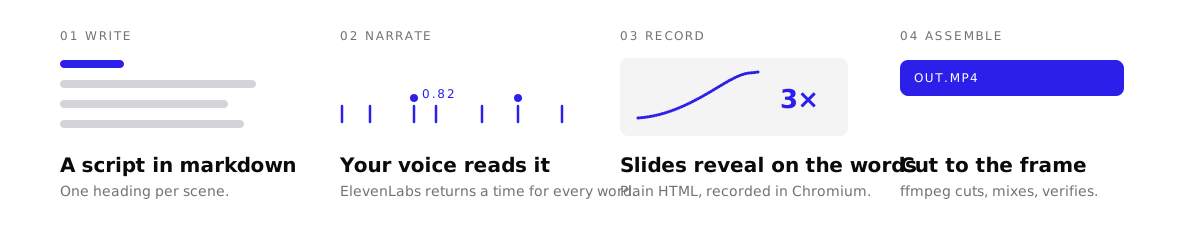
You write four files. One cue id per reveal, such as 1.1script, ties the script, the cues, and the page together.
| File | What it holds |
|---|---|
script.md |
What the voice says, under one ## N. Title heading per section. |
decktalk.toml |
The project file. It ties each section to a page or to a clip of your own. |
cues.json |
The phrase that each reveal starts on. |
A page in deck/ |
The slides, as plain HTML. |
The narrate stage writes a words file with the start and end of every spoken word. If a cue phrase is not in the spoken words, the build stops and names the cue. Your first deck writes one section in all four files.
Why the cuts are exact

A browser does not start recording at a known time, so DeckTalk does not use a timer. The recorder covers the page in magenta until the narration starts. The first frame without magenta is narration t=0, on Linux, macOS, and Windows.
decktalk verify then measures every reveal in the finished video. This sample comes from a build without voice of the starter, and one frame lasts 40 ms.
check                 cue       at   chg %   ctl %   offset     a/v  result
1:1.1title           0.70     0.70    1.87    0.00    +20ms   +16ms  changed
2:2.1code            8.93    23.41   10.79    0.00    -10ms   -34ms  changed
3:3.1make            8.21    38.13   10.85    0.00    -10ms    +8ms  changed
The offset column is the time from the cue time to the onset of the reveal, in milliseconds. Verify defines every column and limit.
Requirements and costs
- Software. DeckTalk needs Python 3.12 or later, on Linux, macOS, or Windows.
decktalk installdownloads the rest. - Accounts. A build without voice needs no account. A voiced build needs an ElevenLabs API key and a voice id.
- Cost. Every ElevenLabs plan can call the API. The free plan has limits for a video you publish.
Requirements and costs lists every download and every command that spends credits.
How it compares
| Tool | Timing comes from | Slides are | After you edit one sentence |
|---|---|---|---|
| DeckTalk | the spoken words, one time per word | your HTML | DeckTalk voices one section again. build --only N records only that section. |
| Remotion, Motion Canvas | frame numbers or seconds in code, by default | code | You time the change again by hand and render again. |
| Manim | seconds in code, or bookmarks in the narration with manim-voiceover | code | With manim-voiceover, bookmarks follow the new text. You still render the scene again in Python. |
| Descript | a recording you made | your screen | Overdub voices the new words. The screen recording does not move with them. |
| Synthesia, HeyGen | the avatar's speech | their avatar and scenes | You generate the video again. |
The FAQ has the full comparison. Every build also gives you these parts:
- A free build without voice. Every stage runs with no key, and a click marks each word.
- Cached narration. DeckTalk voices a section again only when it changes, and keeps a recording whose page, words and cues have not moved.
- Captions, chapters and a transcript. Every build writes SRT, VTT, chapters and a transcript page.
- A soundscape. Add music, an ambience bed, and sound effects.
- Loudness. DeckTalk normalizes the mix to -16 LUFS.
- Checked output.
recordandverifycatch bad recordings and late reveals.
Status and support
DeckTalk is alpha, and a minor release can still break things. One person maintains it.
CI runs the unit tests and a full offline build on Linux for every push to main and every pull request. CONTRIBUTING lists the macOS and Windows runs.
- Report bugs and ask questions in Issues.
- Show what you made in Discussions.
- Report a vulnerability privately. SECURITY.md explains how.
- The changelog lists every release.
Documentation
The docs are at docs.decktalk.ai.
- Install and build a first video: Quickstart
- Write your own section: Your first deck
- Give an agent the whole contract: Reference card for agents
- Understand how it is built: ARCHITECTURE.md and the decision notes
Contributing
To work on DeckTalk itself, start with CONTRIBUTING.md.
Apache-2.0. Made by Jacob Beaudin.
1 maintainer

Release files for decktalk 0.4.0
For a detailed explanation of source distributions (sdists) and built distributions (wheels), please see the package formats documentation.
Source distribution (sdist)
| File | Size | Uploaded | |
|---|---|---|---|
| decktalk-0.4.0.tar.gz | 820.9 kB | Details |
Built distribution (wheel)
| File | Interpreter | ABI | Platform | Reset |
|---|---|---|---|---|
| decktalk-0.4.0-py3-none-any.whl | Python 3 | none | any | Details |
Total release size: 1.7 MB
Release files / decktalk-0.4.0.tar.gz
| Download URL | decktalk-0.4.0.tar.gz |
|---|---|
| Size | 820.9 kB |
| Tags | Source |
|
SHA-256 checksum How to use checksums |
74c7d8ceed0036ba56a1861727132697eafc61649ba81e1fd34ef09cfab013cd
|
|
BLAKE2b-256 checksum How to use checksums |
51c3791d0bb84a42791763d9f013865762f70f48a25430a114e39b1e3b3b141c
|
| Upload date | |
|
Uploaded using Trusted Publishing? What is trusted publishing? |
Yes |
| Uploaded via |
twine/7.0.0 CPython/3.13.14
|
Provenance
Provenance describes where a file came from. On PyPI, provenance is shared via attestations, which provide a verifiable record of the build or publishing details. View details, limitations and caveats.


PyPI Publish Attestation
PyPI verified that this artifact, at this checksum, originated from the publisher listed below.
Signed by GitHub Actions, verified by PyPI on Sep 19, 2026.
Transparency logRelease files / decktalk-0.4.0-py3-none-any.whl
| Download URL | decktalk-0.4.0-py3-none-any.whl |
|---|---|
| Size | 887.0 kB |
| Tags | Python 3 |
|
SHA-256 checksum How to use checksums |
397d552046e80c0c861a2f7e862dd4ca3f529d37a83dcf271940b2555caa3251
|
|
BLAKE2b-256 checksum How to use checksums |
adc214b8d45647b4b4c6ed5712e840bced8bd0347162c0274bdd31d784332df3
|
| Upload date | |
|
Uploaded using Trusted Publishing? What is trusted publishing? |
Yes |
| Uploaded via |
twine/7.0.0 CPython/3.13.14
|
Provenance
Provenance describes where a file came from. On PyPI, provenance is shared via attestations, which provide a verifiable record of the build or publishing details. View details, limitations and caveats.
PyPI Publish Attestation
PyPI verified that this artifact, at this checksum, originated from the publisher listed below.
Signed by GitHub Actions, verified by PyPI on Sep 19, 2026.
Transparency log













