
This release is a pre-release and may not be stable for production use.
DeckTalk
Every picture lands on its word, and you edit the video like a doc.
Before this, one wrong word meant editing, rendering and recording the whole thing again.
DeckTalk built this film from text files, and every reveal in it starts on its word. Watch it with the sound on, or read the whole pitch at decktalk.ai.



Quickstart ·
Docs ·
Requirements and costs ·
Reference card for agents ·
Changelog
Agents can read llms.txt.
What it is
DeckTalk makes a narrated video from a markdown script and plain HTML slides. Your cloned voice reads the script and comes back with a time for every word, so each reveal starts on the word that introduces it. The script and the slides are text you keep in a repository, so you change a sentence and build again, the way you would change a doc or a codebase.
Four things are different from a video editor, a slide tool, or an animation library.
- Every reveal is cut to the spoken word. A cue names a phrase, not a second, so a reveal follows the narration wherever the voice puts it.
decktalk verifymeasures every reveal in the finished video, and in the sample below each one lands within two frames of its word. - A changed sentence voices only its own section again. DeckTalk names every take by a hash of its text, its voice, its model and its settings, so an edit spends credits only on the sections that changed.
build --section Nrecords only the section you name. - The whole video is text. You write four files, and an agent can write them too. There is no timeline to drag and no project file a person cannot read.
- The command line is the instruction set.
decktalk schemaprints every command, flag, error code, finding code, setting and page attribute as one JSON object, so a coding agent can read the whole tool without running a stage. The six skillsdecktalk initinstalls carry only the craft a command line cannot say. The skills lists them.
Who it is for
- Technical tutorials. A viewer watches a walkthrough whose commands and pictures match the version she just installed. When the library changes, you change the sentence and build again.
- Product demos. A viewer sees the feature narrated over the screen it runs on, with every callout landing on the word that names it.
- Lessons. A viewer follows an explanation in which each idea appears as it is spoken, so nothing is read ahead.
Internal presentations and estimation walkthroughs run the same pipeline. Neither has a shipped example yet.
Make your first video
The first line installs uv, a Python package manager, and then DeckTalk. It brings its own Python, so there is nothing to install before it. Read the script before you run it. That is why it is served from a URL. If you already have uv, uv tool install decktalk does the same thing, and pipx install decktalk works too.
curl -LsSf https://decktalk.ai/install.sh | sh
decktalk init my-lesson && cd my-lesson
decktalk build --no-voice
decktalk init writes the starter, a working three-section project with one equation, and nothing in it has to be deleted first. The first build downloads Chromium and ffmpeg, one time per machine, and announces each download as it happens. The build without voice needs no account, ends on Built, and prints the path of build/final/my-lesson.mp4. Recording runs in real time, so the build takes a little longer than the film it makes, which for the starter is fifty seconds of video.
To hear it in your own voice, copy .env.example to .env, set your ElevenLabs API key and voice id, and run decktalk build --spend. DeckTalk never prints the key. decktalk check --json prices the run before it starts: its spend object carries the sections a voiced run would pay for, their characters, the dollars at your own [voice] price_per_1000_characters, and the most the run can reach. decktalk storyboard freezes every slide at every cue onto one page, which is worth a look before any credit is spent. Every build writes the mp4, SRT and VTT captions, a chapter per section and a transcript page. What spends credits lists the cost of every command.
The quickstart shows the output of each step. If you try DeckTalk on one section of something you teach, tell me in Issues what stopped you.
Drive it from Python
The command line is the first client of a library, and everything a command does, a method does the same way and returns the same object the command prints. Nothing in the library prints. A run reports through its event stream, and a renderer subscribes to it.
import decktalk

project = decktalk.open("my-lesson")
project.events.subscribe(lambda event: print(event.event, event.run))

result = project.build(voice=decktalk.Voicing.PLACEHOLDER)
print(result.ok, result.film)
for finding in result.findings:
    print(finding.code.name, finding.message, finding.location.where)
decktalk.open returns a Project with one method per stage, narrate, cue, record, soundscape, assemble and verify, plus build, check, status, words, storyboard, clip and serve. Every method returns a frozen result whose paths are relative to the project root, so result.model_dump_json() is correct as it is. A voiced call takes voice=decktalk.Voicing.PAID and max_cost, and the library refuses before the first paid request when the estimate is above the cap. Machine.from_environment() is the only function that reads the environment, so two projects on one machine share one toolchain and one stream. decktalk.__all__ is the whole supported surface, generated as the closure of every type a result can hand you. The Python API documents each call.
Give an agent the whole tool
An agent learns DeckTalk from the tool itself rather than from a manual.
- One contract call.
decktalk schemaprints every command with its options, the global flags, the exit codes, the error codes, every finding code with its sentence and the six stages, as one JSON object.decktalk schema settingsprints the settings schema anddecktalk schema pagethe page attributes. - One shape for every answer. Every command prints one flat JSON object under
--json: its own fields besideschema,ok,findingsanderror, withrunandwrittenwhere the command opened a run or wrote a file. Exit codes are closed: 0 found nothing, 1 found something, 2 refused the command line, 3 could not run, 130 interrupted. - Progress as data.
--eventswrites one JSON line per event to stderr as it happens, and every run also writesbuild/events/<run>.jsonl, so a long build can be followed and replayed. - Every knob explained.
decktalk config explain KEYprints a setting's sentence, type, default, safe range, unit, the finding codes it decides and its hazard.--set KEY=VALUEoverrides one setting for one run through the same validation, andconfig setwrites it todecktalk.tomlkeeping the comments. - Findings carry their fix. A finding names its code, a sentence with the measured number, where it was found, whether it is certain, and often a typed fix.
check --fixapplies every safe fix, and--fail-on certain|any|neverand--allow CODEset the exit policy.
This is a finding from a real build, as --json prints it.
{
  "code": "MIX_LOUDNESS",
  "message": "the true peak is -1.4 dBTP, which is above the -1.5 dBTP ceiling the mix was mastered to.",
  "certainty": "uncertain",
  "location": {"where": "build/final/uv-tutorial.mp4", "file": "build/final/uv-tutorial.mp4", "line": null, "section": null, "cue": null},
  "stage": "assemble",
  "fix": null,
  "url": "https://docs.decktalk.ai/reference/findings/MIX_LOUDNESS"
}
And this is what a knob says about itself.
$ decktalk config explain verify.cue_offset_max_ms
verify.cue_offset_max_ms = 80.0 (default)
  How far the measured onset may sit from the cue time, early or late.
  type number, default 80.0, must be between 20 and 400
  unit milliseconds
  hazard A viewer sees a reveal land late at about a fifth of a second, so above roughly 200 milliseconds the limit passes films whose pictures visibly miss their words.
  decides CUE_OFF
  docs https://docs.decktalk.ai/reference/configuration#verify
The reference card is the same instruction set on one page, and the six skills decktalk init installs teach only what a command line cannot say: writing for the ear, spelling math as speech, choosing cue phrases and shaping a slide.
What you write
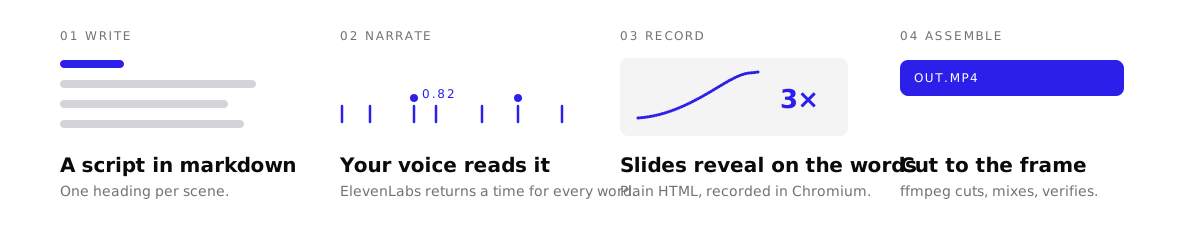
You write four files. One wire id per moment, such as 1.1:title, ties the script, the cues and the page together.
| File | What it holds |
|---|---|
script.md |
What the voice says, under one ## N. Title heading per section. |
decktalk.toml |
The project file. It ties each section to a page or to a clip of your own. |
cues.json |
The phrase that each moment on the page waits for. |
A page in deck/ |
The slides, as plain HTML. |
The narrate stage writes a words file with the start and end of every spoken word. If a cue phrase is not in the spoken words, decktalk check names the cue before a single second is bought. Your first deck writes one section in all four files.
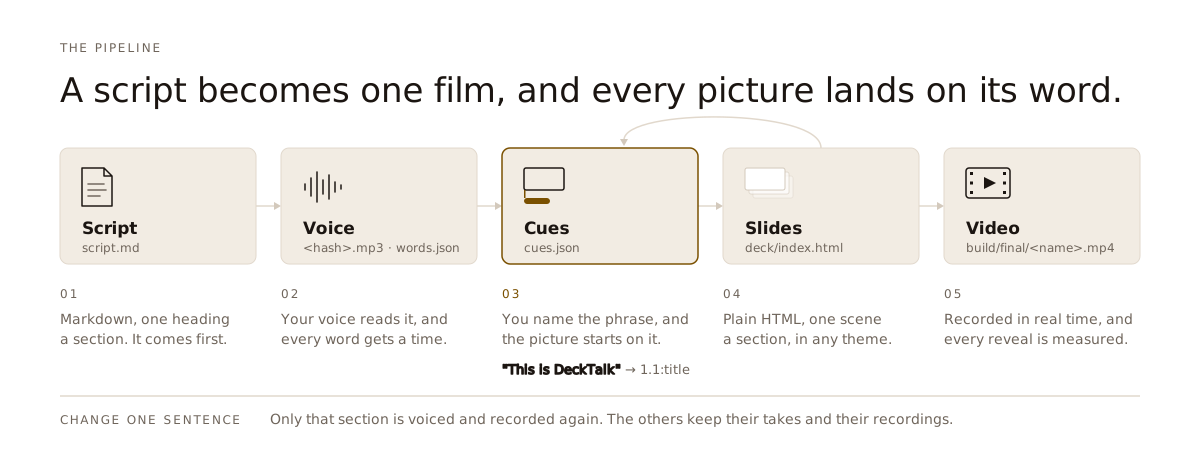
The script comes first, the voice gives every word a time, and the cues are where a named phrase meets its picture. Change one sentence, and only that section is voiced and recorded again.
The page contract
A slide is a <template data-slide="N.M"> in plain HTML, and each element on it names the moment it waits for. Four attributes carry the moments, data-in, data-back, data-front and data-out, and each names a cue local to its slide, which the runtime joins to the slide id into the wire id cues.json carries. This is the opening slide of the starter.
<template data-slide="1.1" data-hold="10" data-describe="the opening title and the count of files">
  <div class="title" data-in="title" data-describe="the title, This is DeckTalk">This is DeckTalk</div>
  <p class="stat" data-in="files" data-count="last" data-describe="the count of files a project holds">4 files</p>
</template>
data-in="title" is the cue 1.1:title, and its phrase in cues.json is the words the picture waits for. data-describe is the sentence the transcript prints when the picture appears. How a moment looks is a closed set of style words, and how long it plays is measured in frames, so verify can hold every landing to its word. No attribute writes a second. The page contract lists all twenty-four attributes with their values, defaults and the finding each one can raise.
Why the cuts are exact
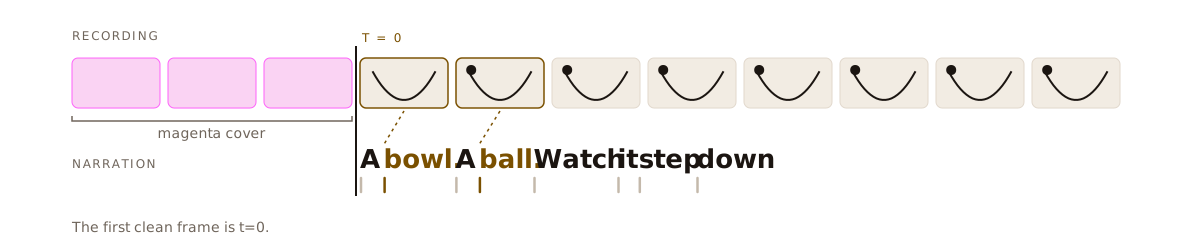
A browser does not start recording at a known time, so DeckTalk does not use a timer. The recorder covers the page in magenta until the narration starts. The first frame without magenta is narration t=0, on Linux, macOS and Windows.
decktalk verify then measures every reveal in the finished video. This is the whole table from a build without voice of the starter, and one frame lasts 40 ms.
 Section   Cue           Spoken   Shown   Offset
 ───────────────────────────────────────────────
 1         1.1:title     0.50     0.48    -0.02
 1         1.1:files     1.93     1.92    -0.01
 1         1.2:script    8.56     8.60    +0.04
 1         1.2:deck      11.87    11.88   +0.01
 1         1.2:word      17.08    17.08   -0.00
 2         2.1:average   21.23    21.28   +0.05
 2         2.1:formula   25.46    25.52   +0.06
 2         2.1:code      29.22    29.24   +0.02
 2         2.1:waited    31.10    31.12   +0.02
 3         3.1:idea      37.09    37.12   +0.03
 3         3.1:again     43.47    43.48   +0.01
 3         3.1:make      44.39    44.40   +0.01
Spoken is the second the cue phrase is said, Shown is the second the picture changed, and Offset is the distance between them. Verify defines every column and every limit that moves one.
Every command
| Command | What it does |
|---|---|
init |
Create a project with a deck that already builds. |
install |
Fetch Chromium and ffmpeg before a build needs them. |
doctor |
Report what is installed and what a run would use. |
status |
Report what is written, what is built and what is stale. |
check |
Judge script.md, cues.json and the pages before a build, and price the run. |
words |
Print every spoken word with its start and end. |
storyboard |
Freeze every slide at every cue onto one page. |
serve |
Serve the project on a local origin over http. |
config |
List, get, set, explain or unset a setting. |
schema |
Print the JSON Schema of a command, a setting or an event. |
narrate |
Voice each section of script.md and time every word. |
cue |
Turn each cue phrase into a second on its section clock. |
record |
Record each page section in headless Chromium. |
soundscape |
Generate the music, the ambience bed and the effects. |
assemble |
Cut, mix and encode the sections into one mp4. |
verify |
Measure the finished mp4: every start, cut, seam and landing. |
build |
Run every stage in order, or a span of them, with --watch to rebuild the changed section as you edit. |
clip |
Cut a span of a built section into its own file. |
A build writes the film, the captions, the chapters and the transcript under build/final/, the takes named by their content hash under build/narrate/, the recordings under build/recordings/, the storyboard under build/storyboard/ and the run's events under build/events/. decktalk status reads all of it back.
Requirements and costs
- Software. The one-line installer brings its own Python, on Linux and macOS. On Windows, install with uv or pipx, which needs Python 3.12 or later. The first build downloads the rest.
decktalk installfetches it up front instead, for a Docker layer, a CI cache or a machine that will be offline, and on Linux it is the step that installs Chromium's system libraries and the only one that asks for sudo. - Accounts. A build without voice needs no account. A voiced build needs an ElevenLabs API key and a voice id, and the voice id is a published name rather than a secret.
- Cost. Every ElevenLabs plan can call the API. The free plan has limits for a video you publish.
Requirements and costs lists every download and every command that spends credits.
How it compares
| Tool | Timing comes from | Slides are | After you edit one sentence |
|---|---|---|---|
| DeckTalk | the spoken words, one time per word | your HTML | DeckTalk voices one section again. build --section N records only that section. |
| Remotion, Motion Canvas | frame numbers or seconds in code, by default | code | You time the change again by hand and render again. |
| Manim | seconds in code, or bookmarks in the narration with manim-voiceover | code | With manim-voiceover, bookmarks follow the new text. You still render the scene again in Python. |
| Descript | a recording you made | your screen | Overdub voices the new words. The screen recording does not move with them. |
| Synthesia, HeyGen | the avatar's speech | their avatar and scenes | You generate the video again. |
The FAQ has the full comparison. Every build also gives you these parts:
- A free build without voice. Every stage runs with no key, and a placeholder voice marks each word.
- Cached narration. DeckTalk voices a section again only when it changes, and keeps a recording whose page, words and cues have not moved.
- Captions, chapters and a transcript. Every build writes SRT, VTT, chapters and a transcript page.
- A soundscape. Add music, an ambience bed and sound effects.
- Loudness. DeckTalk normalizes the mix to -16 LUFS.
- A checked film.
decktalk checkjudges the files before anything is bought, andrecordandverifyjudge what was made.
Status and support
DeckTalk is alpha, and a minor release can still break things. One person maintains it.
CI runs every check in one table on Linux, macOS and Windows for every push to main and every pull request. CONTRIBUTING lists each group and what it holds.
- Report bugs, ask questions and show what you made in Issues.
- Report a vulnerability privately. SECURITY.md explains how.
- The changelog lists every release.
Documentation
The docs are at docs.decktalk.ai.
- Install and build a first video: Quickstart
- Write your own section: Your first deck
- Give an agent the whole contract: Reference card for agents
- Drive it from Python: The Python API
- Understand how it is built: ARCHITECTURE.md and the decision notes
Contributing
To work on DeckTalk itself, start with CONTRIBUTING.md.
Apache-2.0. Made by Jacob Beaudin.
1 maintainer

Release files for decktalk 0.5.0rc1
For a detailed explanation of source distributions (sdists) and built distributions (wheels), please see the package formats documentation.
Source distribution (sdist)
| File | Size | Uploaded | |
|---|---|---|---|
| decktalk-0.5.0rc1.tar.gz | 958.2 kB | Details |
Built distribution (wheel)
| File | Interpreter | ABI | Platform | Reset |
|---|---|---|---|---|
| decktalk-0.5.0rc1-py3-none-any.whl | Python 3 | none | any | Details |
Total release size: 2.0 MB
Release files / decktalk-0.5.0rc1.tar.gz
| Download URL | decktalk-0.5.0rc1.tar.gz |
|---|---|
| Size | 958.2 kB |
| Tags | Source |
|
SHA-256 checksum How to use checksums |
82fcca4e4c26290ae31f6dfba50fefddc4fa5293f1520b9de09e4ba3e59a230f
|
|
BLAKE2b-256 checksum How to use checksums |
094de8dfe2aa084ec1de33625e84dadd5b03def73c071694ec8b02a896f1fe4b
|
| Upload date | |
|
Uploaded using Trusted Publishing? What is trusted publishing? |
Yes |
| Uploaded via |
twine/7.0.0 CPython/3.13.14
|
Provenance
Provenance describes where a file came from. On PyPI, provenance is shared via attestations, which provide a verifiable record of the build or publishing details. View details, limitations and caveats.


PyPI Publish Attestation
PyPI verified that this artifact, at this checksum, originated from the publisher listed below.
Signed by GitHub Actions, verified by PyPI on Sep 25, 2026.
Transparency logRelease files / decktalk-0.5.0rc1-py3-none-any.whl
| Download URL | decktalk-0.5.0rc1-py3-none-any.whl |
|---|---|
| Size | 992.0 kB |
| Tags | Python 3 |
|
SHA-256 checksum How to use checksums |
97c21dcc5b3ef49a74053918c29c9f50648afcb7406ce51a63044cbb330cebc3
|
|
BLAKE2b-256 checksum How to use checksums |
805c126f23f30eb709f1bc8c4327e96539f3987f9a2164ae42a2e61ded11b2bb
|
| Upload date | |
|
Uploaded using Trusted Publishing? What is trusted publishing? |
Yes |
| Uploaded via |
twine/7.0.0 CPython/3.13.14
|
Provenance
Provenance describes where a file came from. On PyPI, provenance is shared via attestations, which provide a verifiable record of the build or publishing details. View details, limitations and caveats.
PyPI Publish Attestation
PyPI verified that this artifact, at this checksum, originated from the publisher listed below.
Signed by GitHub Actions, verified by PyPI on Sep 25, 2026.
Transparency log













