
deepcsv


"You think you saved a list. You open it tomorrow, and it's a string."
deepcsv exists to fix that.
See it in action

A messy Excel file with numbers saved as text, lists saved as strings and 3 outliers. data_details() finds all three, one line fixes each, and the second report comes back clean. The output in the GIF is real, not a mock-up.
The Problem
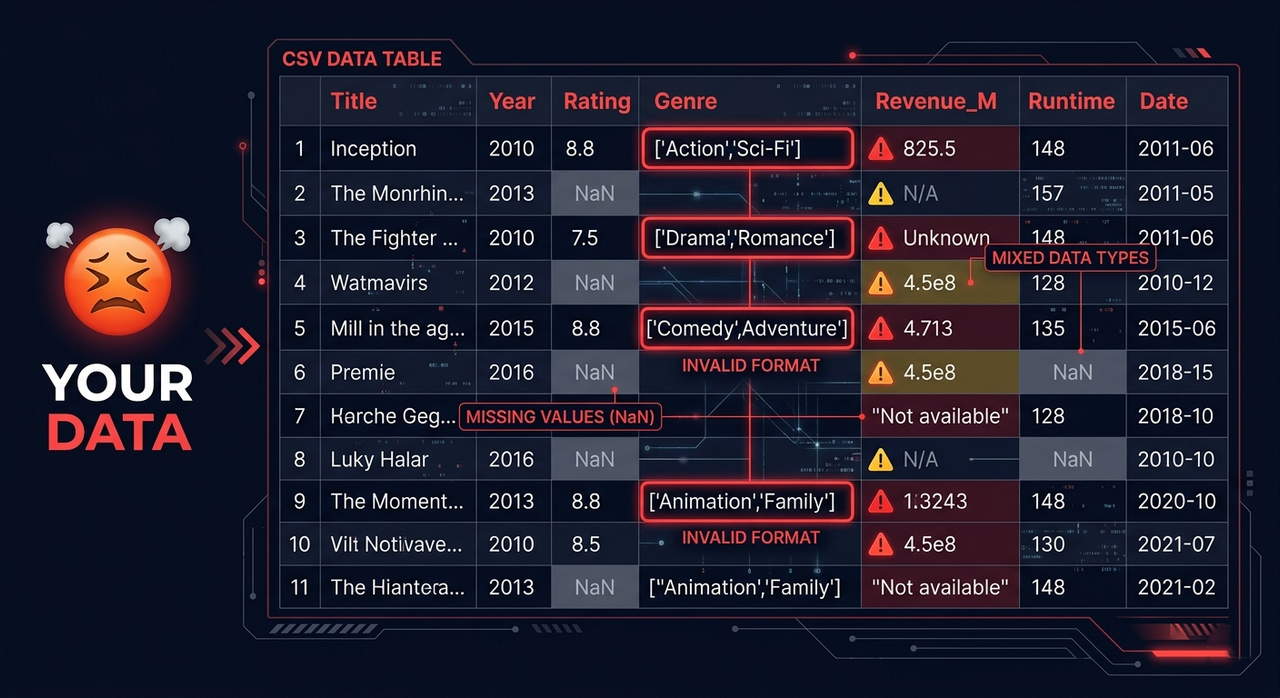
Your CSV files are lying to you.
- You save a list, open the file tomorrow, and it's a string
- You have lists and dicts stored as strings, nested inside other lists and dicts
- Your column looks like numbers but secretly holds 3 different data types
- You have 200 CSV files across 40 folders and process them one by one
- You load a file and spend 20 minutes just picking the right reader
- You have nulls scattered everywhere with no clean way to handle them
Small problems like these quietly break pipelines.
The Solution
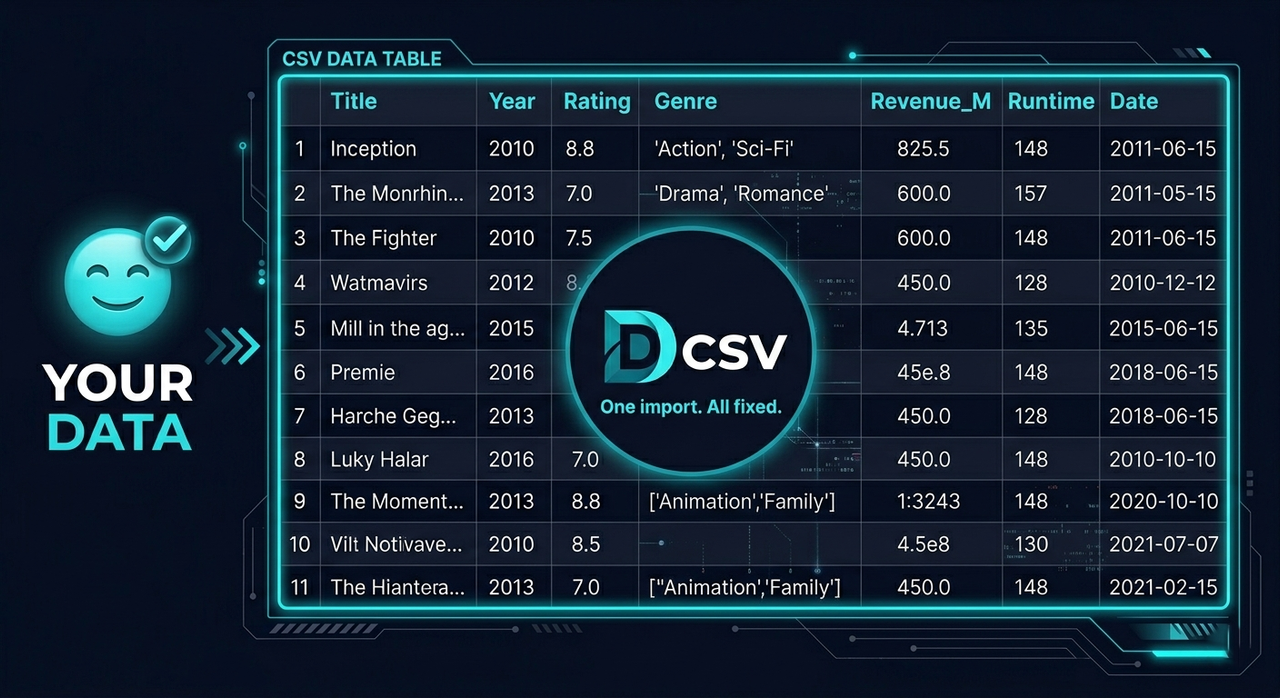
deepcsv handles all of it with one import.
- Walks through every folder and subfolder automatically
- Detects columns storing lists as strings and converts them to real NumPy arrays
- Catches mixed-type columns and fixes them automatically
- Saves in any format you choose, not just Parquet
- Reads any file format with one function, so there is no more picking the right reader
- Cleans nulls by column, row, index, value or type
Installation
pip install deepcsv

# with the ML tools (auto_fs, auto_outliers)
pip install deepcsv[ml]
Functions Overview
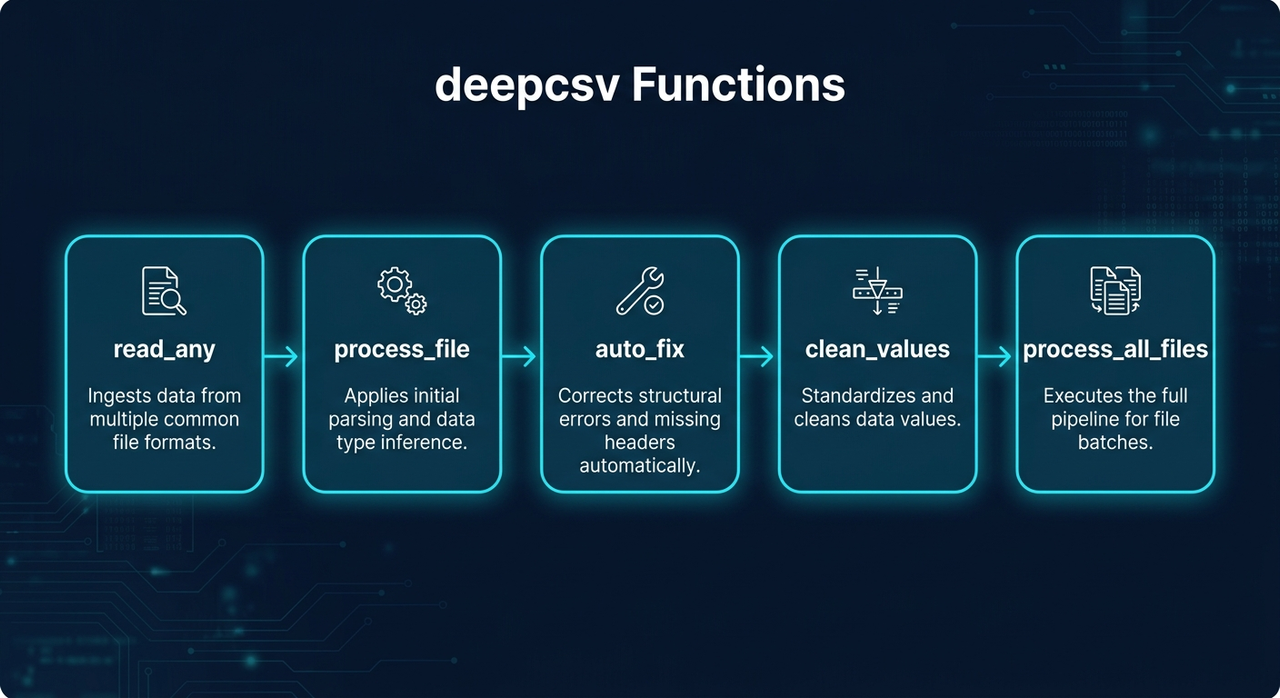
| Function | What it does |
|---|---|
process_file() |
Converts string lists to NumPy arrays, fixes mixed types |
process_all_files() |
Batch processes entire folder trees |
read_any() |
Reads any file format automatically |
clean_values() |
Cleans nulls, values and types |
auto_fix() |
Finds and fixes mixed data types and numbers stored as text |
auto_fs() |
Feature selection: keeps the columns that matter for your target |
auto_outliers() |
Detects outliers and removes their rows (IQR, Z-score or Isolation Forest) |
data_details() |
Report about your data (types, missing values, outliers), exportable as CSV or TXT |
merge_data() |
Merges two datasets (any format) by a specific column |
Functions
process_file(data_input, file_format=None, auto_fix=False, to_list=False, deep_check=False, col_name="all")
Reads a file or DataFrame, converts array-like strings to NumPy arrays, fixes mixed-type columns, and optionally saves the result.
import deepcsv

# Process only
df = deepcsv.process_file('path/to/file.csv')

# Process and save as parquet
df = deepcsv.process_file('path/to/file.csv', file_format='parquet')

# Process and convert to real Python lists
df = deepcsv.process_file('path/to/file.csv', to_list=True)

# Deep parse nested lists and dicts inside arrays
df = deepcsv.process_file('path/to/file.csv', deep_check=True)

# Only some columns
df = deepcsv.process_file('path/to/file.csv', col_name=["col1","col2"])
| Parameter | Type | Default | Description |
|---|---|---|---|
deep_check |
bool |
False |
True: also parses lists and dicts nested inside the arrays. Slower on large datasets |
col_name |
str | list |
"all" |
Column name or list of names to process. The default "all" processes every column. Pass "genres" or ["genres", "tags"] to pick columns |
Supported save formats: .csv .tsv .txt .xlsx .json .parquet .pkl .feather .html .xml
process_all_files(directory_path, output_dir="All CSV Files is Converted Here", file_format="parquet", auto_fix=False, to_list=False, deep_check=False)
Walks through all folders and subfolders, applies process_file on every supported file, and saves results.
import deepcsv

# Default: saves as parquet
deepcsv.process_all_files('path/to/folder')

# Custom output folder
deepcsv.process_all_files('path/to/folder', output_dir='Converted Files')

# Save as CSV
deepcsv.process_all_files('path/to/folder', file_format='csv')
Supported input formats: .csv .txt .tsv .xls .xlsx .json .parquet .pkl .feather .db .sqlite
read_any(file_path)
Reads any supported file format and returns a pandas DataFrame. One function for everything.
from deepcsv import read_any

df = read_any('data/users.csv')
df = read_any('reports/sales.xlsx')
df = read_any('warehouse/orders.parquet')
df = read_any('local.db')
Supported formats: .csv .txt .tsv .xls .xlsx .json .parquet .pkl .feather .db .sqlite
clean_values(data_input, ...)
Cleans a DataFrame by removing nulls, specific values, specific types, or rows by index.
from deepcsv import clean_values

# Drop fully-null columns
df = clean_values('data.csv', cols=['age', 'salary'])

# Drop rows that have nulls in specific cols
df = clean_values('data.csv', cols=['age', 'salary'], ax_0=True)

# Drop rows by index
df = clean_values(df, index=[0, 5, 12])

# Remove rows where a specific value exists
df = clean_values(df, cols=['status'], finding_value='N/A')

# Remove rows where value meets a condition
df = clean_values(df, cols=['score'], finding_value='N/A', condition=['>=', 500])

# Remove rows by Python type
df = clean_values(df, cols=['age'], finding_type=str)

# Apply on all columns except some
df = clean_values('data.csv', all_cols_except=['id', 'name'])
| Parameter | Type | Default | Description |
|---|---|---|---|
data_input |
str | DataFrame |
required | File path or DataFrame |
cols |
list |
None |
Columns to apply on |
ax_0 |
bool |
False |
True: drop rows with nulls. False: drop fully-null columns |
index |
list |
None |
Row indexes to drop |
condition |
list |
None |
[operator, value], for example ['>=', 500] |
all_cols_except |
list |
None |
Apply on all columns except these |
finding_value |
any |
None |
Find and remove rows containing this value |
finding_type |
type |
None |
Find and remove rows matching this Python type |
Supported operators: >= <= > < == !=
auto_fix(data_input)
Automatically detects columns with mixed data types and fixes them by converting all values to the most dominant type. Logs every change made.
from deepcsv import auto_fix

df = auto_fix('data.csv')
df = auto_fix(my_dataframe)
from deepcsv import auto_fix

df = auto_fix('data.csv')
df = auto_fix(my_dataframe)

# Fix only specific columns
df = auto_fix('data.csv', col_name='age')
df = auto_fix('data.csv', col_name=['age', 'score', 'price'])
| Parameter | Type | Default | Description |
|---|---|---|---|
data_input |
str | DataFrame |
required | File path or DataFrame |
col_name |
str | list |
"all" |
Column name or list of names to fix. Default "all" applies to every column |
auto_fs(df, target, model=None, mode="balanced", corr_threshold=0.3)
Automatically selects the most important features for a given target column. Three modes, so you can pick speed or accuracy.
from deepcsv.ml import auto_fs

# Balanced mode (default): Ridge + cross-validation drops weak features
result = auto_fs(df, target='price')

# Accurate mode: GradientBoosting + cross-validation, slowest but most precise
result = auto_fs(df, target='price', mode='accurate')

# Fast mode: correlation threshold only, much faster on large datasets
result = auto_fs(df, target='price', mode='fast')

# Custom correlation threshold in fast mode
result = auto_fs(df, target='price', mode='fast', corr_threshold=0.4)
| Parameter | Type | Default | Description |
|---|---|---|---|
df |
DataFrame |
required | Input DataFrame |
target |
str |
required | Target column name |
model |
model |
None |
Custom sklearn model. Defaults to auto-tuned Ridge |
mode |
str |
"balanced" |
"fast": correlation filter only. "balanced": Ridge + cross-validation loop. "accurate": GradientBoosting + cross-validation, slowest but most precise |
corr_threshold |
float |
0.3 |
Minimum correlation to keep a feature (used in fast mode) |
auto_fslives in thedeepcsv.mlsubpackage. Install the extras withpip install deepcsv[ml](scikit-learn and tqdm) to use it.
auto_outliers(df, cols=None, method="iqr", threshold=None)
Detects outliers in numeric columns and removes their rows. A row is removed if it is an outlier in any checked column. Missing values are never counted as outliers.
from deepcsv.ml import auto_outliers

# IQR rule on every numeric column (default)
clean = auto_outliers(df)

# Check only some columns (keep your target column untouched)
clean = auto_outliers(df, cols=['age', 'salary'])

# Z-score with a stricter threshold
clean = auto_outliers(df, method='zscore', threshold=2.5)

# Look at all columns together, which catches rows that are only strange as a combination
clean = auto_outliers(df, method='isolation_forest', threshold=0.1)
| Parameter | Type | Default | Description |
|---|---|---|---|
df |
str | DataFrame |
required | File path or DataFrame |
cols |
list |
None |
Numeric columns to check. Default: all numeric columns |
method |
str |
"iqr" |
"iqr": outside Q1 - t*IQR / Q3 + t*IQR. "zscore": abs(z) > t. "isolation_forest": looks at all columns together (needs scikit-learn) |
threshold |
float |
None |
t of the method. Defaults: 1.5 (iqr), 3.0 (zscore), 0.05 = share of outliers (isolation_forest) |
The original index is kept, so you can see which rows were removed.
data_details(data_input, export=None, output_path="data_details", show=True)
Prints a report about your data: size, memory, missing values, duplicates, types, unique values, numeric stats and outliers. Each warning names the deepcsv function that fixes it.
from deepcsv import data_details

report = data_details('data/users.csv')            # print the report
report = data_details(df, export='csv')            # also save the columns table
report = data_details(df, export='txt')            # also save the full report
report = data_details(df, export=['csv', 'txt'], output_path='reports/users')

report['overview']   # dict with rows, columns, memory, duplicates, missing cells
report['columns']    # DataFrame, one row per column
report['warnings']   # list of problems found
============================================================
 DATA DETAILS
============================================================
Rows            : 6
Columns         : 4  (numeric: 1, other: 3)
Memory          : 0.001 MB
Duplicate rows  : 0
Missing cells   : 1 (4.17%)

------------------------------------------------------------
 COLUMNS
------------------------------------------------------------
column  dtype  non_null  nulls  null_%  unique
   age  int64         6      0    0.00       6
 price object         6      0    0.00       6
  tags object         6      0    0.00       1
  city object         5      1   16.67       2

------------------------------------------------------------
 NUMERIC STATS
------------------------------------------------------------
column   mean     std  min  25%  50%  75%   max  outliers
   age 74.167 110.671 25.0 27.5 30.0 32.5 300.0         1

------------------------------------------------------------
 WARNINGS
------------------------------------------------------------
- (age) has 1 outliers - remove them with ml.auto_outliers().
- (price) stores numbers as text - fix it with auto_fix().
- (tags) has a single value - it carries no information.
- (tags) stores lists/dicts as strings - convert it with process_file().
============================================================
| Parameter | Type | Default | Description |
|---|---|---|---|
data_input |
str | DataFrame |
required | File path (any supported format) or DataFrame |
export |
str | list |
None |
"csv": columns table. "txt": full report. ["csv", "txt"]: both |
output_path |
str |
"data_details" |
File path without extension |
show |
bool |
True |
False: do not print, only return the report |
merge_data(left, right, on, how="inner", suffixes=("_x", "_y"))
Merges two datasets on a column (or a list of columns). Each dataset can be a file in any supported format or a DataFrame, so you can merge a CSV with an Excel file directly.
from deepcsv import merge_data

df = merge_data('users.csv', 'orders.xlsx', on='user_id')
df = merge_data(users_df, orders_df, on='user_id', how='left')
df = merge_data('a.csv', 'b.csv', on=['country', 'year'], how='outer')
| Parameter | Type | Default | Description |
|---|---|---|---|
left, right |
str | DataFrame |
required | File path or DataFrame |
on |
str | list |
required | Column name(s) that exist in both datasets |
how |
str |
"inner" |
"inner", "left", "right" or "outer" |
suffixes |
tuple |
("_x", "_y") |
Added to columns with the same name in both datasets |
A warning is printed when repeated keys can multiply rows.
Function Signatures
process_file(data_input: Union[str, pd.DataFrame], file_format: str = None, auto_fix: bool = False, to_list: bool = False, deep_check: bool = False, col_name:  Union[str, list] = "all") -> pd.DataFrame
process_all_files(directory_path: str, output_dir="All CSV Files is Converted Here",file_format= "parquet",auto_fix=False, to_list=False, deep_check=False) -> None
read_any(file_path: str) -> pd.DataFrame
clean_values(data_input, cols=None, ax_0=False, index=None, condition=None, all_cols_except=None, finding_value=None, finding_type=None) -> pd.DataFrame
auto_fix(data_input: Union[str, pd.DataFrame], col_name: Union[str, list] = "all") -> pd.DataFrame
auto_fs(df: pd.DataFrame, target: str, model=None, mode: str = "balanced", corr_threshold: float = 0.3) -> pd.DataFrame
auto_outliers(df: Union[str, pd.DataFrame], cols: list = None, method: str = "iqr", threshold: float = None) -> pd.DataFrame
data_details(data_input: Union[str, pd.DataFrame], export: Union[str, list] = None, output_path: str = "data_details", show: bool = True) -> dict
merge_data(left: Union[str, pd.DataFrame], right: Union[str, pd.DataFrame], on: Union[str, list], how: str = "inner", suffixes: tuple = ("_x", "_y")) -> pd.DataFrame
What you get
- Lists stored as strings become real NumPy arrays (or Python lists).
deep_checkalso handles lists and dicts nested inside them. - The cleaning functions work on one column, a list of columns, or all of them.
- Mixed-type columns and numbers stored as text are found and fixed, and every change is printed.
- Cleaning by null, value, type or index, with six comparison operators for conditions.
- One reader for 10+ formats, and saving to CSV, Excel, JSON, Parquet, Feather and more.
- Folder trees are processed recursively.
auto_fsselects features in three modes, andauto_outliersremoves outliers with three methods.data_detailsreports on your data and exports it as CSV or TXT, andmerge_datajoins files of different formats.
Notes
- Requires
pyarrowfor Parquet and Feather support process_all_filesonly saves files that contain converted list columns
Requirements
- Python >= 3.7
- pandas
- pyarrow
- scikit-learn and tqdm (optional, only needed for
deepcsv.ml:pip install deepcsv[ml])
1 maintainer

Metadata
1 maintainer
Release files for deepcsv 0.8.0
For a detailed explanation of source distributions (sdists) and built distributions (wheels), please see the package formats documentation.
Source distribution (sdist)
| File | Size | Uploaded | Provenance | Actions |
|---|---|---|---|---|
| deepcsv-0.8.0.tar.gz | 32.3 kB | Without provenance | Details for deepcsv-0.8.0.tar.gz |
Built distribution (wheel)
| File | Interpreter | ABI | Platform | Actions Reset |
|---|---|---|---|---|
| deepcsv-0.8.0-py3-none-any.whl | Python 3 | none | any | Details for deepcsv-0.8.0-py3-none-any.whl |
Total release size: 57.1 kB
Release files / deepcsv-0.8.0.tar.gz
| Download URL | deepcsv-0.8.0.tar.gz |
|---|---|
| Size | 32.3 kB |
| Tags | Source |
|
SHA-256 checksum How to use checksums |
708671a3d9db4934a630d3a43ae228603355e0d7d63dc1a79c2f2fbc02f654e5
|
|
BLAKE2b-256 checksum How to use checksums |
c24c465844373f5c0e1fc75708010125b96653d4935a96d99d7f2c8707ae8b1f
|
| Upload date | |
|
Uploaded using Trusted Publishing? What is trusted publishing? |
No |
| Uploaded via |
twine/7.0.0 CPython/3.13.12
|
Release files / deepcsv-0.8.0-py3-none-any.whl
| Download URL | deepcsv-0.8.0-py3-none-any.whl |
|---|---|
| Size | 24.8 kB |
| Tags | Python 3 |
|
SHA-256 checksum How to use checksums |
2f56d28dba1da96c32d05bf051c8a60410d211711a35f425691ca625fbde22ac
|
|
BLAKE2b-256 checksum How to use checksums |
b2cdb8899898f8d77c0da85c869a111f877c2816d7a93210a3494b596a88a7f4
|
| Upload date | |
|
Uploaded using Trusted Publishing? What is trusted publishing? |
No |
| Uploaded via |
twine/7.0.0 CPython/3.13.12
|
Security for deepcsv 0.8.0
Provenance
Provenance describes where a file came from. On PyPI, provenance is shared via attestations, which provide a verifiable record of the build or publishing details. View details, limitations and caveats.
No provenance found
None of the files in this release were uploaded with provenance metadata.
A note on package security
PyPI is a repository for distributing packages, not a service for auditing them. While third-party security researchers and our staff do their best to detect and remove malicious packages, PyPI cannot guarantee the quality, security or suitability of any given package.
To learn more about protecting yourself from malicious actors, visit our package security documentation.














