
depression
You A-Z. AI depression.ai
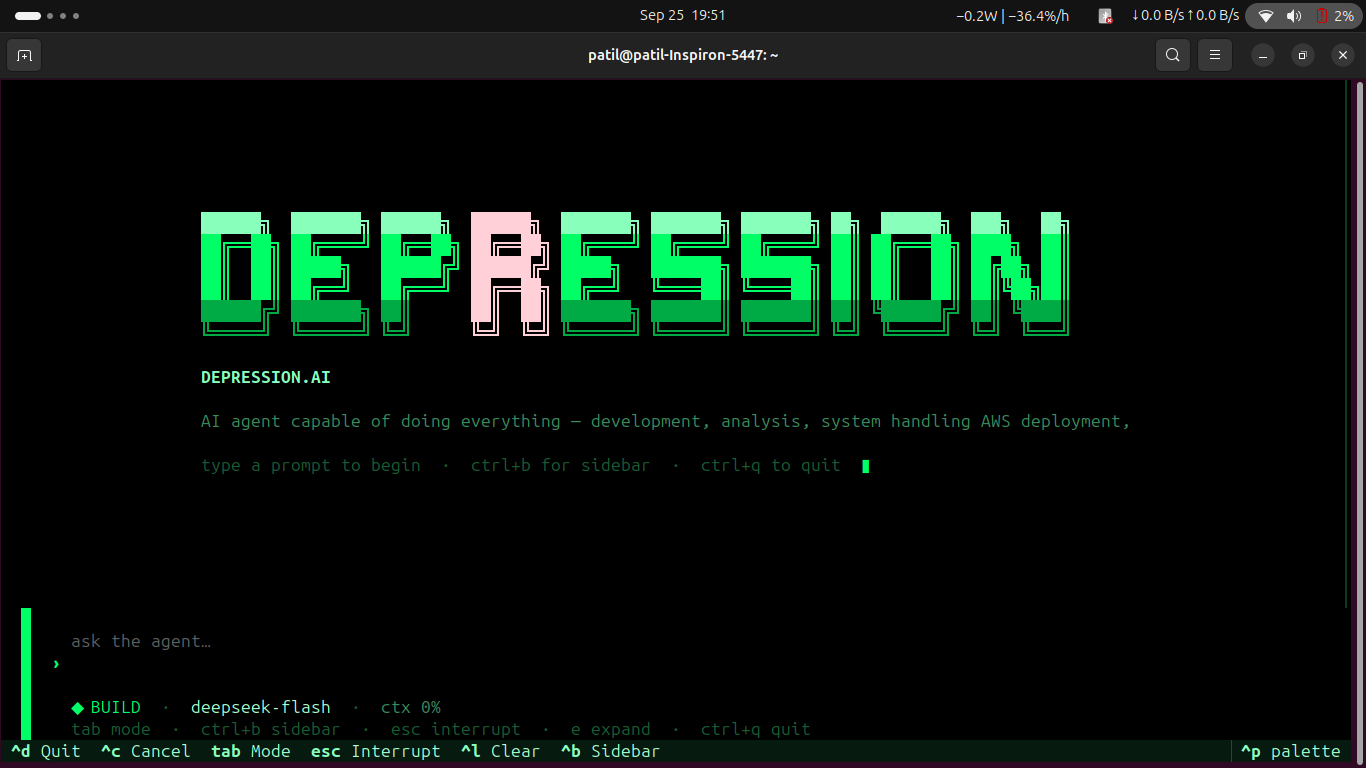
Terminal-native agentic AI for development, system operations, analysis, and cloud deployment.
👥 Team Depression
A team that builds ON ETHICS
🎓 Academic Institution & Project Context

Moodlakatte Institute of Technology (MIT), Kundapura
Department of Information Science & Engineering (ISE)
depression.ai is being developed as an academic major project by final-year Information Science & Engineering (ISE) students of Moodlakatte Institute of Technology (MIT), Kundapura.
The project combines agentic AI, software engineering, system automation, cloud operations and LLM integration as part of the team's academic work.
College
- 🏫 Moodlakatte Institute of Technology (MIT), Kundapura
- 🎓 Department: Information Science & Engineering (ISE)
- 📚 Project Type: Academic Major Project
- 👨🎓 Team: TEAM DEPRESSION
College LinkedIn
🧑💻 R Naveen Patil

Lead Developer • AI & Agentic Systems • Cloud & Infrastructure
R Naveen Patil is the primary developer behind the depression.ai framework, responsible for the core architecture, agentic workflow, LLM integration, system tooling, cloud integration and overall development of the project.
Profiles
🤝 Team Members

Rahul Jadav📧 |

K G Meghashree Naik📧 |

SUMANTHA MS📧 |
🚀 What Is depression.ai?
depression.ai is an advanced CLI-based agentic AI harness developed by Team Depression.
It is built for people who want an AI agent that can work with a real computer, real projects, real tools and real infrastructure — not just answer questions in a chat window.
Think of depression.ai as an agent runtime for a software engineer and technical operator:
                    USER
                      │
                      ▼
              depression.ai
              Agent Harness
                      │
          ┌───────────┼───────────┐
          ▼           ▼           ▼
       Reason       Plan        Context
          │           │           │
          └───────────┼───────────┘
                      ▼
                Tool Selection
                      │
        ┌─────────────┼─────────────┐
        ▼             ▼             ▼
    Filesystem     Terminal        Git
        │             │             │
        ├─────────────┼─────────────┤
        ▼             ▼             ▼
      Browser        MCP           AWS
                      │
                      ▼
                 Verification
                      │
                      ▼
                    RESULT
The framework is designed to handle many multi-step workflows that a software engineer or technical operator performs:
- Understand an unfamiliar codebase
- Analyze bugs and failures
- Plan implementation changes
- Create and modify files
- Run commands and tests
- Debug failures
- Review Git changes
- Use browser automation
- Search and inspect information
- Work with MCP tools
- Inspect and operate supported AWS environments
- Prepare applications for deployment
- Verify the result of executed work
The LLM provides the reasoning capability. depression.ai provides the environment around that model: context, tools, permissions, sessions, execution and recovery.
Important: The quality of an agentic task depends on both the framework and the connected model. A model with weak reasoning or unreliable tool/function calling can produce poor results even when the framework provides the required tools.
🧠 Agentic, Not Just Chat
A normal chatbot primarily returns text.
depression.ai is designed around an execution loop:
Understand
   ↓
Inspect
   ↓
Plan
   ↓
Choose Tool
   ↓
Execute
   ↓
Observe Result
   ↓
Re-evaluate
   ↓
Continue / Correct
   ↓
Verify
   ↓
Report
This makes the framework suitable for tasks where the answer is not simply a paragraph of text, but a change that has to be made and verified on a real system.
For example:
"Find why my application is failing and fix it."

            ↓

Inspect project
            ↓
Read relevant files
            ↓
Understand configuration
            ↓
Run diagnostic commands
            ↓
Identify failure
            ↓
Modify required files
            ↓
Run tests / verification
            ↓
Inspect the result
            ↓
Report what changed
The exact behaviour depends on the model, available tools, permissions and environment.
🧠 About depression.ai
depression.ai is an agentic AI framework developed and released by Team Depression.
It is a terminal-native AI workspace designed to assist with the complete workflow from:
Development
     ↓
Analysis
     ↓
System Operations
     ↓
Testing & Debugging
     ↓
Git & Project Management
     ↓
AWS Operations
     ↓
Deployment
The framework is designed around an LLM-driven agent architecture, meaning the model acts as the reasoning layer while depression.ai provides the execution environment, tools, permissions, project context and session management.
The framework is not simply a collection of predefined commands. The agent can inspect the current environment, understand the user's request, determine the required sequence of operations, execute available tools and verify the result.
🖥️ Terminal-Native TUI
The primary interface is a terminal-native Textual TUI designed for interactive agent operation.
The interface brings the agent workflow into a single workspace with features such as:
- Interactive conversation
- Plan / Build mode switching
- LLM connection configuration
- AWS configuration
- Tool-call cards
- Permission prompts
- Todo tracking
- Thinking indicators
- Diff inspection
- Session management
- Project context
- Agent execution feedback
The goal is to provide a workflow similar to modern terminal-native coding agents while extending the scope beyond software development into system and cloud operations.
🏗️ Architecture
                         USER
                           │
                           ▼
                ┌─────────────────────┐
                │   depression.ai     │
                │       TUI / CLI     │
                └──────────┬──────────┘
                           │
                ┌──────────┴──────────┐
                │                     │
                ▼                     ▼
        ┌───────────────┐     ┌───────────────┐
        │   PLAN AGENT  │     │  BUILD AGENT  │
        │               │     │               │
        │ Read / Analyze│     │ Execute Tools │
        │ Plan Tasks    │     │ Modify System │
        └───────┬───────┘     └───────┬───────┘
                │                     │
                └──────────┬──────────┘
                           ▼
                  ┌─────────────────┐
                  │   TOOL SYSTEM   │
                  ├─────────────────┤
                  │ Terminal        │
                  │ Filesystem      │
                  │ Git             │
                  │ Patch           │
                  │ Search          │
                  │ Web             │
                  │ Browser         │
                  │ AWS             │
                  │ MCP             │
                  │ Todo / Process  │
                  └─────────────────┘
🧩 Plan + Build Architecture
depression.ai separates planning from execution using two complementary agent modes.
PLAN
The Plan Agent focuses on understanding the task before making system changes.
User Request
     ↓
Project Inspection
     ↓
Context Gathering
     ↓
Problem Analysis
     ↓
Task Breakdown
     ↓
Execution Plan
The planning stage can inspect project files, understand dependencies, analyze the environment and determine the steps required to complete the task.
BUILD
The Build Agent performs the required operations using the available tools.
Approved / Selected Plan
          ↓
     Tool Selection
          ↓
       Execution
          ↓
      Verification
          ↓
        Result
This separation provides a clear distinction between reasoning and execution.
💻 Development Capabilities
depression.ai can operate directly on software projects through its tool system.
Project Understanding
- Analyze existing projects
- Inspect project structure
- Read source code
- Understand dependencies
- Search through files
- Identify configuration problems
- Analyze build errors
Code Operations
- Create files
- Modify existing files
- Apply patches
- Refactor code
- Debug applications
- Run tests
- Verify changes
- Work with Git
Example
User:
"Analyze this project and find why the application is failing."

Agent:
    ↓
Inspect project
    ↓
Read configuration
    ↓
Inspect source code
    ↓
Run relevant commands
    ↓
Identify failure
    ↓
Create fix
    ↓
Run verification
    ↓
Report result
The agent determines the required actions based on the task, available tools and connected model.
🖥️ System Operations
The framework can interact with the local development environment through its configured tools.
Example tasks include:
"Check my project structure."

"Find why this application is failing."

"Install the required dependencies."

"Run the tests and fix the errors."

"Find unused files."

"Check the running processes."

"Prepare this project for deployment."

"Inspect the Git changes."

"Create a clean patch for this issue."
System-level operations are controlled through the permission system where required.
☁️ AWS Integration
AWS is integrated into the agent workflow so cloud infrastructure can be handled from the same terminal-native environment.
The architecture allows the agent to combine:
User Request
     ↓
depression.ai
     ↓
Agent Reasoning
     ↓
AWS Tools / AWS CLI
     ↓
AWS Environment
Depending on the configured tools, AWS permissions and available credentials, the agent can assist with:
- AWS environment inspection
- Infrastructure analysis
- Resource management
- AWS CLI workflows
- Deployment workflows
- Cloud operations
- Monitoring and troubleshooting workflows
- Creating supported resources
- Modifying supported resources
- Removing supported resources
- Application deployment workflows
The exact operations available depend on the AWS credentials, IAM permissions and tools configured in the environment.
🔐 AWS Security & Permissions
depression.ai does not bypass AWS security controls.
The agent operates using the AWS identity and permissions supplied by the user.
For example:
AWS IAM Permissions
        ↓
depression.ai
        ↓
Allowed AWS Operations
If the configured AWS identity does not have permission to perform an operation, the agent cannot legitimately perform that operation.
This allows AWS access to remain controlled through standard AWS authentication and IAM authorization.
🔌 Connecting an AWS Account
AWS credentials can be configured through the TUI or supported environment variables.
Example:
export AWS_ACCESS_KEY_ID="your-access-key"
export AWS_SECRET_ACCESS_KEY="your-secret-key"
export AWS_DEFAULT_REGION="ap-south-1"
Then start:
depression
The TUI can be used to configure the AWS environment when supported by the installed version.
AWS Access Key Setup
Important: AWS recommends using temporary credentials and IAM roles instead of long-term access keys whenever possible. Use an IAM user access key only when your use case actually requires programmatic long-term credentials. For
depression.ailocal development, an IAM user with only the permissions required by your workflows can be used.
An AWS access key contains two values:
Access Key ID
Secret Access Key
Both values are required for programmatic authentication. The secret access key is shown only when the key is created, so save it securely at that time.
Step 1 — Sign in to AWS
Open the AWS Management Console and sign in with an identity that has permission to manage IAM users and credentials.
Step 2 — Open IAM
From the AWS Management Console:
AWS Console
    ↓
IAM
Then open Users.
Step 3 — Create an IAM User
If you do not already have a suitable IAM user:
IAM
  ↓
Users
  ↓
Create user
Enter a username, for example:
depression-agent
Give the user only the permissions required for the AWS operations that depression.ai needs.
AWS recommends managing permissions through groups and policies and following the principle of least privilege. Do not give administrator-level permissions just because the agent is easier to configure that way.
For example, if the agent only needs to inspect S3, grant the minimum S3 permissions required instead of attaching AdministratorAccess.
Step 4 — Open the User's Security Credentials
After creating or selecting the IAM user:
IAM
  ↓
Users
  ↓
depression-agent
  ↓
Security credentials
Find the Access keys section.
Step 5 — Create the Access Key
Choose:
Create access key
AWS may first show an Access key best practices & alternatives page. Review the alternatives. If your workflow genuinely requires an access key, continue with the appropriate programmatic-access use case.
Add an optional description such as:
depression.ai local development
Then choose:
Create access key
Step 6 — Save the Credentials Immediately
AWS will display:
Access Key ID
Secret Access Key
Save both securely.
The secret access key cannot be retrieved again after the creation screen. If you lose it, create a replacement access key rather than expecting AWS to show the old secret again.
Do not paste the secret key into:
- GitHub
- README files
- source code
- public issue trackers
- screenshots
- Discord/Slack/WhatsApp messages
- public
.envfiles - public cloud logs
Step 7 — Configure depression.ai
For local development, the credentials can be supplied through the supported TUI configuration or environment variables.
Example:
export AWS_ACCESS_KEY_ID="YOUR_ACCESS_KEY_ID"
export AWS_SECRET_ACCESS_KEY="YOUR_SECRET_ACCESS_KEY"
export AWS_DEFAULT_REGION="ap-south-1"
Then start the agent:
depression
The values above are examples only. Replace them with your actual credentials.
Step 8 — Verify the AWS Credentials
If AWS CLI is installed, verify the identity before using the agent:
aws sts get-caller-identity
A successful response should identify the AWS account and IAM identity associated with the credentials.
You can then test the AWS integration used by your workflow.
AWS Credential Flow
AWS Console
     ↓
IAM
     ↓
IAM User
     ↓
Attach Required Permissions
     ↓
Security Credentials
     ↓
Create Access Key
     ↓
Access Key ID + Secret Access Key
     ↓
depression.ai
     ↓
AWS SDK / AWS CLI
     ↓
AWS Resources
Least-Privilege Example
Do not start with:
AdministratorAccess
unless there is a genuine administrative requirement and you understand the security consequences.
Prefer a policy that grants only the operations required by the agent.
For example:
depression.ai
     ↓
IAM User
     ↓
Required AWS Policy
     ↓
Only required services/actions
If the agent only needs to inspect resources, use read-only permissions where practical.
If the agent needs to create, modify or delete resources, grant only the specific write/delete actions required for those workflows.
Rotating an Access Key
If you need to replace a key:
Create new access key
        ↓
Update depression.ai / environment
        ↓
Verify the new key
        ↓
Deactivate old key
        ↓
Confirm old key is unused
        ↓
Delete old key
Do not immediately delete an old key that may still be used by an application. AWS supports having up to two access keys for an IAM user, which allows a controlled rotation process.
Security Rules
Never commit AWS credentials to Git.
Add sensitive files to .gitignore:
.env
.env.*
*.pem
*.key
.aws/
If an AWS secret is accidentally exposed:
Stop using the exposed credential
        ↓
Deactivate the access key
        ↓
Create a replacement key if required
        ↓
Check CloudTrail / access history
        ↓
Review the IAM permissions
        ↓
Remove the secret from the repository/history
A leaked AWS secret should be treated as compromised. Do not simply delete the visible line from the latest commit and assume the credential is safe.
Never commit AWS access keys, secret keys,
.envfiles or other credentials to GitHub.
For production deployments, prefer IAM roles, temporary credentials, workload identity or another AWS-supported short-lived credential mechanism instead of embedding long-lived access keys in applications or servers.
For the latest AWS guidance, see the official AWS IAM documentation on access keys and IAM users.
🤖 LLM Integration
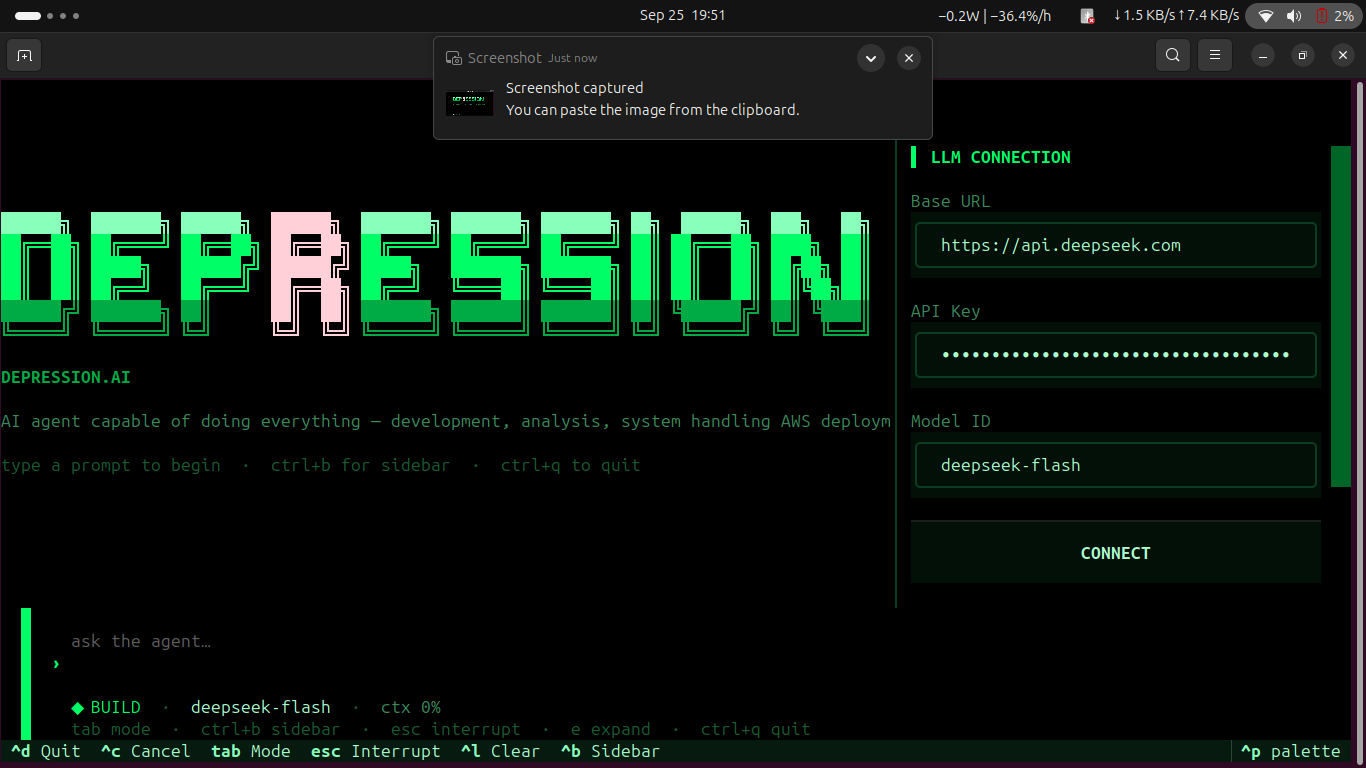
The framework separates the agent runtime from the LLM provider.
The model acts as the reasoning layer while depression.ai provides:
LLM
 ↓
Agent Runtime
 ↓
Context
 ↓
Tools
 ↓
Permissions
 ↓
Execution
The user can configure an LLM through:
Provider
Base URL
API Key
Model
Example:
Provider : custom
Base URL : https://api.example.com/v1
API Key  : ****************
Model    : your-model
This allows the framework to work with compatible remote model APIs.
🧠 OpenAI-Compatible & API-Based Models
The framework can be configured around compatible API endpoints rather than forcing a single model provider.
Example:
depression.ai
      │
      ▼
┌──────────────────┐
│ Compatible API   │
│ Endpoint         │
└────────┬─────────┘
         │
         ▼
       LLM
A compatible endpoint generally exposes the API format expected by the configured provider adapter.
However:
API compatibility does not automatically mean that every model will perform well as an agent.
Agentic workloads require more than simply generating text.
🧠 Model Requirements
A model used with depression.ai should ideally provide:
- Chat / text generation
- Sufficient context length
- Strong instruction following
- Code understanding
- Multi-turn conversation support
- Reliable reasoning
- Structured output capability
- Tool / function calling where supported
- Consistent responses
For agentic development workflows, model capability is especially important because the model is responsible for understanding the task and deciding how to use the available tools.
🏠 Local LLM Support
One of the major directions for depression.ai is local and self-hosted LLM execution.
A locally hosted model can be exposed through a local model server and connected to the same agent runtime.
For example:
Local GPU
    ↓
Model Runtime
    ↓
Local LLM Server
    ↓
Compatible API
    ↓
depression.ai
    ↓
Agent
    ↓
Tools
For a local endpoint, the configuration can conceptually look like:
Provider : custom
Base URL : http://localhost:11434/v1
API Key  : local
Model    : your-local-model
The exact URL, API format and model name depend on the local model runtime being used.
⚡ GPU-Based Local AI
For local deployment, the model runs on infrastructure controlled by the organization.
┌─────────────────────────────────────────┐
│             LOCAL GPU SERVER             │
│                                         │
│        ┌──────────────────────┐         │
│        │     GPU / VRAM       │         │
│        └──────────┬───────────┘         │
│                   ↓                     │
│        ┌──────────────────────┐         │
│        │    Local Model       │         │
│        │      Runtime         │         │
│        └──────────┬───────────┘         │
│                   ↓                     │
│             Local LLM API              │
└───────────────────┬─────────────────────┘
                    ↓
             depression.ai
                    ↓
          Agents + Tools + Data
Model size, quantization, context length, concurrent users and workload determine the required GPU VRAM, RAM and compute capacity.
🔒 Local & Self-Hosted AI
The existing depression.ai architecture keeps the agent framework and tool execution on the user's system, while the LLM can be supplied through an API.
The next stage of the architecture is to support the LLM itself running inside the organization's controlled infrastructure.
┌────────────────────────────────────────────────┐
│              ORGANIZATION NETWORK              │
│                                                │
│  ┌───────────────┐                             │
│  │ User / TUI    │                             │
│  └───────┬───────┘                             │
│          ↓                                     │
│  ┌────────────────┐                            │
│  │ depression.ai  │                            │
│  │ Agent Runtime  │                            │
│  └───────┬────────┘                            │
│          ↓                                     │
│  ┌────────────────┐                            │
│  │ Local LLM      │                            │
│  │ GPU Server     │                            │
│  └───────┬────────┘                            │
│          ↓                                     │
│  ┌────────────────────────────────────────┐    │
│  │ Internal Files / Tools / Infrastructure│    │
│  └────────────────────────────────────────┘    │
│                                                │
└────────────────────────────────────────────────┘
This direction is intended for environments where sensitive engineering documents, source code, internal correspondence, financial information, designs and other confidential information need to remain within controlled infrastructure.
🧠 Multiple Local Models
A self-hosted deployment can potentially run multiple open-weight models for different workloads.
                 depression.ai
                       │
          ┌────────────┼────────────┐
          ↓            ↓            ↓
     Code Model    General Model   Reasoning
          │            │            │
          └────────────┼────────────┘
                       ↓
                  GPU Server
Different tasks may require different model characteristics.
For example:
| Task | Potential Model Requirement |
|---|---|
| Code generation | Strong code understanding |
| Code review | Long context + reasoning |
| Document analysis | Large context |
| Planning | Strong instruction following |
| Tool execution | Reliable tool calling |
| General assistance | General-purpose instruction model |
The model-selection layer can therefore evolve toward task-based model selection for self-hosted environments.
🛠️ Tool System
The agent runtime provides tools for interacting with the working environment.
Current tool categories include:
┌─────────────────────────┐
│       TOOL SYSTEM       │
├─────────────────────────┤
│ Terminal                │
│ Filesystem              │
│ Git                     │
│ Patch                   │
│ Search                  │
│ Web                     │
│ Todo                    │
│ Process                 │
│ Browser Automation      │
│ AWS                     │
│ MCP                     │
└─────────────────────────┘
The LLM determines which available tools are relevant to the current task.
This allows the same agent architecture to handle different workflows without requiring a separate application for every operation.
🔗 MCP Support
depression.ai includes support for the Model Context Protocol (MCP).
MCP allows additional tool servers to be connected to the agent runtime.
depression.ai
      │
      ├── Built-in Tools
      │
      └── MCP
           ├── Server 1
           ├── Server 2
           ├── Server 3
           └── ...
This makes it possible to extend the agent with additional capabilities without hard-coding every external integration directly into the core framework.
🔐 Permission System
Agentic systems can execute operations that affect the user's files, system or infrastructure.
depression.ai therefore includes permission handling for tool operations.
Example:
filesystem.execute [medium]

Allow? [y/N]
The permission system allows users to review potentially sensitive or destructive actions before execution.
Conceptually:
Agent wants to execute action
          ↓
Permission Check
          ↓
┌─────────┴─────────┐
│                   │
▼                   ▼
Allowed           Ask User
                    │
                 y / N
                    │
                    ▼
                Execute
💾 Sessions & Recovery
The framework provides session and project-state handling.
Features include:
- Persistent sessions
- Session resume
- SQLite-backed session storage
- Snapshots
- Git-stash-based undo
- Diff inspection
- Todo tracking
- Tool execution history
Useful commands:
/session
/snapshot
/undo
/compact
This makes it possible to continue work across multiple interactions while maintaining relevant project state.
📋 Todo & Task Tracking
Complex agentic workflows can involve multiple operations.
The TUI provides task tracking to make the execution process easier to follow.
TODO
────────────────────────
✓ Inspect project
✓ Identify dependency issue
→ Modify configuration
○ Run tests
○ Verify deployment
────────────────────────
This helps separate the overall task into smaller execution steps.
⌨️ TUI Commands
/help
/plan
/build
/auto
/snapshot [message]
/undo
/model
/provider
/session
/compact
/tools
/permissions
/plugins
/metrics
/cost
/tokens
/config
/set
/exit
Mode Switching
Ctrl + P
Switch between:
PLAN ↔ BUILD
🖥️ CLI
Start the application:
depression
Specify a project:
depression -p /path/to/project
Select a model:
depression -m MODEL
Select a provider:
depression --provider PROVIDER
Start a new session:
depression --new-session
Resume a session:
depression --session <id>
Disable MCP:
depression --no-mcp
Set maximum turns:
depression --max-turns N
📦 Installation
Clone the repository:
git clone https://github.com/rnaveenpatil/depression.ai.git
cd depression.ai
Install the package:
pip install depression.ai
For development:
pip install -e ".[dev]"
Start:
depression
⚡ Quick Start
git clone https://github.com/rnaveenpatil/depression.ai.git
cd depression.ai
pip install -e .
depression
After starting the TUI, configure the LLM:
LLM CONNECTION
────────────────────────────
Provider    : custom
Base URL    : ...
API Key     : ...
Model       : ...
────────────────────────────
For AWS workflows, configure the AWS credentials and region through the supported configuration mechanism.
🔧 Runtime Configuration
Environment variables can be used where supported:
export DEPRESSION_PROVIDER=custom
export DEPRESSION_BASE_URL=https://api.example.com/v1
export DEPRESSION_API_KEY="your-api-key"
export DEPRESSION_MODEL="your-model"

export AWS_ACCESS_KEY_ID="your-access-key"
export AWS_SECRET_ACCESS_KEY="your-secret-key"
export AWS_DEFAULT_REGION="ap-south-1"
Local model example:
export DEPRESSION_PROVIDER=custom
export DEPRESSION_BASE_URL=http://localhost:11434/v1
export DEPRESSION_API_KEY=local
export DEPRESSION_MODEL="your-local-model"
⚙️ Configuration
Configuration can be stored in:
.agent/config.json
or:
~/.agent/config.json
Initialize configuration:
depression --init-config
🎯 Example Agent Tasks
Development
Analyze this project and explain its architecture.

Find the cause of this build error and fix it.

Review the dependencies and identify unnecessary packages.

Run the tests and fix the failing tests.

Refactor this module without changing its public API.
System
Check my project structure.

Find the process using this port.

Inspect the current environment.

Check why this command is failing.

Prepare this project for deployment.
Git
Review my Git changes.

Explain the current diff.

Create a clean patch for this change.

Prepare the project for a commit.
AWS
Analyze my AWS environment.

Investigate the deployment failure.

Check the configured AWS environment.

Prepare this application for AWS deployment.

Analyze the infrastructure configuration.
The exact operations performed depend on the available tools, model capabilities, credentials and permissions.
🔄 Agent Execution Flow
A typical task follows a workflow similar to:
                    USER REQUEST
                         │
                         ▼
                 ┌──────────────┐
                 │ Context Load │
                 └──────┬───────┘
                        ↓
                 ┌──────────────┐
                 │ Plan Agent   │
                 └──────┬───────┘
                        ↓
                 ┌──────────────┐
                 │ Task Planning│
                 └──────┬───────┘
                        ↓
                 ┌──────────────┐
                 │ Build Agent  │
                 └──────┬───────┘
                        ↓
                 ┌──────────────┐
                 │ Tool Calling │
                 └──────┬───────┘
                        ↓
                 ┌──────────────┐
                 │ Verification │
                 └──────┬───────┘
                        ↓
                       RESULT
🧱 Why the Framework Is Different
depression.ai is designed as a general-purpose agentic execution framework rather than a single-purpose coding assistant.
The same runtime can combine:
LLM
 │
 ├── Development
 ├── Filesystem
 ├── Terminal
 ├── Git
 ├── System Operations
 ├── Browser Automation
 ├── MCP
 └── AWS
This allows one agentic workspace to move from:
Idea
 ↓
Analysis
 ↓
Development
 ↓
Testing
 ↓
System Handling
 ↓
Cloud Operations
 ↓
Deployment
🔒 Security, Privacy & Data Boundary
depression.ai is designed with a local-first, security-focused architecture.
The core agent runtime and the operations performed by its tools run on the user's machine:
USER MACHINE
────────────────────────────────────
depression.ai
Agent Runtime
Project Context
Filesystem
Terminal
Git
Sessions
Permissions
Configured Tools
AWS Integration
────────────────────────────────────
What stays local
The framework is designed so that Team Depression does not receive or remotely inspect your project files, terminal output, source code or local system data merely because you installed the package or signed in.
The agent's local components include:
- Agent execution
- Tool execution
- Filesystem interaction
- Terminal commands
- Git operations
- Session state
- Permission handling
- Local project context
Remote LLM providers
If you configure a remote LLM API, information required to answer your request may leave your machine and be sent to that LLM provider.
That can include, depending on the task and implementation:
- Your prompt
- Relevant conversation/context
- Selected project content
- Tool results
- Code or configuration required for the model to reason about the task
Therefore:
Using a remote LLM does not mean the entire framework is remote. The agent runtime remains local, but model requests and the data included in those requests are subject to the configured LLM provider's policies.
Review the privacy, retention and data-handling policies of your selected provider before using sensitive information with a remote model.
Local LLM mode
depression.ai can also be connected to a locally hosted, OpenAI-compatible model server through the LLM Connection panel.
For example:
User Machine
     ↓
depression.ai
     ↓
Local LLM Server
     ↓
Local GPU / CPU
When the model itself is hosted locally, the model inference can remain inside your machine or controlled network instead of sending model requests to a public API.
Gmail / Google login
The Gmail/Google login is not the agent backend.
It is used for authentication and product-level usage identification by Team Depression, such as understanding authenticated usage and estimating how many people are using or installing the package.
Signing in does not give Team Depression remote access to your terminal, project directory or local files.
The login system should therefore be understood separately from the agent execution system:
Google Login
     │
     └── Product authentication / usage identification

depression.ai Agent
     │
     └── Local agent + tool execution
A Gmail/Google login does not make your project data automatically available to Team Depression.
Open source & auditability
The project is developed as an open-source framework. The source code can be inspected and audited by users and developers.
Security should still be evaluated realistically: no software can honestly guarantee absolute security. Users should review the source, permissions, connected tools, AWS policies and LLM-provider configuration before using the framework with sensitive environments.
Security principles
depression.ai follows a security-focused approach around:
- Local-first agent execution
- Explicit permission handling for sensitive operations
- Sensitive-file protection
- Secret redaction / scanning mechanisms where implemented
- Least-privilege AWS access
- User-controlled LLM configuration
- Separation between authentication and agent execution
- Open-source code for inspection
Never commit API keys, AWS secrets, passwords, tokens, private keys or .env files to Git.
📁 Project Structure
src/
├── agent/
├── cli/
├── config/
├── context/
├── llm/
├── mcp/
├── permissions/
├── plugins/
├── project/
├── session/
├── storage/
├── tools/
├── tui/
└── utils/
The framework is organized around the agent runtime, LLM integration, context handling, tools, permissions, sessions, plugins, MCP and TUI.
🧪 Development
Install development dependencies:
pip install -e ".[dev]"
Run tests:
pytest
Lint:
ruff check src/
Format check:
ruff format --check src/
Type checking:
mypy src/
📌 Project Status
depression.ai is an actively developed agentic AI framework by Team Depression.
The existing framework provides the foundation for:
✓ Terminal-native agent
✓ Plan + Build architecture
✓ Tool execution
✓ Filesystem operations
✓ Terminal operations
✓ Git workflows
✓ MCP support
✓ Permission controls
✓ Persistent sessions
✓ Snapshot / undo workflows
✓ TUI
✓ Runtime LLM configuration
✓ AWS-oriented workflows
The development direction includes:
→ Stronger local LLM support
→ GPU-based inference
→ Self-hosted deployment
→ Multiple local model support
→ Task-based model selection
→ Local and self-hosted LLM support
→ GPU-based inference
→ Multiple local model support
→ Task-based model selection
→ Controlled on-premise deployments
→ Enterprise / industrial AI workflows
📞 Team Depression — Contact Information
R Naveen Patil
Lead Developer
- Email:
rnaveenpatil@gmail.com - Phone:
7483894502 - LinkedIn: https://www.linkedin.com/in/r-naveen-patil-a45403292/
- GitHub: https://github.com/rnaveenpatil
- Portfolio: https://rnaveenpatil-resume.netlify.app
Rahul Jadav
Teammate
- Email:
rjadav214@gmail.com - Phone:
8296537642 - LinkedIn: https://www.linkedin.com/in/subzero91/
- GitHub: https://github.com/Rahul-Jadav-0
K G Meghashree Naik
Teammate
- Email:
meghashree.kg13@gmail.com - Phone:
8431898976 - LinkedIn: https://www.linkedin.com/in/k-g-meghashree/
- GitHub: https://github.com/Meghashree-13
SUMANTHA MS
Teammate
- Email:
mssumanth836@gmail.com - Phone:
9481864481 - LinkedIn: https://www.linkedin.com/in/sumantha-ms-235ba2295/
🔗 Repository
GitHub: https://github.com/rnaveenpatil/depression.ai
TEAM DEPRESSION
Build. Break. Fix. Repeat.
You A-Z. AI depression.ai
depression.ai — Developed by Team Depression
📜 License
This project is released under the MOODLAKATTE INSTITUTE.
1 maintainer

Metadata
1 maintainer
Release files for depression.ai 1.1.4
For a detailed explanation of source distributions (sdists) and built distributions (wheels), please see the package formats documentation.
Source distribution (sdist)
| File | Size | Uploaded | Provenance | Actions |
|---|---|---|---|---|
| depression_ai-1.1.4.tar.gz | 443.2 kB | Without provenance | Details for depression_ai-1.1.4.tar.gz |
Built distribution (wheel)
| File | Interpreter | ABI | Platform | Actions Reset |
|---|---|---|---|---|
| depression_ai-1.1.4-py3-none-any.whl | Python 3 | none | any | Details for depression_ai-1.1.4-py3-none-any.whl |
Total release size: 920.1 kB
Release files / depression_ai-1.1.4.tar.gz
| Download URL | depression_ai-1.1.4.tar.gz |
|---|---|
| Size | 443.2 kB |
| Tags | Source |
|
SHA-256 checksum How to use checksums |
ac894d07b2073f691ae0b8c53d43715aa08d05456e35f5dd6205437f786adfec
|
|
BLAKE2b-256 checksum How to use checksums |
62ceb3b41b282096e35af439218a493a749a8ca1ef0ea95990dc382a3a1cfbac
|
| Upload date | |
|
Uploaded using Trusted Publishing? What is trusted publishing? |
No |
| Uploaded via |
twine/7.0.0 CPython/3.12.3
|
Release files / depression_ai-1.1.4-py3-none-any.whl
| Download URL | depression_ai-1.1.4-py3-none-any.whl |
|---|---|
| Size | 476.9 kB |
| Tags | Python 3 |
|
SHA-256 checksum How to use checksums |
4f1174653cfaff9f05ea5e192424eee2859ec09623cb368a2ed5c3b42e7d0311
|
|
BLAKE2b-256 checksum How to use checksums |
3aafd1a71c27310be8fc8359211c600ea69d4e838e050e6904df86a616626e93
|
| Upload date | |
|
Uploaded using Trusted Publishing? What is trusted publishing? |
No |
| Uploaded via |
twine/7.0.0 CPython/3.12.3
|
Security for depression.ai 1.1.4
Provenance
Provenance describes where a file came from. On PyPI, provenance is shared via attestations, which provide a verifiable record of the build or publishing details. View details, limitations and caveats.
No provenance found
None of the files in this release were uploaded with provenance metadata.
A note on package security
PyPI is a repository for distributing packages, not a service for auditing them. While third-party security researchers and our staff do their best to detect and remove malicious packages, PyPI cannot guarantee the quality, security or suitability of any given package.
To learn more about protecting yourself from malicious actors, visit our package security documentation.














