




dethrottled
Self-hosted web access for AI agents. No API keys, no quotas, no per-call bill.
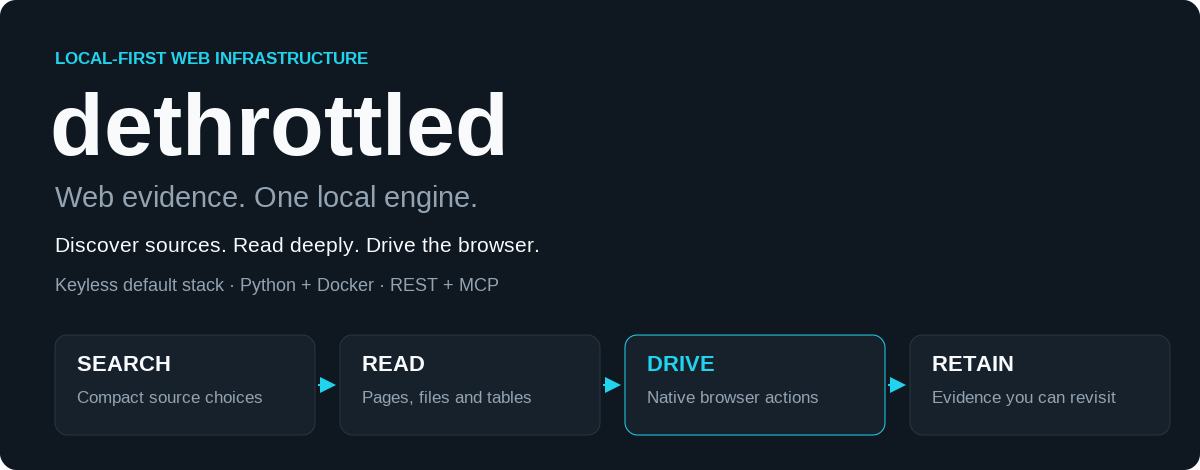
dethrottled gives an agent, or your own scripts, the web: it searches several engines, reads whatever the results point to (pages, PDFs, spreadsheets, slide decks, scans, audio and video), drives a real Chrome when a site insists on one, and keeps what it read so the next question starts where the last one stopped. It runs in Docker on your own hardware, AMD64 or ARM64.
Every answer says how good it is. Results carry their quality, warnings, completeness, dates and provenance, and when something is missing, the exact next call to make. A failed or thin read is reported as one, never dressed up as a success.
Why dethrottled
- Keyless, end to end. Search, rendering, OCR, speech, embeddings and reranking run locally or against public pages. No account, key or paid service is needed; metered providers exist only as explicit opt-ins.
- Search that keeps working. When one engine blocks the server, the next one answers by itself, and every result lists the engines that found it.
- Reads what simple scrapers can't. Each read climbs only as far as the page needs: plain HTTP, TLS impersonation, a JavaScript renderer, a real browser. Sites with an official API (Stack Exchange, PubMed, GitHub, npm) are read through it instead.
- Honest results.
quality,warnings, partial and truncated flags, attempt history, date sources and source hashes travel with the text. - Built for agents and scripts. An MCP server and REST gateway with per-client tokens and scopes, an installable agent skill, a CLI, and responses sized for context windows: focused excerpts, token estimates and continuation handles.
- It remembers. Long documents are kept for follow-up reads, public evidence goes into a local searchable corpus for 90 days, and the server learns which read steps each site refuses.
Quick start
You need Docker Engine with Compose.
git clone https://github.com/halonyx-io/dethrottled.git
cd dethrottled
docker compose up -d --build --wait
curl -fsS http://127.0.0.1:8787/health
The first build downloads Chrome, OCR data and local models, so it takes a while. Then search:
curl -sS http://127.0.0.1:8787/v2/search \
  -H 'Content-Type: application/json' \
  -d '{"query":"sqlite write-ahead logging","limit":5}'
and read a page, keeping only the passages about one topic:
curl -sS http://127.0.0.1:8787/fetch \
  -H 'Content-Type: application/json' \
  -d '{"url":"https://sqlite.org/wal.html","focus":"checkpoint","max_chars":600}'
/fetch takes one page as url or up to ten as urls.
Prefer not to clone? With Python 3.10+ and Docker:
python3 -m venv .venv && . .venv/bin/activate
python -m pip install dethrottled
dethrottled stack up
dethrottled stack status
dethrottled stack up detects your CPU, memory, GPU, timezone and language, and
Guided Setup shows the plan before applying it.
What it does
Search
A search asks DuckDuckGo first. If it refuses, Yahoo's and then Bing's result pages are read directly, then the browser tries DuckDuckGo, and Google in the real browser is the last resort. Alongside that chain:
- Yahoo's page runs beside DuckDuckGo. It lists most of the same pages and shows their dates, so DuckDuckGo's results pick those dates up.
- Yandex (through a bundled SearXNG) and Mwmbl add results from indexes of their own. One of them follows every three primary results, so they are visible at small limits.
- The menu holds at most fifteen unique results. One page reached under several
addresses comes back once, keeping everyone's dates and provenance, and
engineslists every engine that found it. - Google hides its links behind throttled redirects. When a destination cannot
be resolved it is matched to another engine's copy (marked as inferred) or
listed under
unresolved; dethrottled never invents a URL.
| Profile | What it does |
|---|---|
web (default) |
The chain plus Yahoo, Yandex and Mwmbl, waiting at most 1 s for the extras |
fast |
One quick round: the chain plus Yahoo if it answers within 0.3 s, no reranking |
thorough |
Also Bing's page, and waits for every engine |
news |
Dated news engines first (DuckDuckGo News, Google News, Qwant News, Reuters, Bing News), freshest first |
academic |
Adds Crossref, OpenAlex and arXiv |
A local Ettin reranker refines the top of the list, and you can restrict, exclude or prefer domains.
Read almost anything
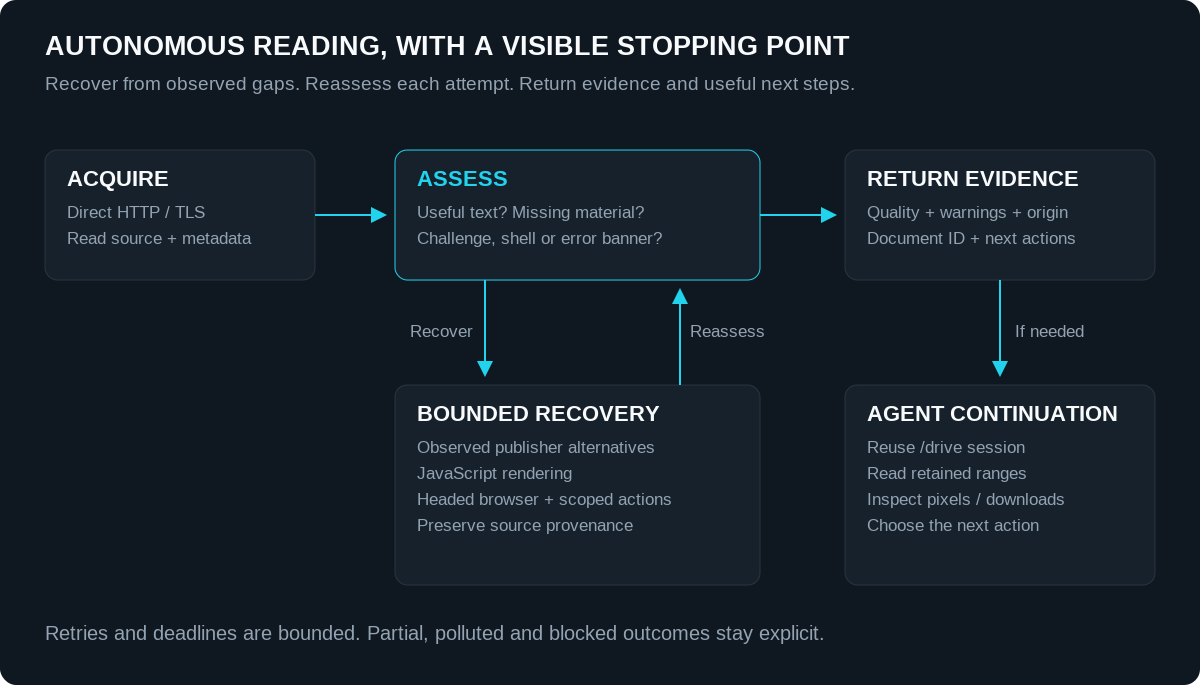
After every attempt the result is assessed. Is there readable text? Is this an app shell waiting for JavaScript, a challenge page, an error banner or a teaser? A short page with no sign of JavaScript-built content is taken as it is; a script shell goes on to the renderer. When a page needs more than rendering, a read planner tries the fix it observed: scrolling a feed, expanding collapsed sections, waiting out a loading state, or following the publisher's own alternative format.
The same fetch call reads:
| Source | What you get |
|---|---|
| Web pages | Main text with title, publisher-declared dates and identifiers (DOI, ISBN, package versions) |
| Text layer, detected tables, page ranges and Tesseract OCR for scans; optional Docling layout analysis | |
| Office and OpenDocument | DOCX, PPTX, XLSX, XLS, ODT, ODS, ODP, EPUB, RTF, legacy DOC/PPT, MSG and XLSB |
| Data and text | CSV and TSV row windows, JSON, XML, Markdown, plain text |
| Feeds | RSS and Atom as dated items, newest first |
| Archives and email | ZIP, TAR and GZIP members; EML messages and attachments |
| Media | Captions and subtitles, image OCR, and speech-to-text for audio and video with the optional speech worker |
Drive a real browser
When reading isn't enough, /drive hands your agent a real Chrome session:
snapshot the page's controls, click, fill and submit forms, switch tabs and
frames, capture network responses, download files and take screenshots. Sessions
persist across calls, survive worker restarts through checkpoints, and stay
inside the hosts you allow.
curl -sS http://127.0.0.1:8787/drive \
  -H 'Content-Type: application/json' \
  -d '{"url":"https://example.com/","session":"demo","allowed_hosts":["example.com"],"steps":[{"action":"snapshot","limit":10}]}'
The browser runs as its own user behind a kernel firewall: it can reach public addresses and nothing on your network. It uses your real GPU when one is available, and your machine's timezone and language.
Research in one call
/research takes a question, searches several angles, reads the most promising
sources in parallel and returns an evidence bundle: excerpts matched to your
question, with the gaps it could not cover. Mirrors and duplicate copies are
collapsed so the bundle contains distinct sources. No model writes an answer;
your agent does that with the evidence in hand.
curl -sS http://127.0.0.1:8787/research \
  -H 'Content-Type: application/json' \
  -d '{"question":"How does Python sqlite3 create an in-memory database?","max_sources":4}'
Keep and reuse evidence
- Retained documents. Every read gets a
document_id. Page through a long PDF, jump to a table's rows or view the source page as an image, without fetching it again. - A shared corpus. Public reads are indexed in the background, lexically and
with local MiniLM/E5 embeddings, and kept for 90 days.
corpus_searchfinds passages across everything read before.
Batches for scripts: DPR
DPR is the lightweight path for lists of URLs: up to 500 per job from
a CSV or text file, lean 2,000-character rows by default, durable across
restarts, exported as JSONL, CSV or extracted files. resolve turns one search
into the first usable page. Five uncached pages take a few seconds.
And more
- Site mapping and crawling within one site, with explicit page and path bounds.
- Field extraction. Named CSS selectors pull exact values out of a page without a model.
- Ad and tracker blocking. HaGeZi Multi PRO filtering is on by default across every fetcher and browser.
- Health you can read.
/healthis liveness;/readyand/v2/statussayok,degraded(an engine was seen failing) orinitializing(no search yet since start-up).
What a result looks like
A real fetch response, trimmed:
{
  "url": "https://sqlite.org/wal.html",
  "quality": "ok",
  "tier": "direct/trafilatura",
  "content_status": "complete",
  "page_type": "article",
  "published": "2026-08-25",
  "date_source": "page",
  "content": "In its default configuration, SQLite will checkpoint the WAL file at the conclusion of any transaction when the WAL file is more than 1000 pages long...",
  "content_chars": 30118,
  "truncated": true,
  "document_id": "doc_8a903f5c0b48492fb6fcf21d236245fc",
  "warnings": [],
  "tokens_estimated": 150
}
truncated is true because focus returned only the matching passages; the full
30,118-character text is kept under document_id. When a read is incomplete,
workflow.next_actions names the exact call to make next.
Connect your agent
| You use | Connect with |
|---|---|
| An MCP client (Claude, Codex, Cursor and others) | The MCP adapter: Streamable HTTP at /mcp with a bearer token |
| Your own code, remotely | The authenticated REST gateway, same routes as the HTTP API |
| Python | The Python package |
| A coding agent that reads skills | The agent skill and the client playbook |
| A shell script | The dethrottled CLI and DPR for batches |
Honest limits
- Some sites block automated access whatever the client. Those reads fail, and say so.
- Search depends on upstream engines, which rate-limit, change their pages and sometimes answer bots with decoys. dethrottled rests an engine that refuses and moves on, but it cannot make an engine answer.
- Search dates come from what engines show: a provider's own date where there is one, otherwise a lead from the snippet, labelled as such. A result with no date shown has none.
- "Readable" is not "correct". OCR and speech can misread, and a page can be wrong. dethrottled reports evidence; it does not verify claims.
- The fetch ladder does not consult
robots.txt. You are responsible for how you use it. Use the authenticated adapters and network isolation when anyone else can reach it.
Documentation
| Start here | For |
|---|---|
| Quick start | Install, first requests, everyday use |
| Client playbook | How agents should call each tool and read each field |
| HTTP API | Routes, examples and the request reference |
| Browser operation | Actions, sessions, scope, checkpoints and downloads |
| Reading and evidence | Formats, OCR, layout, spreadsheets and continuation |
| Configuration | Workers, profiles, models and tuning |
| Requirements | Hardware, memory and disk |
| Operations | Upgrades, backups and releases |
| All documentation | Everything else |
Contributing
Read AGENTS.md before changing code. It sets out the rules contributors (human or AI) follow here, and the checks a change must pass.
This checkout is 1.9.5. A running service reports its own version at /health.
License
dethrottled's own code is MIT. The default Docker stack also runs third-party software under its own licences: two AGPL-3.0 libraries in the API image (PyMuPDF for PDFs, EbookLib for EPUB), SearXNG in its own container, and on AMD64 Google Chrome in the browser worker, which is proprietary and downloaded from Google when the image is built. Running it for yourself adds no obligations. If you modify it and let other people use it over a network, or redistribute the images, read third-party notices first.
Maintained by Halonyx
1 maintainer

Metadata
1 maintainer
Release files for dethrottled 1.9.5
For a detailed explanation of source distributions (sdists) and built distributions (wheels), please see the package formats documentation.
Source distribution (sdist)
| File | Size | Uploaded | Provenance | Actions |
|---|---|---|---|---|
| dethrottled-1.9.5.tar.gz | 12.7 MB | With provenance | Details for dethrottled-1.9.5.tar.gz |
Built distribution (wheel)
| File | Interpreter | ABI | Platform | Actions Reset |
|---|---|---|---|---|
| dethrottled-1.9.5-py3-none-any.whl | Python 3 | none | any | Details for dethrottled-1.9.5-py3-none-any.whl |
Total release size: 25.4 MB
Release files / dethrottled-1.9.5.tar.gz
| Download URL | dethrottled-1.9.5.tar.gz |
|---|---|
| Size | 12.7 MB |
| Tags | Source |
|
SHA-256 checksum How to use checksums |
ff56a0444a8ab66f76f2118c338aa0ad621dea5c7e2041982007bd19c653020b
|
|
BLAKE2b-256 checksum How to use checksums |
7037a1f25b714ea66997d1f8461b11069e279799bcd535c8c6b6602cbf3b0059
|
| Upload date | |
|
Uploaded using Trusted Publishing? What is trusted publishing? |
Yes |
| Uploaded via |
twine/7.0.0 CPython/3.13.16
|
Provenance
Provenance describes where a file came from. On PyPI, provenance is shared via attestations, which provide a verifiable record of the build or publishing details. View details, limitations and caveats.


PyPI Publish Attestation
PyPI verified that this artifact, at this checksum, originated from the publisher listed below.
Signed by GitHub Actions, verified by PyPI on Nov 18, 2026.
Transparency logRelease files / dethrottled-1.9.5-py3-none-any.whl
| Download URL | dethrottled-1.9.5-py3-none-any.whl |
|---|---|
| Size | 12.7 MB |
| Tags | Python 3 |
|
SHA-256 checksum How to use checksums |
aca6babcbbae8282402fbed68c59ba9ab92461f6d5c75a84303935c65740aa77
|
|
BLAKE2b-256 checksum How to use checksums |
ab283fd4d0d298cbd2b9acc0e05d57349f4cd2fabb67a11333c6d2f8bd5c0150
|
| Upload date | |
|
Uploaded using Trusted Publishing? What is trusted publishing? |
Yes |
| Uploaded via |
twine/7.0.0 CPython/3.13.16
|
Provenance
Provenance describes where a file came from. On PyPI, provenance is shared via attestations, which provide a verifiable record of the build or publishing details. View details, limitations and caveats.
PyPI Publish Attestation
PyPI verified that this artifact, at this checksum, originated from the publisher listed below.
Signed by GitHub Actions, verified by PyPI on Nov 18, 2026.
Transparency logSecurity for dethrottled 1.9.5
Provenance
Provenance describes where a file came from. On PyPI, provenance is shared via attestations, which provide a verifiable record of the build or publishing details. View details, limitations and caveats.
Full provenance
Both files in this release have been uploaded with provenance metadata.
Attestation for dethrottled-1.9.5.tar.gz
PyPI Publish Attestation
PyPI verified that this artifact, at this checksum, originated from the publisher listed below.
Signed by GitHub Actions, verified by PyPI on Nov 18, 2026.
Transparency logA note on package security
PyPI is a repository for distributing packages, not a service for auditing them. While third-party security researchers and our staff do their best to detect and remove malicious packages, PyPI cannot guarantee the quality, security or suitability of any given package.
To learn more about protecting yourself from malicious actors, visit our package security documentation.














