
df2tables: Pandas DataFrames to Interactive DataTables

Project description
df2tables: Pandas DataFrames to interactive DataTables
df2tables is a Python utility for exporting pandas.DataFrame objects to interactive HTML tables using DataTables—an excellent JavaScript library for table functionality. It generates standalone .html files viewable in any browser without Jupyter notebooks, servers, or frameworks.
Useful for data inspection, feature engineering workflows, especially with large datasets that need interactive exploration.
Features
- Converts
pandas.DataFrameto interactive standalone HTML tables - Self-contained HTML files with embedded data—no external dependencies at runtime
- Works independently of Jupyter or web servers—viewable offline in any browser, portable and easy to share
- Color-coded formatting for numeric columns with customizable precision
- Easy customizable HTML (minimal template system using comnt included)
- Useful for some training dataset inspection and feature engineering: Quickly browse through large datasets, identify outliers, and data quality issues interactively
Screenshots
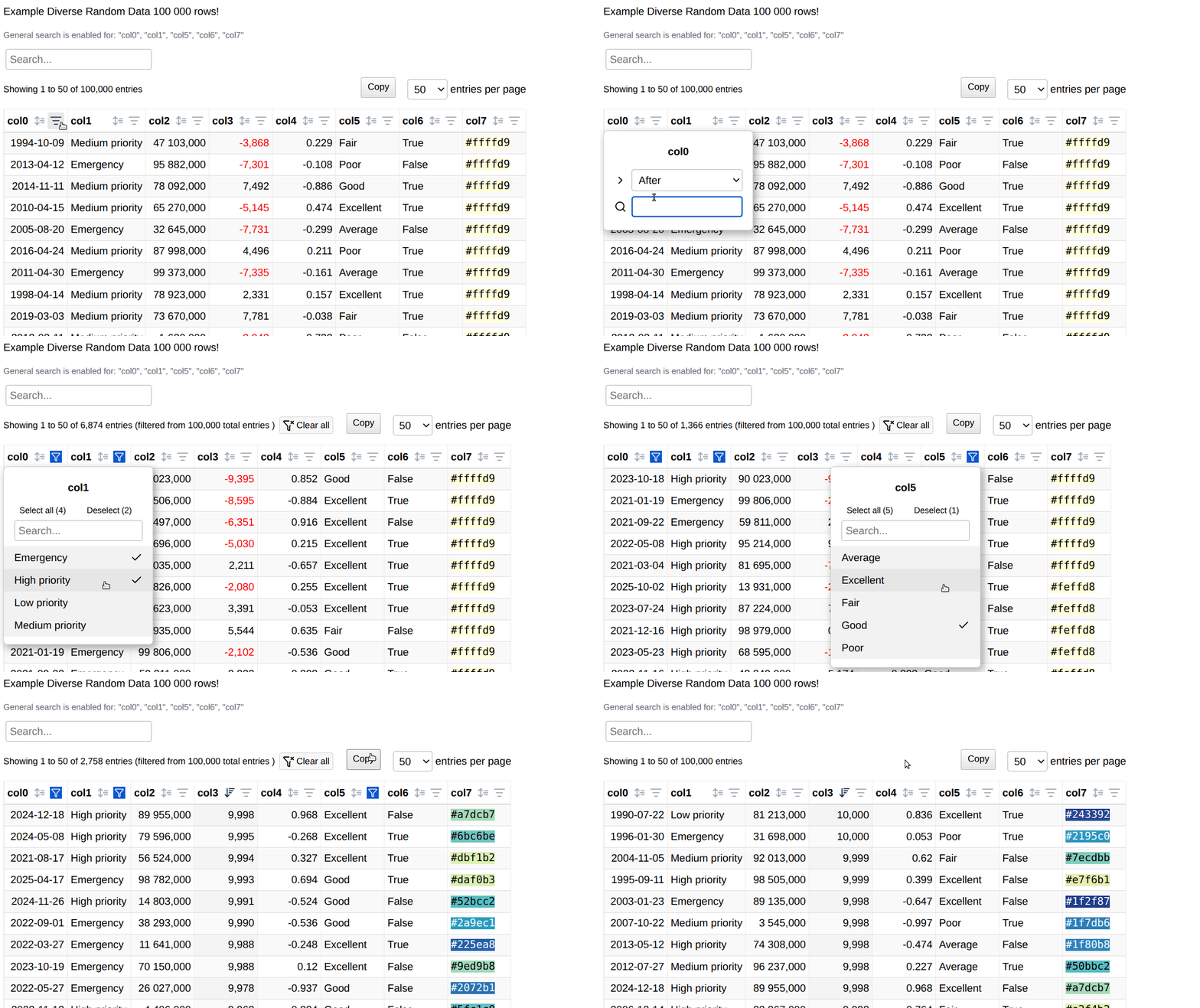
A standalone html file containing a js array as data source for datatables has several advantages, e.g. you can browse quite large data locally (something you don't usually do on a server). Below is an example of 100k rows with additional html rendering.
Quick Start
import pandas as pd
import df2tables as df2t

df = pd.DataFrame({
    "Name": ["Alice", "Bob", "Carol"],
    "Score": [92.5, -78.3, 85.0],
    "Joined": pd.to_datetime(["2021-01-05", "2021-02-10", "2021-03-15"])
})

# Basic usage with color-coded numeric columns
df2t.render(
    df,
    title="User Scores",
    precision=1,
    num_html=["Score"],
    to_file="output.html",
    startfile=True
)
Main Function
render
df2t.render(
    df: pd.DataFrame,
    title: str = "Title",
    precision: int = 2,
    num_html: List[str] = [],
    to_file: Optional[str] = None,
    startfile: bool = True,
    templ_path: str = TEMPLATE_PATH
) -> Union[str, file_object]
Parameters:
df: Input pandas DataFrametitle: Title for the HTML tableprecision: Number of decimal places for floating-point numbersnum_html: List of numeric column names to render with color-coded HTML formatting (negative values in red)to_file: Output HTML file path. If None, returns HTML string instead of writing filestartfile: If True, automatically opens the generated HTML file in default browsertempl_path: Path to custom HTML template (uses default if not specified)
Returns:
- HTML string if
to_file=None - File object if
to_fileis specified
sample_df
Generates and renders a built-in example DataFrame for testing:
html_string = df2t.sample_df()
Feature Engineering Example
import pandas as pd
import df2tables as df2t

# Load your training dataset
df = pd.read_csv("training_data.csv")

# Quick inspection of the entire dataset
df2t.render(
    df,
    title="Training Dataset Overview",
    to_file="dataset_overview.html"
)

# Focus on specific numeric features with color coding
numeric_features = ["feature1", "feature2", "target_variable"]
df2t.render(
    df[numeric_features + ["id", "category"]],
    title="Key Numeric Features",
    precision=3,
    num_html=numeric_features,
    to_file="numeric_features.html"
)

# Inspect feature correlations or engineered features
feature_stats = df.describe().T
df2t.render(
    feature_stats,
    title="Feature Statistics",
    precision=4,
    num_html=["mean", "std", "min", "max"],
    to_file="feature_stats.html"
)
Requirements
- Python 3.7+
- pandas
- numpy
Installation
pip install df2tables
License
MIT License
© ts-kontakt
Appendix: Template Customization
Offline Usage
Note: "Offline" viewing assumes internet connectivity for CDN resources (DataTables, jQuery, PureCSS). For truly offline usage, modify the template to reference local copies of these libraries instead of CDN links.
Templates use comnt, a minimal markup system based on HTML/JS comments.
<!--[title-->
My Table Title
<!--title]-->

const data = /*[tab_data*/ [...] /*tab_data]*/;
The default HTML template includes:
- PureCSS (CDN) for responsive styling
- DataTables 2.3.2 (CDN) for table interactivity
- jQuery 3.7.1 (CDN)
- JavaScript enhancements for sorting HTML-formatted numbers and coloring negative values
While comnt is used to ensure that the HTML template just works independently, you can also use other templating systems like Jinja2 by rendering the final content after.
Custom Templates
Copy and modify datatable_templ.html to apply custom styling or libraries, then pass the new template path to templ_path.
Customization
# Return HTML string for further processing
html_content = df2t.render(df, to_file=None)

# Use custom template
df2t.render(
    df,
    to_file="custom_output.html",
    templ_path="my_custom_template.html"
)

# Handle MultiIndex columns (experimental)
# MultiIndex columns are automatically flattened with underscore separation
Release history Release notifications | RSS feed


Download files
Download the file for your platform. If you're not sure which to choose, learn more about installing packages.
Source Distribution
Built Distribution
Filter files by name, interpreter, ABI, and platform.
If you're not sure about the file name format, learn more about wheel file names.
Copy a direct link to the current filters
File details
Details for the file df2tables-0.0.2.tar.gz.
File metadata
- Download URL: df2tables-0.0.2.tar.gz
- Upload date:
- Size: 13.7 kB
- Tags: Source
- Uploaded using Trusted Publishing? No
- Uploaded via: twine/6.1.0 CPython/3.12.3
File hashes
| Algorithm | Hash digest | |
|---|---|---|
| SHA256 |
13afcf13976ffa7067427a1756e2786d172b34a09f621271452e011d21840f70
|
|
| MD5 |
04759563fd9ff00caf0011a0af5c6b0f
|
|
| BLAKE2b-256 |
33831ec2a1d8ff0a698a050c5e27846eab31d10583a774bfa6a7e5764eae5134
|
File details
Details for the file df2tables-0.0.2-py3-none-any.whl.
File metadata
- Download URL: df2tables-0.0.2-py3-none-any.whl
- Upload date:
- Size: 12.9 kB
- Tags: Python 3
- Uploaded using Trusted Publishing? No
- Uploaded via: twine/6.1.0 CPython/3.12.3
File hashes
| Algorithm | Hash digest | |
|---|---|---|
| SHA256 |
179c6a7d3778122602893ef703bce3059dcff26722a6a743ecdab501464358c4
|
|
| MD5 |
731b8f5d337f4446a3de5d6a3521de1a
|
|
| BLAKE2b-256 |
17cf1b05e470b02830dabcf21c690baa298d9ca41a9d35e4418cd8aab6cc2c43
|






