
df2tables: Pandas DataFrames to Interactive DataTables

Project description
df2tables: Pandas DataFrames to Interactive DataTables


df2tables is a Python utility for exporting pandas.DataFrame objects to interactive HTML tables using DataTables—an excellent JavaScript library for table functionality.
Features
- Converts
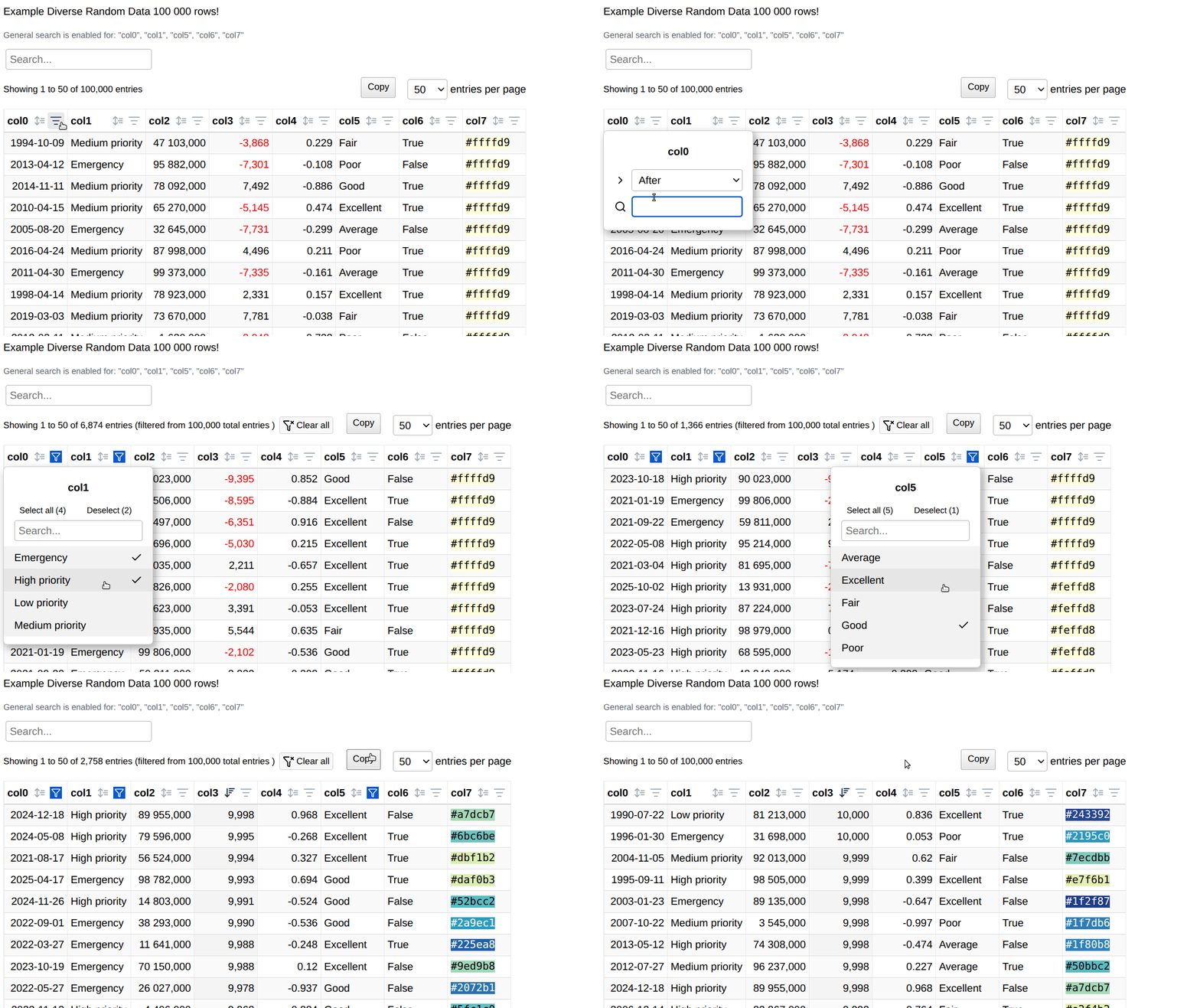
pandas.DataFrameto interactive standalone HTML tables - You can browse quite large data sets using filters and sorting
- No need to export to Excel—you can explore and filter your data directly in the browser, which is faster and more convenient
- Works independently of Jupyter or web servers—viewable offline in any browser, portable and easy to share
- Useful for some training dataset inspection and feature engineering: Quickly browse through large datasets, identify outliers, and data quality issues interactively
- Minimal HTML snippet generation: Generate embeddable HTML content for Flask or other web frameworks
- Smart column detection: Automatically identifies categorical columns (≤5 unique values by default) for dropdown filtering
Screenshots
Quick Start
The simplest function call with default arguments is:
df2tables.render(df, to_file='df.html')
Installation
Example use
pip install df2tables
import pandas as pd
import df2tables as df2t

df = pd.DataFrame({
    "Name": ["Alice", "Bob", "Carol"],
    "Score": [92.5, -78.3, 85.0],
    "Joined": pd.to_datetime(["2021-01-05", "2021-02-10", "2021-03-15"])
})

# Basic usage with color-coded numeric columns
df2t.render(
    df,
    title="User Scores",
    precision=1,
    num_html=["Score"],
    to_file="output.html",
    startfile=True
)
Dataframe indexes are not rendered by default. If you want to enable indexes in an HTML table, simply call df2tables.render(df.reset_index(), args...
Main Functions
render
df2t.render(
    df: pd.DataFrame,
    title: str = "Title",
    precision: int = 2,
    num_html: List[str] = [],
    to_file: Optional[str] = None,
    startfile: bool = True,
    templ_path: str = TEMPLATE_PATH,
    load_column_control: bool = True,
    dropdown_select_threshold: int = 5
) -> Union[str, file_object]
Parameters:
df: Input pandas DataFrametitle: Title for the HTML tableprecision: Number of decimal places for floating-point numbersnum_html: List of numeric column names to render with color-coded HTML formatting (negative values in red)to_file: Output HTML file path. If None, returns HTML string instead of writing filestartfile: If True, automatically opens the generated HTML file in default browsertempl_path: Path to custom HTML template (uses default if not specified)load_column_control: If True, smartly integrates the exceptional DataTables Column Control extension programmatically for enhanced filtering and search capabilities (default: True)dropdown_select_threshold: Maximum number of unique values in a column to qualify for dropdown filtering (default: 5)
Returns:
- HTML string if
to_file=None - File object if
to_fileis specified
render_inline
df2t.render_inline(
    df: pd.DataFrame,
    **kwargs
) -> str
Generates minimal HTML content suitable for embedding in Flask or other web framework templates. This function:
- Returns only the table markup and JavaScript data bindings
- Excludes full HTML document structure (no
<html>,<head>,<body>tags) - Important: Does NOT automatically load jQuery or DataTables libraries - you must include these dependencies in your host page
- Perfect for embedding interactive data previews in existing web applications
Parameters:
- Same as
render()exceptto_fileis not allowed (always returns string)
Column Name Formatting
For better readability in table headers, df2tables automatically converts underscores to spaces in column names when the column name is longer than 20 characters and contains underscores. This improves word wrapping and prevents excessively wide columns.
To disable this automatic word wrapping behavior, add the following CSS to your custom template:
span.dt-column-title {
    white-space: nowrap;
}
Fast Dataset Browsing
One of the key strengths of df2tables is its ability to quickly generate interactive HTML tables for rapid dataset exploration. The combination of standalone HTML files and the DataTables Column Control extension makes it exceptionally fast to browse through multiple datasets.
Bulk Dataset Processing
For exploratory data analysis across multiple datasets, you can generate tables programmatically. The example below uses the vega_datasets package, which provides easy access to a variety of sample datasets commonly used in data visualization and analysis.
Note: Install vega_datasets with pip install vega_datasets to run this example.
Quick browse first 10 vega datasets
import df2tables as df2t
from vega_datasets import data

# WARNING: This will open many browser tabs! Use with caution.
# Consider setting startfile=False for bulk processing.

for dataset_name in (sorted(dir(data))[:10]):
    dataset_func = getattr(data, dataset_name)
    try:
        df = dataset_func()
        print(f"{dataset_name}: {len(df.index)} rows")

        # df2tables can handle datasets above 100k rows, but we limit to smaller datasets
        # for this demo to avoid generating too many large files
        if len(df.index) < 100_000:
            df2t.render(
                df,
                title=f'Dataset: {dataset_name}',
                to_file=f'{dataset_name}.html',
                startfile=True
            )
    except Exception as e:
        print(f'Error processing {dataset_name}: {e}')

print("Generated HTML files. Open them manually to browse datasets.")
⚠️ Important Note: When startfile=True (default), each generated HTML file opens automatically in your default browser. For bulk processing, set startfile=False to avoid opening dozens of browser tabs simultaneously.
Web Framework Integration
The render_inline() function makes it easy to embed interactive DataTables in web applications. Important: You must include the required JavaScript libraries (jQuery, DataTables) in your host page as render_inline() does not automatically include them.
Complete Flask Example
Here's a complete, working Flask application that demonstrates how to properly embed a DataTable with all required dependencies:
import df2tables as df2t
from flask import Flask, render_template_string

app = Flask(__name__)

@app.route("/")
def home():
    # Generate sample data (or use your own DataFrame)
    df = df2t.get_sample_df()
    # For larger datasets, you might use:
    # df = generate_large_dataframe(10000)  # Your data source

    df_title = "DataFrame Rendered as DataTable inline in <strong>Flask</strong>"

    # Generate the embeddable DataTable HTML
    string_datatable = df2t.render_inline(
        df,
        title=df_title,
        dropdown_select_threshold=5,
        load_column_control=True,
    )

    # Embed in a complete HTML template with all required dependencies
    return render_template_string(
        """
        <!DOCTYPE html>
        <html>
        <head>
            <title>Flask Data Dashboard</title>
            <meta name="viewport" content="width=device-width, initial-scale=1">

            <!-- Required: jQuery must be loaded first -->
            <script src="https://code.jquery.com/jquery-3.7.1.min.js"></script>

            <!-- Required: DataTables CSS and JS -->
            <link href="https://cdn.datatables.net/2.3.2/css/dataTables.dataTables.min.css" rel="stylesheet">
            <script src="https://cdn.datatables.net/2.3.2/js/dataTables.min.js"></script>

            <!-- Optional: PureCSS for styling -->
            <link rel="stylesheet" href="https://cdn.jsdelivr.net/npm/purecss@3.0.0/build/pure-min.css">
        </head>
        <body style="background-color: #f4f4f4;">
            <div style="background-color: #fff; padding: 20px; margin: 20px;">
                <h1>My Flask Data Dashboard</h1>
                {{ inline_datatable | safe }}
            </div>
        </body>
        </html>
        """,
        inline_datatable=string_datatable,
    )

if __name__ == "__main__":
    app.run(debug=True)
Key points for web framework integration:
- Required dependencies: Always include jQuery and DataTables CSS/JS in your host page
- Column Control: When
load_column_control=True, the extension is loaded automatically by the generated JavaScript - Self-contained data: The
render_inline()function includes all table data and initialization code - Smart filtering: Automatic dropdown filters for categorical columns
DataTables Column Control Extension Integration
The load_column_control parameter enables smart integration with the remarkable DataTables Column Control extension, bringing professional-grade filtering capabilities to your data tables:
- Categorical columns (≤
dropdown_select_thresholdunique values): Get elegant dropdown select filters (searchList) for intuitive data filtering - Text/numeric columns: Benefit from sophisticated search functionality (
searchDropdown) and ordering controls - Intelligent detection: The module automatically identifies column types and applies the most appropriate Column Control features
- Seamless loading: The outstanding Column Control extension is loaded dynamically via JavaScript, ensuring optimal performance and compatibility
# Enable smart integration with DataTables Column Control extension (default)
df2t.render(df, load_column_control=True, to_file="enhanced_table.html")

# Disable Column Control for simpler tables
df2t.render(df, load_column_control=False, to_file="simple_table.html")

# Customize dropdown threshold
df2t.render(df, dropdown_select_threshold=10, to_file="custom_table.html")
get_sample_df / render_sample_df
# Get sample DataFrame for testing
sample_df = df2t.get_sample_df()

# Generate and render sample DataFrame
html_string = df2t.render_sample_df(to_file="sample_table.html")

## Requirements

- Python 3.7+
- pandas
- numpy

## Technical Details

### DataTables Column Control Extension Integration

The module smartly integrates with the exceptional [DataTables Column Control extension](https://datatables.net/extensions/columncontrol/) for optimal user experience:

- **Select columns**: Columns with ≤`dropdown_select_threshold` unique values get sophisticated dropdown filters (`searchList`) via Column Control
- **Search columns**: Other columns benefit from Column Control's advanced search functionality (`searchDropdown`) and ordering controls
- **Dynamic loading**: The [Column Control extension](https://datatables.net/extensions/columncontrol/) JavaScript libraries are loaded programmatically to maintain clean templates
- **Robust fallback**: If the Column Control extension cannot be loaded, tables gracefully fall back to standard DataTables functionality

### Error Handling

The module includes  error handling for:
- **JSON serialization**: Custom encoder handles complex pandas data types
- **Column compatibility**: Automatically converts problematic column types to string representation
- **Missing columns**: Validates `num_html` column names against DataFrame columns
- **Script loading**: Graceful fallback if the [DataTables Column Control extension](https://datatables.net/extensions/columncontrol/) cannot be loaded

## TODO / Future Enhancements

### DataTables Configuration Expansion

Currently, `df2tables` uses a predefined set of DataTables configuration options. Future versions could expose more DataTables initialization parameters directly from Python:


## License

MIT License
© Tomasz Sługocki

## Appendix: Template Customization

### Offline Usage
*Note: "Offline" viewing assumes internet connectivity for CDN resources (DataTables, jQuery, PureCSS, [DataTables Column Control extension](https://datatables.net/extensions/columncontrol/)). For truly offline usage, modify the template to reference local copies of these libraries instead of CDN links.*

Templates use [comnt](https://github.com/ts-kontakt/comnt), a minimal markup system based on HTML/JS comments.

```html
<!--[title-->
My Table Title
<!--title]-->

const data = /*[tab_data*/ [...] /*tab_data]*/;
The default HTML template includes:
- PureCSS (CDN) for responsive styling
- DataTables 2.3.2 (CDN) for table interactivity
- jQuery 3.7.1 (CDN)
- DataTables Column Control Extension (CDN) - the outstanding Column Control extension loaded programmatically when enabled
- JavaScript enhancements for sorting HTML-formatted numbers and coloring negative values
DataTables Column Control Extension CDN Resources
When load_column_control=True, the following resources from the excellent DataTables Column Control extension are loaded dynamically:
// JavaScript libraries loaded programmatically
const columncontrol_js = [
    "https://cdn.datatables.net/columncontrol/1.0.6/js/dataTables.columnControl.js",
    "https://cdn.datatables.net/columncontrol/1.0.6/js/columnControl.dataTables.js"
];

// CSS loaded after JavaScript initialization
const columncontrol_css =
    "https://cdn.datatables.net/columncontrol/1.0.6/css/columnControl.dataTables.css";
While comnt is used to ensure that the HTML template just works independently (and avoid Json.parse), you can also use other templating systems like Jinja2 by rendering the final content after.
Custom Templates
Copy and modify datatable_templ.html to apply custom styling or libraries, then pass the new template path to templ_path.
Customization
# Return HTML string for further processing
html_content = df2t.render(df, to_file=None)

# Generate minimal HTML for embedding (requires jQuery/DataTables in host page)
html_snippet = df2t.render_inline(df, title="Embedded Table")

# Use custom template
df2t.render(
    df,
    to_file="custom_output.html",
    templ_path="my_custom_template.html"
)

# Disable DataTables Column Control extension for custom implementations
df2t.render(
    df,
    to_file="basic_table.html",
    load_column_control=False
)

# Adjust dropdown threshold for categorical columns
df2t.render(
    df,
    dropdown_select_threshold=10,  # Columns with ≤10 unique values get dropdowns
    to_file="custom_filtering.html"
)

# Handle MultiIndex columns (experimental)
# MultiIndex columns are automatically flattened with underscore separation
Release history Release notifications | RSS feed


Download files
Download the file for your platform. If you're not sure which to choose, learn more about installing packages.
Source Distribution
Built Distribution
Filter files by name, interpreter, ABI, and platform.
If you're not sure about the file name format, learn more about wheel file names.
Copy a direct link to the current filters
File details
Details for the file df2tables-0.1.0.tar.gz.
File metadata
- Download URL: df2tables-0.1.0.tar.gz
- Upload date:
- Size: 14.6 kB
- Tags: Source
- Uploaded using Trusted Publishing? No
- Uploaded via: twine/6.1.0 CPython/3.12.3
File hashes
| Algorithm | Hash digest | |
|---|---|---|
| SHA256 |
41824a9d5608218a7af1ef76dc257f0088c9e38299a82e185c850a528e644c20
|
|
| MD5 |
4a0936b17fe82754fa471bf00f18e971
|
|
| BLAKE2b-256 |
1e6928e8600bde162c083fe119a1d836b2f9688fa2cbd489ea10a6b5721d783f
|
File details
Details for the file df2tables-0.1.0-py2.py3-none-any.whl.
File metadata
- Download URL: df2tables-0.1.0-py2.py3-none-any.whl
- Upload date:
- Size: 16.6 kB
- Tags: Python 2, Python 3
- Uploaded using Trusted Publishing? No
- Uploaded via: twine/6.1.0 CPython/3.12.3
File hashes
| Algorithm | Hash digest | |
|---|---|---|
| SHA256 |
c0bfc3368f60901ea17d0147f2cf8c793b603b7a176beb696349b613671aa07f
|
|
| MD5 |
06b24d478897ead045179ab65d2633e4
|
|
| BLAKE2b-256 |
e9f24e43a6773b9deff4c0205417f02c83f355d0c963b03cfabf6ceef2507cf3
|






