
Integration testing, streaming utilities, and repetition detection for distributed LLM inference on DGX Spark clusters

Project description



dgxarley
Tooling for the DGX Arley K3s inference cluster — integration tests, streaming utilities, and CLI entry points for SGLang, Ollama, and OpenWebUI services.
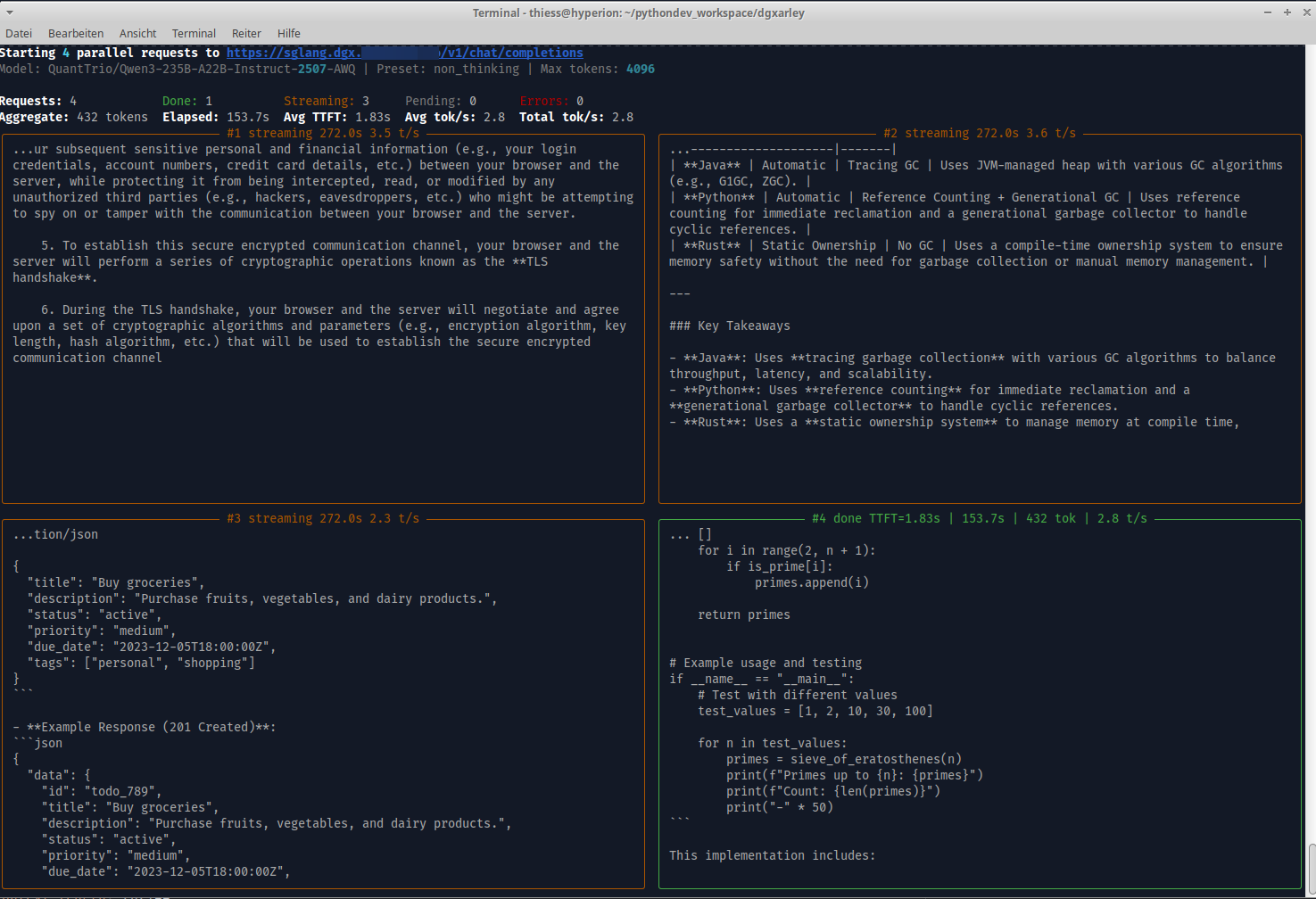
Heureka! — Qwen3-235B-A22B MoE (AWQ 4-bit) running distributed inference across both DGX Sparks:
sglang-raw — Dual-panel SSE stream viewer
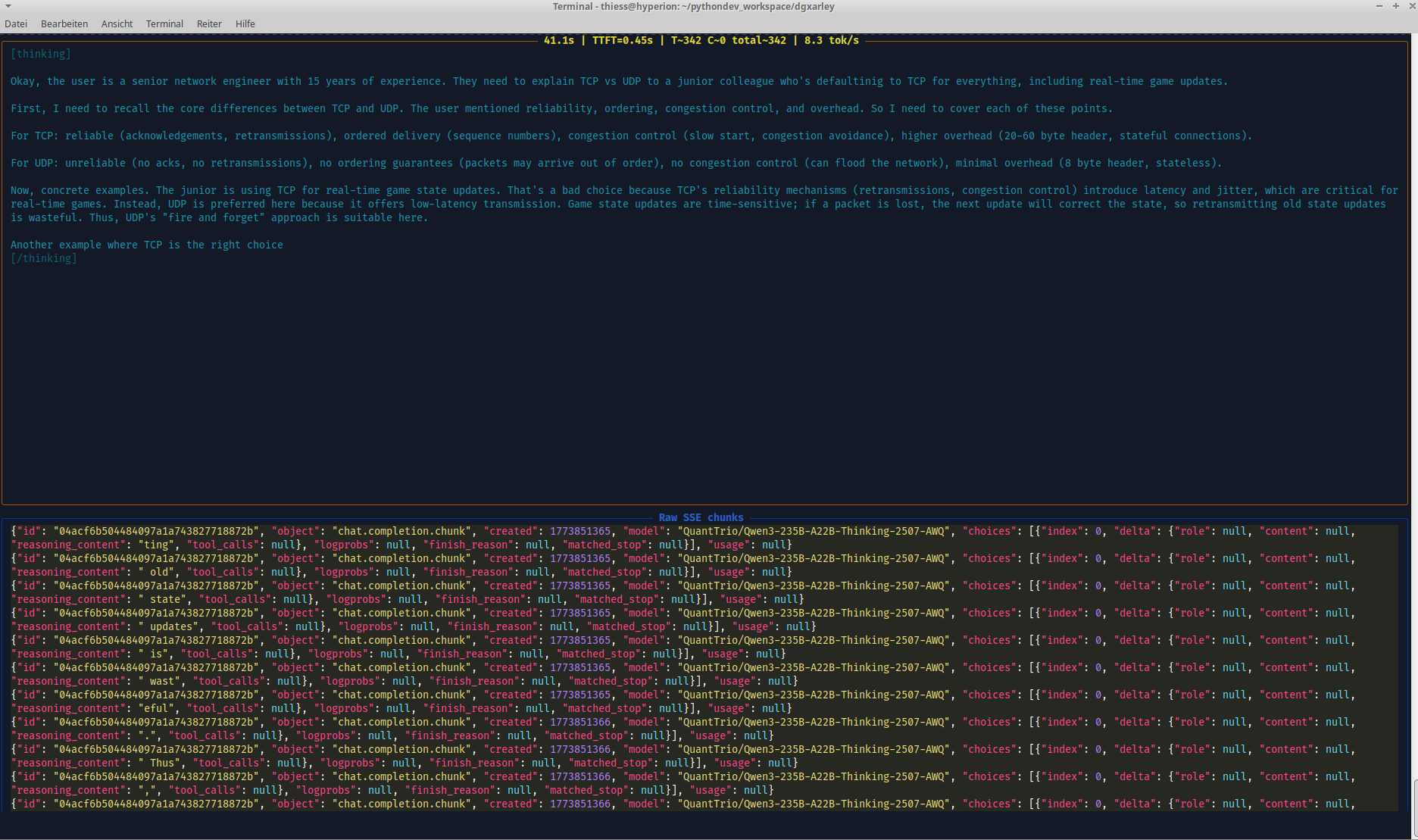
Dual-panel Rich TUI for inspecting SGLang's OpenAI-compatible streaming API in real time. The top half renders the AI response as it arrives, while the bottom half displays the raw JSON SSE stream chunks — showing fields like chat_completion_chunk, choices, delta, finish_reason, and model. Useful for debugging streaming behaviour, verifying token delivery, and understanding the wire format of the API.
sglang-raw — Think/text token classification
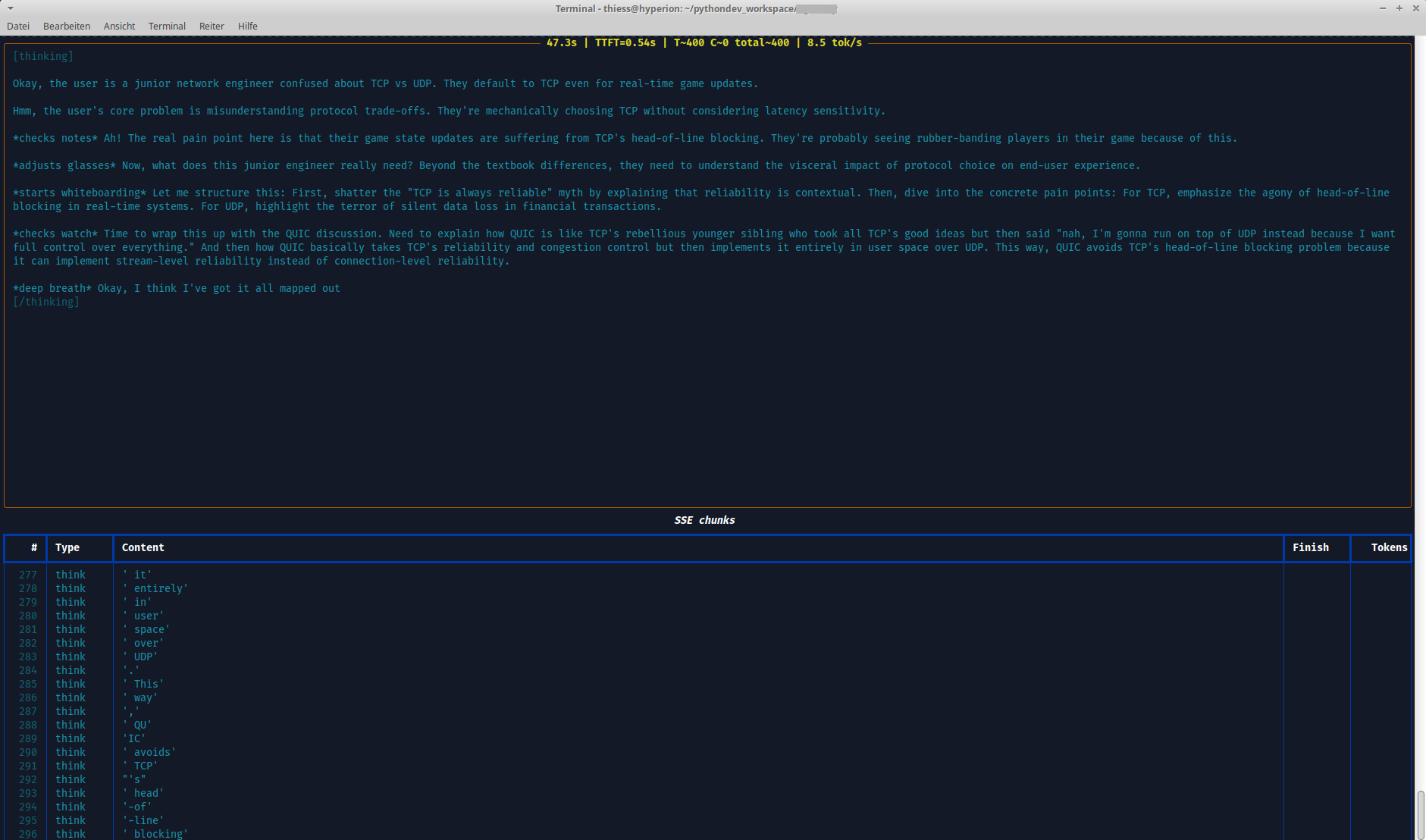
Token-level stream inspection with per-chunk breakdown in a structured table. Columns show the token type (think vs text), content, finish reason, and cumulative token count — visualizing how reasoning tokens (from <think>...</think> blocks) are separated from the actual output tokens. This view helps when tuning thinking budgets, verifying reasoning_parser behaviour, or diagnosing unexpected token classification.
What's included
CLI tools
| Command | Description |
|---|---|
sglang-raw |
Interactive SSE stream viewer with dual-panel Rich display (interpreted output + raw JSON chunks) |
sglang-test |
Direct SGLang client with sequential and parallel load testing (live Rich TUI) |
sglang-bench |
Benchmark launcher for SGLang with persistent dataset caching and concurrency-sweep mode |
openwebui-test |
OpenWebUI / LLM client with preset management and streaming |
ollama-test |
Ollama API health, model, embedding, and chat completions tests |
comfyui-test |
ComfyUI integration tests for the local image-generation playground |
kceve-kvm |
RS232 serial control for KCEVE KVM1001A KVM switches — 4-port and 10-port variants, --ports/KCEVE_KVM_PORTS (switch ports, query state, sniff) |
kceve-kvm-web |
Web UI for KCEVE KVM control (FastAPI, requires dgxarley[web]) |
kceve-kvm-web-plain |
Lightweight web UI for KCEVE KVM control (stdlib http.server, no extra dependencies) |
kceve-kvm-web — KCEVE KVM1001A Web UI
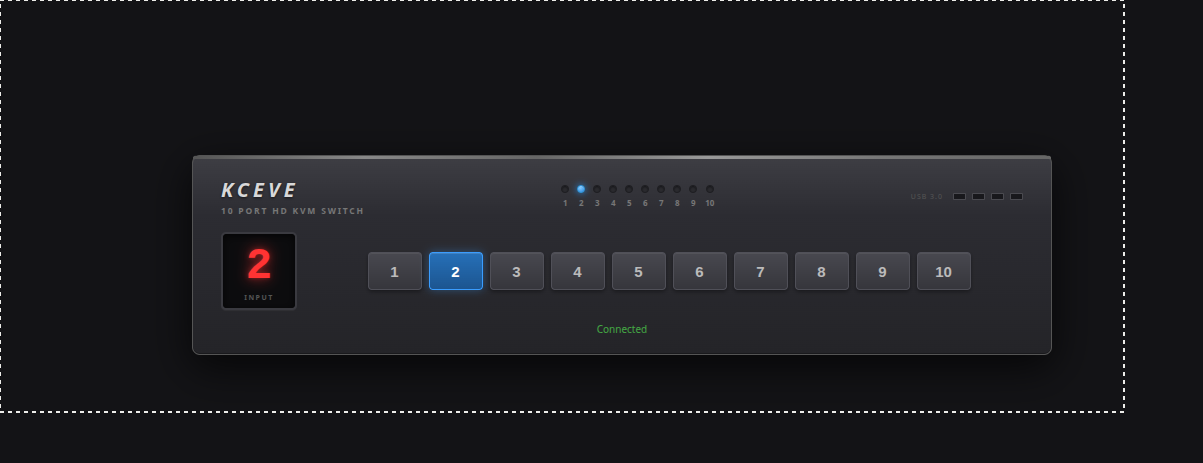
Browser-based control panel for the KCEVE KVM1001A KVM switch via RS232 serial. Shows the currently active input port on a virtual 7-segment display and allows switching between inputs with a single click. The port count defaults to 10 and is selectable for the 4-port variant via -n/--ports (or the KCEVE_KVM_PORTS env var). Commands are sent over a USB-to-RS232 adapter at 115200 baud using the X<channel>,1$ ASCII protocol.
Remote test setup (serial over SSH tunnel)
If the KVM is connected to a remote host, you can tunnel the serial port via TCP:
# 1. On k3smaster (where the USB-RS232 adapter is connected): expose serial as TCP server
root@k3smaster ~ # socat tcp-listen:7000,reuseaddr,fork /dev/ttyACM0,b115200,raw,echo=0

# 2. On workstation: SSH tunnel to remote TCP port
user@workstation ~ $ ssh -N -L 7000:127.0.0.1:7000 root@k3smaster &

# 3. On workstation: create local PTY from TCP tunnel
user@workstation ~ $ socat pty,link=/tmp/kvm-serial,raw,echo=0 tcp:127.0.0.1:7000 &

# 4. On workstation: start web UI on the local PTY
user@workstation ~ $ kceve-kvm-web -d /tmp/kvm-serial -p 8080
Then open http://localhost:8080 in a browser.
Libraries
| Module | Description |
|---|---|
dgxarley.integration.repetition_detector |
Offline n-gram, sentence, and loop repetition analysis for completed LLM outputs |
dgxarley.integration.streaming_repetition_guard |
Real-time repetition detection for token streams with configurable thresholds |
Installation
pip install dgxarley
Quick start
from dgxarley.integration.repetition_detector import detect_repetition

report = detect_repetition(llm_output)
print(report.summary())
# [LOW] score=0.12 — N-Gram 'this is a test' x2
from dgxarley.integration.streaming_repetition_guard import RepetitionGuard

guard = RepetitionGuard()
for chunk in llm_stream:
    token = chunk.choices[0].delta.content or ""
    result = guard.feed(token)
    if result.should_stop:
        print(f"STOP: {result.reason}")
        break
Requirements
- Python >= 3.14
Source & documentation
Full documentation, network architecture, and Ansible playbooks: GitHub
License
This project is licensed under the LGPL where applicable/possible — see LICENSE.md. Some files/parts may use other licenses: MIT | GPL | LGPL. Always check per‑file headers/comments.
Authors
- Repo owner (primary author)
- Additional attributions are noted inline in code comments
Acknowledgments
- Inspirations and snippets are referenced in code comments where appropriate.
⚠️ Note
This is a development/experimental project. For production use, review security settings, customize configurations, and test thoroughly in your environment. Provided "as is" without warranty of any kind, express or implied, including but not limited to the warranties of merchantability, fitness for a particular purpose and noninfringement. In no event shall the authors or copyright holders be liable for any claim, damages or other liability, whether in an action of contract, tort or otherwise, arising from, out of or in connection with the software or the use or other dealings in the software. Use at your own risk.
Release history Release notifications | RSS feed


Download files
Download the file for your platform. If you're not sure which to choose, learn more about installing packages.
Source Distribution
Built Distribution
Filter files by name, interpreter, ABI, and platform.
If you're not sure about the file name format, learn more about wheel file names.
Copy a direct link to the current filters
File details
Details for the file dgxarley-0.0.49.tar.gz.
File metadata
- Download URL: dgxarley-0.0.49.tar.gz
- Upload date:
- Size: 73.0 MB
- Tags: Source
- Uploaded using Trusted Publishing? No
- Uploaded via: Hatch/1.16.5 cpython/3.14.4 HTTPX/0.28.1
File hashes
| Algorithm | Hash digest | |
|---|---|---|
| SHA256 |
08362cf4f79e5ca3081de10377e3ffa1d6f9125a8494fd34b0bf745ca1e12121
|
|
| MD5 |
1a309a179cebd32fe9ed203394d09123
|
|
| BLAKE2b-256 |
7c1dac9fc2cd1285ca453241c6f25dc89c4c07f53109a43d24bf17bc06ac5e1a
|
File details
Details for the file dgxarley-0.0.49-py3-none-any.whl.
File metadata
- Download URL: dgxarley-0.0.49-py3-none-any.whl
- Upload date:
- Size: 100.1 kB
- Tags: Python 3
- Uploaded using Trusted Publishing? No
- Uploaded via: Hatch/1.16.5 cpython/3.14.4 HTTPX/0.28.1
File hashes
| Algorithm | Hash digest | |
|---|---|---|
| SHA256 |
91f156e1d13346751c65fb6856e1908c01d5360eee5864f211366044122f394e
|
|
| MD5 |
f01afbf9fa698bd1453dc54347e8e08a
|
|
| BLAKE2b-256 |
85639f4276253f570660d5df15807810f0df04e2a25cedc50214ae7378230c8e
|






