
A simple example package

Project description
Diblob
Diblob is the package for digraphs (pseudographs) computations. Main assumption is enable easily operate on the json digraphs representations. Package enables treat subgraph as node or subraphs extraction for future work. Package based on basic python structures (not depend on non-basic packages)
Installation
- Package can be installed with pip using
pip install diblob. - Using requirements.txt (packages necessary just for testing) by
pip install -r equirements.txt.
Data structure
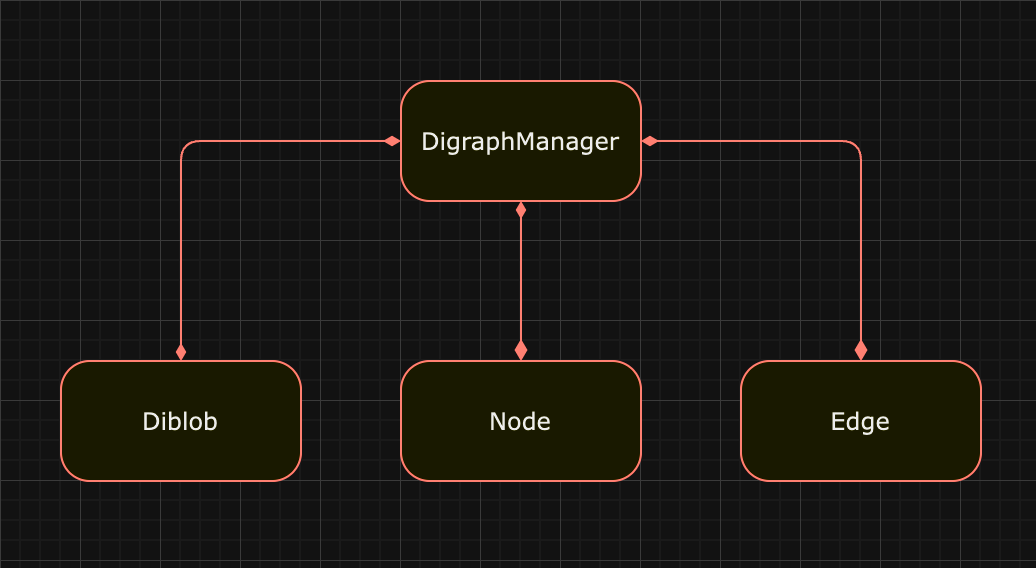
The core of the diblob is the data structure, where every operation is managed by GraphManager. Operations are performed on Node, Edge and Blob components.
Node
Node representation in digraph.
node_id- id of the node used byGraphManager.diblob_id- id of the diblob, where node is placed.incoming_nodes- list of node ids (tails of the edges for which node is head).outgoing_nodes- list of node ids (heads of the edges for which node is tail).
Incoming / outgoing nodes can be redundant (pseudographs are also considered).
Edge
Edge representation in digraph.
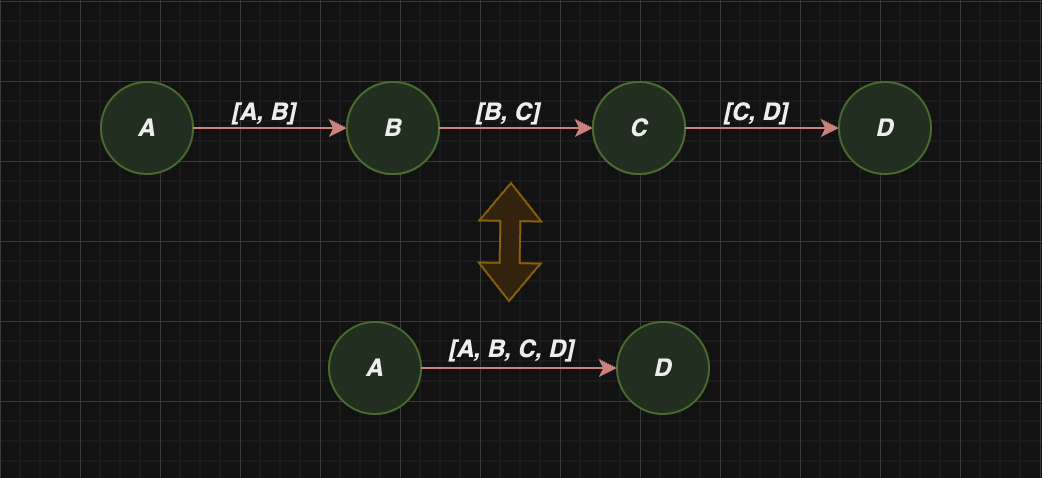
path- list of node ids.
Path is keep as list, which enables treat chain of node ids as edge:
Diblob
Diblob representation in digraph.
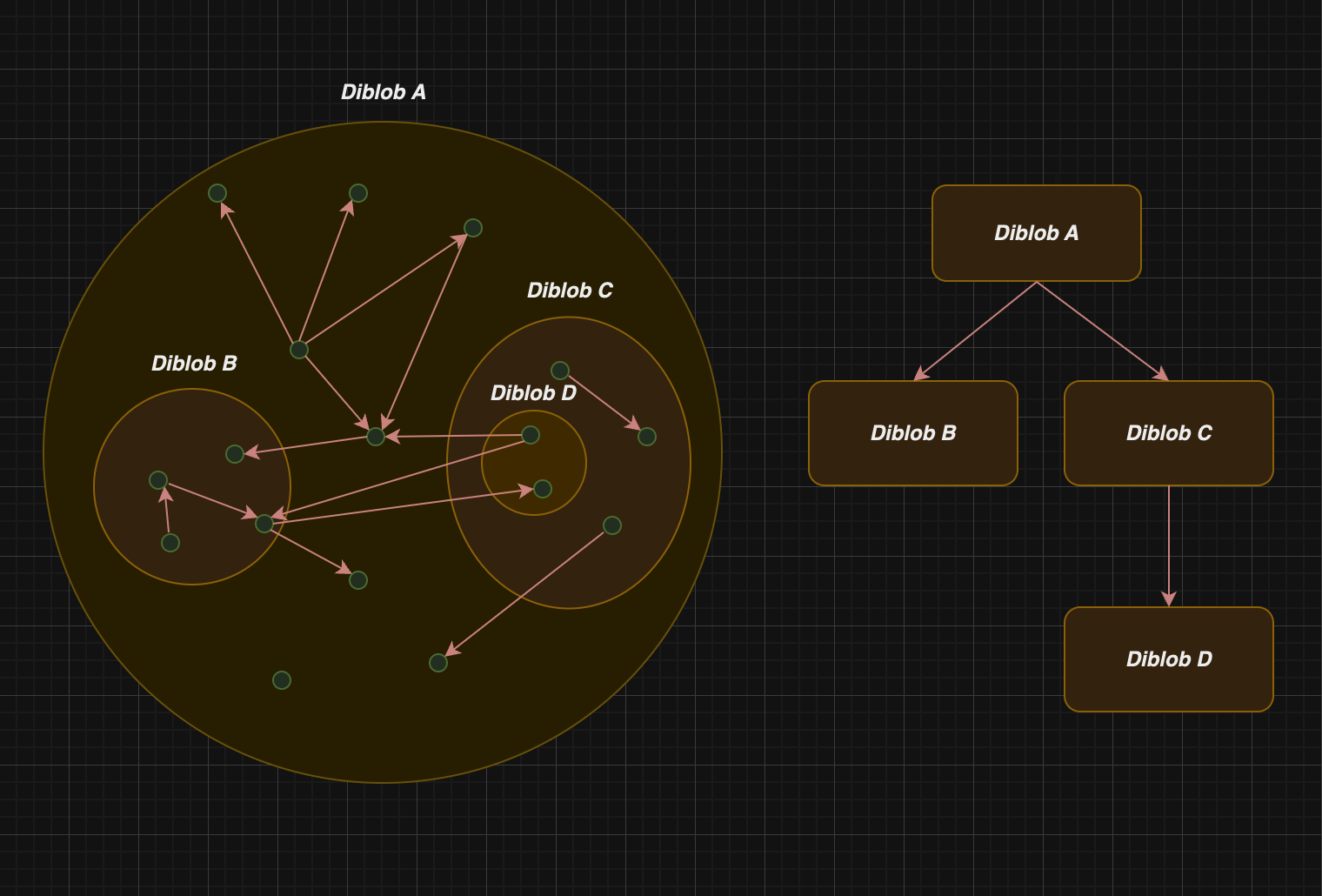
diblob_id- id of the diblob used byGraphManager.parent_id- id of the diblob which is the parent for diblob.children- ids of the diblobs which are children of the diblob.nodes- node ids (or diblob ids) embedded in diblob.
Diblobs which share the same graph creates tree-based structure. Moreover, entire graph is also treat as diblob (root):
Examples
Digraph data structure can be created as following:
from diblob import DigraphManager

digraph_dict = {"B0": {"A": ["B", "F"],
                       "B": ["C", "D", "E"],
                       "C": ["D"],
                       "D": ["E", "F", "G"],
                       "E": ["F", "A"],
                       "F": ["G", "B"],
                       "G": ["A", "D"]}}

digraph_manager = DigraphManager(digraph_dict)
Note that if we have digraph in json file, we can load it using json.load.
Let's create in the digraph blobs B1, B2 with following nodes: A, B and C, D, E:
from diblob import tools

digraph_manager.gather('B1', {'A', 'B'})
digraph_manager.gather('B2', {'C', 'D', 'E'})

tools.display_digraph_json(digraph_manager('B0'))
The result is following (display_digraph is helper function for printing human friendly python output):
{
"B0": {
    "B1": {
        "B": [{"B2": ["C", "D", "E"]}],
        "A": ["B", {"B0": ["F"]}],
    },
    "B2": {
        "C": ["D"],
        "D": ["E", {"B0": ["F", "G"]}],
        "E": [{"B0": ["F"]}, {"B1": ["A"]}],
    },
    "F": ["G", {"B1": ["B"]}],
    "G": [{"B1": ["A"]}, {"B2": ["D"]}],
},
}
Now let's compress created diblobs to points:
digraph_manager.compress_diblob('B1')
digraph_manager.compress_diblob('B2')

tools.display_digraph(digraph_manager('B0'))
The result is as follows:
{
"B0": {
    "F": ["G", "B1"],
    "B2": ["F", "B1", "G", "F"],
    "B1": ["F", "B2", "B2", "B2"],
    "G": ["B1", "B2"],
},
}
Diblob documentation
Check out the Diblob documentation for more details.
Release history Release notifications | RSS feed


Download files
Download the file for your platform. If you're not sure which to choose, learn more about installing packages.
Source Distributions
Built Distribution
Filter files by name, interpreter, ABI, and platform.
If you're not sure about the file name format, learn more about wheel file names.
Copy a direct link to the current filters
File details
Details for the file diblob-0.1-py3-none-any.whl.
File metadata
- Download URL: diblob-0.1-py3-none-any.whl
- Upload date:
- Size: 12.6 kB
- Tags: Python 3
- Uploaded using Trusted Publishing? No
- Uploaded via: twine/5.0.0 CPython/3.10.13
File hashes
| Algorithm | Hash digest | |
|---|---|---|
| SHA256 |
380ade5587da0ef8d1c4e18868dd446c4333d824a6c33741a456c9f812843db9
|
|
| MD5 |
79052a1f11aab25effed33adcb727b45
|
|
| BLAKE2b-256 |
2926c08f3c80f716a6e623e1604986a16247d35ccc70fc53bb2f13527801dfa5
|






