
A simple example package

Project description
Diblob
Diblob is the package for digraphs (pseudographs) computations. Main assumption is enable easily operate on the json digraphs representations. Package enables treat subgraph as node or subraphs extraction for future work. Package based on basic python structures (not depend on non-basic packages)
Installation
- Package can be installed with pip using
pip install diblob. - Using requirements.txt (packages necessary just for testing) by
pip install -r equirements.txt.
Data structure
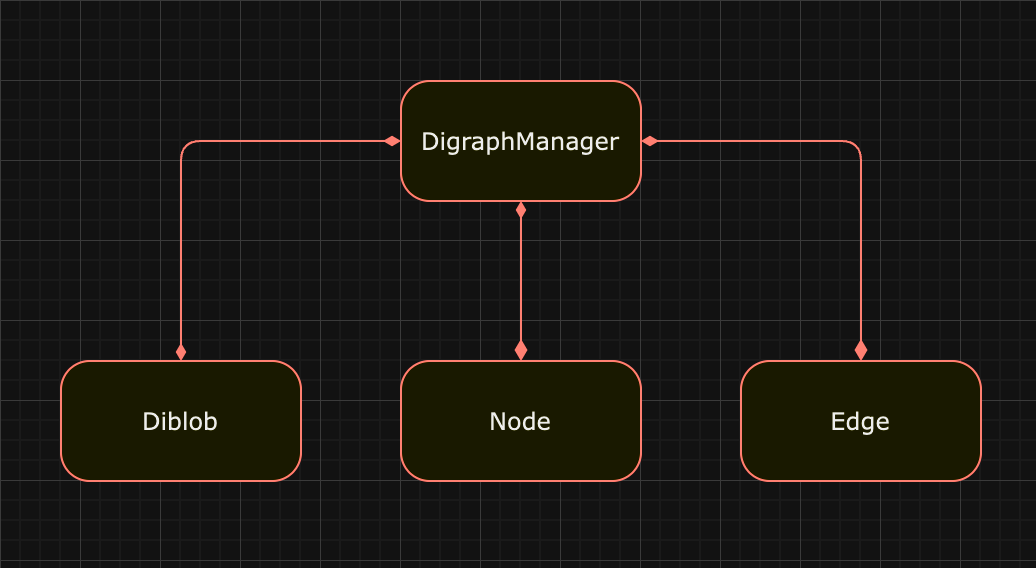
The core of the diblob is the data structure, where every operation is managed by GraphManager. Operations are performed on Node, Edge and Blob components.
Node
Node representation in digraph. Components cosists of following fields:
node_id- id of the node used byGraphManager.diblob_id- id of the diblob, where node is placed.incoming_nodes- list of node ids (tails of the edges for which node is head).outgoing_nodes- list of node ids (heads of the edges for which node is tail).
Incoming / outgoing nodes can be redundant (pseudographs are also considered).
Edge
Edge representation in digraph.
path- list of node ids.
Diblob
Diblob representation in digraph.
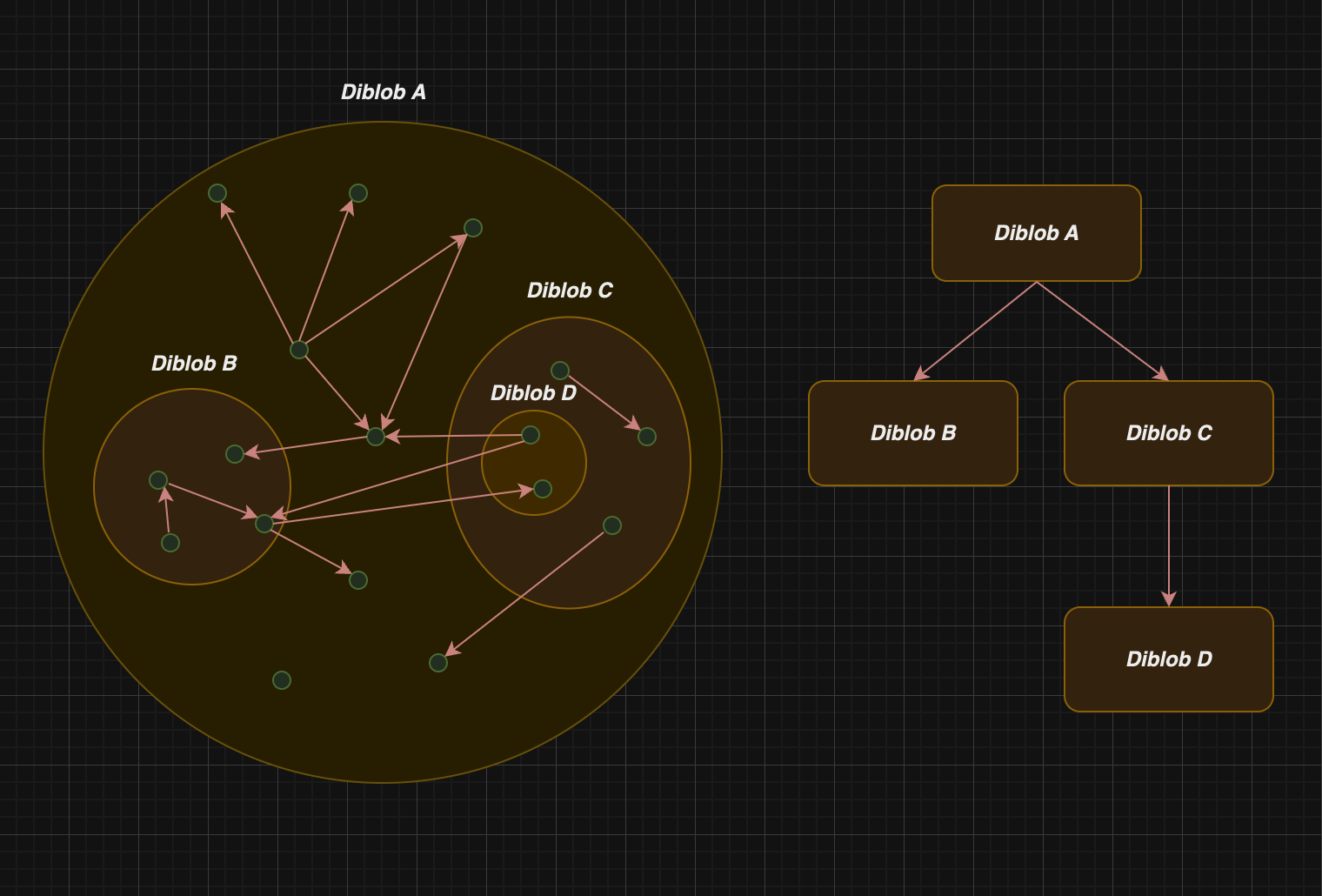
diblob_id- id of the diblob used byGraphManager.parent_id- id of the diblob which is the parent for diblob.children- ids of the diblobs which are children of the diblob.nodes- node ids (or diblob ids) embedded in diblob.
Diblobs which share the same graph creates tree-based structure. Moreover, entire graph is also treat as diblob (root):
Examples
Digraph data structure can be created as following:
from diblob import DigraphManager

digraph_dict = {"B0": {"A": ["B", "F"],
                       "B": ["C", "D", "E"],
                       "C": ["D"],
                       "D": ["E", "F", "G"],
                       "E": ["F", "A"],
                       "F": ["G", "B"],
                       "G": ["A", "D"]}}

digraph_manager = DigraphManager(digraph_dict)
Note that if we have digraph in json file, we can load it using json.load.
Let's create in the digraph blobs B1, B2 with following nodes: A, B and C, D, E:
from diblob import tools

digraph_manager.gather('B1', {'A', 'B'})
digraph_manager.gather('B2', {'C', 'D', 'E'})

tools.display_digraph_json(digraph_manager('B0'))
The result is following (display_digraph is helper function for printing human friendly python output):
{
"B0": {
    "B1": {
        "B": [{"B2": ["C", "D", "E"]}],
        "A": ["B", {"B0": ["F"]}],
    },
    "B2": {
        "C": ["D"],
        "D": ["E", {"B0": ["F", "G"]}],
        "E": [{"B0": ["F"]}, {"B1": ["A"]}],
    },
    "F": ["G", {"B1": ["B"]}],
    "G": [{"B1": ["A"]}, {"B2": ["D"]}],
},
}
Now let's compress created diblobs to points:
digraph_manager.compress_diblob('B1')
digraph_manager.compress_diblob('B2')

tools.display_digraph(digraph_manager('B0'))
The result is as follows:
{
"B0": {
    "F": ["G", "B1"],
    "B2": ["F", "B1", "G", "F"],
    "B1": ["F", "B2", "B2", "B2"],
    "G": ["B1", "B2"],
},
}
Diblob documentation
Diblob package consists of following modules:
components- used by graph manager (node, edge, diblob).digraph_manager- core of the proposed data structure.factory- examples of graph_manager used for more complicated digraphs creation.algorithms- examples of use diblob with basic digraphs algorithms like DFS, DFSA (modified DFS) and Dijkstra algorithm.exceptions- used in modules.tools- for comfortable work with digraphs.
In entire package methods started with '_' are used by GraphManager (indirectly).
Components
Components are used by GraphManager for data structure creation. Data Structure consist of instances of classes Node, Edge and Diblob.
Node
Node representation in digraph. Incoming / outgoing nodes can be redundant (pseudographs are also considered).
Fields
node_id- id of the node used byGraphManager.diblob_id- id of the diblob, where node is placed.incoming_nodes- list of node ids (tails of the edges for which node is head).outgoing_nodes- list of node ids (heads of the edges for which node is tail).
Methods
get_incoming_edges(self)returns set of edge ids where the node is head.get_outgoing_edges(self)- returns set of edge ids where the node is tail.incoming_dim(self)- number of incoming nodes.outgoing_dim(self)- number of outgoing nodes._add_incoming(self, node_id: str)- adds new node_id to incoming_nodes._add_outgoing(self, node_id: str)- adds new node_id to outgoing_nodes._rm_incoming(self, node_id: str)- removes node_id from incoming_nodes._rm_outgoing(self, node_id: str)- removes node_id from outgoing_nodes.
Edge
Edge representation in digraph. Enable to treat some kinds of paths as one edge.
Fields
path- list of node ids.
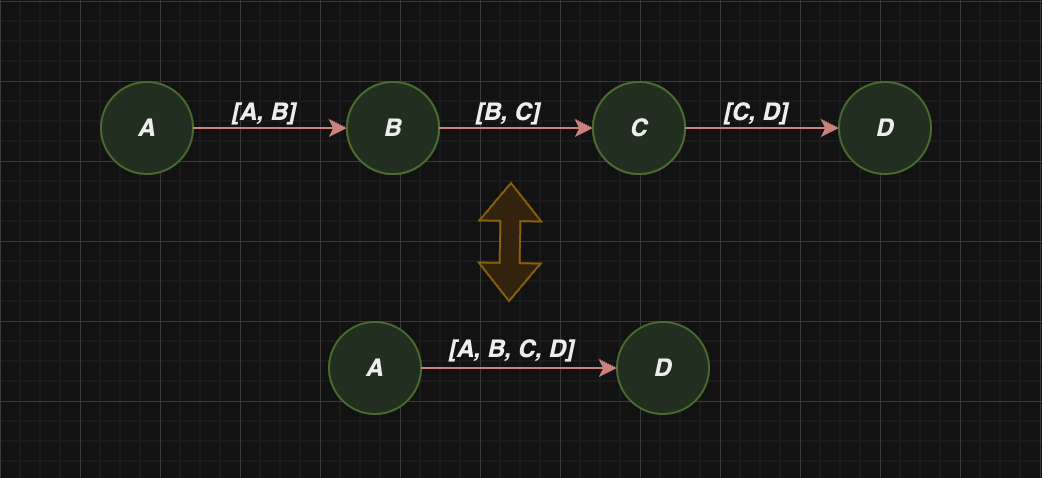
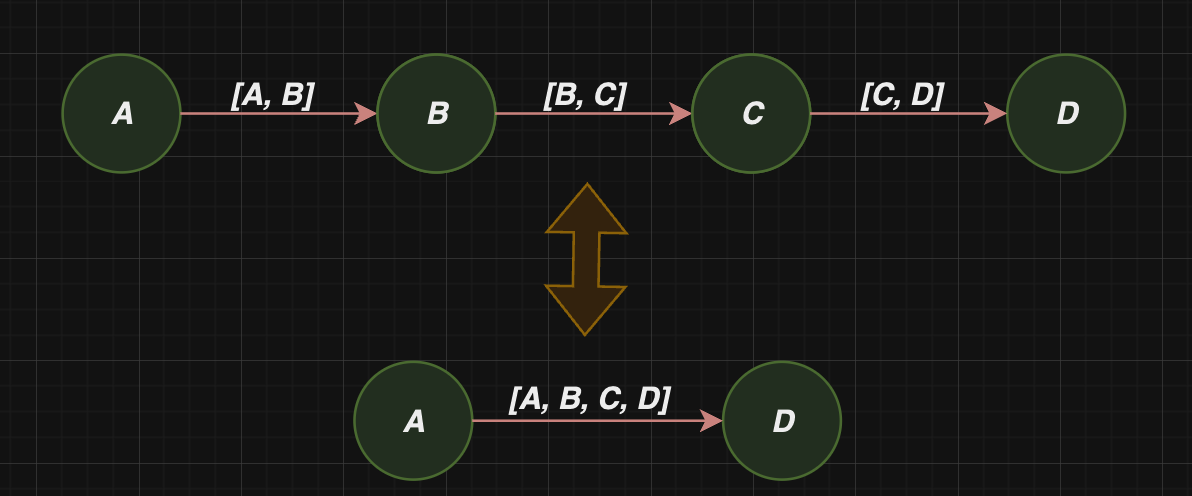
Path is keep as list, which enables treat chain of node ids as edge (used for example in compress_edges):
Methods
get_tail_and_head(self)- returns tail and head of the edge.get_id(self)- returns edge_id (head, tail)._reverse(self)- reverse path field.
Diblob
Fields
Diblob representation in digraph.
diblob_id- id of the diblob used byGraphManager.parent_id- id of the diblob which is the parent for diblob.children- ids of the diblobs which are children of the diblob.nodes- node ids (or diblob ids) embedded in diblob.
Methods
_add_children(self, *child_ids: tuple[str])- adds diblob_ids to the diblob._add_nodes(self, *node_ids: tuple[str])- adds node_ids to the diblob.
Digraph Manager
Digraph Manager is responsible for data structure management. Is the core of entire package. DigraphManager instance creation require digraph dict representation. For instance:
digraph_dict = {
               "B0": {
                   "B1": {
                       "B": [{"B2": ["C", "D", "E"]}],
                       "A": ["B", {"B0": ["F"]}],
                   },
                   "B2": {
                       "C": ["D"],
                       "D": ["E", {"B0": ["F", "G"]}],
                       "E": [{"B0": ["F"]}, {"B1": ["A"]}],
                   },
                   "F": ["G", {"B1": ["B"]}],
                   "G": [{"B1": ["A"]}, {"B2": ["D"]}],
               },
               }

graph_manager = GraphManager(digraph_dict)
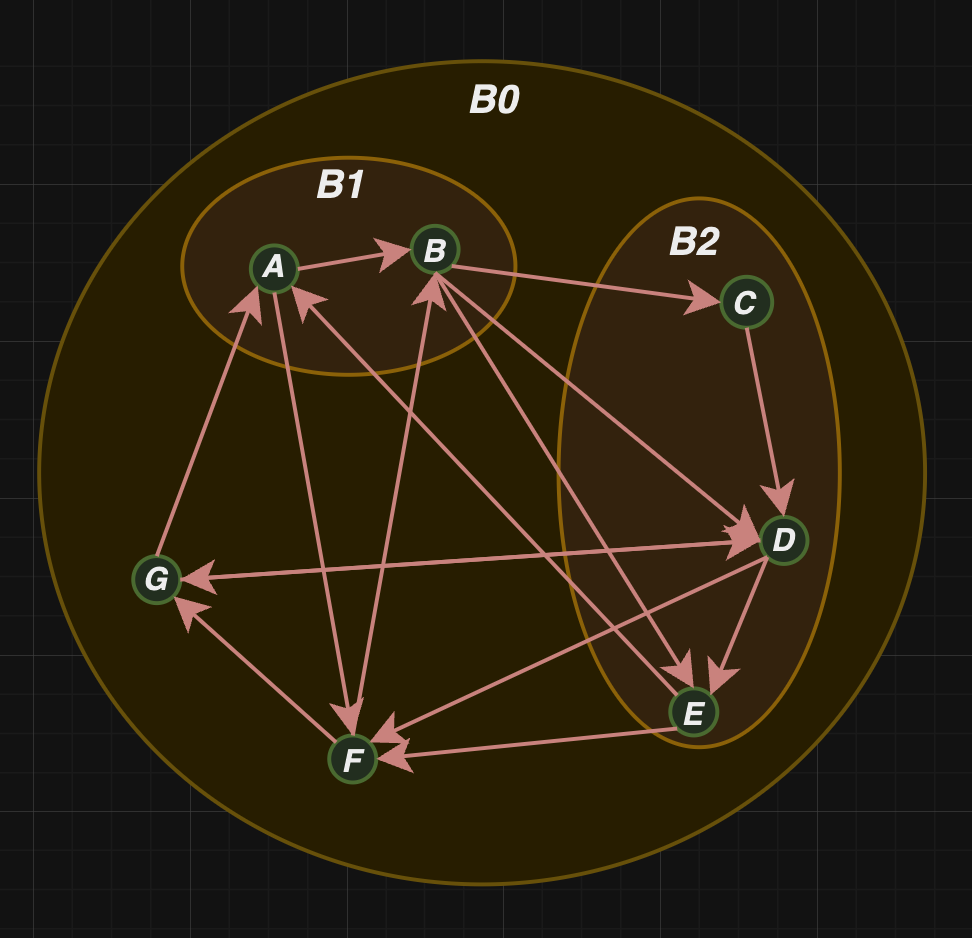
In effect, following digraph has been created:
Fields
diblobs- dict where key, value equals diblob_id, Diblob object respectively (keepB0,B1,B2in the picture above).nodes- dict where key, value equals node_id, Node object respectively (keepA,B,C,D,E,F,Gin the picture above).edges- dict where key, value equals node_id, list of Edge objects respectively. List is used because multiple edges with the same
head and tail are enabled (keeps edgesAB,AF,BC,BD,BE,CD,DE,DF,DG,FB,FG,GAin the picture above).root_diblob_id- root blob_id which represents entire digraphs .Even if digraph doesn't have diblobs inside, entire graphs is treat as diblob. (B0in the picture above).
Methods
-
construct(self, diblob_id: str, graph_dict_representation: dict, gather_dict: dict, edges_to_connect: list[str])diblob_id: str- id of the considered Diblob (recurrsion).graph_dict_representation: dict- delivered dict digraph representation.gather_dict: dict- dict for reccursion result accumulation.edges_to_connect: list[str]- edges to connect during digraph building.
helper function used in__init__for diblob construction using reccursion.
-
get_diblobs_common_ancestor(self, diblob_id1: str, diblob_id2: str)diblob_id1: str- diblob_id of the first Diblob.diblob_id2: str- diblob_id of the second Diblob.
returns diblob_id of the common ancestor of diblobs using delivered blob_ids (Diblobs have tree structure).
-
get_diblob_descendants(self, diblob_id: str)diblob_id: str- diblob_id of the Diblob for which its ancestor is being searched.
returns set of diblob_ids which are in the subtree for which Diblob with diblob_id is the root.
-
get_diblob_edges(self, diblob_id: str)diblob_id: str- diblob_id of considered Diblob.
returns set of all edge ids, set of incoming edge ids, set of outgoing edge ids and set of diblob descendants with considered diblob_id as side effect.
-
is_diblob_ancestor(self, potential_ancestors: set, diblob_id: str)potential_ancestors: set- set of blob_ids of potential ancestors.diblob_id: str- considered Diblob.
validates if diblob with diblob_id in potential_ancestors is the ancestor of the diblob.
-
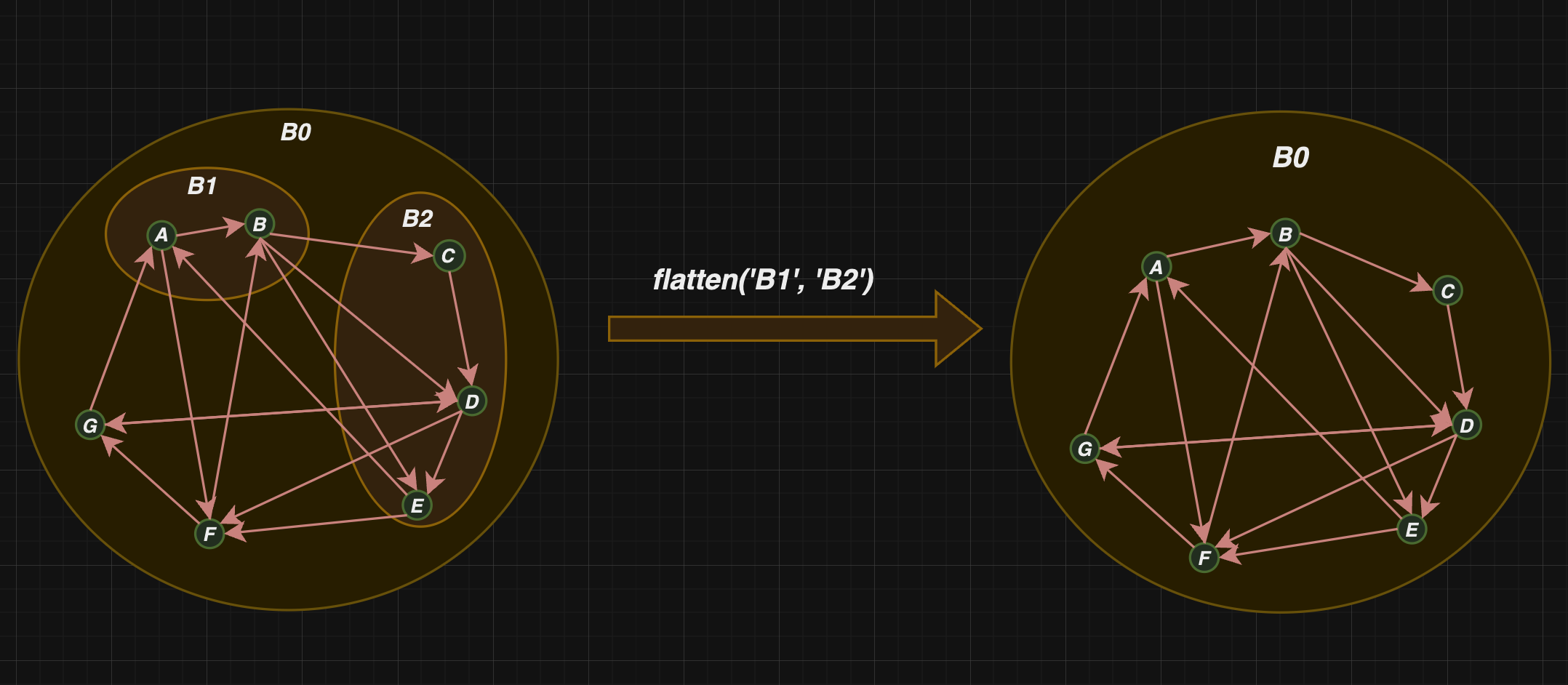
flatten(self, *diblob_ids: tuple[str])*diblob_ids: tuple[str]- blob_ids which will be flatten.
removes diblobs with delivered ids (removing diblob doesn't implies nodes deletion. Nodes are transferred to the diblob's direct ancestor). Root diblob cannot be flattened:
-
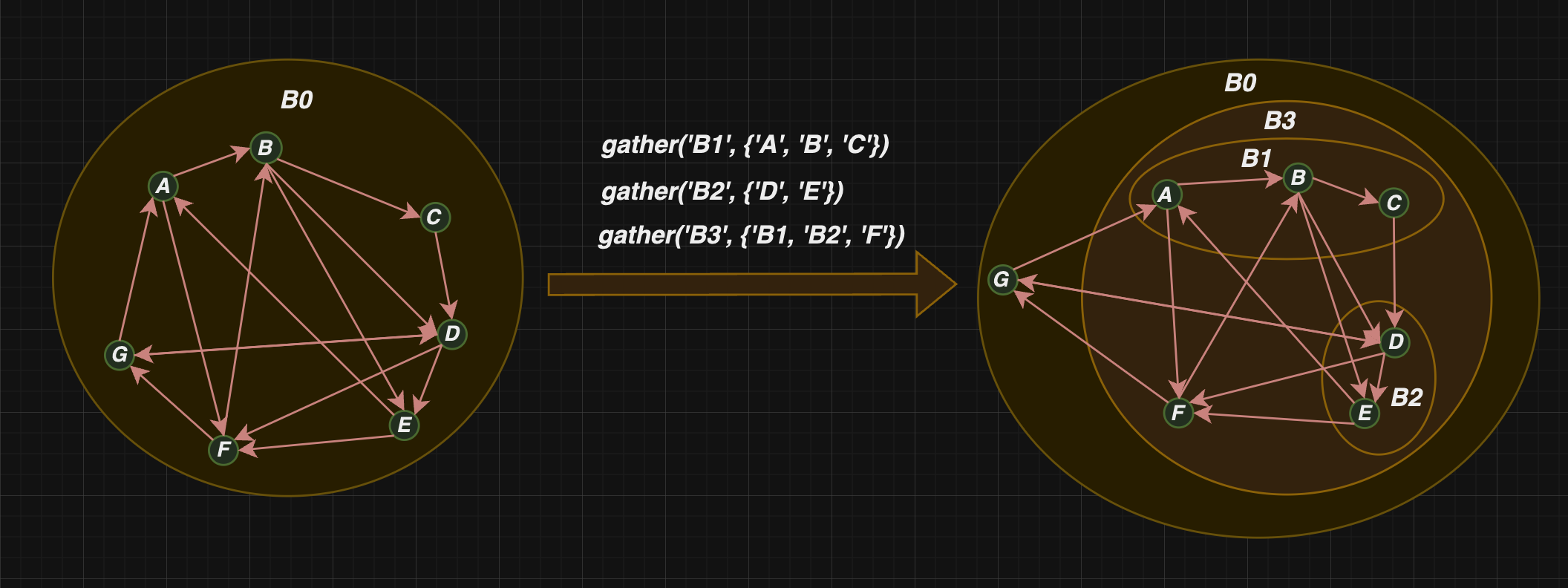
gather(self, new_diblob_id: str, node_ids: set[str])new_diblob_id: str- diblob_id of the diblob which will be created.node_ids: set[str]- node_ids which will be placed in the new Diblob.
accumulate nodes and diblobs into new diblob:
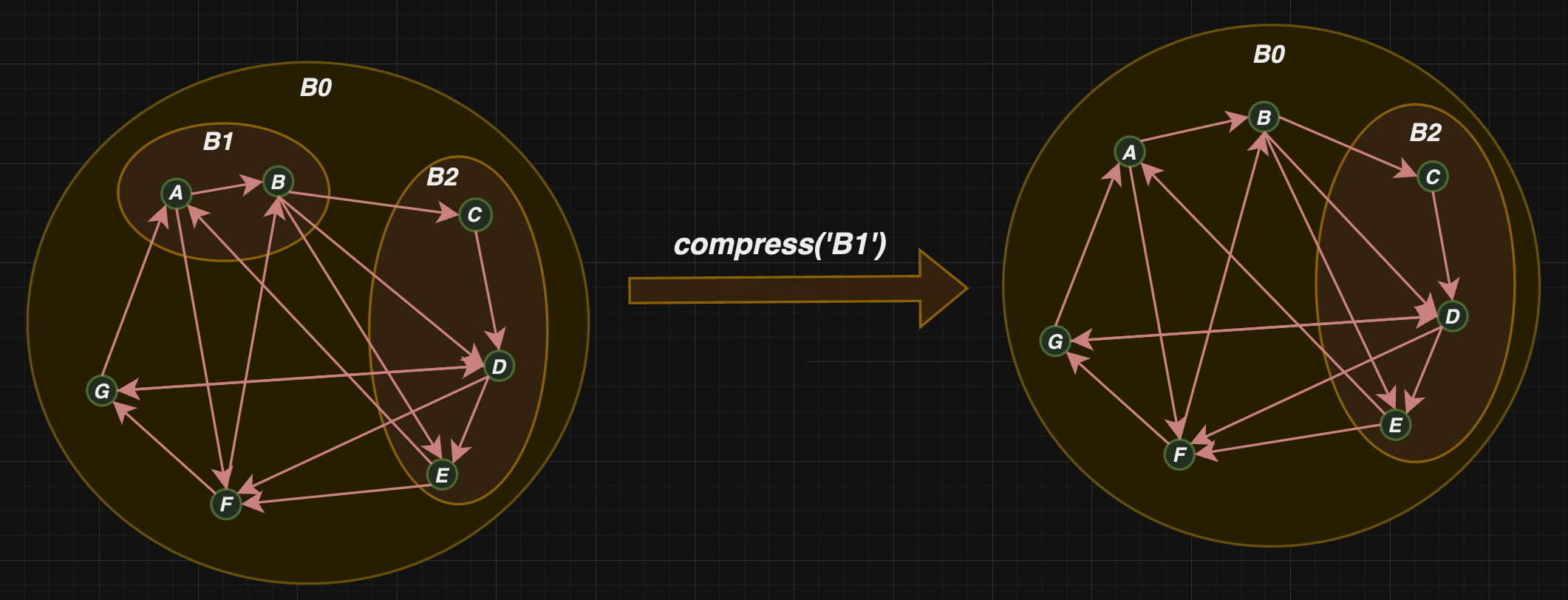
compress_diblob(self, diblob_id: str)diblob_id: str- diblob_id of Diblob which will be compressed.
compress diblob into single node:
merge_edges(self, edge_1: Edge, edge_2: Edge)edge_1: Edge- first edge which will be merged.edge_2: Edge- second edge which will be merged.
merge edges if they are compatible (head of the first one should equals tail of the second one, and incoming / outgoing edges of the second one should equal 1)
get_multiple_edge_ids(self, *edge_ids : tuple[str])*edge_ids : tuple[str]- edge_ids for which operation will be performed.
returns list of edge_ids with every occurrence.
remove_edges(self, *edges: tuple[Edge])*edges: tuple[Edge]- edges which will be removed.
remove edges from the digraph (uses objects, no edge_ids).
connect_nodes(self, *edge_ids: tuple[str])*edge_ids: tuple[str]- pair or node ids for wchich edge will be created.
creates edges from pair of node_ids.
remove_nodes(self, *nodes: tuple[Node])*nodes: tuple[Node]- nodes which will be removed.
remove nodes from the digraph (uses objects, no edge_ids).
add_nodes(self, *node_ids: tuple[str], diblob_id: str=None)*node_ids: tuple[str]- node_ids which will be added.diblob_id: str=None- diblob_id of the diblob where nodes will be placed.
add nodes to the digraph (optionally diblob_id can be chosen. Set as root_id if not delivered).
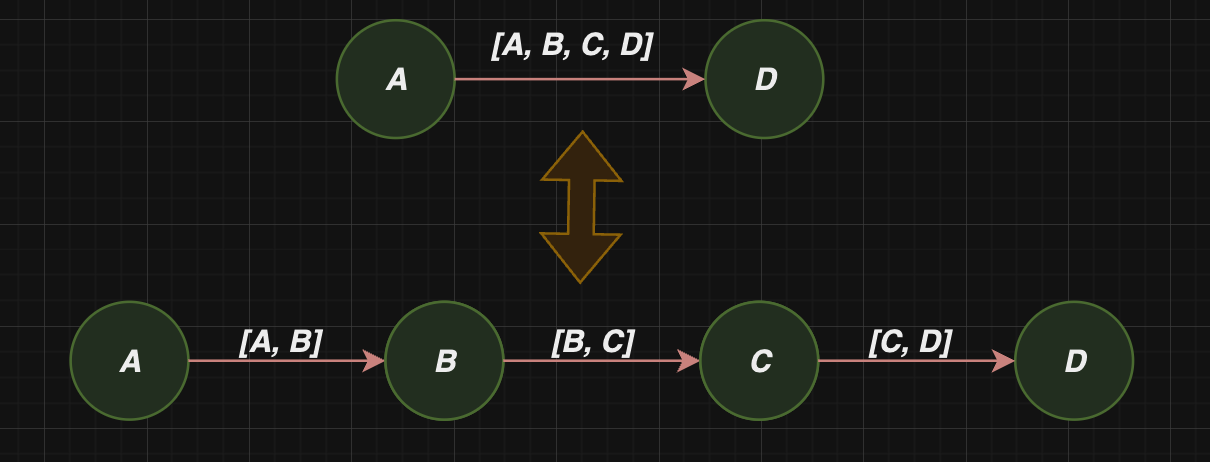
compress_edges(self)- compress edges in the digraph (accumulates nodes with len(incoming_nodes) = len)outgoing_nodes) = 1):
decompress_edges(self)- reverse operation to compress_edges:
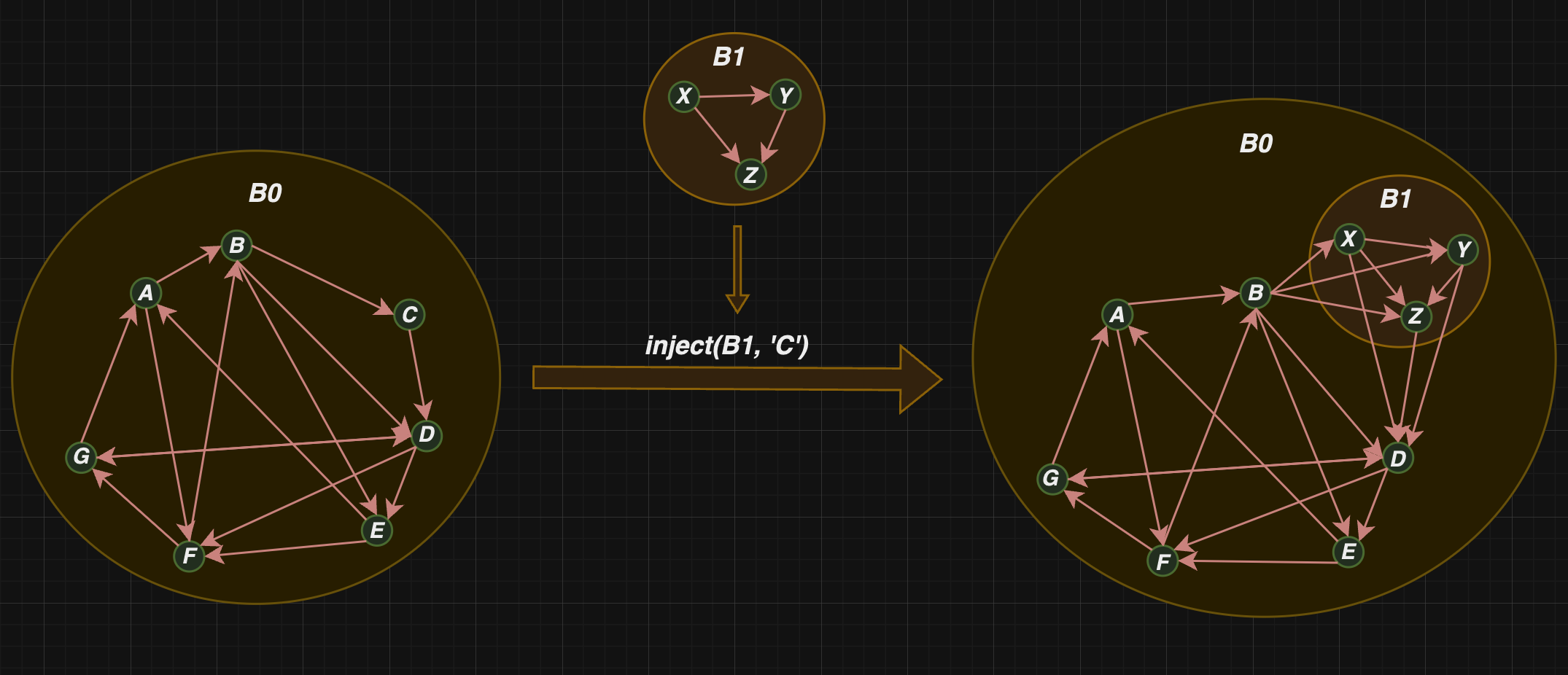
inject(self, digraph_manager: GraphManager, node_id: str)digraph_manager: DiraphManager- dighraph which will be injected.node_id- node_id of the node which will be replaced by digraph.
takes other DigraphManager andreplace node by it:
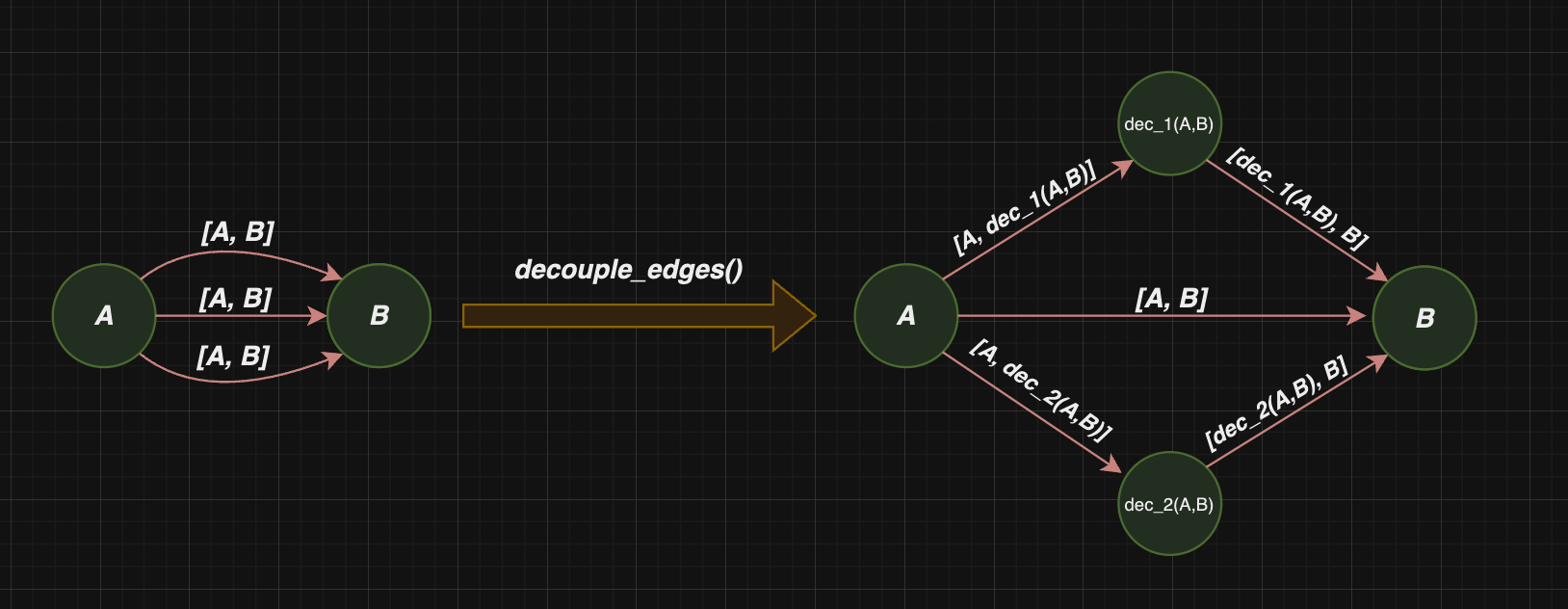
decouple_edges(self)- convert pseudograph to digraph by edge decoupling:
reverse_edges(self, *edges: tuple[Edge])*edges: tuple[Edge]- edges which will be reversed.
reverse selected edges (use object, not node_id).sorted(self)- sort all fields of the digraph structure.
GraphManager has also magic methods which enables comfortable work on the structure:
__setitem__enable during implementation new methods with easy components setting:
"""
Note that maintaining the structure is covered by other methods. __set_item__ is used just for methods implementation.
For instance digraph_manager[('A', 'B')] = AB not implies that nodes 'A' and 'B' are connected in structure.
Edge object is just registered by GraphManager.

If you want to create correct edge use connect_nodes method  on structure without Edge.
"""


digraph_dict = {"B0": {}}
digraph_manager = DigraphManager(digraph_dict)

A = Node(node_id='A', diblob_id='B0', incoming_nodes=[], outgoing_nodes=[])
B = Node(node_id='B', diblob_id='B0', incoming_nodes=[], outgoing_nodes=[])
B1 = Diblob(children={}, diblob_id='B1', nodes=['A', 'B'], parent_id='B0')
AB = Edge(['A', 'B'])

digraph_manager['A'] = A
digraph_manager['B'] = B
digraph_manager['B1'] = B1
digraph_manager[('A', 'B')] = AB
__get_item__enable getting object by it's registered id.__contains__check if specific id is registered by diblob.__call__can be used for diblob extraction. For example following code:
digraph_dict = {
                "B0": {
                    "B2": {
                        "E": [{"B0": ["F"]}, {"B1": ["A"]}],
                        "C": ["D"],
                        "D": ["E", {"B0": ["F", "G"]}],
                    },
                    "G": [{"B1": ["A"]}, {"B2": ["D"]}],
                    "F": ["G", {"B1": ["B"]}],
                    "B1": {
                        "B": [{"B2": ["C", "D", "E"]}],
                        "A": ["B", {"B0": ["F"]}],
                    },
                },
                }

digraph_manager = DigraphManager(digraph_dict)
tools.display_digraph(digraph_manager('B1'))
returns
{
"B1": {
    "B": [{"B2": ["C", "D", "E"]}],
    "A": ["B", {"B0": ["F"]}],
},
}
Note that outgoing edges are saved. For cutting them use cut_outgoing_edges from tools.
Factory
Factory enables creation other types of digraphs based on delivered digraph. It's decoupled with GraphManager, because GraphManager working with it's own structure.
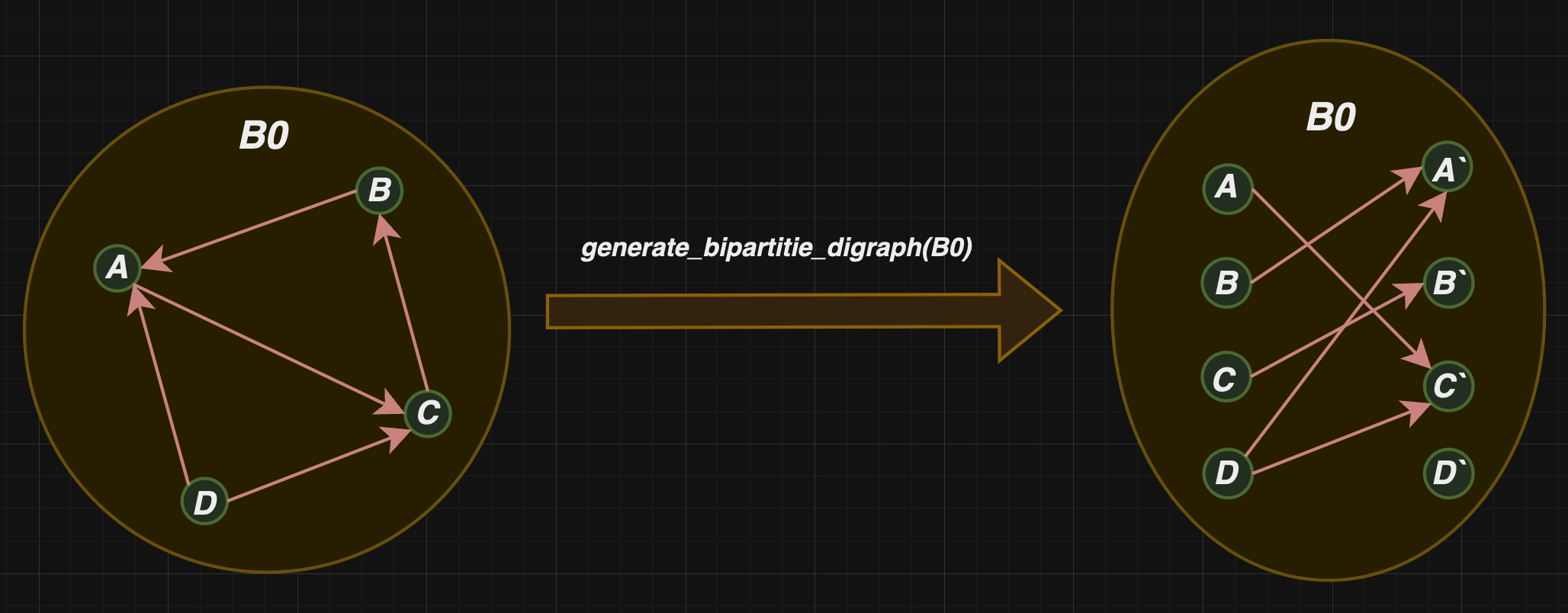
Edge digraph and Biparite digraph can be created just for digraphs with only root diblobs.
methods:
generate_edge_digraph(digraph_manager: DigraphManager, reduce_value: int = 0, delimiter: str = '|')digraph_manager: DigraphManager- DigraphManager which is the base for edge digraph contruction.reduce_value: int- reduce number of delimiter.delimiter: str- delimiter which will be used for node_id from edge creation.
enable edge digraph creation (edges because nodes):
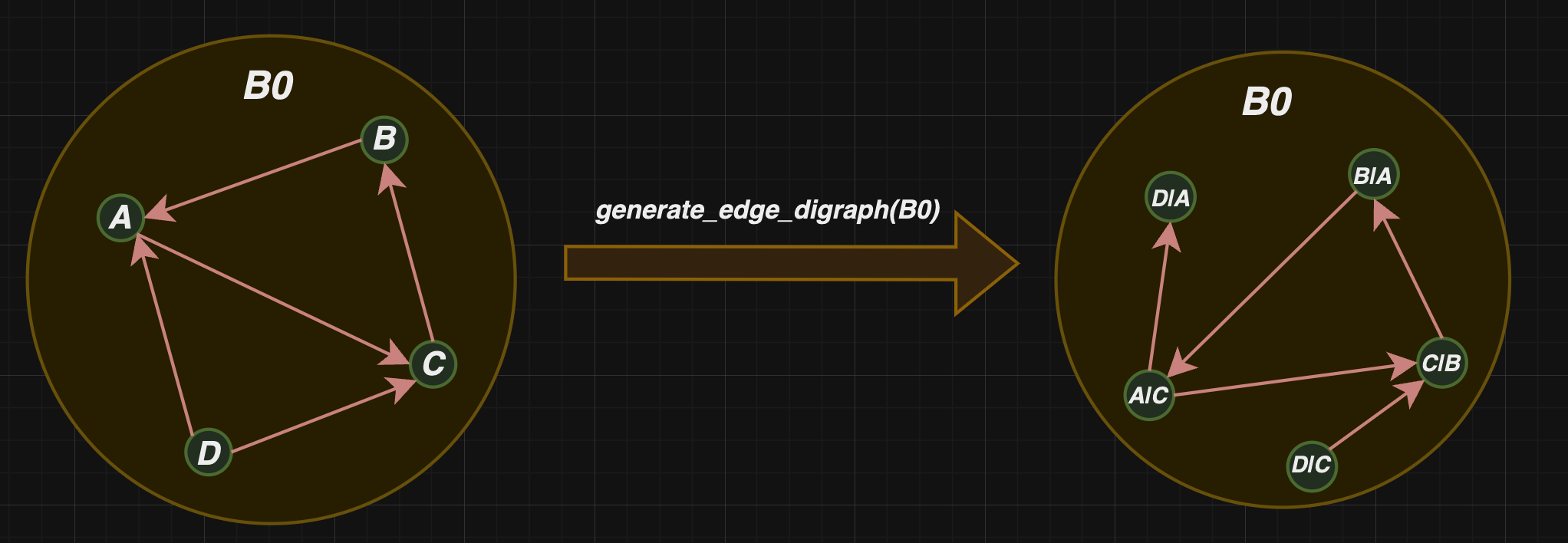
In the example default delimiter and reduce_value was used. Delimiter add separator between node_ids during node_id creation in edge graph, reduce value enable cutting delimiter (for example if we use generate_edge_digraph second time in the graph on the right in the picture, we get for instance the node with node_id = "A|C|C|B" with default reduce value = 0, but "A|C|B" if reduce_value = 1 is set).
generate_bipartite_digraph(digraph_manager: DigraphManager)digraph_manager: DigraphManager- DigraphManager which is the base for bipartite digraph contruction.
enable bipartite digraph creation:
Aghoritms
In order to working with diblob explanation, DFS, DFSA and Dijkstra algorithms are created.
- DFS - Deep first search alghoritm.
- DFSA - modification of the DFS (with the nodes visit time)
- DijkstraAlgorithm - the shortes paths between node and the others.
alghoritms use duck typing. We need deliver GraphManager instance during creation. Then use run methon on selected node_id (in DijkstraAlgorithm cost_function as a dict can be also delivered)
Example of run:
from diblob import DigraphManager
from diblob.algorithms import DFS, DFSA, DijkstraAlgorithm

digraph_dict = {"B0": {"A": ["B", "F"],
                       "B": ["C", "D", "E"],
                       "C": ["D"],
                       "D": ["E", "F", "G"],
                       "E": ["F", "A"],
                       "F": ["G", "B"],
                       "G": ["A", "D"]}}

digraph_manager = DigraphManager(digraph_dict)

dfs = DFS(digraph_manager)
dfsa = DFSA(digraph_manager)
da = DijkstraAlgorithm(digraph_manager)

dfs.run('A')
dfsa.run('B')
da.run('C')
Tools
Tools for diblob which are used for user friendly printing or cutting nodes in json. Tools deliver following functions:
display_digraph(d: dict, indent=0)- enable printing dict in json format (work as print).cut_outgoing_edges(digraph_manager, diblob_id: str)- cut from the dict outgoing nodes of the Digraph (can be used with GraphManager call)sort_outgoing_nodes_in_dict_repr(node_lst: list)- sort outgoing nodes.
Example:['C', 'B', 'A', {'G1': ['A', 'C', 'B']}] -> ['A', 'B', 'C', {'G1': ['A', 'B', 'C']}]list_groupby- works like groupby from itertools (no need data to be sorted)
Release history Release notifications | RSS feed


Download files
Download the file for your platform. If you're not sure which to choose, learn more about installing packages.
Source Distribution
Built Distribution
Filter files by name, interpreter, ABI, and platform.
If you're not sure about the file name format, learn more about wheel file names.
Copy a direct link to the current filters
File details
Details for the file diblob-1.0.2.tar.gz.
File metadata
- Download URL: diblob-1.0.2.tar.gz
- Upload date:
- Size: 23.4 kB
- Tags: Source
- Uploaded using Trusted Publishing? No
- Uploaded via: twine/5.0.0 CPython/3.10.13
File hashes
| Algorithm | Hash digest | |
|---|---|---|
| SHA256 |
2d12b4a1fb90a6f2a7595610ac1564ed9685939c2b6929c0ded38cecd2faa649
|
|
| MD5 |
0800ffc50fc7f57157e598c57aef4f5f
|
|
| BLAKE2b-256 |
d08cfb60b6401779c855e59a41dbec70a979e66bee14bbfdcf1328984d3a3efa
|
File details
Details for the file diblob-1.0.2-py3-none-any.whl.
File metadata
- Download URL: diblob-1.0.2-py3-none-any.whl
- Upload date:
- Size: 16.6 kB
- Tags: Python 3
- Uploaded using Trusted Publishing? No
- Uploaded via: twine/5.0.0 CPython/3.10.13
File hashes
| Algorithm | Hash digest | |
|---|---|---|
| SHA256 |
d4d4dee1ce2264dff7cf3122ba94ee2b835041945ce5a4297c52c619f69a59d7
|
|
| MD5 |
b9b0df3ef46d51cf09a46f75106cbe8f
|
|
| BLAKE2b-256 |
da53969fdbeaa5662da9146e3a908530dac87f78f0a18391b518e3d4efac49c7
|






