
dirplot







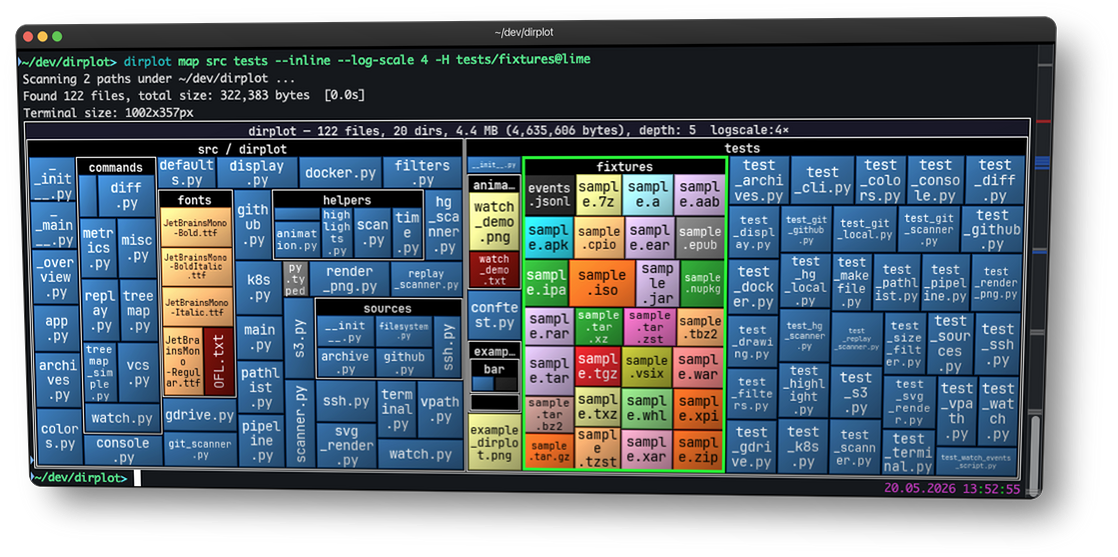
dirplot creates nested treemap images for directory trees. It can display them in the system image viewer or inline in the terminal (iTerm2 and Kitty protocols, auto-detected). It also animates git history, watches live filesystems, and scans remote sources.
pip install dirplot
dirplot map .          # treemap of current directory, opens in system viewer
dirplot map . --inline # display inline in terminal (iTerm2 / Kitty / Ghostty)
Use cases
- Find what's eating your disk — map
~/Downloads,~/.cache, ornode_modulesacross a monorepo to spot the culprits at a glance. - Inspect before you install — visualise a Python wheel, JAR, or RPM without unpacking it.
- Understand a codebase instantly — map a legacy project or a large GitHub repo to grasp its structure before reading a single line.
- Compare releases — diff two archive versions or two git tags to see exactly what grew, shrank, or disappeared.
- Scan remote filesystems — map an SSH host, S3 bucket, Docker container, or Kubernetes pod without copying anything locally.
- AI & data exploration — map a vector database, model weights directory, or agent memory folder (
~/.claude/projects/). - Sysadmin at a glance — map
/var/logto see which services generate the most logs, or scan a container image's filesystem layers. - Animate history — watch a repository or live filesystem evolve over time as a timelapse.
Features
- Squarified treemap layout; file area proportional to size; per-extension colours (GitHub Linguist palette for known types, configurable Matplotlib colormap for the rest).
- PNG, animated PNG (APNG), MP4, and MOV output for single frames and animations; interactive SVG for static maps; renders at terminal pixel size or a custom
WIDTHxHEIGHT. - Inline terminal display — renders directly into iTerm2, Kitty, Ghostty, WezTerm, and Warp without opening a separate window; protocol auto-detected.
- Animate git history (
dirplot git), Mercurial history (dirplot hg), and replay filesystem event logs (dirplot replay) — output APNG, MP4, or MOV. Watch live filesystems (dirplot watch) with optional snapshot and event logging. - Scan metrics (
dirplot metrics) — file/dir counts, total size, depth, top extensions by count or size, largest files and directories with percentage of total; JSON output supported. - Compare two trees (
dirplot diff) — treemap diff of any two sources (local dirs, GitHub repos, archives, S3, SSH, Docker, K8s, or two commits/tags);dirplot diff .shows uncommitted changes; files sized by B; colour-coded borders show added (green), removed (red), and changed (blue) files. Git/hg repos scan only tracked files; change detection uses blob hashes (LFS-aware). - Scan SSH hosts, AWS S3, GitHub repos (public and private), Docker containers, Kubernetes pods, and Google Drive — no extra deps beyond the respective CLI.
- Read archives directly (zip, tar, 7z, rar, jar, whl, …) without unpacking.
- Works on macOS, Linux, and Windows (WSL2 fully supported).
Installation
# Try without installing (always fetches the latest release)
uvx dirplot@latest --version

# Recommended: isolated tool install via uv (fastest)
uv tool install dirplot

# Alternative: pipx (install pipx first if needed: brew install pipx on macOS)
pipx install dirplot

# Into the current environment
pip install dirplot
Optional extras — install only what you need:
| Extra | Enables | Install |
|---|---|---|
ssh |
Scan remote servers via SSH (adds paramiko) | pip install "dirplot[ssh]" |
s3 |
Scan AWS S3 buckets (adds boto3) | pip install "dirplot[s3]" |
libarchive |
Additional archive formats: .tar.zst, .iso, .dmg, .rpm, .cab, … (requires system libarchive) |
pip install "dirplot[libarchive]" |
Other runtime requirements:
dirplot watch— watchdog is installed automatically.dirplot git— requiresgitonPATH.dirplot hg— requireshg(Mercurial) onPATH.- MP4 output (
dirplot git,dirplot hg,dirplot replay) — requires ffmpeg onPATH. dirplot metaon.mp4files — requiresffprobe(bundled with ffmpeg).
Quick start
dirplot map .                                # current directory, opens in viewer
dirplot map . --inline                       # display in terminal (iTerm2/Kitty/Ghostty)
dirplot map . --output treemap.png --no-show # save to file
dirplot map . --log-scale 4                  # log scale when one file dominates
dirplot map github://pallets/flask           # GitHub repo
dirplot map project.zip                      # archive — no unpacking needed

dirplot diff .                               # uncommitted changes
dirplot diff .@HEAD~5 .@HEAD                 # last 5 commits

dirplot metrics .                            # file counts, sizes, top extensions
dirplot git . --range main --output h.mp4    # full git history as MP4
See the full documentation for the complete command reference.
Documentation
Full documentation is available at deeplook.github.io/dirplot.
Development
git clone https://github.com/deeplook/dirplot
cd dirplot
make test
See CONTRIBUTING.md for full details.
A significant portion of this codebase was developed with AI assistance (primarily Claude by Anthropic). All generated code was reviewed and curated by the author.
License
MIT — see LICENSE.
1 maintainer

Metadata
1 maintainer
Release files for dirplot 0.6.0
For a detailed explanation of source distributions (sdists) and built distributions (wheels), please see the package formats documentation.
Source distribution (sdist)
| File | Size | Uploaded | Provenance | Actions |
|---|---|---|---|---|
| dirplot-0.6.0.tar.gz | 1.3 MB | Without provenance | Details for dirplot-0.6.0.tar.gz |
Built distribution (wheel)
| File | Interpreter | ABI | Platform | Actions Reset |
|---|---|---|---|---|
| dirplot-0.6.0-py3-none-any.whl | Python 3 | none | any | Details for dirplot-0.6.0-py3-none-any.whl |
Total release size: 2.3 MB
Release files / dirplot-0.6.0.tar.gz
| Download URL | dirplot-0.6.0.tar.gz |
|---|---|
| Size | 1.3 MB |
| Tags | Source |
|
SHA-256 checksum How to use checksums |
f211482ae0cb3e88c1578f9c7fb10af3ecb521d76e1c04f6a6f5f73c46e45c08
|
|
BLAKE2b-256 checksum How to use checksums |
1d827369720d3d6551bdd4f3e43b0013ac99cfea48ec8b5943418a71a6a6ef4d
|
| Upload date | |
|
Uploaded using Trusted Publishing? What is trusted publishing? |
No |
| Uploaded via |
uv/0.11.3 {"installer":{"name":"uv","version":"0.11.3","subcommand":["publish"]},"python":null,"implementation":{"name":null,"version":null},"distro":{"name":"macOS","version":null,"id":null,"libc":null},"system":{"name":null,"release":null},"cpu":null,"openssl_version":null,"setuptools_version":null,"rustc_version":null,"ci":null}
|
Release files / dirplot-0.6.0-py3-none-any.whl
| Download URL | dirplot-0.6.0-py3-none-any.whl |
|---|---|
| Size | 956.0 kB |
| Tags | Python 3 |
|
SHA-256 checksum How to use checksums |
a05fdc03b1052f158fd44e97e7928acf7967223ee074a85a3eb0e8f02c8860da
|
|
BLAKE2b-256 checksum How to use checksums |
58f38ff6d8b7a500bb5a682fed792d840cafc4f549a5270f9c4eb92ed9264d15
|
| Upload date | |
|
Uploaded using Trusted Publishing? What is trusted publishing? |
No |
| Uploaded via |
uv/0.11.3 {"installer":{"name":"uv","version":"0.11.3","subcommand":["publish"]},"python":null,"implementation":{"name":null,"version":null},"distro":{"name":"macOS","version":null,"id":null,"libc":null},"system":{"name":null,"release":null},"cpu":null,"openssl_version":null,"setuptools_version":null,"rustc_version":null,"ci":null}
|
Security for dirplot 0.6.0
Provenance
Provenance describes where a file came from. On PyPI, provenance is shared via attestations, which provide a verifiable record of the build or publishing details. View details, limitations and caveats.
No provenance found
None of the files in this release were uploaded with provenance metadata.
A note on package security
PyPI is a repository for distributing packages, not a service for auditing them. While third-party security researchers and our staff do their best to detect and remove malicious packages, PyPI cannot guarantee the quality, security or suitability of any given package.
To learn more about protecting yourself from malicious actors, visit our package security documentation.














