
Nested treemap visualizations for directory trees and archives

Project description
dirplot






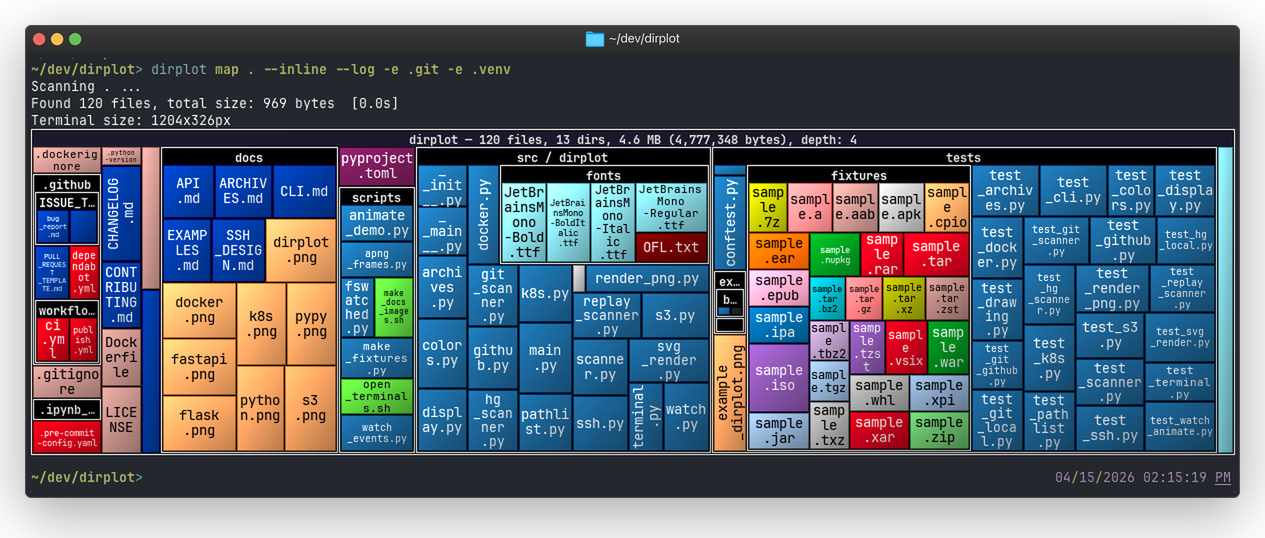
dirplot creates nested treemap images for directory trees. It can display them in the system image viewer or inline in the terminal (iTerm2 and Kitty protocols, auto-detected). It also animates git history, watches live filesystems, and scans remote sources.
Features
- Squarified treemap layout; file area proportional to size; ~500 extensions mapped to GitHub Linguist colours.
- PNG, animated PNG (APNG), MP4, and MOV output for single frames and animations; interactive SVG for static maps; renders at terminal pixel size or a custom
WIDTHxHEIGHT. - Animate git history (
dirplot git), Mercurial history (dirplot hg), watch live filesystems (dirplot watch), and replay event logs (dirplot replay) — output APNG, MP4, or MOV. - Scan metrics (
dirplot metrics) — file/dir counts, total size, depth, top extensions by count or size, largest files and directories with percentage of total; JSON output supported. - Scan SSH hosts, AWS S3, GitHub repos (public and private), Docker containers, and Kubernetes pods — no extra deps beyond the respective CLI.
- Read archives directly (zip, tar, 7z, rar, jar, whl, …) without unpacking.
- Works on macOS, Linux, and Windows (WSL2 fully supported).
Installation
# Recommended: isolated tool install via uv (fastest)
uv tool install dirplot

# Alternative: pipx (install pipx first if needed: brew install pipx on macOS)
pipx install dirplot

# Into the current environment
pip install dirplot
Optional extras: pip install "dirplot[ssh]", "dirplot[s3]", "dirplot[libarchive]".
dirplot watch uses watchdog for filesystem monitoring — installed automatically as a dependency.
dirplot git requires git on PATH; dirplot hg requires hg (Mercurial) on PATH. MP4 output (dirplot git, dirplot watch, dirplot replay with --animate) requires ffmpeg on PATH. dirplot read-meta on .mp4 files also requires ffprobe (bundled with ffmpeg).
Quick start
dirplot map .                                                    # current directory
dirplot map . --inline                                           # display in terminal
dirplot map . --output treemap.png --no-show                     # save to file
dirplot map . --log-scale 4 --inline                              # log scale (4× ratio), inline
dirplot map github://pallets/flask                               # GitHub repo
dirplot map docker://my-container:/app                           # Docker container
dirplot map project.zip                                          # archive file
tree src/ | dirplot map                                          # pipe tree output

dirplot git . -o history.mp4 --animate                           # full git history
dirplot git . -o history.mp4 --animate --last 30d                # last 30 days
dirplot git github://owner/repo -o h.mp4 --animate --last 7d     # GitHub, last week

dirplot hg /path/to/repo -o history.png --animate                # full hg history
dirplot hg /path/to/repo@tip -o history.png                      # static, tip only

dirplot watch . --output treemap.png                             # live watch
dirplot watch . --output treemap.mp4 --animate                   # record as MP4

dirplot demo                                                     # run examples, save to ./demo/

dirplot metrics .                                                # scan metrics: counts, size, top extensions
dirplot metrics . --sort-by size                                 # sort extensions by total bytes
dirplot metrics . --top 5 --json                                 # top-5 entries as JSON
dirplot map . --metrics --no-show                                # treemap + metrics in one pass
Documentation
- CLI reference — all commands, flags, and usage examples
- Remote access — SSH, S3, GitHub, Docker, Kubernetes
- Archives — supported formats and dependencies
- Python API — programmatic usage
Development
git clone https://github.com/deeplook/dirplot
cd dirplot
make test
See CONTRIBUTING.md for full details.
License
MIT — see LICENSE.
Release history Release notifications | RSS feed


Download files
Download the file for your platform. If you're not sure which to choose, learn more about installing packages.
Source Distribution
Built Distribution
Filter files by name, interpreter, ABI, and platform.
If you're not sure about the file name format, learn more about wheel file names.
Copy a direct link to the current filters
File details
Details for the file dirplot-0.4.3.tar.gz.
File metadata
- Download URL: dirplot-0.4.3.tar.gz
- Upload date:
- Size: 866.3 kB
- Tags: Source
- Uploaded using Trusted Publishing? No
- Uploaded via: uv/0.11.3 {"installer":{"name":"uv","version":"0.11.3","subcommand":["publish"]},"python":null,"implementation":{"name":null,"version":null},"distro":{"name":"macOS","version":null,"id":null,"libc":null},"system":{"name":null,"release":null},"cpu":null,"openssl_version":null,"setuptools_version":null,"rustc_version":null,"ci":null}
File hashes
| Algorithm | Hash digest | |
|---|---|---|
| SHA256 |
f8d54de393916fdbc76f51922690cbf3db8c42bdf212c8ca4f562fcbb1733224
|
|
| MD5 |
803f52328b916d50ff3bd824509cbd7b
|
|
| BLAKE2b-256 |
8510066c50459a5b84ff4c5b6dd3db766abe6413544dd0fee81fd3a71e445ec3
|
File details
Details for the file dirplot-0.4.3-py3-none-any.whl.
File metadata
- Download URL: dirplot-0.4.3-py3-none-any.whl
- Upload date:
- Size: 628.8 kB
- Tags: Python 3
- Uploaded using Trusted Publishing? No
- Uploaded via: uv/0.11.3 {"installer":{"name":"uv","version":"0.11.3","subcommand":["publish"]},"python":null,"implementation":{"name":null,"version":null},"distro":{"name":"macOS","version":null,"id":null,"libc":null},"system":{"name":null,"release":null},"cpu":null,"openssl_version":null,"setuptools_version":null,"rustc_version":null,"ci":null}
File hashes
| Algorithm | Hash digest | |
|---|---|---|
| SHA256 |
1bbd63e6093bc23fbe14383f3eeab133cd5c33b877bd682cbc03919716a39a72
|
|
| MD5 |
0e8bc7bdfb0c55a3328b2c150c6addc2
|
|
| BLAKE2b-256 |
612149d253d9f7f3353b39926467e7013595f8d9987b854775354f090e952d45
|






