
django-admin-list-charts
Super simple charts for Django admin changelist pages, driven by date_hierarchy and bundled with Chart.js.
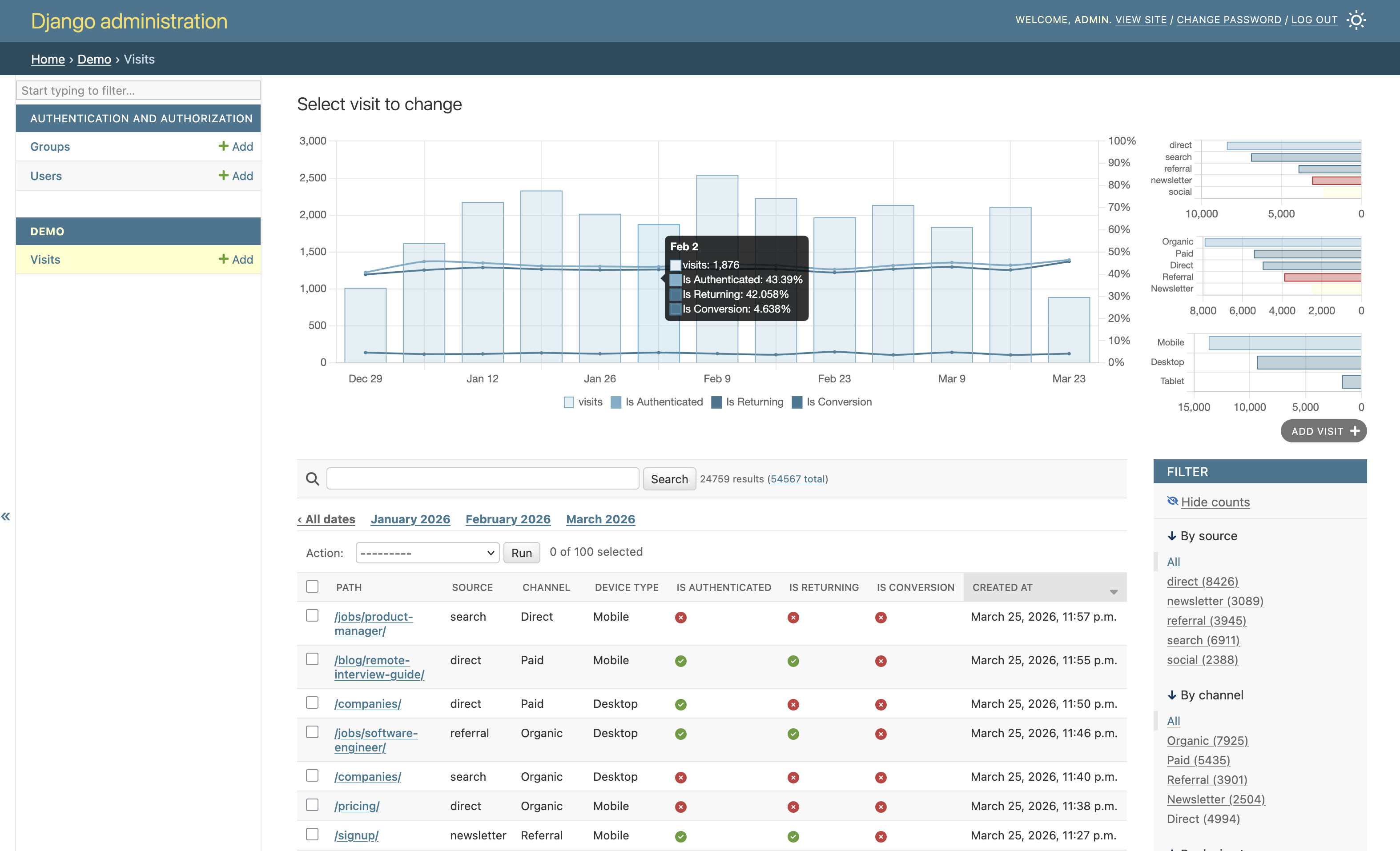
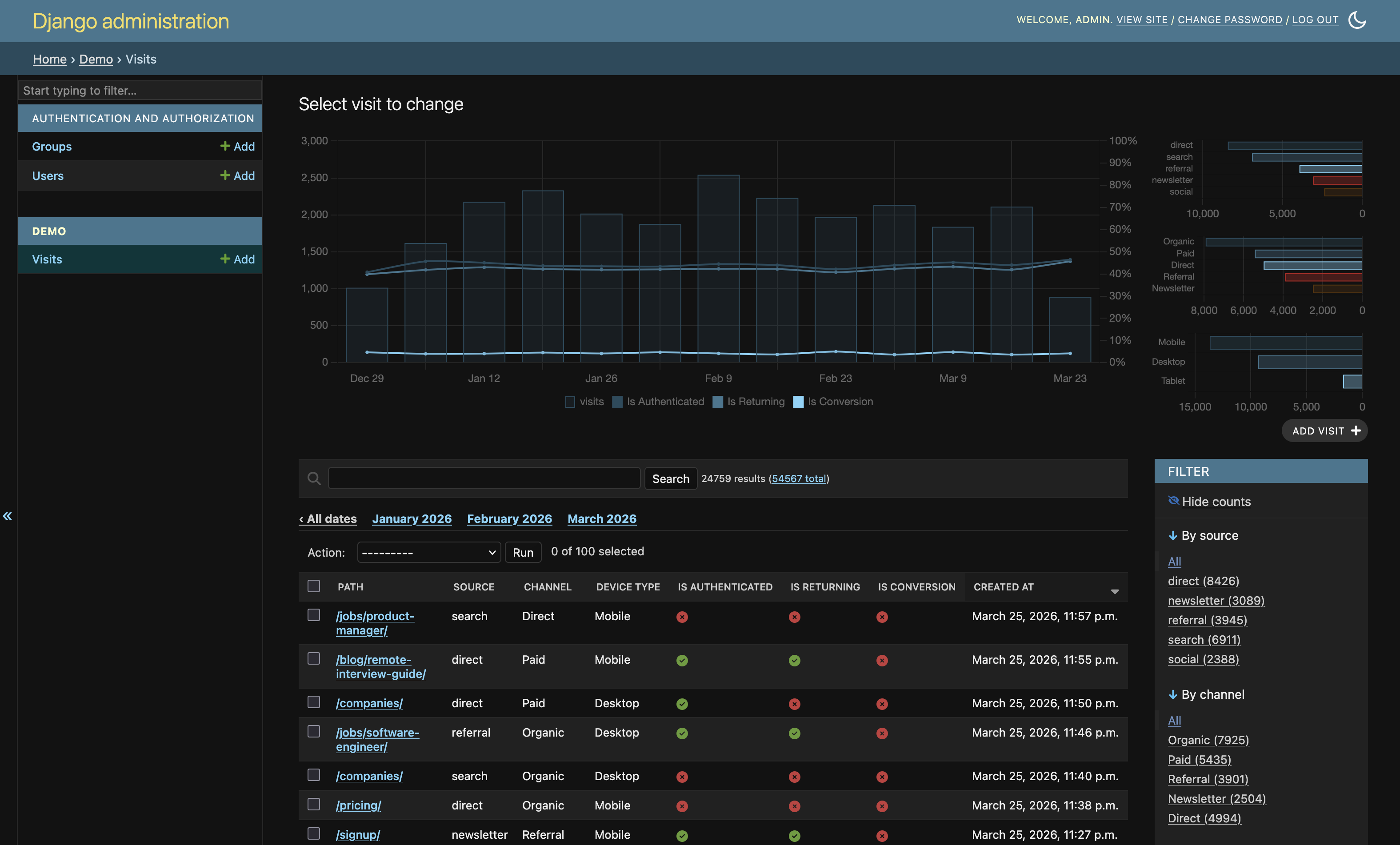
It is built to be a drop-in enhancement: install, mix in ListChartMixin, and your admin list gets a compact timeline chart. When Django's facet counts are enabled, it also renders a dense sidebar of categorical distributions.
Requirements
Python>=3.12,<3.15Django>=5,<7
Installation
pip install django-admin-list-charts
Add the app:
INSTALLED_APPS = [
    # ...
    'admin_list_charts',
]
Quick Start (60 seconds)
from django.contrib import admin
from admin_list_charts.admin import ListChartMixin

from .models import Order


@admin.register(Order)
class OrderAdmin(ListChartMixin, admin.ModelAdmin):
    date_hierarchy = 'created_at'
    list_filter = ('status', 'source', 'is_paid', 'is_returning')
That is enough to get:
- a main timeline chart on changelist pages
- automatic facet sidebar charts when Django facet counts are enabled (
_facets)
How Facet Mode Works
When Django admin "Show counts" / facets are active:
- Main chart stays focused on timeline volume, with optional boolean rate overlays.
- Right sidebar is filled with compact absolute distributions for facet fields.
- Sidebar uses compact horizontal bar charts (no pie/donut) for better readability in limited space.
- Auto-selection is intentionally permissive so available
list_filterchoices are shown whenever there is data.
Optional Tuning
You can explicitly control what gets charted.
@admin.register(Order)
class OrderAdmin(ListChartMixin, admin.ModelAdmin):
    date_hierarchy = 'created_at'
    list_filter = ('status', 'source', 'channel', 'is_paid', 'is_returning')

    # Optional explicit picks (if omitted, auto-selection is used)
    chart_facet_fields = ('status', 'source', 'channel')
    chart_rate_fields = ('is_paid', 'is_returning')

    # Optional limits
    chart_facet_max_series = 6
    chart_auto_max_facet_fields = 4
    chart_auto_max_rate_fields = 3
Config Reference
chart_facet_fields: categorical/choice-like fields for facet chartschart_rate_fields: boolean fields to render as percentage overlays in main chartchart_top_fields: optional top-N charts ([(field_name, limit), ...])chart_facet_max_series: max series per facet field (top-N values)chart_auto_select: defaultTrue; enables auto-field detection when explicit tuples are emptychart_auto_max_facet_fields: default4chart_auto_max_rate_fields: default3
Theme / Palette (optional)
ADMIN_LIST_CHARTS = {
    'palette': {
        'accent': '#1f5fa6',
        'series': [
            '#1f5fa6',
            '#2f9e44',
            '#d6336c',
            '#0c8599',
            '#e67700',
            '#6b7280',
        ],
    },
}
palette.accent: primary bar/accent colorpalette.series: ordered series colors
If omitted, colors are derived from Django admin CSS variables.
Agent-Friendly Integration Notes
If you are delegating setup to a coding agent, ask it to do exactly this:
- Install package:
pip install django-admin-list-charts - Add
'admin_list_charts'toINSTALLED_APPS - For each admin class that needs charts:
- mix in
ListChartMixin - ensure
date_hierarchyis set - keep meaningful
list_filterfields for facet mode
- mix in
- Run migrations and start server
- Verify in Django admin changelist:
- base timeline appears
- enabling facets shows sidebar distribution charts
This package is intentionally configuration-light, so most projects work with only those steps.
Local Reference Project
This repository includes example_project/ for manual testing.
python -m pip install -e .
python example_project/manage.py migrate
python example_project/manage.py createsuperuser
python example_project/manage.py seed_visits --truncate --days 180 --min-per-day 120 --max-per-day 450
python example_project/manage.py runserver
Then open http://127.0.0.1:8000/admin/ and inspect the Visits changelist.
Examples
Acknowledgements
Inspired by Dani Hodovic's article on adding charts to Django admin: https://findwork.dev/blog/adding-charts-to-django-admin/
1 maintainer

Metadata
1 maintainer
Release files for django-admin-list-charts 0.4
For a detailed explanation of source distributions (sdists) and built distributions (wheels), please see the package formats documentation.
Source distribution (sdist)
| File | Size | Uploaded | |
|---|---|---|---|
| django_admin_list_charts-0.4.tar.gz | 84.4 kB | Details |
Built distribution (wheel)
| File | Interpreter | ABI | Platform | Reset |
|---|---|---|---|---|
| django_admin_list_charts-0.4-py3-none-any.whl | Python 3 | none | any | Details |
Total release size: 167.3 kB
Release files / django_admin_list_charts-0.4.tar.gz
| Download URL | django_admin_list_charts-0.4.tar.gz |
|---|---|
| Size | 84.4 kB |
| Tags | Source |
|
SHA-256 checksum How to use checksums |
148c5032574c983348351482e336cf50ee17c664c18c56599bfb8ed68aba741d
|
|
BLAKE2b-256 checksum How to use checksums |
e2c0c9f7a30da21d829801a8f4a2ab66eeb11647755df764a20da5be1e8a15a3
|
| Upload date | |
|
Uploaded using Trusted Publishing? What is trusted publishing? |
No |
| Uploaded via |
twine/6.2.0 CPython/3.14.3
|
Release files / django_admin_list_charts-0.4-py3-none-any.whl
| Download URL | django_admin_list_charts-0.4-py3-none-any.whl |
|---|---|
| Size | 82.9 kB |
| Tags | Python 3 |
|
SHA-256 checksum How to use checksums |
bd6c7c88241e054c3bdaf5637846bdd5adea667eb584cdced718363215041908
|
|
BLAKE2b-256 checksum How to use checksums |
b2674873557bde8d2a4982350b5ce4685951eaf9d223bb74dd7f9ffee8cccaab
|
| Upload date | |
|
Uploaded using Trusted Publishing? What is trusted publishing? |
No |
| Uploaded via |
twine/6.2.0 CPython/3.14.3
|














