
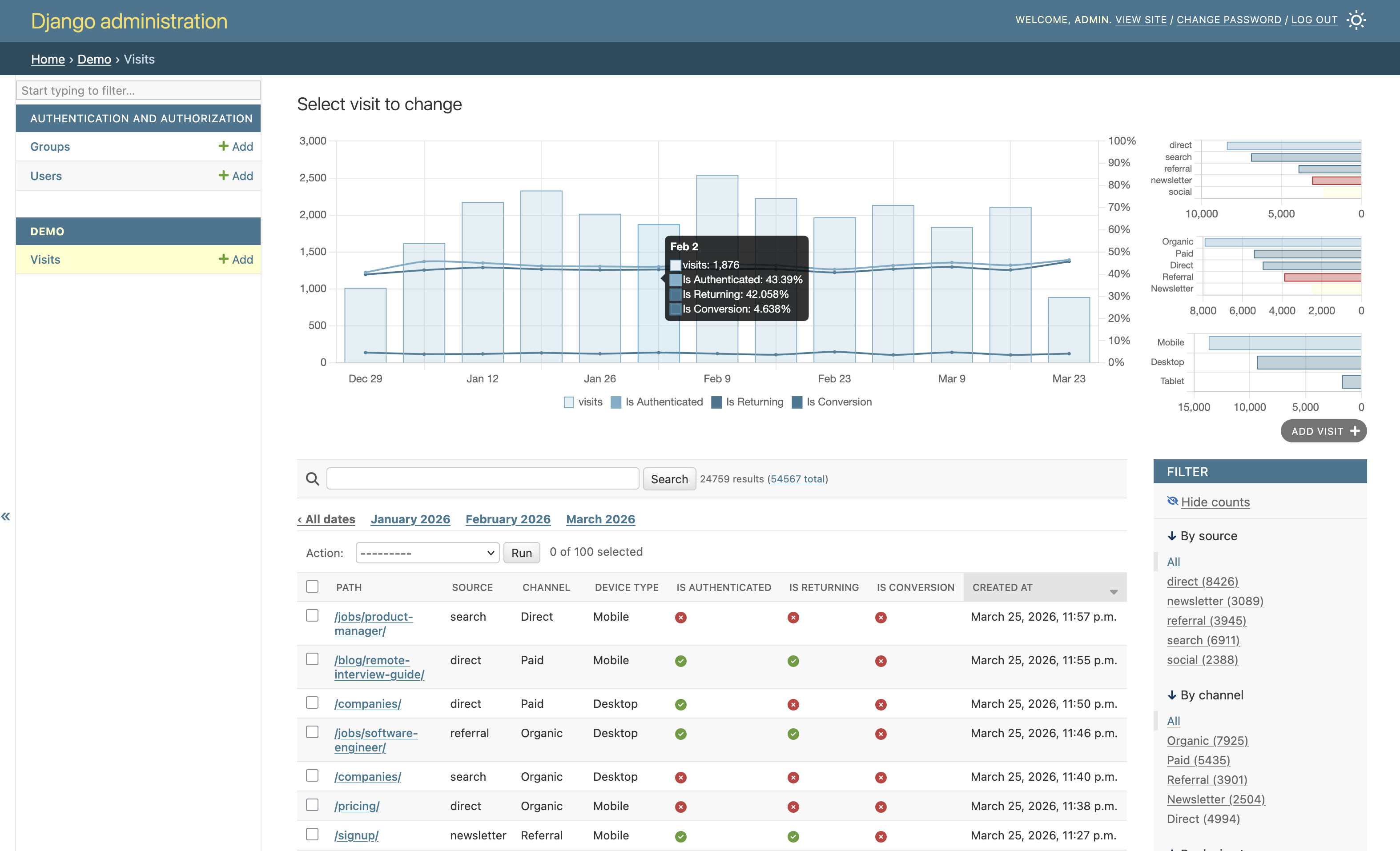
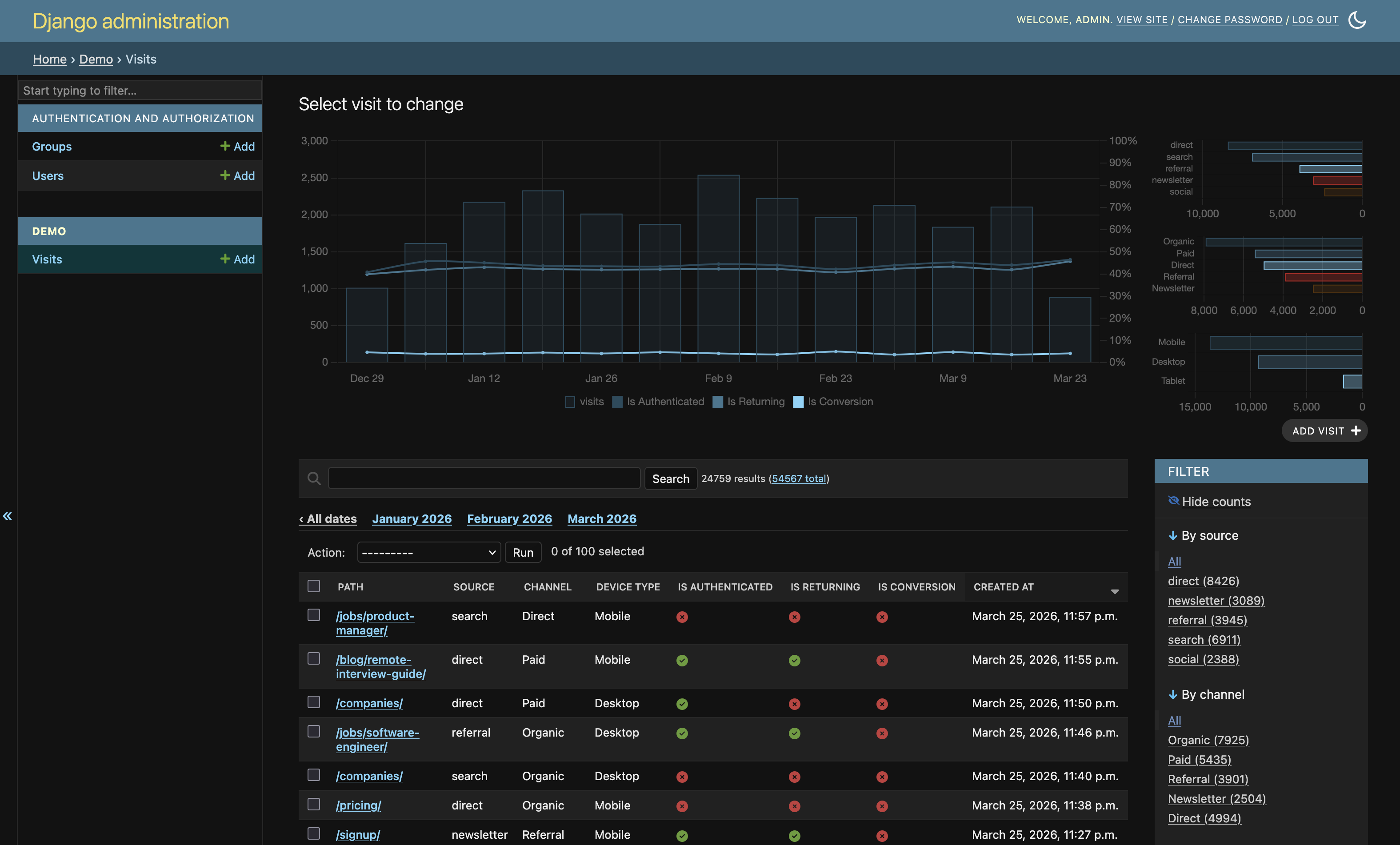
Super simple bar charts for django admin list views visualizing the number of objects based on date_hierarchy using Chart.js.

Project description
django-admin-list-charts
Super simple bar charts for django admin list views visualizing the number of objects based on date_hierarchy using Chart.js.
This package serves as a ready-made drop-in solution with Chart.js included. This way you can super-charge your django admin with date-based bar charts in less than a minute :)
Examples
Requirements
Python>=3.12,<3.15Django>=5,<7
Compatibility update
This release updates package metadata for modern supported runtimes and is intended for Django 5.x-6.x projects running on Python 3.12-3.14.
Installation
-
Install Django admin list charts from PyPI by using
pip:pip install django-admin-list-charts -
Add
'admin_list_charts'entry to DjangoINSTALLED_APPSsetting. -
Sprinkle some
ListChartMixinover every admin class where you want to display charts in the admin list view. For example:
    ...
    from admin_list_charts.admin import ListChartMixin

    @admin.register(Foo)
    class FooAdmin(ListChartMixin, admin.ModelAdmin):
	    date_hierarchy = 'created'
	    ...
- Done!
Facets-enabled chart mode
When Django admin Show counts (_facets) is enabled in the changelist filters, the chart view switches to a denser mode:
- main mixed chart: volume bars + boolean rate overlays
- compact right context rail: selected facet composition and quick stats
This mode is designed to work with little or no extra config.
Zero-config (recommended)
If your model has:
- one date field used by
date_hierarchy - a few
choicesfields - a few boolean fields
the mixin auto-selects the most informative fields for overlays when facets are on.
Optional tuning
You can still explicitly tune what appears:
from django.contrib import admin
from admin_list_charts.admin import ListChartMixin


@admin.register(MyModel)
class MyModelAdmin(ListChartMixin, admin.ModelAdmin):
    date_hierarchy = 'created_at'
    list_filter = ('status', 'category', 'is_active', 'is_flagged')

    # Optional explicit field picks (override auto-selection)
    chart_facet_fields = ('status', 'category')
    chart_rate_fields = ('is_active', 'is_flagged')

    # Optional caps (used by auto-selection too)
    chart_facet_max_series = 6
    chart_auto_max_facet_fields = 2
    chart_auto_max_rate_fields = 3
Configuration reference
chart_facet_fields: tuple of categorical/choices fields to visualize in context chartschart_rate_fields: tuple of boolean fields to overlay as percentage trend lineschart_facet_max_series: max values per categorical field shown in charts (top-N)chart_auto_select:Trueby default; enables automatic field selection when explicit tuples are emptychart_auto_max_facet_fields: max auto-selected categorical fields (default:2)chart_auto_max_rate_fields: max auto-selected boolean fields (default:3)
Practical notes
- Keep
list_filtermeaningful; facet mode follows the currently filtered changelist queryset. - If your model has many candidate fields, start with auto mode, then pin explicit fields for stable output.
- For best readability, keep boolean overlay fields to 2-3 and categorical fields to 1-2.
Local reference project
This repository includes a tiny Django project at example_project/ for manual testing while developing this package.
The demo app used by this project lives in example_project/demo/ and exists for local testing purposes. It is not part of the reusable admin_list_charts package API.
-
Install this package in editable mode:
python -m pip install -e . -
Run migrations in the example project:
python example_project/manage.py migrate -
Create an admin user:
python example_project/manage.py createsuperuser -
Seed chartable demo data (high-volume, multi-facet):
python example_project/manage.py seed_visits --truncate --days 180 --min-per-day 120 --max-per-day 450 -
Start the server and open admin:
python example_project/manage.py runserver
Then browse to http://127.0.0.1:8000/admin/ and open Visits to verify list charts and filter combinations.
When Show counts (_facets) is enabled in the changelist sidebar, additional high-density charts are rendered. By default, the mixin auto-selects the most informative choice and boolean fields, so this works with little or no per-admin configuration in most cases.
Acknowledgements
This rather pragmatic solution was heavily inspired by the work of Dani Hodovic (see https://findwork.dev/blog/adding-charts-to-django-admin/).


Download files
Download the file for your platform. If you're not sure which to choose, learn more about installing packages.
Source Distribution
Built Distribution
Filter files by name, interpreter, ABI, and platform.
If you're not sure about the file name format, learn more about wheel file names.
Copy a direct link to the current filters
File details
Details for the file django_admin_list_charts-0.3.0.tar.gz.
File metadata
- Download URL: django_admin_list_charts-0.3.0.tar.gz
- Upload date:
- Size: 83.5 kB
- Tags: Source
- Uploaded using Trusted Publishing? No
- Uploaded via: twine/6.2.0 CPython/3.14.3
File hashes
| Algorithm | Hash digest | |
|---|---|---|
| SHA256 |
0e72c6902f00d1a4fb5dd663c7798aa59c247dc9da2088cfd8f9e3395e98469a
|
|
| MD5 |
2eac98619ec25411669393a1c507228c
|
|
| BLAKE2b-256 |
ef76508d86775f159557a98c412d95e48b56f8e944ae1e28bba6ca8637403372
|
File details
Details for the file django_admin_list_charts-0.3.0-py3-none-any.whl.
File metadata
- Download URL: django_admin_list_charts-0.3.0-py3-none-any.whl
- Upload date:
- Size: 81.7 kB
- Tags: Python 3
- Uploaded using Trusted Publishing? No
- Uploaded via: twine/6.2.0 CPython/3.14.3
File hashes
| Algorithm | Hash digest | |
|---|---|---|
| SHA256 |
75ed70eebe5a0f03b0616932b36214a425a5c7a8e214837ba8360b93c5c4752a
|
|
| MD5 |
6811ee189e850e1d4e23a552038ecc96
|
|
| BLAKE2b-256 |
d54c8a3d1269812a31f1cd95195eb019baf89e8436c14c46c72f3a42a32c04e7
|






