
Super simple bar charts for django admin list views visualizing the number of objects based on date_hierarchy using Chart.js.

Project description
django-admin-list-charts
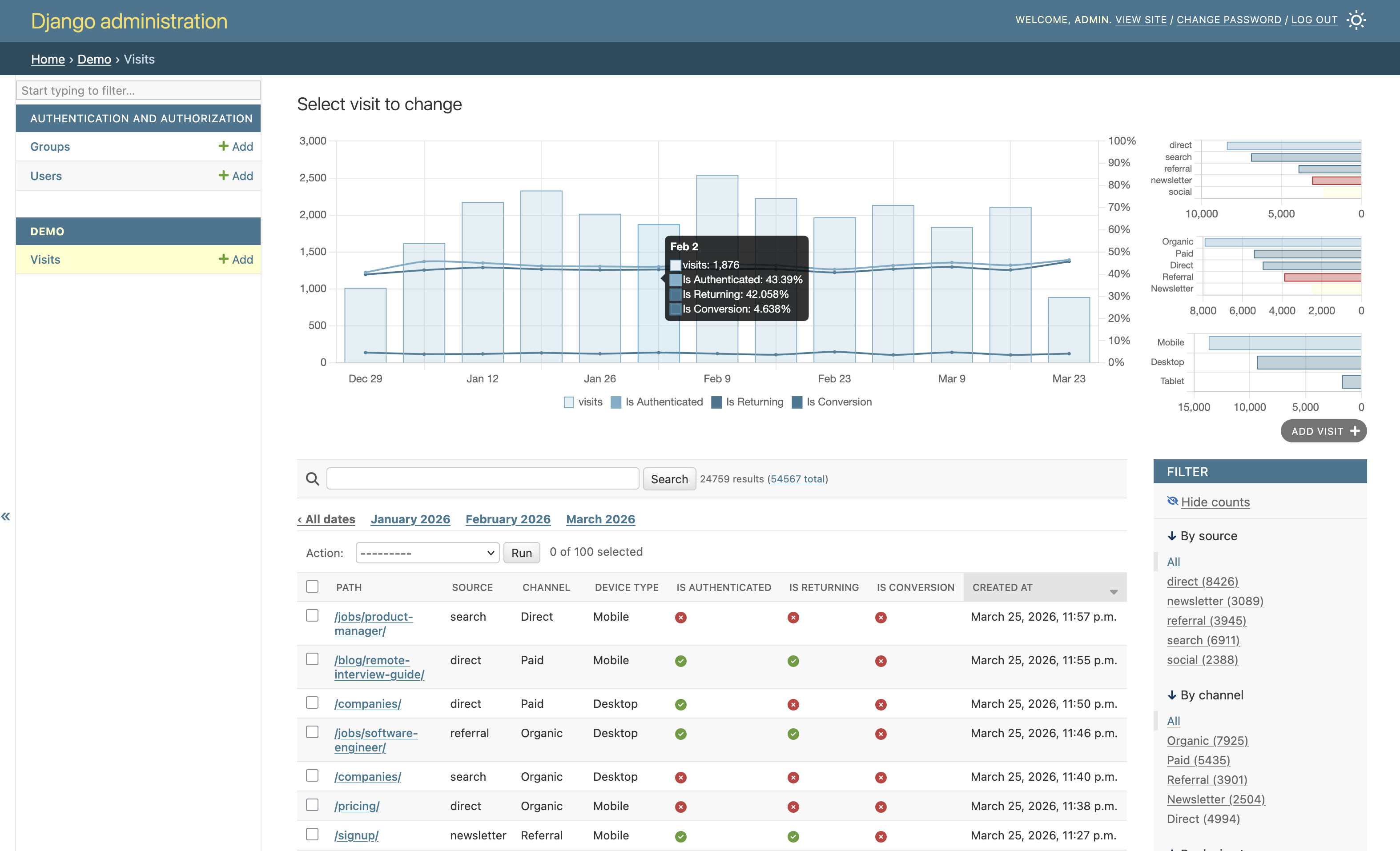
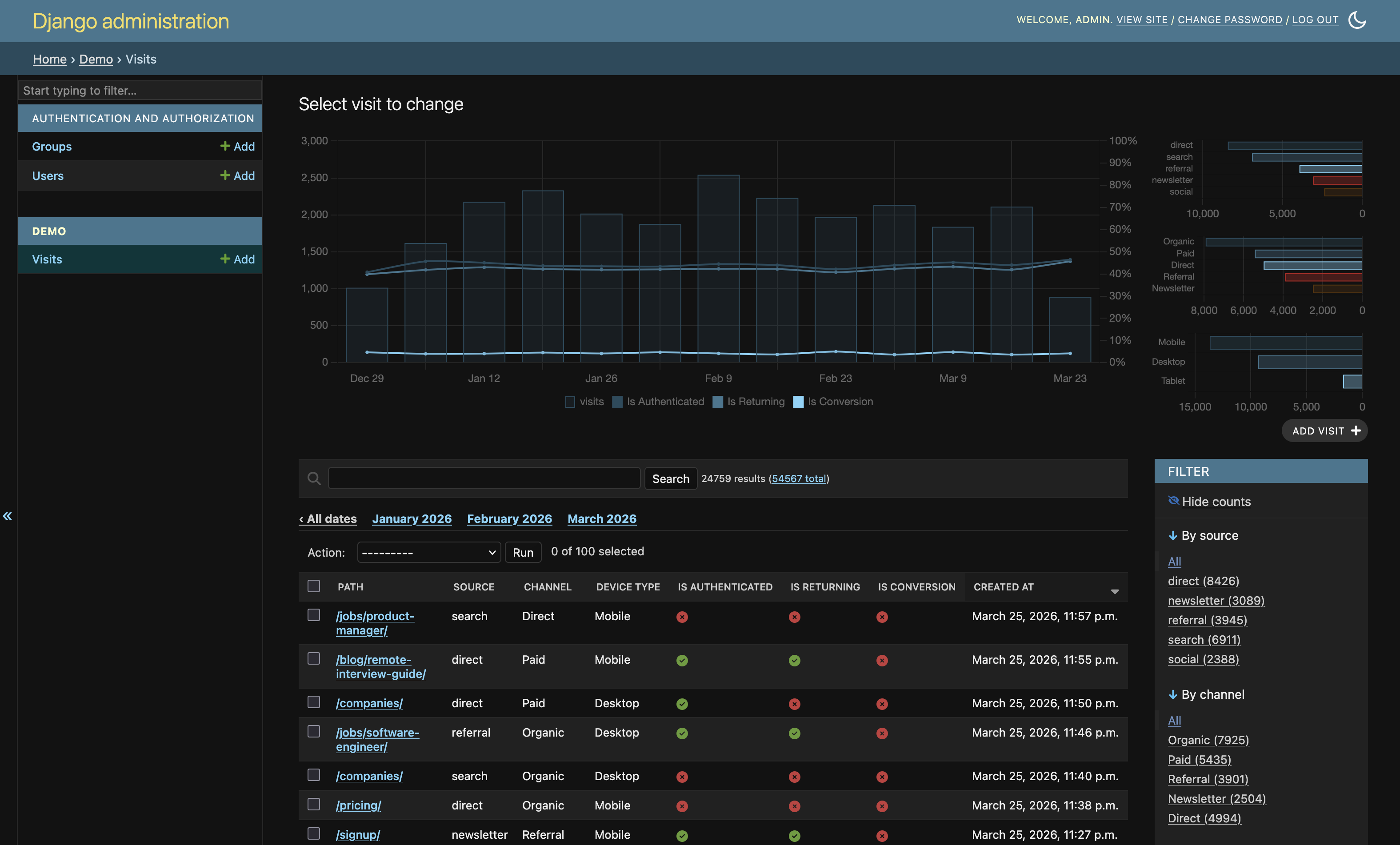
Super simple charts for Django admin changelist pages, driven by date_hierarchy and bundled with Chart.js.
It is built to be a drop-in enhancement: install, mix in ListChartMixin, and your admin list gets a compact timeline chart. When Django's facet counts are enabled, it also renders a dense sidebar of categorical distributions.
Requirements
Python>=3.12,<3.15Django>=5,<7
Installation
pip install django-admin-list-charts
Add the app:
INSTALLED_APPS = [
    # ...
    'admin_list_charts',
]
Quick Start (60 seconds)
from django.contrib import admin
from admin_list_charts.admin import ListChartMixin

from .models import Order


@admin.register(Order)
class OrderAdmin(ListChartMixin, admin.ModelAdmin):
    date_hierarchy = 'created_at'
    list_filter = ('status', 'source', 'is_paid', 'is_returning')
That is enough to get:
- a main timeline chart on changelist pages
- automatic facet sidebar charts when Django facet counts are enabled (
_facets)
How Facet Mode Works
When Django admin "Show counts" / facets are active:
- Main chart stays focused on timeline volume, with optional boolean rate overlays.
- Right sidebar is filled with compact absolute distributions for facet fields.
- Sidebar uses compact horizontal bar charts (no pie/donut) for better readability in limited space.
- Auto-selection is intentionally permissive so available
list_filterchoices are shown whenever there is data.
Optional Tuning
You can explicitly control what gets charted.
@admin.register(Order)
class OrderAdmin(ListChartMixin, admin.ModelAdmin):
    date_hierarchy = 'created_at'
    list_filter = ('status', 'source', 'channel', 'is_paid', 'is_returning')

    # Optional explicit picks (if omitted, auto-selection is used)
    chart_facet_fields = ('status', 'source', 'channel')
    chart_rate_fields = ('is_paid', 'is_returning')

    # Optional limits
    chart_facet_max_series = 6
    chart_auto_max_facet_fields = 4
    chart_auto_max_rate_fields = 3
Config Reference
chart_facet_fields: categorical/choice-like fields for facet chartschart_rate_fields: boolean fields to render as percentage overlays in main chartchart_top_fields: optional top-N charts ([(field_name, limit), ...])chart_facet_max_series: max series per facet field (top-N values)chart_auto_select: defaultTrue; enables auto-field detection when explicit tuples are emptychart_auto_max_facet_fields: default4chart_auto_max_rate_fields: default3
Theme / Palette (optional)
ADMIN_LIST_CHARTS = {
    'palette': {
        'accent': '#1f5fa6',
        'series': [
            '#1f5fa6',
            '#2f9e44',
            '#d6336c',
            '#0c8599',
            '#e67700',
            '#6b7280',
        ],
    },
}
palette.accent: primary bar/accent colorpalette.series: ordered series colors
If omitted, colors are derived from Django admin CSS variables.
Agent-Friendly Integration Notes
If you are delegating setup to a coding agent, ask it to do exactly this:
- Install package:
pip install django-admin-list-charts - Add
'admin_list_charts'toINSTALLED_APPS - For each admin class that needs charts:
- mix in
ListChartMixin - ensure
date_hierarchyis set - keep meaningful
list_filterfields for facet mode
- mix in
- Run migrations and start server
- Verify in Django admin changelist:
- base timeline appears
- enabling facets shows sidebar distribution charts
This package is intentionally configuration-light, so most projects work with only those steps.
Local Reference Project
This repository includes example_project/ for manual testing.
python -m pip install -e .
python example_project/manage.py migrate
python example_project/manage.py createsuperuser
python example_project/manage.py seed_visits --truncate --days 180 --min-per-day 120 --max-per-day 450
python example_project/manage.py runserver
Then open http://127.0.0.1:8000/admin/ and inspect the Visits changelist.
Examples
Acknowledgements
Inspired by Dani Hodovic's article on adding charts to Django admin: https://findwork.dev/blog/adding-charts-to-django-admin/


Download files
Download the file for your platform. If you're not sure which to choose, learn more about installing packages.
Source Distribution
Built Distribution
Filter files by name, interpreter, ABI, and platform.
If you're not sure about the file name format, learn more about wheel file names.
Copy a direct link to the current filters
File details
Details for the file django_admin_list_charts-0.4.tar.gz.
File metadata
- Download URL: django_admin_list_charts-0.4.tar.gz
- Upload date:
- Size: 84.4 kB
- Tags: Source
- Uploaded using Trusted Publishing? No
- Uploaded via: twine/6.2.0 CPython/3.14.3
File hashes
| Algorithm | Hash digest | |
|---|---|---|
| SHA256 |
148c5032574c983348351482e336cf50ee17c664c18c56599bfb8ed68aba741d
|
|
| MD5 |
6cdd66a0dff54bcc1ce5dbcca7324298
|
|
| BLAKE2b-256 |
e2c0c9f7a30da21d829801a8f4a2ab66eeb11647755df764a20da5be1e8a15a3
|
File details
Details for the file django_admin_list_charts-0.4-py3-none-any.whl.
File metadata
- Download URL: django_admin_list_charts-0.4-py3-none-any.whl
- Upload date:
- Size: 82.9 kB
- Tags: Python 3
- Uploaded using Trusted Publishing? No
- Uploaded via: twine/6.2.0 CPython/3.14.3
File hashes
| Algorithm | Hash digest | |
|---|---|---|
| SHA256 |
bd6c7c88241e054c3bdaf5637846bdd5adea667eb584cdced718363215041908
|
|
| MD5 |
8a9508813449fded8e8b041ed1b3e391
|
|
| BLAKE2b-256 |
b2674873557bde8d2a4982350b5ce4685951eaf9d223bb74dd7f9ffee8cccaab
|






