
Django Check SEO will check the SEO aspects of your site for you, and will provide advice in case of problems.

Project description

Replacing some features of Yoast or SEMrush for django CMS users.
In other words, django-check-seo will tell you if you have problems concerning a broad range of SEO aspects of your pages.
Installation
- Install module using pipenv:
pipenv install django-check-seo
- Or pip:
pip install django-check-seo
- Add it to your installed apps:
"django-check-seo.apps.DjangoCheckSEOConfig",
- Add it to your
urls.py(beforeurl(r'^', include('cms.urls')),or it will not work):
url(r"^django-check-seo/", include("django-check-seo.urls")),
- Or add this if you're using path:
path("django-check-seo/", include("django-check-seo.urls")),

Prerequisites
This application need beautifulsoup4, requests, djangocms & djangocms_page_meta.
Config
Basic settings
Basic config (used by default) is in django-check-seo/conf/settings.py:
SEO_SETTINGS = {
    "content_words_number": [300, 600],
    "internal_links": 1,
    "external_links": 1,
    "meta_title_length": [30, 60],
    "meta_description_length": [50, 160],
    "keywords_in_first_words": 50,
    "max_link_depth": 3,
    "max_url_length": 70,
}
If you need to change something, just define it in your mywebsite/settings.py file in a dict named DJANGO_CHECK_SEO_SETTINGS.
Example:
If you put this in your settings.py file:
DJANGO_CHECK_SEO_SETTINGS = {
    "internal_links": 25,
    "meta_title_length": [15,30],
}
Then this will be the settings used by the application:
SEO_SETTINGS = {
    "content_words_number": [300, 600],
    "internal_links": 25,
    "external_links": 1,
    "meta_title_length": [15,30],
    "meta_description_length": [50, 160],
    "keywords_in_first_words": 50,
    "max_link_depth": 3,
    "max_url_length": 70,
}
Authentication
The website you want to test may require a prior connection due to a .htaccess file (or may use wsgi-basic-auth), which prevents django-check-seo from accessing its html code.
To prevent this, you can specify the login informations (username/password) in the DJANGO_CHECK_SEO_AUTH dictionnary (in your website settings).
This dictionary must contain two keys named user and pass.
Example:
- In
mywebsite/settings.py:
DJANGO_CHECK_SEO_AUTH = {
    "user": os.getenv("HTACCESS_USER"),
    "pass": os.getenv("HTACCESS_PASS"),
}
- In
.envfile:
export HTACCESS_USER=myusername
export HTACCESS_PASS=mypassword

WSGI_AUTH_CREDENTIALS=$HTACCESS_USER:$HTACCESS_PASS
Want a screenshot?
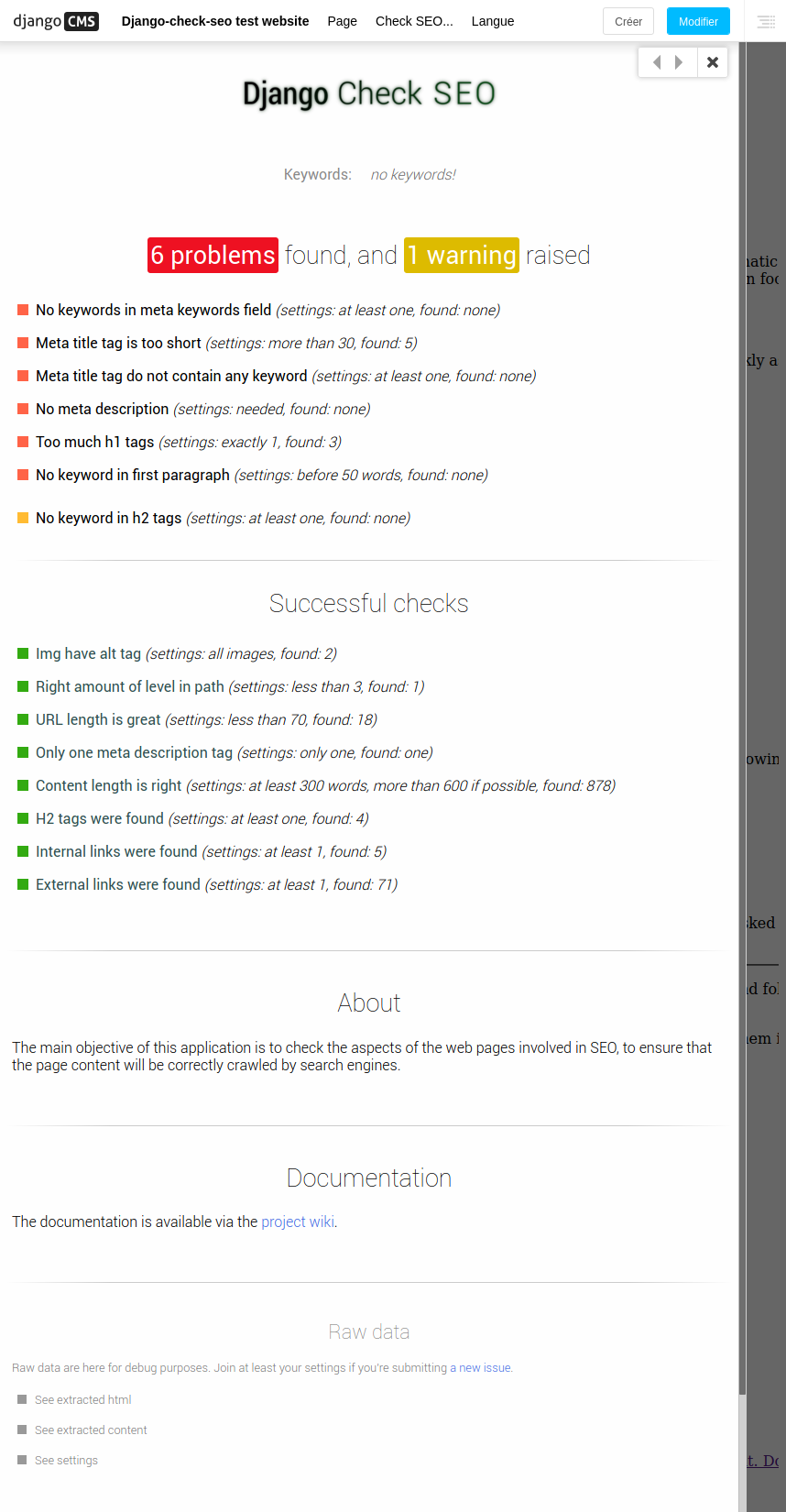
Other screenshots and videos are available on the wiki.
Interested in finding out more?
Take a look at the wiki:
Release history Release notifications | RSS feed


Download files
Download the file for your platform. If you're not sure which to choose, learn more about installing packages.
Source Distribution
Built Distribution
Filter files by name, interpreter, ABI, and platform.
If you're not sure about the file name format, learn more about wheel file names.
Copy a direct link to the current filters
File details
Details for the file django-check-seo-0.0.5.tar.gz.
File metadata
- Download URL: django-check-seo-0.0.5.tar.gz
- Upload date:
- Size: 563.6 kB
- Tags: Source
- Uploaded using Trusted Publishing? No
- Uploaded via: twine/3.1.1 pkginfo/1.5.0.1 requests/2.22.0 setuptools/45.0.0 requests-toolbelt/0.9.1 tqdm/4.41.1 CPython/3.6.9
File hashes
| Algorithm | Hash digest | |
|---|---|---|
| SHA256 |
b54fedbd024c2ca81f2e5d0a009bf1fe229ed142f6173e2f5fc4695d289a7a35
|
|
| MD5 |
97463d449ae9687cd99c75eb086e7e79
|
|
| BLAKE2b-256 |
9bfe06075a52f7d0261f5795868d32f8e01fc93beef0fe705726fb1270e75d49
|
File details
Details for the file django_check_seo-0.0.5-py3-none-any.whl.
File metadata
- Download URL: django_check_seo-0.0.5-py3-none-any.whl
- Upload date:
- Size: 577.6 kB
- Tags: Python 3
- Uploaded using Trusted Publishing? No
- Uploaded via: twine/3.1.1 pkginfo/1.5.0.1 requests/2.22.0 setuptools/45.0.0 requests-toolbelt/0.9.1 tqdm/4.41.1 CPython/3.6.9
File hashes
| Algorithm | Hash digest | |
|---|---|---|
| SHA256 |
9da474d7c35bcd0f6e19dbceb577ba03d122d1653906acc08efbe2ee17017506
|
|
| MD5 |
a7df2433e38d7b261badbd72a6f5dba3
|
|
| BLAKE2b-256 |
8a869a3b4636732f463ddbf007cd4574c6417f04e7c4fa51e848e0bbc2a4e82b
|









