
Django Check SEO will check the SEO aspects of your site for you, and will provide advice in case of problems.

Project description

Replacing some features of Yoast or SEMrush for Django & Django-CMS users.
In other words, django-check-seo will tell you if you have problems concerning a broad range of SEO aspects of your pages.



Install
(compatible with django >= 1.8.15 & python >= 2.7)
-
Install the module from PyPI:
python3 -m pip install django-check-seo -
Add it in your
INSTALLED_APPS:"django_check_seo", -
Add this in your
urls.py(if you're using django-cms, put it before thecms.urlsline or it will not work):path("django-check-seo/", include("django_check_seo.urls")),- Or add this if you're still using
url(you shouldn't):url(r"^django-check-seo/", include("django_check_seo.urls")),
- Or add this if you're still using
-
Update your Django Site object parameters with a working url (here's an example for dev environment).
-
Add
testserver(and maybewww.testserver) to yourALLOWED_HOSTSlist in your settings.py (django-check-seo uses the Test Framework in order to get content, instead of doing an HTTP request). -
(optional) Configure the settings (see config).
-

Misc
This application needs beautifulsoup4 (>=4.7.0) and djangocms_page_meta (==0.8.5 if using django < 1.11). It may be used with or without django-cms (a django-check-seo button will appear in the topbar if you're using django-cms).
If you're not using Django CMS (only Django), here's the link format to access your pages reports:
https://example.com/django-check-seo/?page=/example-page/
  -> will check https://example.com/example-page/

https://example.com/fr/django-check-seo/?page=/example-page/
  -> will check https://example.com/example-page/
     (using localized url (if you add django-check-seo in i18n_patterns))
Config
Basic settings
The basic config (used by default) is located in django-check-seo/conf/settings.py and looks like this:
DJANGO_CHECK_SEO_SETTINGS = {
    "content_words_number": [300, 600],
    "internal_links": 1,
    "external_links": 1,
    "meta_title_length": [30, 60],
    "meta_description_length": [50, 160],
    "keywords_in_first_words": 50,
    "max_link_depth": 3,
    "max_url_length": 70,
}
If you need to change something, just define a dict named DJANGO_CHECK_SEO_SETTINGS in your settings.py.
Custom settings example:
If you put this in your settings.py file:
DJANGO_CHECK_SEO_SETTINGS = {
    "internal_links": 25,
    "meta_title_length": [15,30],
}
Then this will be the settings used by the application:
DJANGO_CHECK_SEO_SETTINGS = {
    "content_words_number": [300, 600],
    "internal_links": 25,  # 1 if using default settings
    "external_links": 1,
    "meta_title_length": [15,30],  # [30, 60] if using default settings
    "meta_description_length": [50, 160],
    "keywords_in_first_words": 50,
    "max_link_depth": 3,
    "max_url_length": 70,
}
Want to know more ? See the wiki page Settings explained.
Select main content (exclude header/footer/...)
Since django-check-seo will count things like number of words on the main content and the number of internal links, it is important to only select the main content of the page (an address in the footer is not the main content of your page).
Django-check-seo use a string (named DJANGO_CHECK_SEO_EXCLUDE_CONTENT) of css selectors to exclude unwanted html nodes from the html content:
DJANGO_CHECK_SEO_EXCLUDE_CONTENT = "tag, .class, #id, tag > .child_class"
You can find a reference table of css selectors explained here (on mdn docs).
Example: See this issue's comment for an example.
Want a screenshot?
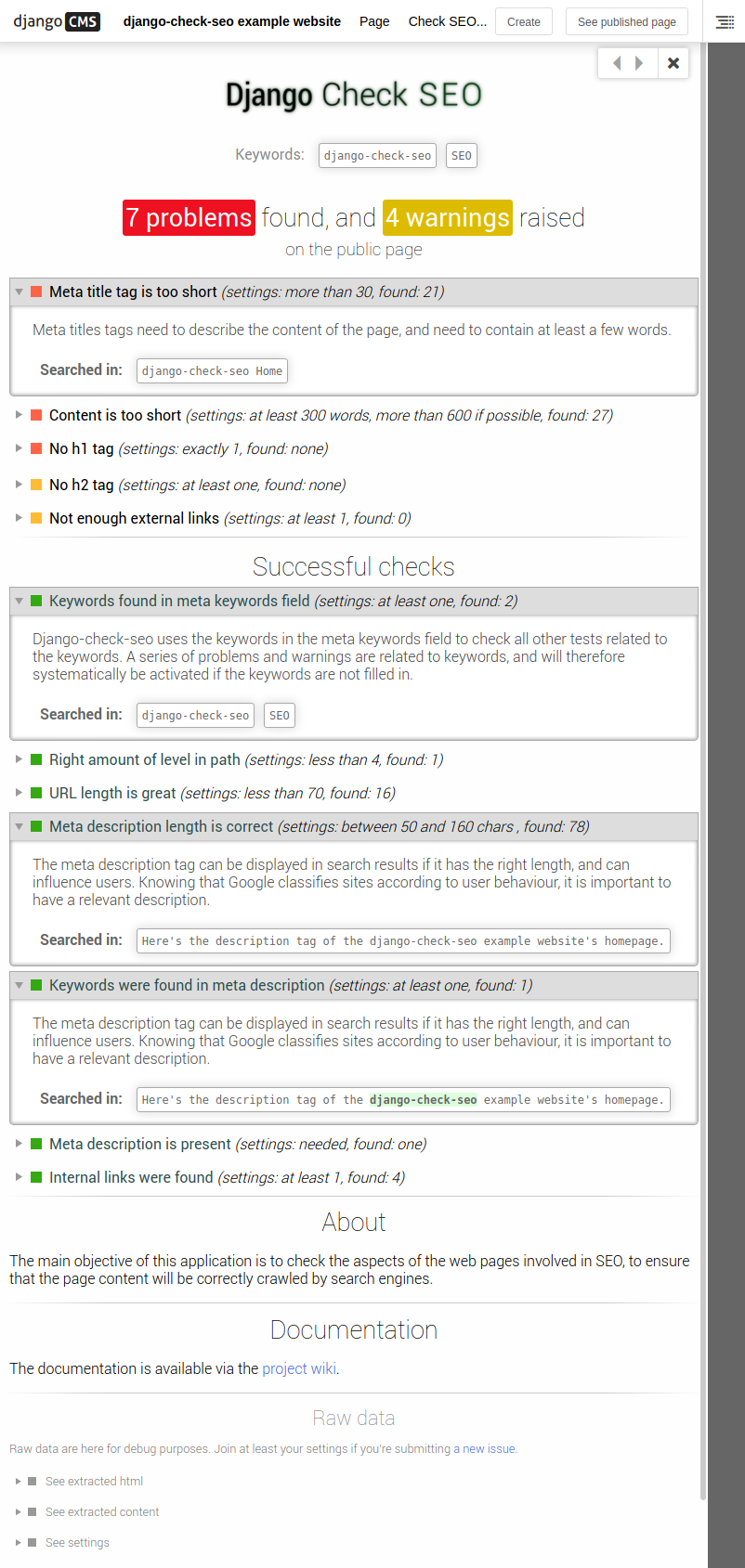
Other (older) screenshots and videos are available on the wiki.
Unit tests
They are located in tests folder.
The file launch_tests.sh is here to manage tests launching for you. You only need python3-venv (for python3 venv) and virtualenv (for python2 venv) in order to make it work.
Contributing
See CONTRIBUTING.md.
Interested in finding out more?
Take a look at the wiki:
Release history Release notifications | RSS feed


Download files
Download the file for your platform. If you're not sure which to choose, learn more about installing packages.
Source Distribution
Built Distribution
Filter files by name, interpreter, ABI, and platform.
If you're not sure about the file name format, learn more about wheel file names.
Copy a direct link to the current filters
File details
Details for the file django-check-seo-0.6.4.tar.gz.
File metadata
- Download URL: django-check-seo-0.6.4.tar.gz
- Upload date:
- Size: 590.0 kB
- Tags: Source
- Uploaded using Trusted Publishing? No
- Uploaded via: twine/4.0.2 CPython/3.10.8
File hashes
| Algorithm | Hash digest | |
|---|---|---|
| SHA256 |
476b673ce1d9bae1db276cd4a21aa7de812602df08e23925debb7686fba0de9a
|
|
| MD5 |
94c37b9ba4956183c266de0cb7ab0659
|
|
| BLAKE2b-256 |
3b0f56e41e42525d7b6fe673030ec851f070f9639e17307df9841a35fca8271a
|
File details
Details for the file django_check_seo-0.6.4-py3-none-any.whl.
File metadata
- Download URL: django_check_seo-0.6.4-py3-none-any.whl
- Upload date:
- Size: 582.3 kB
- Tags: Python 3
- Uploaded using Trusted Publishing? No
- Uploaded via: twine/4.0.2 CPython/3.10.8
File hashes
| Algorithm | Hash digest | |
|---|---|---|
| SHA256 |
a7954e6c6bd9668d3ed22259a7d8a80f7ecf66bcaf0c97c52ab669985edd51f1
|
|
| MD5 |
507aba5882eefca0bd5eb4c0a7720cbc
|
|
| BLAKE2b-256 |
2880837ab2170c8d2d129d6f637b145934335cebd1468ad5058e1eca04d6c6a1
|








