
django-openrouter




Reusable Django application for managing OpenRouter models, usage profiles, budgets and request logs from Django admin.
Your product code (translation, chat, summarization, …) talks to OpenRouter through this library instead of hardcoded settings.py keys and model ids. An operator picks active models, sets daily/monthly limits, and inspects spend in admin.
Documentation: https://svalench.github.io/django-openrouter/
Requires Python 3.11+ and Django 4.2+ (subject to Django's Python compatibility). This is a third-party integration, not an official OpenRouter SDK.
For production, use Django 5.2.18+ or the latest patched release in a currently supported Django series. Compatibility tests for Django 4.2, 5.0 and 5.1 do not imply security support; those series are end-of-life and may remain affected by upstream advisories.
Why not settings.py?
Hardcoding OPENROUTER_MODEL = "anthropic/claude-3.5-sonnet" means a deploy to change models, budgets or a kill switch. django-openrouter stores that runtime policy in the database, caches it, and enforces limits before every request.
API keys stored in admin are encrypted in the database (Fernet, key derived from SECRET_KEY) and are write-only: after save the value cannot be viewed, only replaced or cleared. Keys can still come from the environment (OPENROUTER_API_KEY) if you prefer not to keep them in the database.
Quickstart
1. Install
pip install django-openrouter
2. Enable the app and migrate
# settings.py
INSTALLED_APPS = [
    ...,
    "django_openrouter",
]
MIDDLEWARE = [
    ...,
    "django.contrib.auth.middleware.AuthenticationMiddleware",
    "django_openrouter.middleware.CurrentUserMiddleware",
    ...,
]
python manage.py migrate
3. Configure in Django admin
- Open OpenRouter → OpenRouter settings. Paste an API key (it is encrypted and cannot be viewed after save) or leave it empty and set
OPENROUTER_API_KEYin the environment. - Run
python manage.py sync_modelsto pull the model catalog (GET /api/v1/models). - Create a Usage profile (slug
translation,chat, …), add one or more models in priority order (first is tried first), plus limits and budgets. - Set that profile as default profile if you want
chat(messages=...)without a name.
4. Call from your Django application
After configuring the chat profile, run this in a view, task, or
python manage.py shell:
from django_openrouter import chat

result = chat("chat", messages=[{"role": "user", "content": "Hello"}])
print(result.content)
print(result.model_used, result.cost_usd, result.latency_ms)
This makes a real API request and may incur provider charges. To try the integration without an API key or provider calls, run the mocked tests in Contributing. See Usage for async clients, streaming, and fallback behavior.
Screenshots: docs/img/.
Admin pages
Four models under OpenRouter. Runtime policy lives here, not in settings.py.
| Page | What it does |
|---|---|
| OpenRouter settings | Kill switch, encrypted API key, streaming, timeouts |
| OpenRouter models | Catalog from OpenRouter: price, latency, throughput |
| Usage profiles | Ordered model chain, limits, budgets, spend stats |
| Request logs | Per-call tokens, cost, latency (read-only) |
OpenRouter settings
Singleton: the changelist redirects to the only row. The row cannot be deleted.
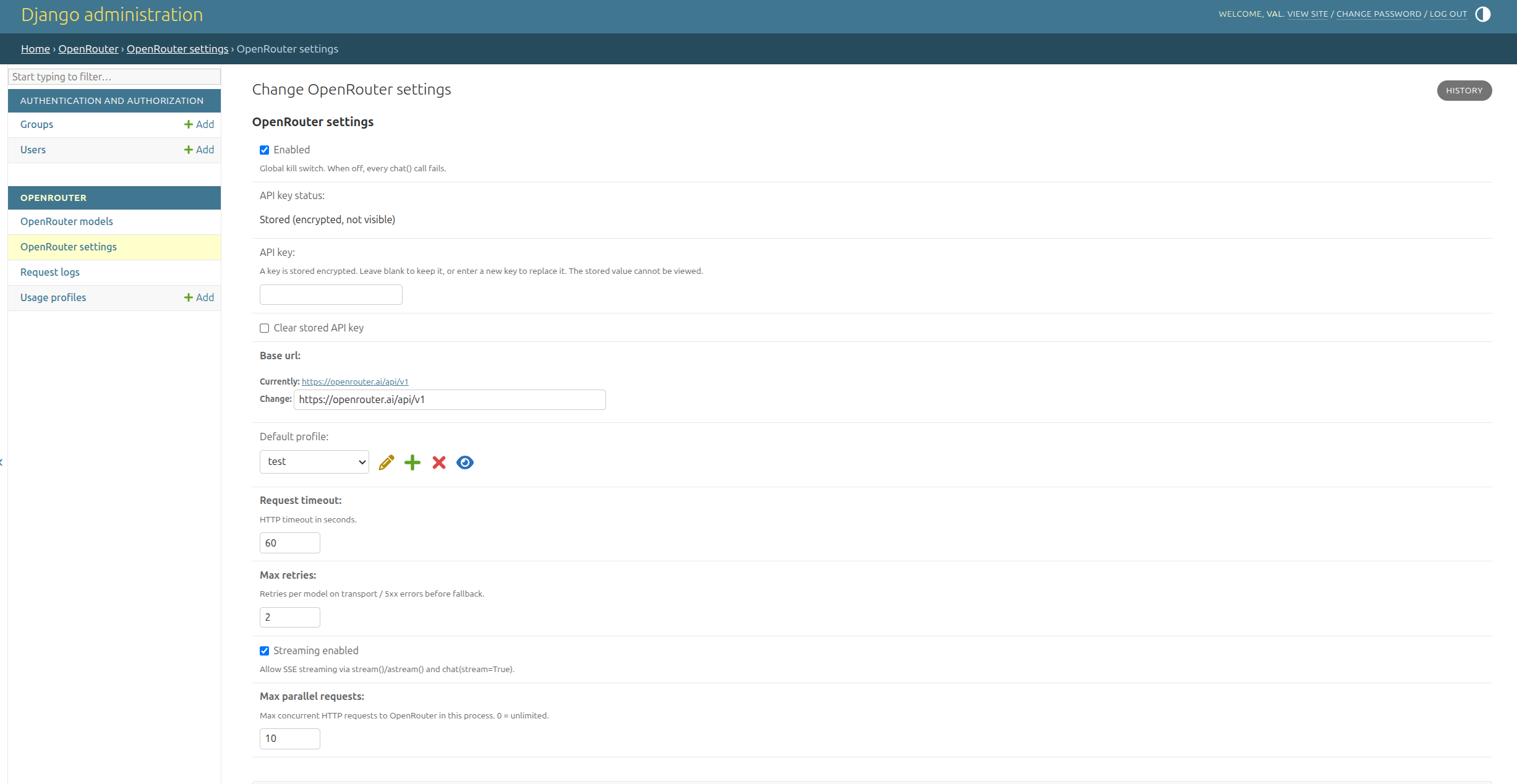
- Enabled — global kill switch. Off → every
chat()/stream()fails. - API key — write-only, Fernet-encrypted from
SECRET_KEY. After save the value cannot be viewed. Blank keeps the stored key; a new value replaces it. Clear stored API key wipes the DB key so the process falls back toOPENROUTER_API_KEY/settings.OPENROUTER["API_KEY"]. - Base URL — OpenRouter API root (
https://openrouter.ai/api/v1). - Default profile — used when
chat(messages=...)omits a profile name. Must be a chat profile. - Default transcription profile — used when
transcribe()omits a profile name. Must be a transcription profile. - Request timeout — idle timeout between bytes, in seconds (default 60). A stream that keeps sending tokens is not stopped by this value.
- Total timeout — optional wall-clock deadline for one
chat()/stream()call. Blank means no overall deadline. - Max retries — retries on transport / 5xx before the next model in the chain.
- Streaming enabled — allows SSE via
stream()/astream()andchat(stream=True). Off by default. - Max parallel requests — cap on concurrent HTTP calls in this process (
0= unlimited).
OpenRouter models
Catalog from GET /api/v1/models (plus /endpoints for latency/throughput). Rows cannot be added or deleted by hand; the detail page is read-only.
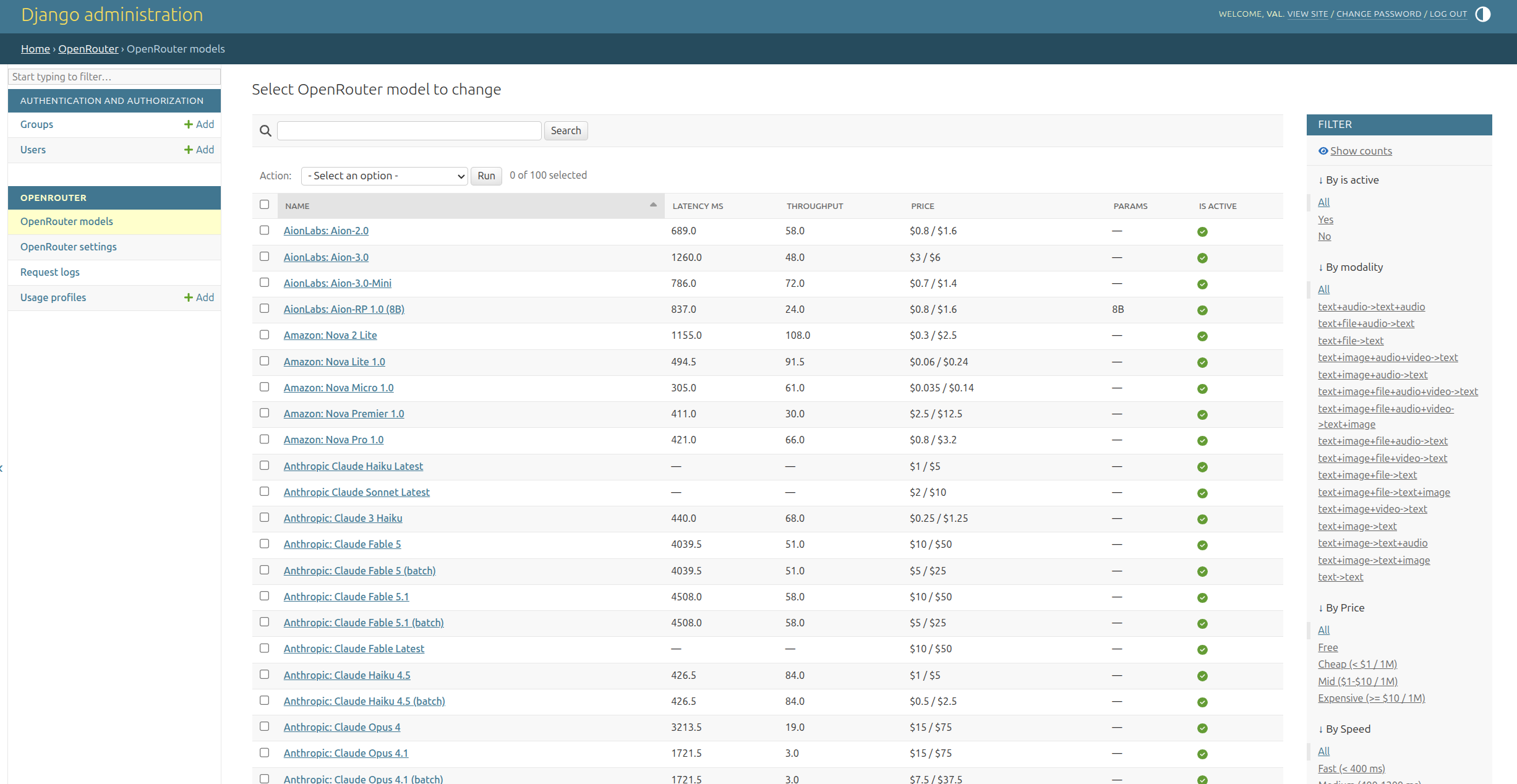
Columns: name, latency_ms (p50 TTFT), throughput (tok/s), prompt/completion price per 1M tokens, parameter size (70B / 8x7B), is_active. Click a column to sort (nulls last).
Filters: active, modality, price (free / cheap < $1 / mid $1–10 / expensive), speed (< 400 ms / 400–1200 / ≥ 1200).
Actions:
- Sync catalog with OpenRouter — upsert; models missing remotely get
is_active=False. - Assign to usage profile… — append selected models to a profile chain (skips duplicates, inactive, and paid models when the profile has
only_free_models).
The changelist refreshes from the API on first view, then serves the database for 10 minutes (CATALOG_CACHE_TIMEOUT). Same sync: python manage.py sync_models.
Usage profiles
A profile is the slug your code passes (chat, translation, …) plus an ordered model list (first is tried first; later rows are fallback on 402 / 429 / 5xx). Exhausted limits/budgets raise; they do not silently fall back.
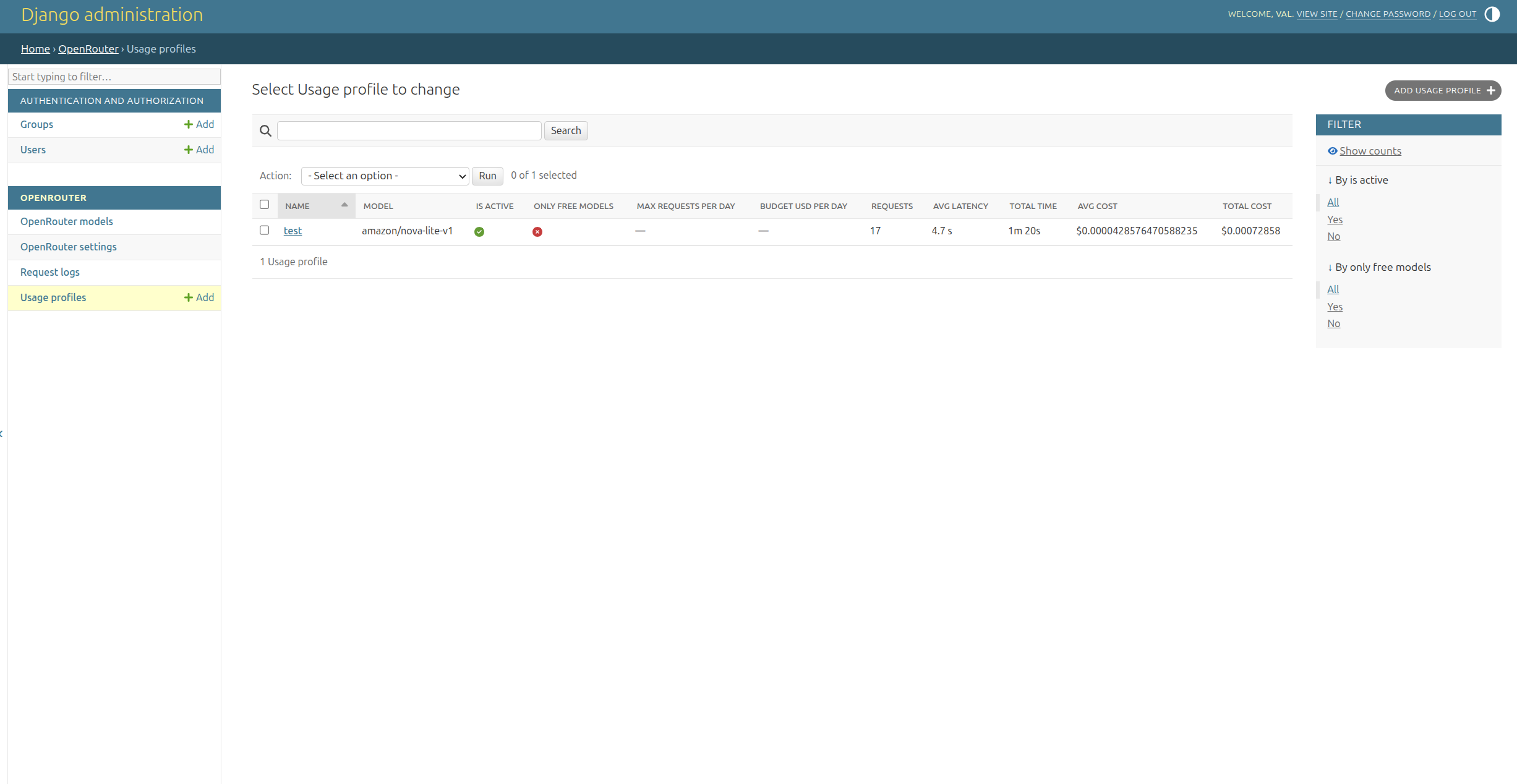
Changelist: name, primary model, active, only-free, daily request/budget caps, and aggregates from logs (request count, avg/total latency, avg/total cost).
On the form: kind (chat or transcription), max_tokens, temperature (0–2 for chat, 0–1 for transcription), optional per-profile request timeout and total timeout (blank = the global values), optional ISO-639-1 language, max_audio_bytes / max_audio_seconds for speech-to-text, daily/monthly request and USD limits (blank = unlimited), only free models, is active. Inline Models (priority order) uses catalog autocomplete (price + latency in the label; same price/speed query filters as the catalog, plus the profile kind). A transcription profile only accepts transcription models. Saving syncs the first chain item into model.
Request logs
Read-only. Every HTTP attempt (including fallbacks and errors) is a row when DatabaseBackend is enabled (the default). Daily/monthly limits are aggregated from this table.
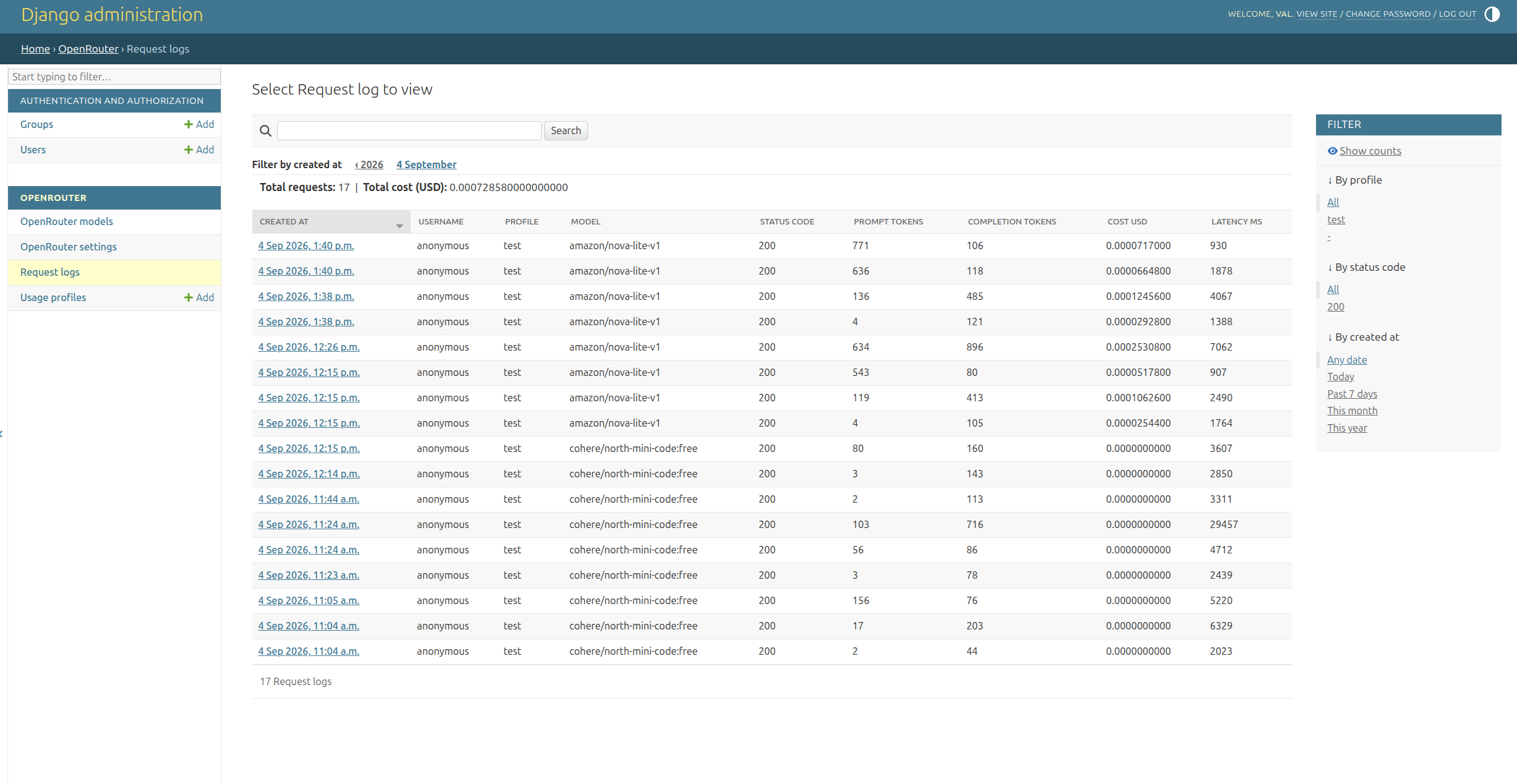
Columns: time, username, profile, model, HTTP status, prompt/completion tokens, cost, latency. Above the table: request count and USD total for the current filter. Filters: profile, status, date.
Username comes from django_openrouter.middleware.CurrentUserMiddleware (after AuthenticationMiddleware). Without it, rows show anonymous. In Celery / management commands use bound_username("worker").
Usage
from django_openrouter import chat

result = chat(
    "translation",
    messages=[{"role": "user", "content": "Translate to French: hello"}],
)
print(result.content)
print(result.model_used, result.cost_usd, result.latency_ms)
Sync client:
from django_openrouter import OpenRouterClient

client = OpenRouterClient("chat")
result = client.chat(messages=[{"role": "user", "content": "Hello"}])
Async:
from django_openrouter import achat

result = await achat("chat", messages=[{"role": "user", "content": "Hello"}])
If a profile’s limit or budget is exhausted, chat() raises BudgetExceeded or RateLimitExceeded and does not silently fall back. Fallback models are only used when OpenRouter returns 402, 408, 429, 5xx, a transport error, or an {"error": ...} body inside a 200 response. After a 402 (account credits exhausted) only free models of the chain are tried.
Retries (max_retries in admin) apply to 408, 425, 429, 5xx and transport errors on the same model, honouring Retry-After, otherwise exponential backoff with jitter (RETRY_BACKOFF).
ChatResult also exposes finish_reason, tool_calls (merged from stream deltas too), reasoning and images (GeneratedImage with data, mime and url). cost_usd is the amount OpenRouter actually billed (usage.cost); catalog_cost_usd is the catalog estimate for reconciliation.
reasoning={"enabled": False} is sent through to OpenRouter. Pass either total_timeout= or deadline_s= on a call; they are the same deadline and are not sent in the JSON body.
model= can reorder only models already configured in that profile; it cannot introduce a model outside the profile chain. The upstream models= override is rejected: configure fallback models in the usage profile so each attempt is checked and budgeted locally.
Profiles with limits atomically reserve a request slot before each HTTP attempt. Request limits count successful, in-flight and interrupted (499) attempts; retries that failed with an HTTP error do not consume the limit. For budgets, the reservation uses the model's full context window at the highest of its per-token catalog prices (prompt, completion, input_cache_read, input_cache_write, internal_reasoning), plus per-request prices (request, web_search) and image × the number of image_url parts in the messages; on successful completion the row is reconciled to reported usage. This deliberately rejects calls when the remaining budget cannot cover that worst case, even if the likely response would be cheap. A budgeted model needs valid catalog prices, a context length and text output (text+image->text is fine); other non-zero price keys (e.g. audio) are rejected as unbounded. Failed or interrupted calls (including cancelled async tasks, logged as 499) retain their reservation because their final charge may be unknown; inspect the request log and provider billing before manually correcting these rows. Provider-side limits remain advisable because catalog pricing or provider charges can change independently of this package.
Streaming is off by default. Turn on Streaming enabled in OpenRouter settings, then iterate chunks:
from django_openrouter import stream

for chunk in stream("chat", messages=[{"role": "user", "content": "Hello"}]):
    print(chunk.delta, end="", flush=True)
chat(..., stream=True) uses the same SSE transport and returns a complete ChatResult. Plain chat() always uses a regular JSON response, even with streaming enabled.
Request timeout is the idle gap between bytes. One streaming profile can set its own request_timeout (or pass request_timeout= on that call) without changing the global value used by other profiles.
Total timeout is the wall-clock deadline for that call. Set it on the call, on the profile, or globally. Per-call overrides the profile, which overrides the global setting. deadline_s= is an alias of total_timeout=.
from django_openrouter import chat, stream
from django_openrouter.exceptions import OpenRouterTimeout

try:
    result = chat(
        "chat",
        messages=[{"role": "user", "content": "Think briefly"}],
        total_timeout=45,
        reasoning={"enabled": False},
    )
except OpenRouterTimeout as exc:
    partial = exc.partial  # ChatResult or None
else:
    print(result.content, result.prompt_tokens, result.completion_tokens)

for chunk in stream("chat", messages=[{"role": "user", "content": "Hello"}], deadline_s=45):
    print(chunk.delta, end="", flush=True)
    if chunk.done and chunk.result is not None and chunk.result.incomplete:
        print(chunk.result.content, chunk.result.prompt_tokens)
stream() stops with result.incomplete=True and keeps the partial text and usage. chat() raises OpenRouterTimeout instead of returning that partial result (exc.partial). Nothing arrived → partial is None and stream() raises too. Only that response is closed; other calls on the shared client continue. The row is logged as 499 (same as an interrupted stream) with the token counts that were already known. A budget reservation stays at the conservative amount, because a non-200 row is not reconciled. The attempt is not retried.
CurrentUserMiddleware keeps the username bound while a StreamingHttpResponse body is iterated, so stream() inside a streaming view is logged under the right user.
Async: astream("chat", messages=...) / AsyncOpenRouterClient("chat").stream(...).
Max parallel requests (default 10, 0 = unlimited) caps concurrent HTTP calls to OpenRouter in the current process — both chat() and stream(), sync and async.
Image generation
Added in 0.5.0. OpenRouter image models answer on POST /chat/completions with modalities: ["image", "text"]. generate_image() sets that for you. The model still has to be on the usage profile (model= only reorders that chain).
from django_openrouter import generate_image

result = generate_image(
    "A red paper crane on a wooden desk",
    profile="images",
    model="google/gemini-2.5-flash-image",
)
print(result.content, result.cost_usd, result.prompt_tokens)
for image in result.images:
    print(image.mime, image.url, len(image.data or b""))
agenerate_image() and OpenRouterClient("images").generate_image(...) / AsyncOpenRouterClient are the same call. A data URL in the provider payload is decoded into data and mime (url is left empty so the base64 blob is not stored twice). An http or https URL is fetched without the OpenRouter API key; url is kept even when the download fails. chat() fills images the same way when the assistant message contains them. Usage and cost_usd are reported as for any other chat call.
Speech-to-text
Added in 0.4.0. Transcription models are not in the default chat catalog. sync_models also fetches GET /api/v1/models?output_modalities=transcription and stores them with modality audio->transcription. Create a usage profile with kind transcription (only those models), set language / size / duration limits if you need them, and point Default transcription profile at it. Budgets and the request log are the same as for chat. There is no separate settings singleton: a profile is already the unit of model choice, limits and spend.
from django_openrouter import transcribe

result = transcribe(
    audio_bytes,
    filename="dictation.webm",
    content_type="audio/webm",
    profile="dictation",
    language="ru",
)
print(result.text, result.cost_usd, result.duration_seconds)
atranscribe() and OpenRouterClient("dictation").transcribe(...) / AsyncOpenRouterClient are the same call. A missing profile name uses default_transcription_profile.
The library does not bundle ffmpeg. Send webm, ogg, mp3, wav, m4a, flac or aac (a browser MediaRecorder blob is fine). To transcode in the host project, set OPENROUTER["AUDIO_PREPARE"] to a dotted path:
def prepare(data: bytes, *, filename: str, content_type: str) -> tuple[bytes, str, str]:
    ...
    return wav_bytes, "audio.wav", "audio/wav"
Django view for a MediaRecorder upload:
from django.http import JsonResponse
from django.views.decorators.http import require_POST

from django_openrouter import transcribe
from django_openrouter.exceptions import (
    AudioTooLarge,
    BudgetExceeded,
    ConfigurationError,
    OpenRouterDisabled,
    UnsupportedAudioFormat,
)

@require_POST
def dictate(request):
    blob = request.FILES["audio"]
    try:
        result = transcribe(blob, filename=blob.name, content_type=blob.content_type)
    except OpenRouterDisabled:
        return JsonResponse({"error": "disabled"}, status=503)
    except (UnsupportedAudioFormat, AudioTooLarge, ConfigurationError) as exc:
        return JsonResponse({"error": str(exc)}, status=400)
    except BudgetExceeded:
        return JsonResponse({"error": "budget"}, status=429)
    return JsonResponse({"text": result.text, "model": result.model_used})
const recorder = new MediaRecorder(stream, { mimeType: "audio/webm" });
recorder.onstop = async () => {
  const body = new FormData();
  body.append("audio", new Blob(chunks, { type: "audio/webm" }), "dictation.webm");
  const response = await fetch("/dictate/", {
    method: "POST",
    body,
    headers: { "X-CSRFToken": csrfToken },
  });
  console.log((await response.json()).text);
};
UnsupportedAudioFormat and AudioTooLarge (default 25 MiB, override with max_audio_bytes) are raised before HTTP. Disabled integration and a missing key raise OpenRouterDisabled and ConfigurationError. A USD budget on a duration-priced model (Whisper, context length 0) needs max_audio_seconds so the reservation has an upper bound. prompt is sent when you pass it; OpenRouter currently ignores a top-level prompt on the multipart API.
Management command
python manage.py sync_models
python manage.py sync_models --api-key sk-or-...
Upserts the chat catalog and the transcription catalog (output_modalities=transcription). Never deletes rows. Sets is_active=False on models that disappeared from both lists.
python manage.py prune_request_logs --days 90 [--dry-run]
Deletes RequestLog rows older than N days (the current month is always kept, monthly limits need it).
python manage.py release_stale_reservations --minutes 60 [--dry-run]
Releases budget reservations still pending after N minutes (left by a killed worker): sets status 499 and cost 0. Reservations for responses that came back without usage are kept. Run it from cron; keep N well above the longest call you allow (total_timeout, or request_timeout × (max_retries + 1) when no deadline is set).
settings.OPENROUTER
| Key | Default | Description |
|---|---|---|
CACHE_TIMEOUT |
60 |
Seconds to keep runtime config in Django’s cache |
CACHE_ALIAS |
"default" |
Cache alias (django.core.cache) |
CATALOG_CACHE_TIMEOUT |
600 |
Seconds to skip re-fetching the admin model catalog |
API_KEY |
unset | Fallback API key if the admin field is empty |
HTTP_REFERER |
unset | Sent as HTTP-Referer (OpenRouter app attribution) |
X_TITLE |
unset | Sent as X-Title |
LOG_BACKENDS |
DB only | Where request logs are written; see below |
RETRY_BACKOFF |
0.5 |
Base seconds for exponential retry backoff (0 = no sleep) |
Also accepted, in this order, when the admin API key is empty:
settings.OPENROUTER["API_KEY"]settings.OPENROUTER_API_KEY- Environment variable
OPENROUTER_API_KEY
Example:
OPENROUTER = {
    "CACHE_TIMEOUT": 60,
    "CATALOG_CACHE_TIMEOUT": 600,
    "CACHE_ALIAS": "default",
    "HTTP_REFERER": "https://my-app.example",
    "X_TITLE": "My App",
}
The default cache backend (LocMemCache) is enough. Redis/Memcached are optional.
Catalog refresh, price/speed columns and profile autocomplete filters are described under Admin pages.
Request logging backends
Every HTTP call (including failed attempts and fallbacks) is logged through the backends listed in OPENROUTER["LOG_BACKENDS"]. An entry is either a dotted path (defaults apply) or a dict with a BACKEND key plus options:
OPENROUTER = {
    "LOG_BACKENDS": [
        # 1. Project database (default): writes RequestLog rows.
        "django_openrouter.log_backends.DatabaseBackend",
        # 2. JSON Lines file with size-based rotation.
        {
            "BACKEND": "django_openrouter.log_backends.FileBackend",
            "PATH": "/var/log/myapp/openrouter-requests.jsonl",
            "MAX_BYTES": 10 * 1024 * 1024,  # rotate at 10 MB
            "BACKUP_COUNT": 5,
        },
        # 3. ClickHouse over its HTTP interface (uses httpx, no extra deps).
        {
            "BACKEND": "django_openrouter.log_backends.ClickHouseBackend",
            "URL": "http://localhost:8123",
            "DATABASE": "analytics",
            "TABLE": "openrouter_request_log",
            "USERNAME": "logger",
            "PASSWORD": "secret",
        },
    ],
}
All configured backends receive every record. Logging is best-effort: a failing backend (full disk, unreachable ClickHouse) never breaks chat() — the error is logged to the django_openrouter logger.
Backend-specific notes:
- DatabaseBackend writes to the
RequestLogmodel. Daily/monthly request limits and budgets are aggregated from that table. Profiles with limits raiseConfigurationErrorif this backend is not configured. - FileBackend uses
logging.handlers.RotatingFileHandler; the line format is one JSON object per request withcreated_at,profile,model,status_code,error_message,prompt_tokens,completion_tokens,cost_usd,latency_ms,username. - ClickHouseBackend inserts
FORMAT JSONEachRowper request. Create a table like:
CREATE TABLE analytics.openrouter_request_log
(
    created_at DateTime,
    profile String,
    model String,
    status_code UInt16,
    error_message String,
    prompt_tokens UInt32,
    completion_tokens UInt32,
    cost_usd Decimal(20, 10),
    latency_ms UInt32,
    username String
)
ENGINE = MergeTree
ORDER BY (created_at, profile);
Each log row stores the Django username that triggered the call. Add django_openrouter.middleware.CurrentUserMiddleware after AuthenticationMiddleware. Unauthenticated (or non-HTTP) calls are logged as anonymous. In Celery / management commands:
from django_openrouter.current_user import bound_username

with bound_username("worker"):
    chat("chat", messages=[...])
You can also point LOG_BACKENDS at your own subclass of django_openrouter.log_backends.LogBackend (implement write(), optionally awrite()).
Add "BACKGROUND": True to any backend entry except DatabaseBackend to write it from a background thread, so a slow ClickHouse or disk does not add latency to chat().
For metrics (Prometheus, OpenTelemetry) connect to django_openrouter.signals.request_logged; it is sent after every attempt with record=LogRecord.
The API key is encrypted with a key derived from SECRET_KEY. When rotating it, keep the old value in SECRET_KEY_FALLBACKS: the key still decrypts and is re-encrypted with the new SECRET_KEY on the next save.
Limits
Usage is aggregated from RequestLog for the current calendar day and month (UsageProfile.get_usage("day"|"month")). Null limit fields mean “unlimited”.
Streams closed by the consumer before the end are logged with status 499; like other interrupted calls they keep their conservative reservation.
Internationalization
Admin labels (filters, help texts, verbose names) are wrapped in gettext_lazy.
Catalogs live in src/django_openrouter/locale/<django_locale>/LC_MESSAGES/django.po.
The host project decides which languages are active. Example:
from django.utils.translation import gettext_lazy as _

LANGUAGE_CODE = "ru"
LANGUAGES = [
    ("ru", _("Русский")),
    ("uk", _("Українська")),
    ("pl", _("Polski")),
    ("be", _("Беларуская")),
    ("en-gb", _("English")),
    ("de", _("Deutsch")),
    ("fr", _("Français")),
    ("es", _("Español")),
    ("zh-hans", _("简体中文")),
]

MIDDLEWARE = [
    "django.contrib.sessions.middleware.SessionMiddleware",
    "django.middleware.locale.LocaleMiddleware",  # after SessionMiddleware
    ...,
]
Django language codes (zh-hans) map to gettext dirs (zh_Hans). English in this
package is en_GB / en-gb — there is no base en catalog.
Compile after editing .po files:
msgfmt -o src/django_openrouter/locale/ru/LC_MESSAGES/django.mo \
        src/django_openrouter/locale/ru/LC_MESSAGES/django.po
Or from a Django project that has this app on INSTALLED_APPS:
python manage.py compilemessages -l ru
.mo files are not generated automatically; without them admin stays in English
even if LANGUAGE_CODE is set.
License
MIT
Contributing
See CONTRIBUTING.md for a local test setup, lint/type checks, and distribution validation. Bug reports should include a minimal reproduction and version information, never real API keys or private request data.
1 maintainer

Metadata
1 maintainer
Release files for django-openrouter 0.5.1
For a detailed explanation of source distributions (sdists) and built distributions (wheels), please see the package formats documentation.
Source distribution (sdist)
| File | Size | Uploaded | Provenance | |
|---|---|---|---|---|
| django_openrouter-0.5.1.tar.gz | 402.1 kB | With provenance | Details |
Built distribution (wheel)
| File | Interpreter | ABI | Platform | Reset |
|---|---|---|---|---|
| django_openrouter-0.5.1-py3-none-any.whl | Python 3 | none | any | Details |
Total release size: 1.4 MB
Release files / django_openrouter-0.5.1.tar.gz
| Download URL | django_openrouter-0.5.1.tar.gz |
|---|---|
| Size | 402.1 kB |
| Tags | Source |
|
SHA-256 checksum How to use checksums |
647efd15f6664f13a677132597971b5d92b1873a3b0d74c7da2b1ab7eecfb133
|
|
BLAKE2b-256 checksum How to use checksums |
c6c12a37dcfdbe1aa3eadc8ab55162701231ebe87c8a3c3fdee954cd34417ede
|
| Upload date | |
|
Uploaded using Trusted Publishing? What is trusted publishing? |
Yes |
| Uploaded via |
twine/7.0.0 CPython/3.13.16
|
Provenance
Provenance describes where a file came from. On PyPI, provenance is shared via attestations, which provide a verifiable record of the build or publishing details. View details, limitations and caveats.


PyPI Publish Attestation
PyPI verified that this artifact, at this checksum, originated from the publisher listed below.
Signed by GitHub Actions, verified by PyPI on Oct 22, 2026.
Transparency logRelease files / django_openrouter-0.5.1-py3-none-any.whl
| Download URL | django_openrouter-0.5.1-py3-none-any.whl |
|---|---|
| Size | 1.0 MB |
| Tags | Python 3 |
|
SHA-256 checksum How to use checksums |
709344cc26da67ce2a3dcec22f3c4ecfa19989c7e553b7558e2b89bb6b28f8ca
|
|
BLAKE2b-256 checksum How to use checksums |
4979c45d4ef569808ab5e413884207d396c33ca0366075fe270ae55bb1f2c50c
|
| Upload date | |
|
Uploaded using Trusted Publishing? What is trusted publishing? |
Yes |
| Uploaded via |
twine/7.0.0 CPython/3.13.16
|
Provenance
Provenance describes where a file came from. On PyPI, provenance is shared via attestations, which provide a verifiable record of the build or publishing details. View details, limitations and caveats.
PyPI Publish Attestation
PyPI verified that this artifact, at this checksum, originated from the publisher listed below.
Signed by GitHub Actions, verified by PyPI on Oct 22, 2026.
Transparency logSecurity for django-openrouter 0.5.1
Provenance
Provenance describes where a file came from. On PyPI, provenance is shared via attestations, which provide a verifiable record of the build or publishing details. View details, limitations and caveats.
Full provenance
All 2 files in this release have been uploaded with provenance metadata.
Attestation for django_openrouter-0.5.1.tar.gz
PyPI Publish Attestation
PyPI verified that this artifact, at this checksum, originated from the publisher listed below.
Signed by GitHub Actions, verified by PyPI on Oct 22, 2026.
Transparency logA note on package security
PyPI is a repository for distributing packages, not a service for auditing them. While third-party security researchers and our staff do their best to detect and remove malicious packages, PyPI cannot guarantee the quality, security or suitability of any given package.
To learn more about protecting yourself from malicious actors, visit our package security documentation.














