
django-schematic













If this is useful to you, a star helps others find it.
Interactive schema visualization for Django projects.
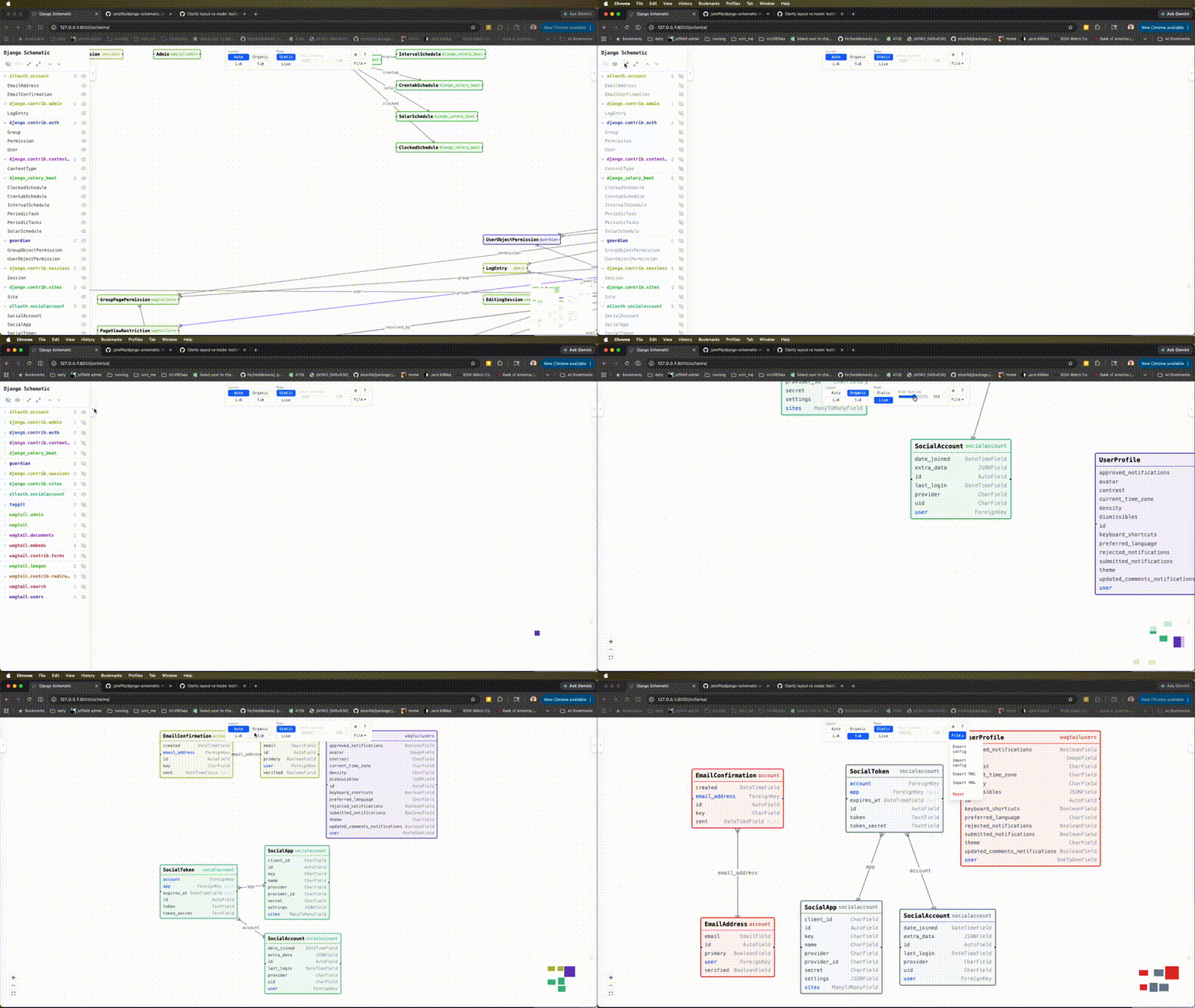
See all your models, fields, and relationships as an interactive, force-directed graph — directly in your browser. Zero Node.js required at runtime.
Features
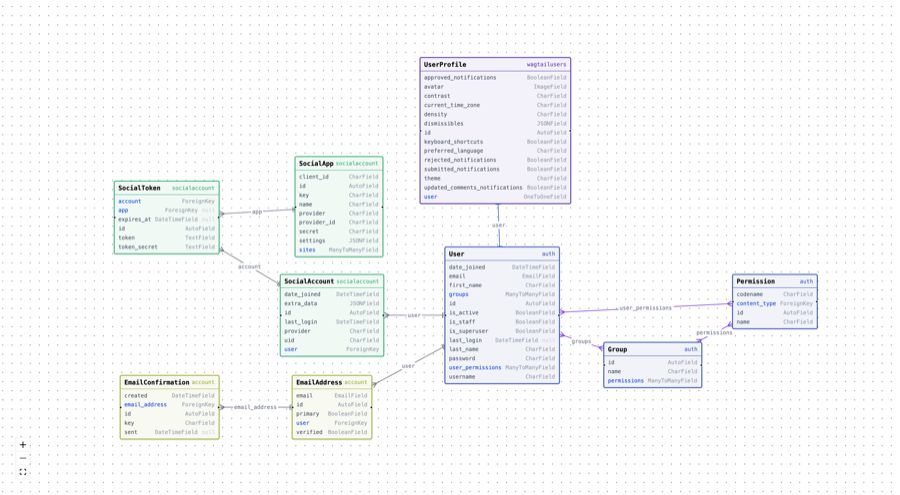
- Export/Import view state as a PNG with location/canvas placement data.
- Export/Import view state as JSON
- Clean JSON API endpoint (
GET /schema/api/) - Force-directed layout with physics settle animation (drag-to-pin support)
- Hierarchical layout via dagre
- Click to expand/collapse field lists per model
- App-based color coding
- Show/hide models and apps via sidebar
- Django 5.x + Python 3.12+ only
Live Demo
- Live Demo
- CI/CD Pipeline Demo (YouTube) — auto-regenerating schema PNGs when models change
Visualize
Frontend Stack
| Aspect | Technology |
|---|---|
| Framework | React 18 |
| Language | TypeScript |
| Graph Visualization | React Flow (@xyflow/react 12) |
| Layout Engines | d3-force + dagre + ELK (3 options) |
| UI / Styling | TailwindCSS 4 |
| State Management | Zustand 5 |
| Bundler | Vite 6 |
| Type Safety | Full TypeScript |
| Testing | Vitest + ESLint |
| CDN Dependencies | None (all bundled) |
| Package Manager | npm |
Exported PNG file with embedded config data
This is an example output PNG file, that can be re-imported into django-schematic
Quick Start
pip install django-schematic
Add to INSTALLED_APPS:
INSTALLED_APPS = [
    ...
    "schematic",
]
Add to urls.py:
from django.urls import include, path

urlpatterns = [
    ...
    path("schema/", include("schematic.urls")),
]
Visit http://localhost:8000/schema/ — your model graph will be there.
Security
The viewer is only accessible when DEBUG = True. In production (DEBUG = False) both the HTML view and the API return 404, making the URL appear non-existent.
To expose the viewer in production behind your own auth layer, set the visible option to a callable:
SCHEMATIC = {
    "visible": lambda request: request.user.is_staff,
}
Configuration
# settings.py (all optional — these are the defaults)
SCHEMATIC = {
    "visible": lambda request: settings.DEBUG,  # or any callable, or True/False
    "include_apps": [],           # empty = all apps
    "exclude_apps": ["admin", "contenttypes", "sessions", "auth"],
    "exclude_models": {},         # {"myapp": ["InternalModel"]}
    "include_abstract": False,
    "include_proxy": True,
    "suppress_through_m2m": False,
}
suppress_through_m2m
When a ManyToManyField uses an explicit through model, Django draws two layers of relationships: the FK edges from the through table to each side, and a direct logical M2M edge on the model that declares the field. With suppress_through_m2m = False (the default) both are shown.
Set suppress_through_m2m = True to hide the redundant logical M2M edge and keep only the FK edges through the junction table — useful when the through model carries extra fields and you want the graph to reflect the true database structure.
Explicit through models are also tagged through in the graph and shown with a through badge in the node header, making them easy to identify regardless of this setting.
API
The schema is also available as JSON:
GET /schema/api/
GET /schema/api/?apps=myapp,otherapp
CI/CD Pipeline (optional)
update_diagrams is a management command that re-renders your PNG schema diagrams automatically when models change. See README.setting-up-CI.md for setup instructions.
Development
# Backend
pip install -e ".[dev]"
pytest

# Frontend
cd ui
npm install
npm run dev   # Vite dev server with HMR
npm run build # Outputs to schematic/static/schematic/
License
MIT
1 maintainer

Download files
Download the file for your platform. If you're not sure which to choose, learn more about installing packages.
Source Distribution
Built Distribution
Filter files by name, interpreter, ABI, and platform.
If you're not sure about the file name format, learn more about wheel file names.
Copy a direct link to the current filters
File details
Details for the file django_schematic-1.3.15.tar.gz.
File metadata
- Download URL: django_schematic-1.3.15.tar.gz
- Upload date:
- Size: 101.1 kB
- Tags: Source
- Uploaded using Trusted Publishing? Yes
- Uploaded via:
twine/7.0.0 CPython/3.13.14
File hashes
| Algorithm | Hash digest | |
|---|---|---|
| SHA256 |
a0a2468ad42270245546266e2776a3da1d4a7a743d92e1fa8700bef82def3884
|
|
| MD5 |
5a41a47f8a4de2b2bc7e4cdb6914e118
|
|
| BLAKE2b-256 |
68e7444fa0cf20512fbe4568c91a4826748e0b46f43377493cf7e6e0a3b4fd51
|
Provenance
The following attestation bundles were made for django_schematic-1.3.15.tar.gz:
Publisher:
release.yml on jsheffie/django-schematic
-
Statement:
-
Statement type:
https://in-toto.io/Statement/v1 -
Predicate type:
https://docs.pypi.org/attestations/publish/v1 -
Subject name:
django_schematic-1.3.15.tar.gz -
Subject digest:
a0a2468ad42270245546266e2776a3da1d4a7a743d92e1fa8700bef82def3884 - Sigstore transparency entry: 2583377844
- Sigstore integration time:
-
Permalink:
jsheffie/django-schematic@dd8ff6c33743bb7fcbca1068257e9858cb45d2d9 -
Branch / Tag:
refs/tags/v1.3.15 - Owner: https://github.com/jsheffie
-
Access:
public
-
Token Issuer:
https://token.actions.githubusercontent.com -
Runner Environment:
github-hosted -
Publication workflow:
release.yml@dd8ff6c33743bb7fcbca1068257e9858cb45d2d9 -
Trigger Event:
push
-
Statement type:
File details
Details for the file django_schematic-1.3.15-py3-none-any.whl.
File metadata
- Download URL: django_schematic-1.3.15-py3-none-any.whl
- Upload date:
- Size: 617.8 kB
- Tags: Python 3
- Uploaded using Trusted Publishing? Yes
- Uploaded via:
twine/7.0.0 CPython/3.13.14
File hashes
| Algorithm | Hash digest | |
|---|---|---|
| SHA256 |
0f7ac2a64b0b4d438361a76b356a0c8d1d59d7ea556ce3cd186dfb980efc6783
|
|
| MD5 |
5ad358769a54d2b77555425bf5f7a677
|
|
| BLAKE2b-256 |
e84123fa672fe015fea58765092004c39d5b21398b99ceba6e252da095909215
|
Provenance
The following attestation bundles were made for django_schematic-1.3.15-py3-none-any.whl:
Publisher:
release.yml on jsheffie/django-schematic
-
Statement:
-
Statement type:
https://in-toto.io/Statement/v1 -
Predicate type:
https://docs.pypi.org/attestations/publish/v1 -
Subject name:
django_schematic-1.3.15-py3-none-any.whl -
Subject digest:
0f7ac2a64b0b4d438361a76b356a0c8d1d59d7ea556ce3cd186dfb980efc6783 - Sigstore transparency entry: 2583377848
- Sigstore integration time:
-
Permalink:
jsheffie/django-schematic@dd8ff6c33743bb7fcbca1068257e9858cb45d2d9 -
Branch / Tag:
refs/tags/v1.3.15 - Owner: https://github.com/jsheffie
-
Access:
public
-
Token Issuer:
https://token.actions.githubusercontent.com -
Runner Environment:
github-hosted -
Publication workflow:
release.yml@dd8ff6c33743bb7fcbca1068257e9858cb45d2d9 -
Trigger Event:
push
-
Statement type:














