
django-schematic


If this is useful to you, a star helps others find it.
Interactive schema visualization for Django projects.
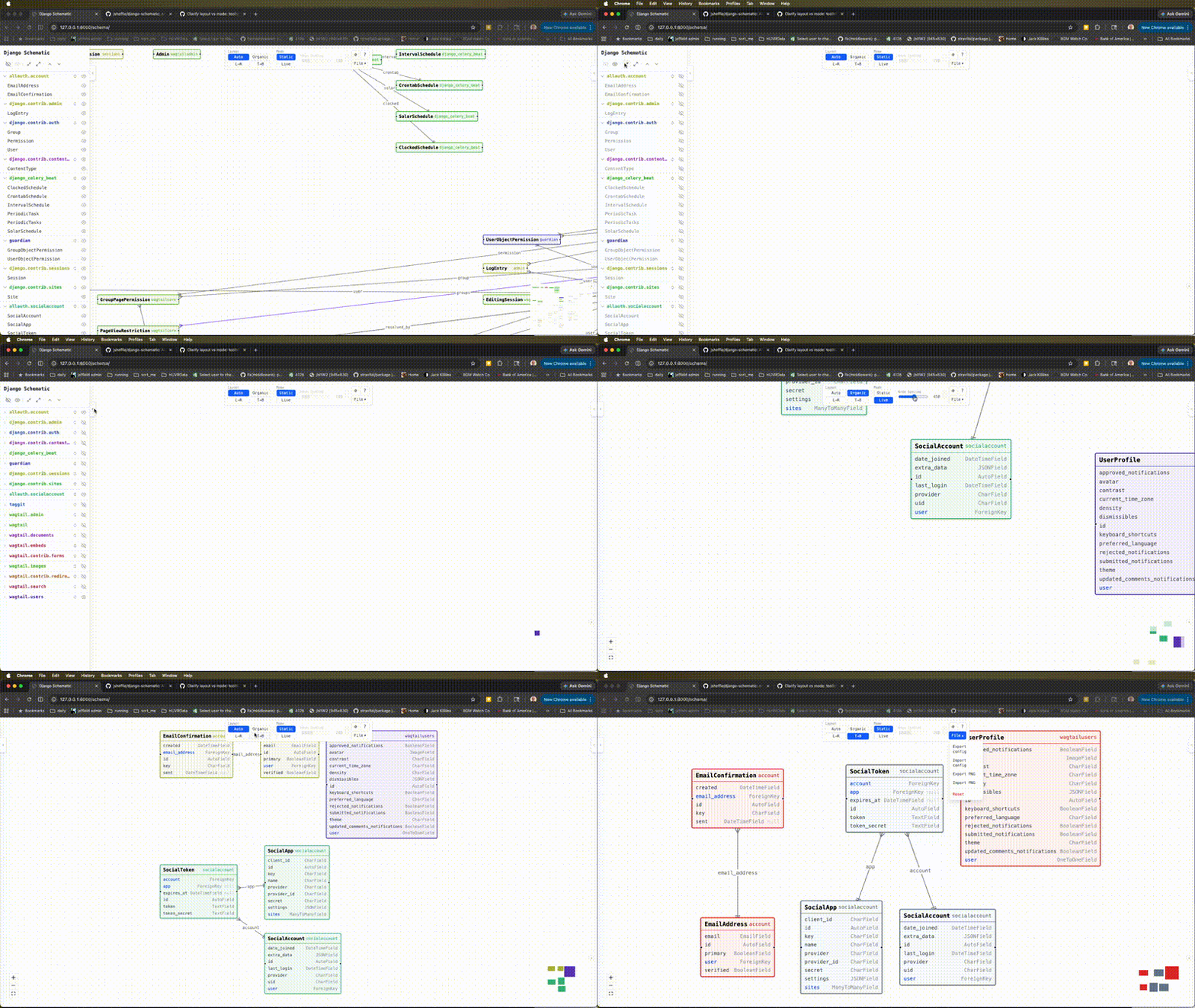
See all your models, fields, and relationships as an interactive, force-directed graph — directly in your browser. Zero Node.js required at runtime.
Features
- Export/Import view state as a PNG with location/canvas placement data.
- Export/Import view state as JSON
- Clean JSON API endpoint (
GET /schema/api/) - Force-directed layout with physics settle animation (drag-to-pin support)
- Hierarchical layout via dagre
- Click to expand/collapse field lists per model
- App-based color coding
- Light and dark themes (Settings > Appearance > Theme; System follows your OS setting)
- Physical database names in the API and in exports: table, column and m2m through table names (see Database names)
- Show/hide models and apps via sidebar
- Django 5.x + Python 3.12+ only
Live Demo
- Live Demo
- CI/CD Pipeline Demo (YouTube) — auto-regenerating schema PNGs when models change
Visualize
Frontend Stack
| Aspect | Technology |
|---|---|
| Framework | React 18 |
| Language | TypeScript |
| Graph Visualization | React Flow (@xyflow/react 12) |
| Layout Engines | d3-force + dagre + ELK (3 options) |
| UI / Styling | TailwindCSS 4 |
| State Management | Zustand 5 |
| Bundler | Vite 6 |
| Type Safety | Full TypeScript |
| Testing | Vitest + ESLint |
| CDN Dependencies | None (all bundled) |
| Package Manager | npm |
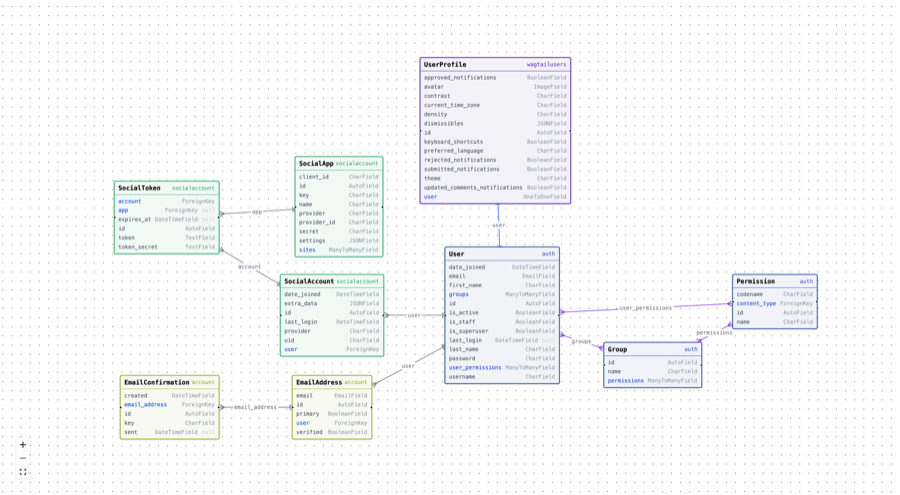
Exported PNG file with embedded config data
This is an example output PNG file, that can be re-imported into django-schematic
Quick Start
pip install django-schematic
Add to INSTALLED_APPS:
INSTALLED_APPS = [
    ...
    "schematic",
]
Add to urls.py:
from django.urls import include, path

urlpatterns = [
    ...
    path("schema/", include("schematic.urls")),
]
Visit http://localhost:8000/schema/ — your model graph will be there.
Security
The viewer is only accessible when DEBUG = True. In production (DEBUG = False) both the HTML view and the API return 404, making the URL appear non-existent.
To expose the viewer in production behind your own auth layer, set the visible option to a callable:
SCHEMATIC = {
    "visible": lambda request: request.user.is_staff,
}
Configuration
# settings.py (all optional — these are the defaults)
SCHEMATIC = {
    "visible": lambda request: settings.DEBUG,  # or any callable, or True/False
    "include_apps": [],           # empty = all apps
    "exclude_apps": ["admin", "contenttypes", "sessions", "auth"],
    "exclude_models": {},         # {"myapp": ["InternalModel"]}
    "include_abstract": False,
    "include_proxy": True,
    "suppress_through_m2m": False,
}
suppress_through_m2m
When a ManyToManyField uses an explicit through model, Django draws two layers of relationships: the FK edges from the through table to each side, and a direct logical M2M edge on the model that declares the field. With suppress_through_m2m = False (the default) both are shown.
Set suppress_through_m2m = True to hide the redundant logical M2M edge and keep only the FK edges through the junction table — useful when the through model carries extra fields and you want the graph to reflect the true database structure.
Explicit through models are also tagged through in the graph and shown with a through badge in the node header, making them easy to identify regardless of this setting.
API
The schema is also available as JSON:
GET /schema/api/
GET /schema/api/?apps=myapp,otherapp
Database names
Tools that watch the database rather than the ORM (for example a logical
replication consumer) see table and column names, not model and field names.
Both the API and every export carry the physical names, read from _meta
with no database connection:
- each node has
db_table(Meta.db_table;nullfor abstract models), - each field has
column(db_column, orcompany_idfor acompanyForeignKey;nullfor a ManyToManyField), - each
m2medge hasthrough_db_table, the table holding its links (auto-created or an explicitthroughmodel).
A PNG or JSON export (config version 8 and later) holds the same names under
dbNames, keyed by model id, so they can be resolved from the file alone:
"dbNames": {
  "orders.Order": {
    "table": "acme_legacy_orders",
    "columns": { "id": "id", "quantity": "qty_ordered", "company": "company_id" },
    "through": { "tags": "acme_orders_order_tags" }
  }
}
The config is the schematic tEXt chunk of an exported PNG. Exports older than
version 8 have no dbNames; fall back to Django's default naming for those.
CI/CD Pipeline (optional)
update_diagrams is a management command that re-renders your PNG schema diagrams automatically when models change. See README.setting-up-CI.md for setup instructions.
Development
# Backend
pip install -e ".[dev]"
pytest

# Frontend
cd ui
npm install
npm run dev   # Vite dev server with HMR
npm run build # Outputs to schematic/static/schematic/
License
MIT
1 maintainer

Metadata
1 maintainer
Release files for django-schematic 1.3.17
For a detailed explanation of source distributions (sdists) and built distributions (wheels), please see the package formats documentation.
Source distribution (sdist)
| File | Size | Uploaded | Provenance | Actions |
|---|---|---|---|---|
| django_schematic-1.3.17.tar.gz | 2.1 MB | With provenance | Details for django_schematic-1.3.17.tar.gz |
Built distribution (wheel)
| File | Interpreter | ABI | Platform | Actions Reset |
|---|---|---|---|---|
| django_schematic-1.3.17-py3-none-any.whl | Python 3 | none | any | Details for django_schematic-1.3.17-py3-none-any.whl |
Total release size: 2.7 MB
Release files / django_schematic-1.3.17.tar.gz
| Download URL | django_schematic-1.3.17.tar.gz |
|---|---|
| Size | 2.1 MB |
| Tags | Source |
|
SHA-256 checksum How to use checksums |
ab45f009b1809fbd0492003b3f0a7d7748ef5ba3de9740b65e9707374d9d7eb7
|
|
BLAKE2b-256 checksum How to use checksums |
b143a869c8b1b9f19ac137513f1b3d332db559939ab79eeb2d74db3e80f31af5
|
| Upload date | |
|
Uploaded using Trusted Publishing? What is trusted publishing? |
Yes |
| Uploaded via |
twine/7.0.0 CPython/3.13.16
|
Provenance
Provenance describes where a file came from. On PyPI, provenance is shared via attestations, which provide a verifiable record of the build or publishing details. View details, limitations and caveats.


PyPI Publish Attestation
PyPI verified that this artifact, at this checksum, originated from the publisher listed below.
Signed by GitHub Actions, verified by PyPI on Nov 1, 2026.
Transparency logRelease files / django_schematic-1.3.17-py3-none-any.whl
| Download URL | django_schematic-1.3.17-py3-none-any.whl |
|---|---|
| Size | 636.0 kB |
| Tags | Python 3 |
|
SHA-256 checksum How to use checksums |
a81df717c109802cb66be9bf4bd6571b340f1fbf0591abd6fa0806e04b28d484
|
|
BLAKE2b-256 checksum How to use checksums |
b683e4d81e2776a68f5c99f89a3c0c7aa60deefdaa418bc9a735b87abeff75ff
|
| Upload date | |
|
Uploaded using Trusted Publishing? What is trusted publishing? |
Yes |
| Uploaded via |
twine/7.0.0 CPython/3.13.16
|
Provenance
Provenance describes where a file came from. On PyPI, provenance is shared via attestations, which provide a verifiable record of the build or publishing details. View details, limitations and caveats.
PyPI Publish Attestation
PyPI verified that this artifact, at this checksum, originated from the publisher listed below.
Signed by GitHub Actions, verified by PyPI on Nov 1, 2026.
Transparency logSecurity for django-schematic 1.3.17
Provenance
Provenance describes where a file came from. On PyPI, provenance is shared via attestations, which provide a verifiable record of the build or publishing details. View details, limitations and caveats.
Full provenance
Both files in this release have been uploaded with provenance metadata.
Attestation for django_schematic-1.3.17.tar.gz
PyPI Publish Attestation
PyPI verified that this artifact, at this checksum, originated from the publisher listed below.
Signed by GitHub Actions, verified by PyPI on Nov 1, 2026.
Transparency logA note on package security
PyPI is a repository for distributing packages, not a service for auditing them. While third-party security researchers and our staff do their best to detect and remove malicious packages, PyPI cannot guarantee the quality, security or suitability of any given package.
To learn more about protecting yourself from malicious actors, visit our package security documentation.














