
DjangoQL





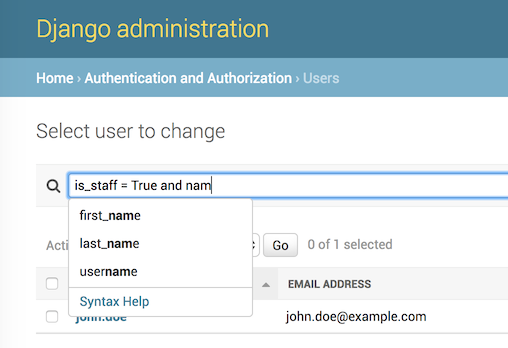
Advanced search language for Django, with auto-completion. Supports logical operators, parenthesis, table joins, and works with any Django model. Tested on Python 3.10–3.14, Django 5.2, 6.0 and 6.1. The auto-completion feature has been tested in Chrome, Firefox, Safari, IE9+.
This is a community fork.
djangoql-iplwebis a fork of the original DjangoQL by ivelum — install the upstream package fromdjangoqlon PyPI. This fork adds internationalization (i18n) of error messages and modernized packaging/tooling.These changes are offered back to the upstream project. If the original maintainers merge them, please switch back to the upstream
djangoqlpackage — this fork exists only to make the improvements available in the meantime, and will defer to upstream once they land there.It is published on PyPI as
djangoql-iplweb, but the import name staysdjangoql(soINSTALLED_APPSandimport djangoqlare unchanged).
See a video: DjangoQL demo
Features
- Python-like query syntax: logical operators (
and,or), parenthesis, and the full set of comparison operators - Searches across model relations via joins, e.g.
author.last_name = "Tolstoy" - Works with any Django model and drops into the Django admin with a single mixin
- Live auto-completion of model field names and values in the admin
- Configurable schema to restrict searchable models/fields (including declarative per-model
include_fields/exclude_fieldsallowlists and denylists) and provide suggestion options - Custom search fields for annotations and fully custom search logic
- Internationalized error messages with translation catalogs for 11 locales
- Usable outside the Django admin, including a standalone JavaScript completion widget
- Multi-line queries —
Shift+Enterinserts a newline (Enterstill submits) - Pretty-print / formatting — re-indent a query via
format_query()or the…/format/endpoint - Per-branch record counts — see how many rows each sub-expression matches via
explain()or the…/explain/endpoint - Syntax highlighting — a tokenizer (
DjangoQLHighlight.tokenize) plus a lightweight, restyleable overlay; no palette or editor imposed - Describe a schema for an LLM —
describe_schema_for_llm()(and thedjangoql_describe_schema_for_llmcommand) emit the full search space as JSON or compact text, ready to teach a model to generate valid DjangoQL
Installation
Using uv (recommended):
$ uv add djangoql-iplweb
Using pip:
$ pip install djangoql-iplweb
Add 'djangoql' to INSTALLED_APPS in your settings.py:
INSTALLED_APPS = [
    ...
    'djangoql',
    ...
]
For full setup instructions and usage examples, see the Documentation below.
Documentation
📖 Full documentation: https://iplweb.github.io/djangoql-iplweb/
The site is built with MkDocs from the docs/ directory. Key pages:
- Installation — complete setup guide
- Django admin integration —
DjangoQLSearchMixinand admin search modes - Language reference — query syntax, operators, and examples
- Schema & custom fields — restrict searchable models/fields, custom search fields
- Describe schema for an LLM — emit the search space as JSON or compact text to teach a model to generate DjangoQL
- Derived fields — date/time parts, relation aggregates, custom search logic
- Outside the admin —
DjangoQLQuerySetandapply_search() - Multi-line queries —
Shift+Enternewline support - Pretty-print / formatting —
format_query()and the format endpoint - Query breakdown (counts) — per-branch record counts with
explain() - Syntax highlighting — tokenizer + overlay, bring-your-own colours/editor
- Completion widget — standalone JS widget outside the admin
- Example project — runnable demo of all of the above
- Internationalization — i18n support and supplied locales
Example project
A runnable demo of all the features above (on a richly related dataset) lives in
example_project/. See its
README for details. Quick start:
cd example_project
uv run python manage.py migrate
uv run python manage.py seed_demo          # lots of related demo data
uv run python manage.py createsuperuser    # optional, for the admin
uv run python manage.py runserver
Then open http://127.0.0.1:8000/ (search demo — auto-completion, multi-line, highlighting, Format, Explain counts) or http://127.0.0.1:8000/admin/ (admin with completion + multi-line + the highlight overlay).
What it looks like
Running a query — live syntax highlighting and results:

The Format button re-indents a query (syntax highlighting throughout):

Explain counts breaks an empty result down per sub-expression, so you can see
where the data runs out — here each side matches ~500 rows but their and
matches none:

Syntax errors are pinpointed in the query box:

Supported by
This fork is graciously supported and maintained by iplweb.

License
MIT
1 maintainer

Release files for djangoql-iplweb 0.31.2
For a detailed explanation of source distributions (sdists) and built distributions (wheels), please see the package formats documentation.
Source distribution (sdist)
| File | Size | Uploaded | |
|---|---|---|---|
| djangoql_iplweb-0.31.2.tar.gz | 318.2 kB | Details |
Built distribution (wheel)
| File | Interpreter | ABI | Platform | Reset |
|---|---|---|---|---|
| djangoql_iplweb-0.31.2-py3-none-any.whl | Python 3 | none | any | Details |
Total release size: 695.5 kB
Release files / djangoql_iplweb-0.31.2.tar.gz
| Download URL | djangoql_iplweb-0.31.2.tar.gz |
|---|---|
| Size | 318.2 kB |
| Tags | Source |
|
SHA-256 checksum How to use checksums |
553c63856fd5789624abfd4aa8f0607a29992c4f74069c63c585b15de2b17916
|
|
BLAKE2b-256 checksum How to use checksums |
afcbd92ebaaf80dd2569911ff6a4fd9ed5ceb687b9ede56af2f233653b7fb05d
|
| Upload date | |
|
Uploaded using Trusted Publishing? What is trusted publishing? |
No |
| Uploaded via |
uv/0.11.14 {"installer":{"name":"uv","version":"0.11.14","subcommand":["publish"]},"python":null,"implementation":{"name":null,"version":null},"distro":{"name":"macOS","version":null,"id":null,"libc":null},"system":{"name":null,"release":null},"cpu":null,"openssl_version":null,"setuptools_version":null,"rustc_version":null,"ci":null}
|
Release files / djangoql_iplweb-0.31.2-py3-none-any.whl
| Download URL | djangoql_iplweb-0.31.2-py3-none-any.whl |
|---|---|
| Size | 377.3 kB |
| Tags | Python 3 |
|
SHA-256 checksum How to use checksums |
f8a592d6997f69dcfa7be2b32ef209158366ec393aba36d18e6b2c400f279420
|
|
BLAKE2b-256 checksum How to use checksums |
520c55b86998093246e6efdbd47f261c1ed71153d184a714794780d062b866fb
|
| Upload date | |
|
Uploaded using Trusted Publishing? What is trusted publishing? |
No |
| Uploaded via |
uv/0.11.14 {"installer":{"name":"uv","version":"0.11.14","subcommand":["publish"]},"python":null,"implementation":{"name":null,"version":null},"distro":{"name":"macOS","version":null,"id":null,"libc":null},"system":{"name":null,"release":null},"cpu":null,"openssl_version":null,"setuptools_version":null,"rustc_version":null,"ci":null}
|














